Everything posted by chodeus
-
No problem. I appreciate people trying to break the plugin so I know how to strengthen it 😂 In future, try to not let it modify the .jsons and have it make the changes via the webui instead. This should be resolved when I’m ready to release the next stable version. Thankyou for reporting it!
-
@johner did you have your AI setup FolderView3 by chance and it modified the docker.json itself?
-
@johner thankyou for reporting that. Did your bot happen to get a copy of your plugin diagnostics while this issue was present? Would be beneficial if you sent that to me.
-
Glad the fix works for you! Thankyou for the report.
-
What do you mean by “category”? Which page of the plugin are you on?
-
You're right with the freeing threshold and it was a bug in 2026.08.29. The threshold was tested against usage after the candidate file, and a kept file's size stayed in the running total, so everything after your 1.5 TB file was measured against a projected 4.55 GB and kept too. That's the 20% stop. Fixed in 2026.09.07. With your reproduction/comparison is that the comparison you quoted is identical in both versions, what changed is the line above it, remaining_bytes_used[$1] = pool_bytes_used[$1] + net_delta[$1], which is now the usage before the file (your 1.581 TB) rather than after it (4.55 GB). So on 09.07 that file should move. Either way, one 1–2 TB file is ~20% of your pool, so at 5% the mover will now essentially empty it. A minimum age or the skip list is a better lever if you want to keep the pool populated. If you think the behaviour you're seeing is incorrect I'm happy to look at your debug zip and see if I missed anything!
-
Anyone having issues with the next release please post your debug zip! It has been improved a lot to try make it easier to diagnose the fault and where improvements need to be made in the plugin. It is really hard to diagnose most things without it! Next release is busy with stability and reliability improvements, skip lists and ignored folder fixes, moving threshold accuracy improvements, with some config warnings and road blocks to stop people putting in conflicting settings, improved per share settings and also improvements to the debug zip! I take the blame if anything is more broken but testing on ZFS cache + XFS array it has been working well! Just a little more testing to go.
-
Just fyi, there's a pending fix for this but even with the fix, only 6 files (about 378GB) can move. The other 91 entries pin everything else on the pool. The pool will stay near 88% until the list is trimmed. For now, delete the 16 nested Season entries whose parent is already listed.
-
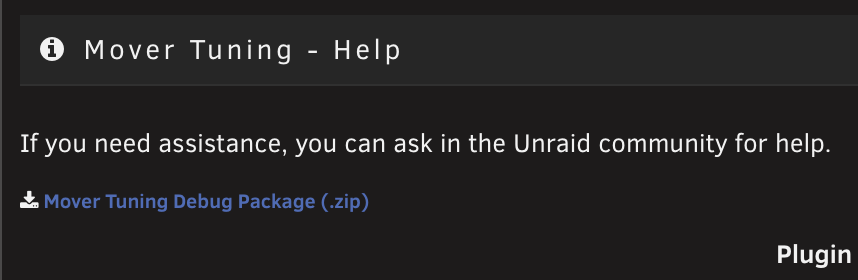
The solution to what? It would be easier to help out if you shared your debug zip located at the bottom of the Mover Tuning settings.
-
Good release thankyou! - forums wont let me react to your post.
-
Glad it worked. I have just pushed an update so it wont be an issue going forward. Appreciate the report!
-
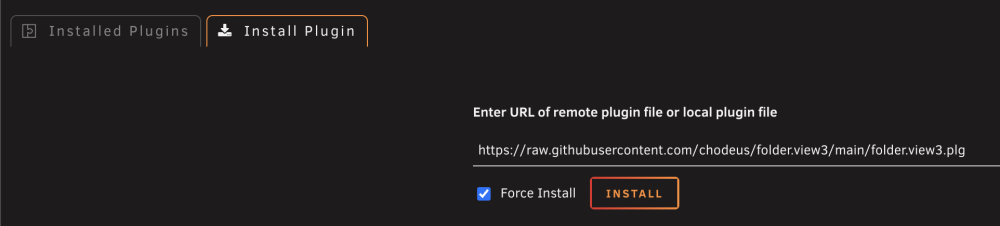
@HHUBS appreciate the logs! That makes it a bit more clear for me. If you want the plugin re-installed use this link and do a Force Install https://raw.githubusercontent.com/chodeus/folder.view3/main/folder.view3.plgThe uninstall method will be fixed in the next release.
-
Are you talking about uninstalling and reinstalling the whole plugin? Did you try hard refreshing your browser? Any dev console errors in your web browser? (f12)
-
I cant remember sorry
-
That's an Unraid-ism unfortunately. You'll see the Folders can take .svg's perfectly fine. You could try convert your SVG to APNG??
-
@Bob-omb these threads might help, you’re not alone. https://forums.unraid.net/topic/199925-missing-docker-icon-log-spam/ https://forums.unraid.net/topic/199974-missing-icon-on-dockers-without-icon-url/ Also, https://product.unraid.net/p/7-3-2-dashboard-nginx-log-spam-from-stale-docker-template-fallback-icons
-
Hello, You're not alone, this has also been reported here https://forums.unraid.net/topic/199925-missing-docker-icon-log-spam/ Hoping for an admin or staff member to address this.
-
I raised an issue and a PR for this on the Unraid Webgui github last week. Hope it gets a look at soon https://github.com/unraid/webgui/pull/2693 @elibosley any chance you can find the time to look at this small PR? This issue is getting reported more and more in Discord as well.
-
I'm keeping my ear to the ground but i've seen snips of the beta version so I think it's not far away.
-
It's not a bad idea but that's a decent structural change. I'm trying to not make any major structural changes because the new Docker page that is due is a huge structural change itself and I'm not really sure if that level of effort is worth it right now. Feel free to write a feature requests here https://github.com/chodeus/folder.view3/issues so I don't lose track and I can see how this might work depending on how far away the new Docker page is. I'm going to avoid yet another toggle for now but update documentation (the tooltip is already update to highlight using "^") to raise awareness around the catch all scenario and how to use it. Thankyou for your help in getting this plugin improved! I'll be release a stable release soon.
-
Unfortunately that plugin and FolderView are completely different. FolderView has to wait for the Unraid page to load to gather the container/vm information and then build the page from that which is why the flash happens. I have made a small change in the beta branch, if you're still running it, that should improve the "flash" by ~300ms. Version 2026.07.13.1 if you're happy to run it and let me know what you think? I'm going to run it for probably a week so I can try get some solid testing out of it before I push it to main with the regex fix.
-
So I've been playing around with this. I can fix the "^" regex to be a "catch all" folder, any container not assigned goes to the folder with the "^" regex. This doesn't assign the container to the regex folder so you can still pick it and assign containers in the "^" regex folder to other folders. Is this acceptable behaviour? I think fixing "^" regex is better than adding another toggle that does the same thing. If you wanted to test it out yourself as it is now, you can load the beta branch. https://raw.githubusercontent.com/chodeus/folder.view3/beta/folder.view3.plg
-
Okay awesome, appreciate the explanation. I have created a feature request issue on my Github and I'll look into this in the not too distant future! Turns out I broke this in April and I just got use to the new look without the 30px indentation. I'll bring this indentation back in some shape in the next stable release. Thankyou for raising it!
-
appreciate your continual maintenance of this plugin, it's great!
-
Now live on CA. Please provide feedback, good feedback is also welcome to build confidence for other users questioning this plugin.