DelDadam
Members
-
Joined
-
Last visited
-
That is a fun fan-control (sorry :-)) method, but at least it is also a great news. I've also tried it, and really, it works. However, I have no idea why the terminal commands installed by the driver reported me initially that this Super IO chip is unsupported, which led me to the conclusion that it is not even worth to try it out. Anyway, thanks for the feedback.
-
@chrneu Aye, one more idea. Actually, you can install the ITE IT87 Driver plugin, but it will not control your fan. However - at leas on our NAS - it displayed an extra Airflow panel on the Dashboard page, and this panel displays the actual RPM of the case fan and the CPU fan. Maybe you may try to install the Dynamix System Autofan plugin too, and to use these 2 plugins in conjunction. I didn't test this though, and AFAIK Autofan plugin is "still under development".
-
Hi, We have two UGREEN DXP4800 PLUS's here, but as far as I know your DXP4800 uses the same ITE IT8613E Super IO chip as ours do. And unfortunately, ich77's ITE IT87 Driver plugin does not support this variant of the chip. At least this was reported by the terminal commands installed by the plugin when I last time attempted to use the plugin. AFAIK the only way to control the fan of your NAS is possible only via its BIOS settings. Look for the ADVANCED panel in the BIOS, and the Hardware Monitoring sub-menu. There you'll find various settings like Fan PWM Slope, Fan Start PWM and Fan Start Temperature Limit. You need to play with/change these 3 settings only. In our NAS these have the following default values: Fan PWM Slope: 35 (how fast the PWM value of the fan increased if temp changes by 1C) Fan Start PWM: 51 (base PWM value of the fan, in our case this corresponded to approx. 600 RPM) Fan Start Temperature Limit: 25 (that is obvious: below this temp the fan does not run) We've changed the above defaults to these values: Fan PWM Slope: 50 Fan Start PWM: 62 Fan Start Temperature Limit: 20 Since the change of these settings the temperature of the processor and the motherboard decreased by ~8-10 C, while the HDD's temp went down by ~5-6 C when not idle (at room temp of 26C). Hope it helps.
-
DelDadam changed their profile photo
-
The thread is a bit old, but this may help. Just use Custom WebUI CSS plugin, and add a CSS rule to have custom orders of these icons. The trick is that the whole toolbar is in a CSS flex box, its HTML code is this: <div class="nav-title right"> <div class="usage-bar">...</div> <div class="nav-item gui_search util">...</div> ...further icons (and other) child elements... </div> CSS flex box allows the ordering of its children inside. So the following CSS rule would place (using the above code example) the GUI search icon (class: gui_search) to the 7th place inside the CSS flex box container: .gui_search { order: 7; }
-
FYI: http://www.mcelog.org/faq.html#11
-
Almost 3000 responders? Our sw. partner with 2M+ users couldn't achieve that. Not even speaking about to make the results public :-) You have a future.
-
Hello All, Meanwhile I've figured out what was wrong. As I didn't experienced the unclean shutdown symptom every time, I started to check timings/delays. The problem was that array was set to spin down after 15 mins of inactivity. If I restarted the server while the disks were spun down, they had to spin up before the array could be stopped - and the value of delay before shutdown (for a graceful reboot) was too small in this case. However if the disks were spinning, the same delay value was OK. This was the reason for that I've seen the error in the log some times, but not every time. Changed the delay to 90 secs, since then no unclean shutdown error logged. Thx. for the help.
-
@trurl: Thank you for your reply. I checked out that topic about unclean shutdown... In my case: no VMs (service is not running) Docker service enabled, but no Docker containers were running Tips & Tweaks plugin installed, to kill terminals (ssh + bash) is set Array: delay was set to default 60 secs, which is usually way more/longer than a normal stopping process of array needs (on this particular machine) The only remaining 'variable' is: I have no clue how long does Unraid need to shutdown plugins. I have 14 plugins installed, but obviously I have no info about which one of these requires how long a shutdown time. The only disturbing fact is that this 'unclean shutdown detected' event does not happens every time. Only sometimes, while the config of the server not changed (mostly) during my test/check period. Ok, I'll set-up a local syslog server, and watch for log entries next time...
-
Hi, Ok, my little test server runs this plugin since it's new version issued in January. I came accross a little bit annoying, uhm... bug? This is what happens 7-8 times out of 10: Server shut-down or restart initiated by using Shutdown/Restart buttons on Main page. Next system boot (it doesn't matter if it is after after a restart or a shutdown + 'cold boot') -> login -> and got an error notification immediatelly: Parity Check Tuning <date> <time> [<server_name>] Unclean shutdown detected System crashed ...and parity check starts automatically... Ok, a side note: not everytime happens this. As I wrote above, my statistics is that it happens in 70-80% of the cases of reboots/shutdowns. What do you need to analyze this? System log? Diagnostics? Diag. is not a problem, I can send it, but for the log files, I guess you need the log when the system is shutting down... AFAIK there is a settings somewhere to save the log to the flash automatically...
-
Parity.check.tuning.page, lines 498-504 and lines 545-551 containing Sunday, Monday, etc. seem to be not translatable.
-
Hm... Maybe not only the lang file is out-of-phase but my findings of the missing messages? What I've done (~4 days ago): looked into the source code on your GitHub project itimpi/parity.check.tuning, and compared the strings there against the strings in paritychecktuning.txt from Unraid repo Then you issued this new release. Maybe it is better if we wait until the Unraid/lang-en_US repo is refreshed with your update, and then I come back to you if I can still find something missing? And there is another problem too which I don't know whether it has any impact on this here. I've found, I guess, a bug that depending on from where an actual page is opened in Unraid, e.g. from Main tab, or from Settings panel, or from Plugins panel, sometimes those TXT files with the translated messages simply not loaded/used at all. I'm planning to report this problem to Unraid. I just need some time to put the report into some sort of 'digestible' form.
-
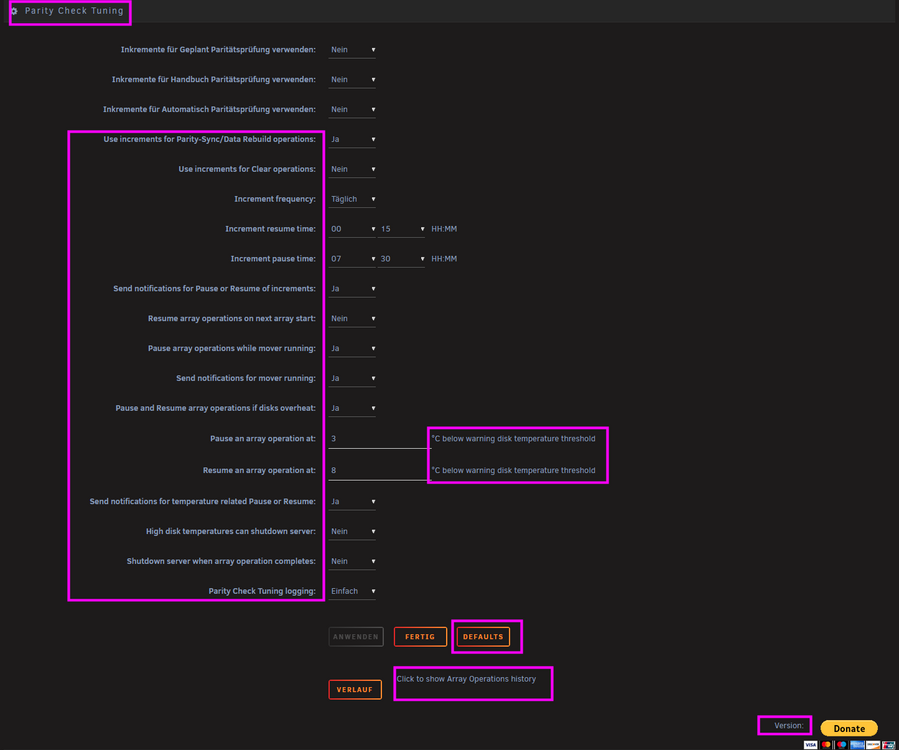
More or less. Sorry for my complicated wording. As you can see in the screenshot some of the text in English, and some of them were picked up from paritychecktuning.txt - while the language was set to German (also tested with other languages). However, this was the situation even before you issued this new bug-fix release, so I doubt that this is only an 'out-of-phase' problem. Anyway, I've checked your source code on GitHub, and found ca. 6 missing messages in paritychecktuning.txt only. Maybe I missed some more.
-
Hi, Where am I supposed to report the problem that almost none of the translated strings in the lang file paritychecktuning.txt are displayed if the selected display language is not English? Is this a plugin issue or Unraid problem?