an3k
Members
-
Joined
-
Last visited
-
Could a moderator please review https://ca.unraid.net/apps/postgresql16-118syna1bsrto2?q=postgresql16 ? It appears to be a near identical copy of https://ca.unraid.net/apps/postgresql16-1fjhyx31tjdck3?q=postgresql16 Thanks
-
Both are nice systems ... the question is: What do you need? Do you need 128 GB RAM? Does it has to be ECC? Is your current system bottlenecked by CPU or do you want to implement something you need more power for?
-
I want to understand why adding a second parity requires a full parity sync, even though the parity was valid before adding the second one. I think that parts of the array that only contain zeros (empty, never written to) doesn't need to be read in detail but could be synced faster instead. * Each disk was cleared (written with zeros) before the parity was built. There's no "I assume this disk is clean and just add it to the array without clearing" disk. I don't plan to do it. I don't critizise the implementation or code or anything. It's just a thought experiement.
-
unRAID 7.3.2 uses Samba 4.22.10 and those are the valid options now server min protocol = SMB3_11 client ipc min protocol = SMB3_11 server signing = mandatory ntlm auth = ntlmv2-only restrict anonymous = 2 null passwords = no smb encrypt = required client signing = required client ipc signing = required client smb encrypt = required server smb encrypt = required
-
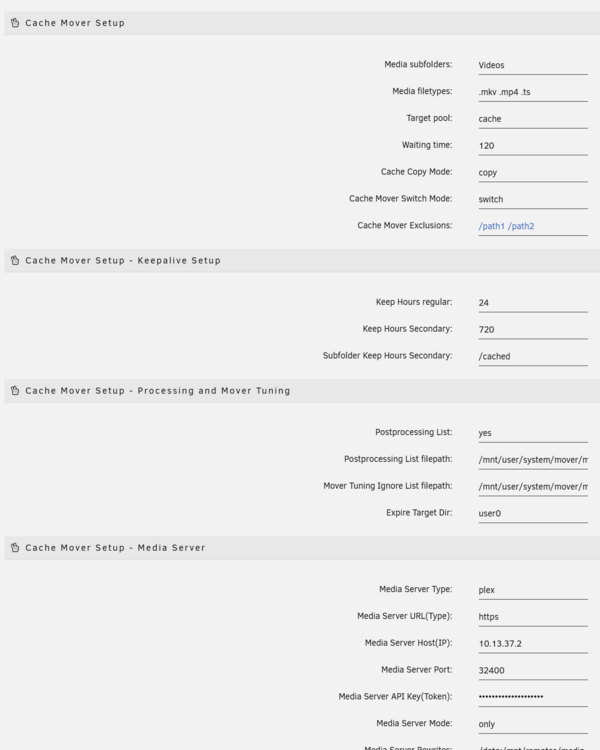
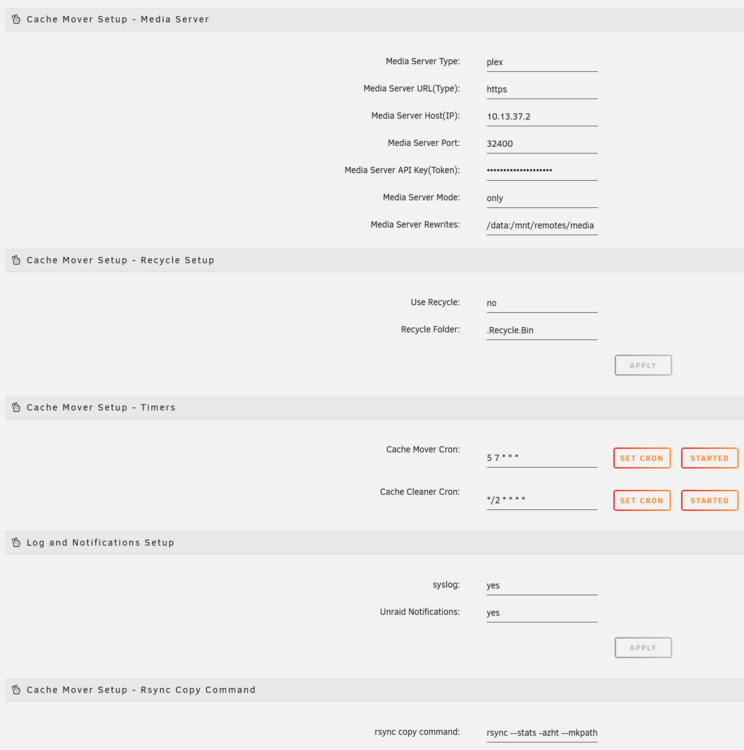
Hi, I tried to setup cache mover but it does nothing but running the crontabs. In Unraid I can access /mnt/remotes/media and I see my directory "Videos" In Plex I have to access /data to see the directory "Videos" directory /cached doesn't exist (where should it be?) the two profcessing and mover tuning file path or the files didn't exist as well, I created the necessary directory and touched the files.