Ron
Members
-
Joined
-
Last visited
Everything posted by Ron
-
Will the unraid Zappiti server app allow me to access unraid movies via my zappiti reference player?
-
Thank you, I will try your suggestions and report back.
-
I am running Unraid 6.12.13 I have (2) 20TB, (2) 16tB hdds in a 72TB array (27.7TB used, 44.3TB free). I purchased another 20TB hdd and precleared it. Today I stopped the array and assigned the new precleared 20TB hdd, and then started up the array and the parity started. After 1 hour and 43 minutes it say 0.3% complete with a 8.9 MB/s estimated speed and a completion time of 26 days, 13 hours. Is this normal? When I replace 1 of the 16TB hdds witha 20TB hdd will it take this long again for parity? I had Unraid running a few years ago and I used to have (2) 16TB Parity hdds with a array of 8 hdds (all smaller than the parity), and I do not recall it taking this long. Should my shares be unmounted? All hdds in the array are green Parity has a orange triangle Array has 1 device warning...parity which is syncing. All drives have a healthy SMART Log.. . Nov 26 16:00:55 Tower kernel: BTRFS info (device loop3): first mount of filesystem e1bf2477-47d0-4f91-8d1e-b8defeb45d58 Nov 26 16:00:55 Tower kernel: BTRFS info (device loop3): using crc32c (crc32c-intel) checksum algorithm Nov 26 16:00:55 Tower kernel: BTRFS info (device loop3): using free space tree Nov 26 16:00:55 Tower root: Resize device id 1 (/dev/loop3) from 1.00GiB to max Nov 26 16:00:55 Tower emhttpd: shcmd (393): /etc/rc.d/rc.libvirt start Nov 26 16:00:55 Tower root: Starting virtlockd... Nov 26 16:00:55 Tower root: Starting virtlogd... Nov 26 16:00:55 Tower root: Starting libvirtd... Nov 26 16:00:55 Tower kernel: tun: Universal TUN/TAP device driver, 1.6 Nov 26 16:00:55 Tower dnsmasq[6454]: started, version 2.89 cachesize 150 Nov 26 16:00:55 Tower dnsmasq[6454]: compile time options: IPv6 GNU-getopt DBus no-UBus i18n IDN2 DHCP DHCPv6 no-Lua TFTP conntrack ipset no-nftset auth cryptohash DNSSEC loop-detect inotify dumpfile Nov 26 16:00:55 Tower dnsmasq-dhcp[6454]: DHCP, IP range 192.168.122.2 -- 192.168.122.254, lease time 1h Nov 26 16:00:55 Tower dnsmasq-dhcp[6454]: DHCP, sockets bound exclusively to interface virbr0 Nov 26 16:00:55 Tower dnsmasq[6454]: reading /etc/resolv.conf Nov 26 16:00:55 Tower dnsmasq[6454]: using nameserver 192.168.1.254#53 Nov 26 16:00:55 Tower dnsmasq[6454]: read /etc/hosts - 2 names Nov 26 16:00:55 Tower dnsmasq[6454]: read /var/lib/libvirt/dnsmasq/default.addnhosts - 0 names Nov 26 16:00:55 Tower dnsmasq-dhcp[6454]: read /var/lib/libvirt/dnsmasq/default.hostsfile Nov 26 16:00:55 Tower usb_manager: Info: rc.usb_manager Reset Connected Status Nov 26 16:00:55 Tower emhttpd: writing GPT on disk (sdf), with partition 1 byte offset 32KiB, erased: 0 Nov 26 16:00:55 Tower emhttpd: shcmd (395): sgdisk -Z /dev/sdf Nov 26 16:00:57 Tower rc.docker: zappiti-server: started succesfully! Nov 26 16:00:58 Tower root: Creating new GPT entries in memory. Nov 26 16:00:58 Tower root: GPT data structures destroyed! You may now partition the disk using fdisk or Nov 26 16:00:58 Tower root: other utilities. Nov 26 16:00:58 Tower emhttpd: shcmd (396): sgdisk -o -a 8 -n 1:32K:0 /dev/sdf Nov 26 16:00:59 Tower root: Creating new GPT entries in memory. Nov 26 16:00:59 Tower root: The operation has completed successfully. Nov 26 16:00:59 Tower kernel: sdf: sdf1 Nov 26 16:01:00 Tower emhttpd: re-reading (sdf) partition table Nov 26 16:01:00 Tower emhttpd: shcmd (397): udevadm settle Nov 26 16:01:00 Tower kernel: sdf: sdf1 Nov 26 16:01:03 Tower kernel: mdcmd (37): check Nov 26 16:01:03 Tower kernel: md: recovery thread: recon P ... Nov 26 16:01:05 Tower autotweak: Appply balanced profile Nov 26 16:01:05 Tower autotweak: Set scaling governor to powersave for CPU 0 Nov 26 16:01:05 Tower autotweak: Set scaling governor to powersave for CPU 1 Nov 26 16:01:05 Tower autotweak: Set scaling governor to powersave for CPU 2 Nov 26 16:01:05 Tower autotweak: Set scaling governor to powersave for CPU 3 Nov 26 16:01:05 Tower autotweak: Set performance preference to balance_performance for CPU 0 Nov 26 16:01:05 Tower autotweak: Set performance preference to balance_performance for CPU 1 Nov 26 16:01:05 Tower autotweak: Set performance preference to balance_performance for CPU 2 Nov 26 16:01:05 Tower autotweak: Set performance preference to balance_performance for CPU 3 Nov 26 16:01:05 Tower autotweak: Set HWP Dynamic Boost to 1 Nov 26 16:01:05 Tower autotweak: Set no_turbo to 0 Nov 26 16:01:05 Tower autotweak: Failed to set ASPM policy Nov 26 16:01:05 Tower autotweak: Set SATA link power management to max_performance for host12 Nov 26 16:01:05 Tower autotweak: Set SATA link power management to max_performance for host13 Nov 26 16:01:05 Tower autotweak: Banned CPUs for network interface interrupt affinity: 0,2-3 Nov 26 16:01:05 Tower autotweak: Usable CPUs for eth0: 1 Nov 26 16:01:05 Tower autotweak: Set CPU affinity of interrupt 128 and tx queue 0 of eth0 to CPU 1 Nov 26 16:01:05 Tower autotweak: Usable CPUs for eth1: 1 Nov 26 16:01:05 Tower autotweak: Set CPU affinity of interrupt 129 and tx queue 0 of eth1 to CPU 1 Nov 26 16:01:05 Tower autotweak: Maximum interface speed: 1000 Mb/s Nov 26 16:01:05 Tower autotweak: TCP parameters optimized Nov 26 16:01:06 Tower Parity Check Tuning: No restart information present Nov 26 16:01:36 Tower tips.and.tweaks: Tweaks Applied Nov 26 16:01:36 Tower unassigned.devices: Mounting 'Auto Mount' Remote Shares... Nov 26 16:01:36 Tower usb_manager: Starting usbip config check... Nov 26 16:01:36 Tower unassigned.devices: Using Gateway '192.168.1.254' for Remote Shares. Nov 26 16:01:36 Tower unassigned.devices: Waiting 5 secs before mounting Remote Shares... Nov 26 16:01:42 Tower unassigned.devices: Mounting Remote Share '//SERVER.DOMAIN.NAME/movies'... Nov 26 16:01:42 Tower unassigned.devices: Mount SMB share '//SERVER.DOMAIN.NAME/movies' using SMB default protocol. Nov 26 16:01:42 Tower unassigned.devices: Mount SMB command: /sbin/mount -t 'cifs' -o rw,hard,relatime,noserverino,nounix,iocharset=utf8,file_mode=0777,dir_mode=0777,uid=99,gid=100,actimeo=10,closetimeo=30,credentials='/tmp/unassigned.devices/credentials_SERVER.DOMAIN.NAME_movies' '//SERVER.DOMAIN.NAME/movies' '/mnt/remotes/SERVER.DOMAIN.NAME_movies' Nov 26 16:01:42 Tower kernel: CIFS: enabling forceuid mount option implicitly because uid= option is specified Nov 26 16:01:42 Tower kernel: CIFS: enabling forcegid mount option implicitly because gid= option is specified Nov 26 16:01:42 Tower kernel: CIFS: Attempting to mount \\SERVER.DOMAIN.NAME\movies Nov 26 16:01:42 Tower unassigned.devices: Successfully mounted '//SERVER.DOMAIN.NAME/movies' on '/mnt/remotes/SERVER.DOMAIN.NAME_movies'. Nov 26 16:01:42 Tower unassigned.devices: Adding SMB share 'SERVER.DOMAIN.NAME_movies'. Nov 26 16:01:42 Tower unassigned.devices: Adding NFS share '/mnt/remotes/SERVER.DOMAIN.NAME_movies'. Nov 26 16:01:42 Tower unassigned.devices: Mounting Remote Share '//SERVER.DOMAIN.NAME/tvshows'... Nov 26 16:01:42 Tower unassigned.devices: Mount SMB share '//SERVER.DOMAIN.NAME/tvshows' using SMB default protocol. Nov 26 16:01:42 Tower unassigned.devices: Mount SMB command: /sbin/mount -t 'cifs' -o rw,hard,relatime,noserverino,nounix,iocharset=utf8,file_mode=0777,dir_mode=0777,uid=99,gid=100,actimeo=10,closetimeo=30,credentials='/tmp/unassigned.devices/credentials_SERVER.DOMAIN.NAME_tvshows' '//SERVER.DOMAIN.NAME/tvshows' '/mnt/remotes/SERVER.DOMAIN.NAME_tvshows' Nov 26 16:01:42 Tower kernel: CIFS: enabling forceuid mount option implicitly because uid= option is specified Nov 26 16:01:42 Tower kernel: CIFS: enabling forcegid mount option implicitly because gid= option is specified Nov 26 16:01:42 Tower kernel: CIFS: Attempting to mount \\SERVER.DOMAIN.NAME\tvshows Nov 26 16:01:42 Tower unassigned.devices: Successfully mounted '//SERVER.DOMAIN.NAME/tvshows' on '/mnt/remotes/SERVER.DOMAIN.NAME_tvshows'. Nov 26 16:01:42 Tower unassigned.devices: Adding SMB share 'SERVER.DOMAIN.NAME_tvshows'. Nov 26 16:01:42 Tower unassigned.devices: Adding NFS share '/mnt/remotes/SERVER.DOMAIN.NAME_tvshows'. Nov 26 16:01:42 Tower unassigned.devices: Mounting Remote Share 'TOWER:/mnt/user/movies'... Nov 26 16:01:42 Tower unassigned.devices: Mount NFS command: /sbin/mount -t 'nfs4' -o rw,hard,relatime 'TOWER:/mnt/user/movies' '/mnt/remotes/TOWER_movies' Nov 26 16:01:44 Tower nfsrahead[10006]: setting /mnt/remotes/TOWER_movies readahead to 128 Nov 26 16:01:44 Tower unassigned.devices: Successfully mounted 'TOWER:/mnt/user/movies' on '/mnt/remotes/TOWER_movies'. Nov 26 16:01:44 Tower unassigned.devices: Adding SMB share 'TOWER_movies'. Nov 26 16:01:44 Tower unassigned.devices: Adding NFS share '/mnt/remotes/TOWER_movies'. Nov 26 16:06:30 Tower Parity Check Tuning: Parity Sync/Data Rebuild detected Nov 26 16:10:00 Tower root: Fix Common Problems Version 2024.11.12 Nov 26 16:10:07 Tower root: Fix Common Problems: Warning: Share appdata set to cache-only, but files / folders exist on the array Nov 26 16:10:09 Tower root: Fix Common Problems: Warning: Email selected as a notification destination, but not properly configured Nov 26 16:12:23 Tower root: Fix Common Problems: Warning: Share downloads set to use pool cache, but files / folders exist on the read pool
-
I just did a control alt delete, and when it rebooted it worked fine...no need to revert to an older version on mine. Sent from my SM-T830 using Tapatalk
-
Just upgraded to the latest...when it rebooted it hung after password, so I rebooted. So far it is good. I am testing to see if it solves my problem with pausing during movies. Sent from my SM-T830 using Tapatalk
-
Post your docker run command. You can find instructions to do so in the docker faq. Thanks, I got it figured out... needed to put the same path for the container, and host. Now it is importing my movies, etc. The one thing i don't see though is the DVR function. Is it not available in this build?
-
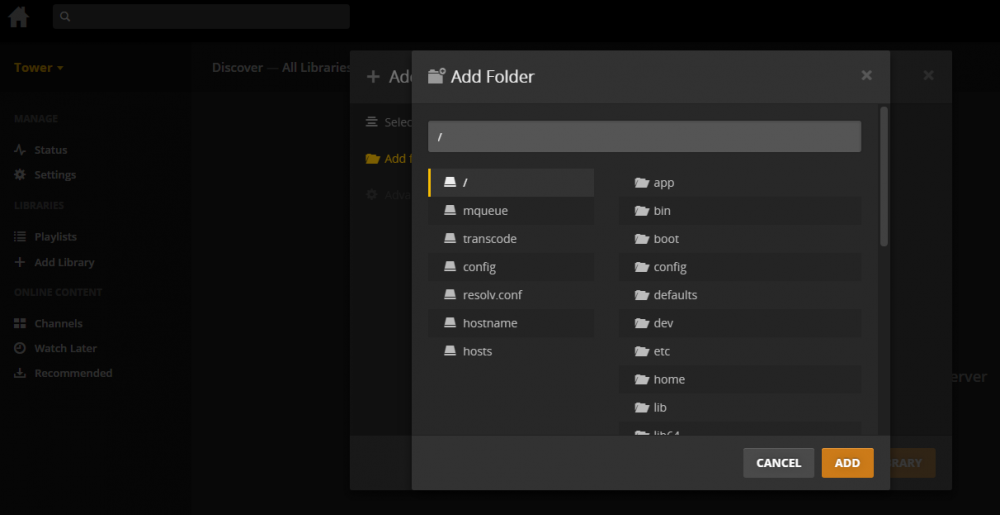
I am trying to get Plex to work, and I am having difficulty getting the folders added. When i click to add the folder it is not giving me the "Tower", but appears to be giving me the root of the USB drive. I had this working before, but now it seems to be different, and I haven't been able to get Plex to see the folders. The only other place I saw was on Unraid where it says "add another port, path or variable"...this is when I edit the Plex Docker. What am I doing wrong, please?