





NLS
Members
-
Joined
-
Last visited
Everything posted by NLS
-
So, I started closing the threads I opened, which threads handled not a single issue, but a series of issues that happened during my Odyssey (so it makes sense to be broken). So for this thread, a weird thing. I now have managed to boot UNRAID on a new motherboard (details on other thread), so I thought I should install my two NVMe. One large NVMe was formatted, used purely as cache anyway (so no static data I care about). One small NVMe very important to me, as it holds appdata (which I had backup though), domains (of which a single VM mattered much, which I DID NOT have backup of the whole VM, although I do have backup of parts of the VM taken from inside the VM) and system. If you read this thread you will see that I had various issues to recover the data etc. Well in unassigned devices on my "new" server, I did see both NVMe. The big one was expected (as it was re-formatted), the small one... well it showed up properly as XFS, free/used space... so I clicked to see the contents. AND I SAW THE CONTENTS! Not really sure what to think, I made a new configuration (preserved only array, not cache pools), and so I assigned cache to my big NVMe and the second pool to my small NVMe... And started the array (with docker and VM stopped). Array started fine! I checked my shares and it still remembered that appdata/domains/system should be on my second cache pool. So I started docker. It started! I saw my containers and the few auto-start containers DID start! Then I started KVM. It started and started my VM! Apparently Windows was right to believe the xfs disks where ok. They just worked. So after huge complications I am back to a working server! Thanks everybody that tried to help.
-
So, guys this got resolved. But it is like I write it: IT GOT resolved. I understand things that happened to me are so weird that some people may think I hide some details. I do not,. As I said the USB with UNRAID was not booting with my new motherboard in EFI mode, after I made various UEFI setting changes. So I decided to GO AROUND the issue, go back to CSM (legacy), which with THIS motherboard was a no-go without PCIe gfx card (in other words on-board graphics somehow only allowed EFI booting, no CSM loading - when the cr*p chinese mb I had before, DID allow for that to work, with same CPU). Anyway, so I went to work next day, tool also UNRAID USB with me to test on a couple other machines. The content of UNRAID USB was with STOCK 7.0.1 without putting my backup over it. Also I have arranged to bring an old simple graphics card back home, to enable legacy boot. In the two machines I tested at work, in BOTH of them USB stick booted in EFI mode! I saw the blue menu! OK I said, something wrong specifically with my home motherboard (although one of them at work was same brand and similar age with my home one). So I went home ready to install the graphics card. But first I tried just once more. STICK BOOTED! IN EFI! I swear I haven't rouched anything. Then I thought, maybe I somehow fixed it with the stock and didn't realize. So I dropped over the stick my own backup of UNRAID USB, but didn't touch the EFI and syslinux folder, plus a few more files I knew didn't differ in version. THIS WORKED TOO! So no my UNRAID just... started booting fine in UEFI mode! So I guess this is a closed issue. Future searches leading to this thread won't be of much help to people. What I can add as closing comment is that indeed UNRAID SHOULD work in EFI boot mode.
-
Fair enough. Next time I will probably make a video.
-
The motherboard detects it as an EFI boot device (it shows in boot priority as the only device and names it EFI:<model>). I will try to bring it to work and try it in a couple different computers (of course change to EFI mode if it is not enabled), because my home computer actually uses the same motherboard (with the difference being that it uses DDR5 RAM not DDR4), so it won't be much of a test. I do not remember EFI booting of UNRAID ever working for me though - but since every single factor has changed and there is no point discussing about what was in the past, I will try with current hardware. I do remember distinctly (remember I use UNRAID for many years) that periodically I did try to use it in EFI instead of legacy mode (my server even before the latest issues, had been upgraded several times just to improve the hardware when I could afford it) and I remember I always switched to legacy because it either didn't work or was unpredictable (booting some times and some times not). But I said, what matters is here and now with the current set. (I have to say I am trying to allocate a very cheap basic graphics card to put on one of the x16-length-x4-bandwidth slots -because I want the full x16 for my PCIe SATA controller and hopefully once more, get around the problem -enable CSM- instead of solving it -boot in EFI-, at the cost of a PCIe slot)
-
This is what I used... I say that above. :(
-
Hi again. As I say in the second line of my post EFI is there. I run the make bootable script only to see if it fixes things. It didn't. This flash drive IS new. I replaced it a month ago (between trying to fix all other issues you may remember). I did a backup of my own boot drive and indeed re-installed from stock 7.0.1 zip just to test. It did not make a difference. No go. ON THAT SAME flash drive, I reformatted (with rufus) and put a Linux live distro, actually tried two... a Debian and a Slackware (since UNRAID is based on it), UEFI based (as my motherboard cannot boot legacy until I add a vga card). This worked fine (with my UEFI settings as they are set, so it wasn't an issue of the settings either). Nothing wrong with flash drive hardware. I put again stock 7.0.1 and over it my backup without replacing the files of stock 7.0.1. Also no go. I noticed that other distros, not only had an EFI folder (with mostly different files inside), but also a couple more like "isolinux" instead of "syslinux" or "(boot)"... I even considered trying to make a Frankenstein UNRAID boot, but was beyond my capabilities in such a short notice. Something with the syslinux method UNRAID uses (apparently it is a hybrid UEFI over CSM enabled - i.e. not compatible with CSM fully off) is probably not compatible with more modern motherboards. (that said, I am not sure I remember UNRAID ever booting in UEFI with any of my previous hardware - because I did try in the past again... at least back then I had a choice so I reverted to legacy, but now I don't have the option) Or maybe it is something else.
-
Yes I have seen older threads about the same issue. There is an EFI folder on the stick (without "-"). I have run the script to make it bootable and said EFI. Seems my problems have no end. (if people remember my previous threads) I once more replaced my motherboard with another one, from a brand I trust (Asus). But I just discovered that for some reason my CPU/chipset configuration (12600 on Z790 motherboard), at least for Asus (!?), doesn't seem to support CSM enabled (compatibility with non-EFI boot), when integrated graphics are used. Strangely enough, this was not a problem with the (otherwise bad) Chinese Z690 motherboard and same CPU! But I cannot replace motherboard a FOURTH time in a month and I don't have readily available gfx card (plus I really want my PCIe x16 slot for my PCI-SATA x8 card - the other slots are x4). ...so I tried booting UNRAID in UEFI mode. It did not work. I actually never remember UNRAID (with this stick or previous sticks) booting in UEFI with any motherboard. It always prefered legacy. But now I am FORCED to use UNRAID in UEFI mode and since it says that it supposedly can, I need to fix this. Is there anything I should be looking? In my UEFI settings, it DOES detect my stick as UEFI:<stick brand and model>. So it can see the EFI folder fine. But it doesn't actually boot it and returns me to UEFI settings screen. Is there any setting I should touch in UEFI? Maybe enable secure boot like being Windows? Maybe make USB stick GPT instead of MBR? (all USB sticks are formated in MBR by default) I really really really need a solution, I am exhausted with the huge chain of issues and this is the cherry on top. Please help. I need my UNRAID to boot in UEFI mode. EDIT: I backed up my USB stick, then formated it in Rufus and installed a live Linux distro. This boots in UEFI fine! So the issue is UNRAID. Then deleted all the files from the stick and replaced them with my UNRAID backup (as suggested by an old thread here). Stick again becomes unbootable and it takes me to UEFI settings.
-
Yes, on board a PCIe card or directly on-board (I don't remember), not USB. Will do it again though (my most "serious" of the two NVMe is just sitting waiting for the best treatment of recovery - the Windows based tool just read it, didn't write anything on it). I did try an older (apparently) xfs_repair using a live distro, and it didn't even attempt to fix the disk, claiming I need a newer version because of I don't remember what. The version that produced the result above (i.e. attempted to fix but failed), was the one within UNRAID 7.0.1. Understood. Right now, the one thing that is most important to me is to see if my VM (NethServer8 with my mail of decades) survived (along with libvirt image I guess). For appdata, most of them I can rebuild and the couple that are important I can probably install from stock and manually replace content of configuration files (or check security of new setup and apply it)... one that comes to mind is my technitium based DNS server container. From UNRAID if I could "request" something (which is not even for me), is to make sure in the future, people that setup a new system are aware of the importance of appdata/domains/system and either back it up or set up a protection scheme for them (and UNRAID requires it, or sets it up or anyway pushes the user to implement it).
-
Thanks. Any idea about the current problem of re-importing my important UNRAID folders properly? (for them to be usable by UNRAID) I will probably flash the NVMe, but I am 99% sure the issue is the motherboard.
-
I will try to see if there is updated firmware for them. They don't work on that motherboard even alone, not only together. They are two different Samsung models of M.2. But my priority now is what I say above. How to re-import things from Windows recovered files to a "new" working cache. My appdata/domains and system (except docker folder... I deleted that, I know it doesn't move gracefully around but can be rebuilt).
-
Yes I edited my reply while you were typing this. See above.
-
Yes that was correct. I did specify properly what to scan. I find it very weird that almighty Linux (the light irony is not targeted towards anybody here or even UNRAID - I am not leaving UNRAID, I have promoted it to so many people), cannot recover anything on a supposedly very resilient fs like xfs, while a simple tool I bought on-line in Windows DID (most probably) recover the files and didn't even whine it had an issue or difficulty. Anyway, recovery aside (hoping I recovered most of what I care properly, I could just test some text based files), my remaining questions remain, if you have any idea to help on that (read above your post after the TL:DR)... I am looking on how to "re-import" those data properly on a new cache from where I keep recovered in NTFS based storage (not the physical process of course, I will find a way... I mean maybe resetting attributes and user/group properly, if the default copy to cache doesn't do that correctly). I did. It was the first think I did when I got the used motherboard (the previous owner never flashed it). It was not even easy on this Chinese brand... I had to go to EFI shell. Remember the motherboard worked fine (with all hardware) for about 10 days. Then hell let loose. EDIT: Oh you meant the firmware of the two storage? No I didn't. Remember, they work on other motherboard (and even worked on THIS one for 10 days). Also they are two different models and sizes. It is not that I bumped on an NVMe firmware bug.
-
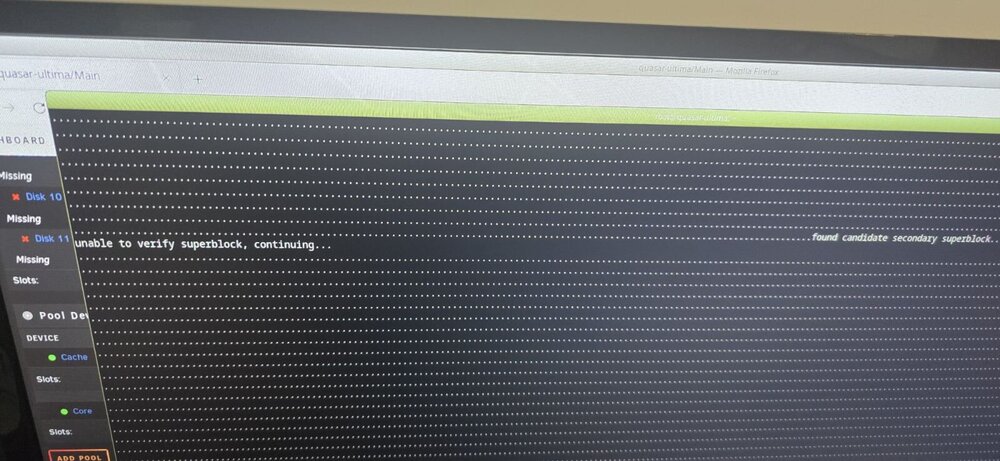
I will try to re-do it but check if the following already covers you: The exact command was xfs_repair -v and the path of the device on that specific computer (/dev/nv-something). The output was all dots (scrolling pages and pages), with sporadic "found candidate superblock" followed by "unable to verify superblock". Which I think was also the final ending of the output. Here is a casual photo I got when I tried originally, a few days ago. I take it that we "fight" to not use the Windows already recovered data because the lost attributes make real use of the data very difficult? (on other news - because this really deserves the "I am going to cry" title of the original thread- my replaced motherboard that did all this, now that I put another M.2 ON a PCIe instead of motherboard, decided to kill the on-board 2.5Gbit NIC... it is like non existent, not detected by UNRAID any more and its port LEDs never light up... so all issues aside, I *AM* going to replace the replaced motherboard... and lose the money as it was bought used and worked like 10 days, so, aside from not very politely letting the seller know, I cannot really request a refund or something... great, ain't it?)
-
First, (and I find the need to clarify, so that we don't start from the alphabet) let me tell you I am into computing since I was 9 and I am now 51. Since my early 20ies I am in IT professionally. I've seen motherboards in the hundreds. About your deduction: 1) No this doesn't tell you that a BIOS setting disabled the ports. Because if I put different NVMe on those same PCIe cards, it does see the NVMe. Only the two "problematic" ones don't show. 2) But no, this doesn't tell you that the disks are dead either. Because those same disks SHOW UP on two different other computers on the same PCIe cards (or even on board). In fact one of the two (where I didn't have data I cared) I now use it on another (Windows) computer. Formatted (not quick format) successfully and copied data to it. No diagnostic shows an issue. 3) I already said that the issue is not UNRAID. The only issue with UNRAID (because you said you want to only use UNRAID), is that if I put UNRAID on a computer (not my server) that can see the two problematic disks, the tools provided by Linux/UNRAID (mount commands and xfs_repair) did not fix the partition, neither let me access the contents. This is where the problem with UNRAID ends. 4) I am an UNRAID Pro/Lifetime user for several years. No disk limits. 5) Those disks WERE my two separate cache pools. I am saying they are not in the array in the sense that they are not part of the parity protected pool. They are cache pools. Anyway, to NOT overcomplicate things. I am not trying any more to see those two disks WITHIN UNRAID WITH THIS MOTHERBOARD. It is a lost cause. I have already put a different NVMe (on a PCIe card, I don't trust the motherboard ports anymore) that I plan to temporarily use as a NEW cache pool. Also, I have (maybe) recovered the data, unfortunately on a Windows computer, since no Linux tool helped me. --- CURRENT SITUATION, for anybody TL:DR --- The questions that are current and I would love someone to answer are those and those only (and are all UNRAID related): 1) How can I make UNRAID forget the two missing pools? Should I make "new configuration"? (or forget one and put different disk on the other) I have done new configuration a number of times (for example to re-arrange disks) so I know how it works. But is the process to follow? EDIT: Already done. New config, retain assignments, but not cache. Reconfigured with new cache disk. Docker and VM are disabled for now, until #2 below is done. 2) How can I use appdata/domains/system I have (hopefully) recovered from a Windows system, copied back to UNRAID and get the proper attributes/user/group? I will probably copy the recovered data over the network. But the problem is will they be usable? Is there a default attrib and chown I should use (or some tool to do it for me)? 3) (bonus) If someone can suggest a specific live rescue distro and specific tool within it, that can help me do the recovery work from within Linux (so that attributes possibly stay), I would love it. Nothing I tried in Linux managed to do it, only a tool in Windows. My most important NVMe (with issue) is still available to recover (Windows recovery only "read" from it and gave me my data, didn't fix it). Thanks, one more time.
-
Thanks for the (huge) reply. Let see... - I know about bifurcation. Not the case here (as it will become obvious below) but also this stpd motherboard does not have such settings. - I COULD NOT use UNRAID for recovery for two reasons: (remember these two disks are two separate cache pools, NOT part of an array and NOT a single pool - I explain this above already, but someone can get lost with all the info) a) As I said, on my own server, the disks cannot even be seen by BIOS/UEFI and not by UNRAID either (it's like they are not there). b) Taking my UNRAID USB stick and putting it on another machine (and the "problem" disks), I can see the disks (but I don't have my array along, so I cannot even start in maintenance mode, I stay with array stopped). With stopped array but seeing the problem disks, UNRAID once detected a disk as xfs and even showed a correct free/used bar, but failed to show contents of the disk. In another attempt it didn't even show free/used, although it again knew it was xfs format. The disks are not readable. xfs_repair does NOT fix them. I tried from within UNRAID (on another machine). On the other hand, Windows already allowed me to read the files, maybe too easily. Sorry. Point me to a tool that can manage to repair the disks on Linux (most probably I have already tried it). My most important cache disk (with the VM etc.) is stored, until I can be able to recover it even better than what I got from Windows. So, yes, will to do something a certain way is nice, yet, it didn't work. - Again, I have already read the disks and got the files. But of course (since it is Windows) I lost all attributes (user information etc.). - You require a diag file yet I cannot provide you one, I mean, read a and b above on why. - I know the forum rules I believe. You can see my profile and see since when I am registered here. Yet, this is a very weird case where I cannot reach the point of being able to make a diagnostic. - I did boot (on other machine that can see the disks) various Linux live distros. They cannot mount the disks. I could probably supply you with the failure info, which is the only "diag" I could possibly supply. No Linux live distro with recovery tool allowed me to recover the data. Again I told you I did that, before you posted that I should try it. - I tried all on-board slots (able to do NVMe) and all PCIe slots that could fit the cards. The card or bifurcation is not the problem, see below on why. As I said there are no bifurcation settings and I tried to set the PCIe to 1-2-3-4-5 gen. No SATA ports are used on motherboard. I have PCIe SATA card. 12 HDD disks. This is unrelated. They were always there when the system was working. No SSD. - So, why BIOS settings are unrelated? Because I tried another NVMe that was NOT on my server and it worked! Server sees this NVMe. On the PCIe cards. They work. So the cards or BIOS settings are not the issue. The specific 2 "bad" NVMe cannot be seen by server, BUT CAN BE SEEN BY ANY OTHER MACHINE I TRIED! Yet the server CAN see other NVMe. Can you explain this? I did BIOS reset, I did format the disks, deleted partitions etc. No go. Thanks for the help. If you read me, you will see I have already done what you think I should try.
-
I don;'t think to answer my questions diag and syslog are needed. I can tell you already what they say: They don't even see the devices. It is not that they see them and not mount them or anything. My questions are quite different above and I am not looking into finding what is wrong (most probably something with the motherboard itself), but bypassing the issue. So again: Can someone help with this?
-
You could. This though won't go on, except hopefully to "close" up this thing. There are so many different issues opened and closed during this... epic, that in the future someone looking for a specific issue will not find the answer but get more confused. This way specific things are cleaner to follow (see the new thread, it is very specific and could happen this situation for so many other reasons). Then again, I am not managing the forum. Do as you like. @bmartino1 Thanks for your reply. I am already on 7.0.1 UNRAID. I would love to debug this, but right now it is just a matter of surviving by finding whatever (alternative) solutions to reach goal. See new thread where I stand now. I bothered with all these issues way too long. Everything that haven't happened with my UNRAID ALL these years (except failed disks of course), happened these last few weeks. Tired. I am not looking for alternatives to UNRAID. I check them out (professionally or by personal interest) from time to time and none covers me the same way as UNRAID.
-
If anybody has followed the original thread here... ...you can see I am in nothing short of an Odyssey to fix my server. Not being able to fix everything exactly as it was, I am now in the crossroads of having to see how to realistically proceed to a working server. Given are the following: - My two pools, made by two M.2 NVMe, are not accessible any more by my server (motherboard issue, it cannot even see their existence) and seemingly were corrupted too (both at the same time!) and xfs_repair did NOT help, but taken to other computers I CAN see the NVMe, CAN see they are formated xfs, but Linux has issue to mount them (and as I said xfs_repair did not help, run from inside UNRAID on another machine, with array stopped). - ...But in Windows, using DiskInternals Linux Reader, I WAS able to read the partitions and extract the data. I cannot yet verify if the data are ok (some text based files, init etc. seem to be readable), I am especially worried about one of my VM (because it is VITAL) and of course let's not forget, that every security info was lost. Keep this in mind. - So I have now in some Windows disk (NTFS), my appdata/domains and system (without the docker folder which is useless after every move anyway). - One of the M.2 NVMe (that I don't care about the content) I formatted (on another machine), as I don't care about it's contents (where temp files). I want to reuse it in my server. I don't trust to put it on motherboard (where the incident happened), but I am trying to find a PCIe card that I can use (one I tried ALSO did not work - that was working on another machine - on a slot that I know it works). Probably some issue of the Chinese motherboard and PCIe speeds. In any case I am waiting for a couple other PCIe cards to put the NVMe on and HOPING one of them will work. (here comes the important part where I need help) - If any of these work, the disk will reappear with its original ID in UNRAID but will be empty and it will miss the OTHER NVMe (as I have no way to put it back) that (the other disk) used to HAVE appdata/domains/system. - If the above won't work in my motherboard (replaced 10 days ago, used, don't plan to replace again yet), I will just put an extra SATA SSD and use that as my pool, until I find a better solution (which probably is to replace the Chinese motherboard with one by the brands I usually trust). So problem is this... In first case, where a card works and one NVMe is back online with its old ID, I need to somehow put from Windows the data back to the "old" (xfs) pool that didn't have it originally. a1) How do I make that transfer? (which is maybe 100GB) Probably use some USB disk and connect it to UNRAID? a2) How do I make UNRAID eliminate the other pool that will not reappear (as the disk is already missing for ever)? a3) How do I make UNRAID use the data I supposedly transferred to the remaining pool? (#1 above) a4) How can I make sure the attributes (read/write/execute, owner, group) of the files/folders are as they should? In case I have to use the SSD instead (I cannot make NVMe work), then both old pools will remain with missing disks and I need to make a new one OR put the SSD in place of one of those pools, probably. b2) How do I make UNRAID eliminate the other pool (or both pools) as the disks will not reappear? b3) Like a3 above. b4) Like a4 above. Any help appreciated. BONUS question: How is it possible that xfs_repair doesn't fix it, Linux doesn't mount it, but some Windows tool managed to extract data and didn't even whine. This is where Linux's recovery options end and xfs resiliency ends? Not very encouraging...
-
I am again forced to split to another thread, so that cleanly someone can help me with the end problem (after NOT solving the issues at their core, I need to now go to the alternatives I have). I will edit this topic with the thread link, but please don't lock this one, to keep it as a closure when this closure FINALLY happens. (I might need to sell the rights to a documentary) EDIT: Here... https://forums.unraid.net/topic/188176-next-day-recovery-of-cache-contents/
-
@trurl You are right. I am not even sure I can enable them. I have the server shut the last couple of days until I decide what to do. @JorgeB Will do, will try in the weekend again. To be honest, being mostly a Windows person (although I use UNRAID from the... ancient times), I was surprised that xfs proved to be so NON resilient AND the lack of recovery possibilities. The only tool that managed to see the contents of my partitions (of both NVMe), was Windows based. The issue is I don't trust much what they recovered, maybe they are ok, maybe not... AND all metadata information (security attributes etc.) is lost which in the case of containers could be "fatal". And this happened suddenly, while server was barely doing anything. I wonder what on my motherboard could have done that. Needless to say I don't trust the bought-used-10-days-ago motherboard any more... after all doesn't see my NVMe at all (even in UEFI/BIOS - except when put in USB-NVMe adapter), while other motherboards can at least acknowledge their existence, both onboard and if put on the PCIe-NVMe card I got. Really this last month UNRAID (well MAYBE not UNRAID itself, but the server system as a whole) has done to me what it hasn't done to me in all those years.
-
For the first. No I am talking about extracting the data and putting on new cache disk (maybe not even M.2). Is there a process to do that? For the second, here is my practical problem. My motherboard stopped seeing the two NVMe altogether, even with the use of a PCIe-NVMe card (!!!). On other computers, I could see the NVMe in UEFI, but I had this issue: Linux systems (live), couldn't really mount them. They could see there is an xfs partition, but failed to mount (missing superblock or something). ON THE OTHER HAND, weirdly enough, Windows machine with ability to see Linux fs (including xfs), was able to see the contents and I could even extract them. But being extracted on Windows etc. doesn't warranty the files are valid (esp. my Nethserver VM image is the most important). Also, I tried to get the two NVMe AND UNRAID stick and boot it on other system. IT DID see the two NVMe but the system cannot start even in maintenance mode as "too many disks are missing" (the whole array is on another server). I would really want to be able to start maintenance mode even like that! (maybe should be allowed?) I tried to run xfs_repair -v /dev/nvme1n1p1 (or whatever was the device) from console, but it didn't fix anything because I got sporadic "found candidate secondary superblock", "unable to verify superblock, continuing"... What should I do? Why Windows could do what this couldn't? TL:DR: Any more sophisticated Linux tools to use to extract data from the NVMe (where xfs_repair fails but Windows "looks like" it can?) and an UNRAID method to use those data on a new pool?
-
OK update. So... it is not freezing (I mean continuously). My son misidentified that. BUT, the (very serious) issue exists and is this: It suddenly lost BOTH the M.2 NVMe storage it has that are both ON-BOARD ... yes on the motherboard! (that were my two cache pools) Remember I was using the server whole week as is and this morning I saw it working, then "lost it", when nobody was doing anything on it. I go to UNRAID GUI properly, but array stays offline because both pools are missing. In BIOS it doesn't see them either. But I am not sure they ever showed up really. But UNRAID identified them properly. I did various BIOS tests (on a very weird Chinese "Colorful" branded motherboard), no go. I even disabled SATA (that I don't use at all). The two pool disks never reappeared. I then quickly got out and got a PCIe dual NVMe card to ignore onboard M.2 controllers and use that instead. NEVER seen the disks either! The card is PI6C20400BLE based and supposdly transparently seen by Linux. So I thought that maybe they somehow died both at the same time (some motherboard/PCU issue), so I took them out and put them on an NVMe-USB device I have and inserted to my Windows machine. Both can be seen (partition shows healthy but cannot mount xfs in Windows). So the M.2 are there. I don't know what happened and why (without anybody touching the server and after a full week of fully working "upgraded" system). I also tried a live boot stick (I just tried Windows 11 PE). Again, no go either from on-board M.2 slot or the new PCIe M.2 card. I could see all my data disks and parity disks, my USB UNRAID boot, but not the two M.2 storage. I really don't know what is happening. One last test was to remove my PCIe SATA controller (yes ALL disks), just to see if there is some weird lane sharing issue. Again didn't see my two M.2 NVMe... So this specific system decided to NOT show those two NVMe in any way. Or not? So I thought of putting one of those NVMe again on my NVMe-USB, I put it on Windows again (my main machine), again it showed up as a 232GB healthy (unknown as it is xfs) partition. So I booted UNRAID on my server and attached this USB device on it. It shows up as a 250GB NVMe on unassigned devices (but shows the controller's ID instead of the disk). It sees there is an xfs partition in it and the proper used/free information! But if I clicked to see the contents of the device, nothing happened... I was waiting forever. Then I refreshed the page. Invalid path. Seems it doesn't show in unassigned devices any more (!)... I see the USB device's led blinking. I remove and re-attach, led is now stable on, but since it didn't dismount cleanly before, unassigned devices shows "reboot". My final action (except maybe in the future swapping the motherboard AGAIN), will be to replace the two pools with a single slow extra HDD. I know my PCIe SATA controller works at least. Not fantastic but will do (if it works, because I believe nothing any more). Even if the NVMe are done for some reason, I don't trust this motherboard any more, becuae if they are dead IT killed them. NEW QUESTION now is: If I do that swap above and since my pool contents (at least one of the two) are VITAL, as it hosts appdata, domains, system. How can I copy those two a new pool AND copy them there? Will UNRAID just resume working after that copy? Also, in case xfs trashed in any way, what are my recovery solutions?
-
OK waking up this topic. I will also update first post. Server just froze again today. Mouse not moving on local screen. After maybe a week without freeze and after the following have been done: - Replaced USB stick. - Replaced PSU (both previous and new are Corsair 850 gold-plus modular). - Replaced motherboard and CPU and switched from AMD to intel as I read about AMD issues (which I didn't have for many months that I used that AMD). - Flashed latest firmware. - Did not replace RAM, but extensively memory checked (run memtest all night) AND tested with 2 vs other 2 sticks and slots (instead of the total 4) and the issue still happened (did this on old motherboard/CPU). - Replaced my dual PCIe SATA controllers with a single newer one. - Flashed it with latest firmware. - Replaced all SATA cables as the new controller used different ones anyway. - Replaced a single disk in the array (as I broke its connector) which I rebuilt successfully (on "new" system). - Didn't replace my cache, but added a second one, made new pool and moved appdata, system and domains there. - All other disks remain (my existing array). - UNRAID is on version 7.0.1 which I updated after my system was practically replaced and stable. I was happy again because system was not crashing and I moderately upgraded the system in the process of "fixing" it. AND TODAY NOT ONLY IT FROZE (right in the middle of the day and without any active task that I know happening - in other words nobody was actively using the server, all disks probably sleeping, no backups happening or any maintenance - most maintenance things happen at night), but according to my son, it freezes almost immediately after reaching login screen! (will verify that final part later today, when home) My UNRAID has a VM (which shouldn't affect it, it is my mail server etc.) and although I have several plugins and containers, I only run 5-6 containers (the rest are stopped unless needed). Really everything points out to UNRAID itself right now. As the original subject says, I AM GONNA CRY! I practically replaced everything. If someone asks, I am not even sure if I can supply debug information if the system started freezing so quickly. I am in IT decades (and use UNRAID for more than a decade) and really this is very weird. Help!?!?
-
...and done.
-
Thanks, will do. Again (and this goes to zfs, not to anybody here), this definitely sucks and I see the bother is way more than the benefit. zfs might not be for my use case, so I will probably revert to xfs or something. Will save me some RAM too.


