





Gog
Members
-
Joined
-
Last visited
Everything posted by Gog
-
You escape a few more fields than me and I use double quotes to your single quotes but I don't see significant changes. This is mine: /usr/local/emhttp/plugins/dynamix.docker.manager/scripts/docker run -d --name="tautulli" --net="bridge" -e TZ="America/New_York" -e HOST_OS="unRAID" -e "PUID"="99" -e "PGID"="100" -p 8181:8181/tcp -v "/mnt/cache/cache_only/appdata/plexmediaserver/Library/Application Support/Plex Media Server/Logs/":"/logs":ro -v "/mnt/cache/cache_only/appdata/tautulli":"/config":rw linuxserver/tautulli
-
I've had to do a "chmod 666" on my deluge config file once before. Deluge did not have permissions to save it's config file...
-
Thanks for this, one less thing to worry about on all the machines at home. I'll probably create 4 copies of the container to allow multiple simultaneous users and point each one in their specific user directory.
-
Thanks. It's not a big need I just read the notification email about CA right before I read your update about 6.1.8 support and it clicked. I used to read the release notes before upgrading but with auto upgrade that stopped.
-
Hi there Is there a way to get the release notes in the notification when a plugin is auto updated?
-
deluge config is in .../appdata/binhex-delugevpn/core.conf
-
For me in the .ovpn the port is on the remote line: remote whatever.vpnprovider.com 1196 udp
-
1- the incoming connection port is a setting that comes from your VPN provider. Read their doc to see what range they let though (if any, some don't). Opening ports on your router doesn't help. 2-check the file permissions in your appdata, the deluge config file may be read only Sent from my SGH-I337M using Tapatalk
-
Sonarr is going to read the file deluge downloaded from the same path as in deluge. In this case, the file in deluge is in /data Add /data -> /mnt/user/downloads in the sonarr parameters, Sonarr will find the downloaded file in /data and copy/move it to /tv
-
Have you tried to go in the sonarr container and see what's visible? I don't know how familiar you are with the CLI but you could try this from a putty session: docker exec -it Sonarr bash cd /data/complete/tv ls -al
-
You don't need to wait. Restart the container. For a beta version, set the version variable and restart Sent from my SGH-I337M using Tapatalk
-
Looks like your .ovpn file is not correct. Try to redownload that and the certificates from yohr vpn provider. And sonarr is complaining about the proxy. Are you using delugevpn's proxy? If so, it wont work until ypur vpn config is fixed Sent from my SGH-I337M using Tapatalk
-
Add /plexpy to the address you use on your local lan Sent from my SGH-I337M using Tapatalk
-
Great idea! I generally use the VPN only for downloads. No point of trying to be anonymous if all the house traffic goes through the VPN and someone does something in the clear. Less of an issue with the rise of HTTPS but still.
-
This has been bugging me for a while so I'll let the paranoid in me speak out If you use this, make sure to *only* visit http://ipmagnet.services.cbcdn.com/ through your VPN. There is only going to be one person checking that webpage with your specific hash and that's you. If someone sniffs that traffic, they will get all your IPs
-
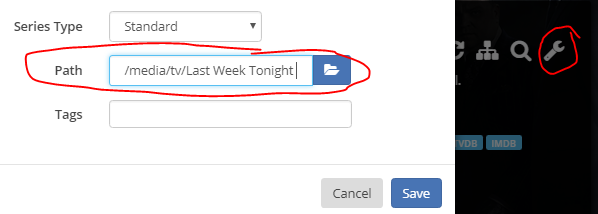
Whoa there buddy, my setup works just fine, don't you jinx me! You have a similar issue as clearzero, sonarr is trying to write in the wrong place. lionelhutz gave the right explanation. Take a look at the sonarr log: Access to the path "/tv/.... And in your sonarr, you defines /dev/rtc, /media, /download and /config. Sonarr has no idea what /tv is. Either define /tv to /mnt/user/whatever in the sonarr container options or in your series, go in options and save them to the path /media/tv/Last Week Toni... Creating the mapping in the sonarr container parameters is probably a *lot* less clicks
-
How is /media defined On sonarr? That's what the error message is complaining about... Sent from my SGH-I337M using Tapatalk
-
It looks like your download path is mapped to /download and your sonarr path is mapped to /media. For the copy/move to work, both containers need to have the exact same path to the video file. Edit: I'm rereading myself and I'm not so sure anymore. It looks like your download path is OK in the first error but not in the second. In the first one it's the media drive that complains. I'm still betting on container mapping though.
-
looks good. This gives everyone access to everything though, you might want to check if your read-only users are really read-only...
-
There is a space in your path, the cd command doesn't like it. You need to "escape" the weird character with a "\" but autocomplete can fix that for you. if you type "cd /mnt/user/TV" and hit the tab key, it should fill in "/mnt/user/TV\ Shows".
-
Can you paste the whole command here?
-
I thought that was the set-OID, set-GID and the sticky bit. Never used them though...
-
That 0 is for the "special" flag. You can safely let it to 0. Sorry, I'm not very fluent on sharing permissions. Now that I think about it with the kids growing up I may need to address this... Anyway, pick a file that works as you want, "ls -al" on it and that will give you the pattern you need to configure in the permission window of Sonarr. Don't forget to set "chown user" and "chown group". 644 and 755 are probably the right bet.
-
Of course. Half the issues at work start with "I didn't change anything but..."
-
Permissions too restrictive in the plex config files? plex may not be able to save it's settings

