






SSD
Moderators
-
Joined
-
Last visited
Everything posted by SSD
-
The SuperMicro 5in3s have 92mm fans.
-
Seems that the trial and error nature of figuring out what version of what would drive one insane!
-
Here were the versions of the packages that I had, compared to the versions included in the devpack, compared to the versions I found at http://slackware.oregonstate.edu/slackware64-current/slackware64/. package / myversion / devpack / oregon-state gcc / 4.8.2 / 5.4.0 / 7.1 glibc / 2.24 / 2.17 / 2.25 binutils / 2.23 / 2.27 / 2.28 make / 3.82 / 4.2.1 / 4.2.1 (same) kernel-headers / 3.10.17 / 4.4.38 / 4.9.35 cxxlibs / 6.0.18 / 6.0.18 / (not found) libmpc / 0.8.2 / 1.0.3 / 1.0.3 (same) attr / 2.4.47 / 2.4.47 / 2.4.47 (same) glib2 / na / 2.46.2 / 2.52.3 sqllite / na / 3.12.2 / 3.19.3 I am not sure what happened to cxxlibs, or if it is even needed. It was part of the older package install. The ones I bolded are the ones that are newer in the Oregon State "-current" version. It looks like a fairly major version upgrade to gcc. I only checked the packages above, looks like you have a bunch more in devpack. With that link above you might find newer versions. If you look in the PACAKGES.TXT file, it will provide the info and tell you what subdirectory the package file is located in. Thanks again!!
-
Awesome! Thank you. Will give it a try.
-
I'd get the latest (6.4). I will be moving to that soon anyway. And will report back if it is producing an executable that gives errors on 6.3.5, which is what I am running now.
-
@dmacias @eschultz Would it be possible to add the C compiler and associated libraries to the NerdPack. They the last vestiges of the unmenu package manager I am still using. And they are as nerdy as you can get! These may not all be the latest x64 versions, but this is the set I have ... gcc-4.8.2-x86_64-1.txz glibc-2.17-x86_64-7.txz binutils-2.23.52.0.1-x86_64-2.txz make-3.82-x86_64-4.txz kernel-headers-3.10.17-x86-3.txz cxxlibs-6.0.18-x86_64-1.txz libmpc-0.8.2-x86_64-2.txz attr-2.4.47-x86_64-1.txz Thanks a lot!!
-
Yes, that is the version that I am running. I see now that the individual package shows updated. I updated from there and it is now working! Thanks!!
-
Thanks @dmacias! I am looking at the plugin, though, and it does not indicate needing an update. What is required to install the new version?
-
@eric, @jonp I was trying out the tmux tool, but when I run it with unRAID 6.3.5, I get the error ... "tmux: error while loading shared libraries: libevent-2.0.so.5: cannot open shared object file: No such file or directory" Any suggestions?
-
Most of the config files deal with setting like spindown, auto start array, array name, IP address, local master, etc. etc. These are pretty easy to redo if you start with the default set of config files, but better to use the real ones. The super.dat file maintains the array configuration (which disks are tied to which slots, whether parity is valid, last parity check and # parity errors, whether array was properly shutdown. The last one can cause an inconvenience - because if your super.dat was from a time that the array was started, and you reuse it, it will report a dirty shutdown and want to do a parity check on boot. Suggestion - when you take a backup of the stick, do so with array stopped!) The other configs you might not want to loose are your docker templates and share configurations. Nothing you can't redo with some time, though, but I'd just as soon keep them. You should also pull the plugins or you'd have to reinstall them. Glad worked for you! Everyone should do these little things once - so you have the knowledge to recover.
-
Get a new flashdrive and prepare it as per instructions, using the unRaid zip file for your version of unRaid. If you can copy the config directory from the old flash to the new one, that would be best. At a minimum you'd need the .key file that, depending on when you made your purchase, you might have in an old e-mail or in a backup. Be careful using an an old flash backup of your entire config directory. Only use it if you are sure that your array configuration has not changed (I.e., you have not added or removed disks) since the backup was taken. With the old key file in place, when you boot you should be able to request to transfer your license to the new flash drive. If you don't have your key file, you would need to reach out Limetech for assistance.
-
OP usually means original poster (person who started a thread). But I think this is referring to the original post, the first post in this thread.
-
Thank you! If I follow those instructions, and I later force update the Docker, will it go back to the current master version? When the master version changes (assuming Docker would be updated), will I be able to update my Docker and get the latest master version installed? Or once I do this, I am on my own to continue to update manually in a similar fashion. Thanks!
-
How can I install the latest development version. I think I selected "master" when I did the install.
-
Resolved this with the help of the folks over at Medusa. If you sometimes include a quality that is not your norm (for example, a 1080p or SD episode when you typically prefer 720p), you need to take that into account when moving shows into Medusa. When adding an existing show, enable all qualities including unknown and set nothing preferred. That prevents Medusa from ignoring or immediately attempting to update existing episode files, which is what happened above. After the import, any episode that is not showing in the 720p resolution, update to be archived, e.g. 'Archived 1080p HDTV'. Archiving prevents Medusa from attempting to replace that episode file in the future. After these adjustments, change the allowed qualities for the show as desired, e.g., to include just the 720p resolutions wanted for new downloads. (Above paragraph assumes that 720p is your norm). I think unRaid users will like the failed download handling, subtitle searching, and in-app manual search features. And looks like an active dev community with new features and improvements on the way. Try it with NZBget, and don't forget to dl and use the NZBtoSickbeard scripts, and not the older SABtoSickbeard ones, even if you use SAB! Cheers!
-
I was playing around with Medusa and copied a show over from SickBeard. Figured I would add it and see how Medusa works. The show had 3 seasons. But strangely when it added, the first two seasons added fine and the shows were recognized. But the third season Medusa decided it wanted to re-download all of the episodes rather than calalog the files that were there. i canceled the downloads and moved it back for now. Any idea what happened or how to avoid this behavior. The episodes, as far as I can tell, were in the quality settings I had selected. But regardless, I'd expect Medusa to merely re-catalog when adding an existing show, not go searching for new versions to download. Not sure how to get support for Medusa directly, and thought I would check here to see if any unRAIDers could help.
-
For the money, I'd tend to go with the 9201-8i card on eBay (~$45 shipped). It will do the same thing for nearly every use case. But I will say that controllers tend to be the longest living assets in my unRAID server. I still have a couple Adaptec 1430SAs that still work quite well. So if you are betting on drives continuing to get faster, maybe the 9207 is worth a small premium. Its up to you. Here are some facts to guide the decision depending on your use case. The 9201 and 9207 are basically the same thing, except PCIe 3.0 vs 2.0. I think the card might have been better packaged as an x4 card. Or better yet, been sold as a 16 drive card in an x8 slot. But maybe if using this with a SAS expander, the x8 bandwidth makes sense. If you put it in a PCIe 3.0 x8 slot, you'd basically have 1000 MB/sec to each drive. That is faster than the 6Gb/sec sata spec for the drives, so you'd really only be getting 600 MB/sec to each drive. With the 2.0 card, you'd get 500 MB/sec, enough to run 8 SSDs at near full speed (full speed is 550 MB/sec) in parallel. (Who runs 8 SSDs at full speed?) With the PCIe 3.0 bandwidth, I'd like the 12 Gb/sec SATA capability for the future proofing. If you put it in a PCIe 3.0 x4 slot, you'd have half that bandwidth (500 MB/sec per drive), enough to run 8 SSD drives nearly full speed in parallel). Not bad. And for spinners, this is way overkill. At PCIe 2.0, you'd be half that (250 MB.sec), constrained for a full complement of SSDs running in parallel, but plenty fast for 8 spinners or 7 spinners with 1 SSD. This is the same as the speed of the PCIe 2.0 in an x8 slot, which is how many people run the 9201-8i. Interestingly, if you put it into a PCIe 3.0 x1 slot, you'd be able to run 6 drives at a very respectable 165 MB/sec, or 8 at 125 MB/sec. That is actually very good for an x1 slot, where with a typical PCIe 1.x card, you'd be limited to 1 drive at 250MB.sec or 2 drives at 125 MB/sec. Although I don't know too many x1 slots that are PCIe 3.0 or would hold an x8 card without melting the back of the slot!. The PCIe 2.0 card would get your 3-4 drives, considerably fewer than 6 to 8. This card really shines in a fast x1 slot! I'd have few reservations about ordering the $99 card if that's what I wanted. I have to believe Newegg would hold them to a high standard for customer satisfaction. And if you put on an credit card, you'd have all the power needed to get your money back if they didn't work properly. I bought a new 9201-16i from Hong Kong for a decent price on eBay, and it works great!
-
This is not the FSBO board. This is good deals on new products. If you are interested in buying one, click on the link and buy from Newegg.
-
If you look back in the thread several posts, you'll see @Frank1940 ran some comparison benchmarks on this system. His speeds were somewhat faster than these. But there are a lot of variables that contribute to turbo write speed. You are seeing nearly 30% improvement, which is quite significant.
-
Actually I have had problems with frequent smart reports and heavy I/O. Worse on add-on controllers vs MB ports. I can't prove it, but a new Seagate 2T drive I had years ago, that I was preclearing on an add on controller while pulling frequent smart reports, got all screwed up and had the freakiest problems I've ever seen. Very long delays responding. I ultimately returned it as defective - but have always thought it was due in some way to preclearing with smart reports. I experimented with something called the "permissive" flag in smartctl on that Seagate and that did not help - maybe made things worse. But do know its not a solution to allowing one to pull constant smart reports. Since then never preclear on anything but motherboard port, and very gentle on pulling smart reports. Kinda forgot all that as I avoided the problems for years. I had disabled updates of the stock GUI (it was causing hangs with my version of unRAID (6.0.1)), so background smart checks were not happening. And with myMain, I never let it do the auto-updates, and I implemented a refresh button that remembered the temperatures from refresh to refresh and avoided pulling new smart report. This causes nearly no smart reports unless I explicitly ask for one. Asking for one every few hours is very low risk. But the machine I used to preclear yesterday was a new build running 6.3.5. Stock GUI using default settings, so doing its background updates. Putting all the fact together with your conclusion, makes a lot of sense that the constant smart reports would screw things up. Would be interesting test to do with GUI turned off or settings adjusted. Probably would not hang.
-
@gfjardim Suggestions ... 1 - Add logging to your script so you can figure out where the hang is occurring when it happens again. (Joe's script has some subshells to work around an unexplained bug - might want to look at that - you may be able to wrap some of your code in sub shells and avoid your bug??) 2 - Add a "resume" feature, so if people use your script and it does hang, they could simply resume their preclear from the plugin page without having to start from scratch. There may already be enough info in the /tmp files to do so, but if not, a "resume" file could be created. People would be more likely to use it if they know that they aren't going to waste alll that time preclearing. This would actually be a very nice feature in preclear. To be able to stop it and resume later - even after a reboot. I was able to resume my failed preclear with a quick patch to my version of the preclear script, but few would know enough to do that, and instead forced to restart at least the current stage. 3 - Add a resumer process that detects the hang, kills the old one, and resumes. Users would never know except for a very brief slowdown. You could use your "phone home" system to share the logs when the resumer has to do its thing. BTW - I pretty much hate shell scripting. Awk is so much easier to use. Had thought about rewriting preclear but in awk, but for a variety of reasons decided to let the preclear scripting stay as it was. But in awk you can use the "system()" command to do the dirty little I/O commands, and still use Awk's simple syntax and structuring features to organize the code. Awk might have a small performance impact in the control logic, but IMO would be well worth it given the added maintainability. Sorry don't have the patience to get into the weeds with you on this. I muddle through shell scripting but have no interest in wasting the brain cells I have left on becoming an expert. Good luck. If I have other preclears to do I will help test if you've got something in place to find bugs.
-
Use Turbo Write mode on the copies. Should make them considerably faster with parity enabled. Moving that much data is not going to be quick - but can be done over a period of a week or so. I would not recommend to break parity. The whole idea of the process is to preserve it!
-
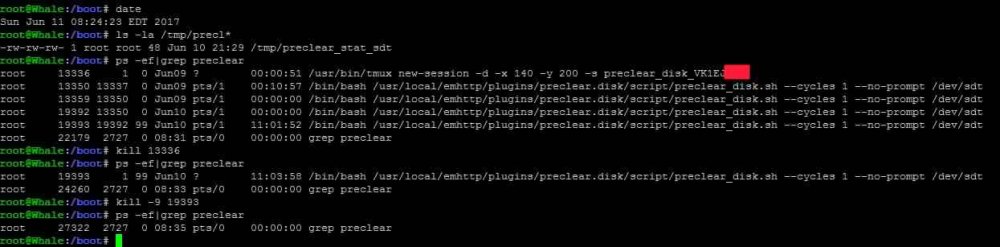
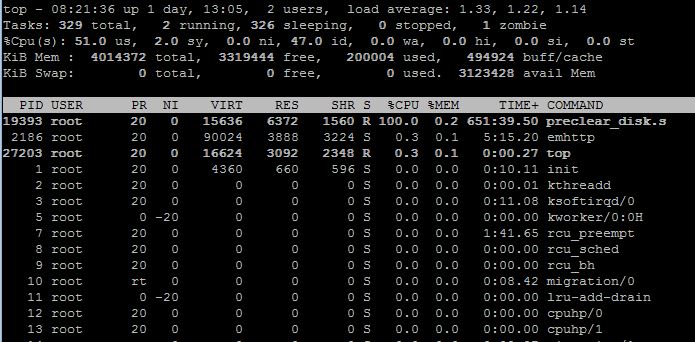
@gfjardim: Similar issue to aptalca, except mine hung during zeroing. I was actually running a preclear using my script and a preclear using your plugin/script on two different computers. Your script was about 2% ahead (despite running on the slower computer) when I went to bed last night. Seemed to pick up speed during the pre-read and hold steady during zeroing. Today that preclear is stalled at 73% zeroing, while the other computer is at 36% through the post-read/verify. Looks like it stopped a mere 3% after I last checked last night. A few screenshots are attached to try to help you diagnose. I was a little skeptical of the preclear plugin and especially the new script, but after reviewing it I was impressed with the restructuring / updates you made. It is now easier to maintain IMO. I especially liked his post-read method. JoeL and I had a dialog (back in the day) of how to do the post-verify more efficiently without resorting to a custom program (which I ultimately implemented as readvz) and did not find a way, but you did and like it better. JoeL basically summed the byte values using an awk program. It was pretty slow. I never got to the point that yours was used - so not 100% sure it is faster - but assume your comparison to /dev/zero is faster or at least comparable to readvz. Plan to use your method going forward, but this bug needs to be fixed first! BTW, thanks for your credits for my work. I basically made three enhancements to preclear, which is otherwise JoeL's creative work and he deserves huge credit for creating it I can't even say how many years ago. He is missed. But my three contributions were: - Fast preclear (-f) - "Real time" status updates to the /tmp folder (one that even the stock GUI uses, and neither Joe or I are credited. This urks me) - "Hidden" option (not so hidden anymore) to bypass all of the prompts and just get to the preclearing directly. Something I added so that preclear could be started from a GUI. FYI - I have been stuck in the relative dark ages of the very stable 6.0.1 and only now looking at this for the first time. Good work. Fix the bug.

-
Great job both in terms of videography, pacing, and content! Truly outstanding!! Few questions tangential to the technical content: 1 - many users are using Dockers for downloading as well as Plex, with Plex being pretty resource intensive at certain times. And most people would have 4 cores not 8. And 16G our RAM is probably most common. For a user that wants a basic Windows VM (non-gaming) how would you recommend provisioning CPU and RAM? Is there a minimum recommended Windows config that won't slow down Plex? 2 - I've always thought that splitting a core between host and VM could be a good thing. For example, if you have a VM with 1 thread from each of two cores, and unRaid owned the others, unRaid would still have access to all of the cores for transcoding, a good thing if the Windows VM is often idle. Why the recommendation to pin complete cores to VMs and not share them, in essence taking them out of the game even if lightly used much of the time. Thanks again for this and your other videos! Great resources for unRaid users!! I plan to use this one and the one on online backups in the next few weeks, after completing my current drive upgrade cycle. (#ssdindex - see first post in thread) Thanks again!
-
Forgot to mention - no firmware updates required.




