





elco1965
Members
-
Joined
-
Last visited
Everything posted by elco1965
-
Thanks. I ran the latest version of Memtest a couple days ago. It ran 3 passes detecting no errors.
-
Thanks for the response. I'll take a look at the docker soon as I get the server running. Is there a good reason to continue with the Memtest on ECC RAM?
-
Fix common problems was reporting "Rootfs getting full" I mostly followed the directions that lead me to the creation of this post. I have been having a couple of issues lately. One of them being with the web GUI. It would become unresponsive. I could log on but when I clicked on the Main tab the drive assignments including the cache pool were missing. VMs would also disappear. The only way to get these back was to stop and restart the array via the terminal. I first noticed the issues when attempting to preclear a couple of drives. The preclear would be aborted almost immediately fail at the beginning of the process with the error "detected memory low". I read through e few post, some suggested bad memory. I also found the "Where can I see what folders are taking up my RAM?" I ran the script "https://raw.githubusercontent.com/Squidly271/misc-stuff/master/memorystorage.plg" and it returned /mnt/plex....something. I unfortunately didn't save the output before the server became mostly unresponsive. The strange thing about the "what folders are taking up my RAM" script, Plex and all other docker containers were stopped and the dashboard was reporting about 70% of the RAM was in use. I had some extra memory and swapped out some of the modules. I am 19 hours into a Memtest with no errors reported. The server has ECC server RAM. I read through the forums and some have suggested the version of Memtest that comes with unRAID is obsolete or doesn't work with ECC memory. I don't know if I should continue with the test or not. Any help with this would be greatly appreciated. Thank you blackhole-diagnostics-20221120-2247.zip
-
After moving some files the cache started to fill up again. Turns out the Unifi-Control Docker was filling the cache with a logs in the cache/appdata//unifi-controller/data/db/journal. The last time I look at the calculation of this folder it was 1.28TB. I have no idea why. I deleted and recreated the Docker img, reinstalled all docker containers, and so far things seem to be back in order. JorgeB, Thanks again for pointing me in the right direction.
-
After cleaning up the cache pool and a reboot, the VMs and Docker Containers have returned. Thank you for the help.
-
I somehow had set the TV share to use cache. I have changed this to no and I'm currently moving some files using the file browser. I'm still confused as to why the VMs have disappeared, or why the web GUI stopped responding. Does a full cache cause this? Thanks for your reply.
-
Can you tell why the mover isn't working? Or why the web GUI became unresponsive?
-
My problems began, or were first noticed, when the Preclearing of a new drive failed during the post read of the first run. I had successfully run 2 other preclear operations the week before. All 3 Preclear operations were run on Seagate 10TB drives. When I got the Post read failed error, I started to have issues accessing the unRAID web GUI. I searched the Forums and came across posts suggesting a memory test be run. I downloaded the current free version of memtesst86 and ran 4 passes of all test with 0 errors detected. I do have ECC memory so ran the tests with ECC enabled. Mover would not move anything prior to the memtest and upon reboot following the memtest the Docker service fails to start and the VMs that were installed are no longer there. Currently running version 6.10.3. Issues in the order as I remember them 1. Preclear failed during post read 2. Unable to access unRAID web GUI 3. Reboot and Mover will not move anything 4. Boot into Memtest, tests run without errors 5. Reboot and Docker service fails to start and VM's are gone. Attached are the Diagnostics and a syslog from before and after the memtest/reboot. I am kind of stuck at this point. Thanks to all who take the time to help. syslog after reboot.txt syslog before reboot.txt blackhole-diagnostics-20221114-0714.zip blackhole-diagnostics-20221114-1503.zip
-
I am new to Deluge. I am using Sonarr as the indexer. I had added a few torrents via Sonarr. These were imported from my library and missing episodes were successfully downloaded by Deluge. These were then moved by Sonarr to the TV share on the array and Deluge was still seeding the torrents. I was remote and locked myself out of Deluge. Before finding the proper way of removing a password I deleted and re-added the Deluge docker thinking re-adding the Torrent files in order to have them seed again would be easy. I have been unsuccessful thus far. What I need to do is to download the torrent file in order to seed. I have read through the FAQ and searched this forum but did not see any instruction for this. Can someone point me to a guide that may help? Thanks in advance
-
I am new to Sonarr. I am using DelugeVPN as the download client. I had added a few torrents via Sonarr. These were imported from my library and missing episodes were successfully downloaded by Deluge. These were then moved by Sonarr to the TV share on the array and Deluge was still seeding the torrents. I was remote and locked myself out of Deluge. Before finding the proper way of removing a password I deleted and re-added the Deluge docker thinking re-adding the Torrent files in order to have them seed again would be easy. I have been unsuccessful thus far. What I need to do is to download the torrent file in order to seed. I have read through the FAQ and searched this forum but did not see any instruction for this. Can someone point me to a guide that may help? Thanks in advance
-
It doesn't make any sense to me either. I mean I am not well versed with command prompt. But I tried to delete the problem table using the terminal from my Ubuntu desktop, the terminal button in the unRAID web gui, and from the MariaDB container itself. Every time I attempted to reinstall I was given the same "the table already exists" error. Maybe it was the commands I was using? The first time I used the Krusader container to delete the table, I was immediately able to reinstall and configure the Two Factor app from within Nextcloud.
-
I was able to get this sorted. For whatever reason I could not delete the table space "TOTP Secrets" via terminal. I was however able to delete it using the Krusader web ui. Seems to be working now. Thanks again for the help.
-
Hey thanks. I appreciate the note.
-
I have considered nuking the instance and starting from scratch. But it is my suspicion that the problem I am having lies in the table in the database that is stored in the mariabd docker. I don't think a reinstall of Nextcloud will do the trick.
-
Thanks again for your time It is indeed the same version. Here is a list of the commands I ran and what was returned. Ran this fisrt occ app:list Found the twofactor_totp app in the list and ran occ app:disable twofactor_totp And then occ app:enable twofactor_totp That returned An exception occurred while executing a query: SQLSTATE[HY000]: General error: 1813 Tablespace for table '`nextcloud`.`oc_twofactor_totp_secrets`' exists. Please DISCARD the tablespace before IMPORT Then occ db:add-missing-indices which returns in green Check indices of the share table. Check indices of the filecache table. Check indices of the twofactor_providers table. Check indices of the login_flow_v2 table. Check indices of the whats_new table. Check indices of the cards table. Check indices of the cards_properties table. Check indices of the calendarobjects_props table. Check indices of the schedulingobjects table. Check indices of the oc_properties table. Check indices of the oc_jobs table. Check indices of the oc_direct_edit table. Done. then this occ migrations:migrate twofactor_totp Which returned this highlighted in red There are no commands defined in the "migrations" namespace. Reading through this document https://docs.nextcloud.com/server/latest/admin_manual/configuration_server/occ_command.html?highlight=db+add+missing# I did not find anything about migrations. I did some web searching but couldn't put a migration command together that worked. I am not well versed with command line interface and don't really now what to do with the migration command. This is when I attempted to drop the table in mariadb docker via cli which returned the frustrating circle of dismay I showed in my earlier post. I also ran the following and it reports back 0 removed. root@9216b20ffa16:/# occ app:disable twofactor_totp No such app enabled: twofactor_totp root@9216b20ffa16:/# occ app:REMOVE twofactor_totp twofactor_totp disabled twofactor_totp 0 removed
-
Thanks for the advise. I am not very good with cli but I managed to drop the table Then I got this error So i researched this and tried to discard the tablespace. This returned an error telling me the tablespace it wants me to discard doesn't exist. I've been going around like this for hours now.
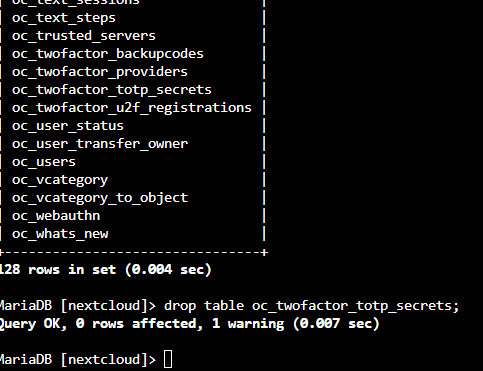
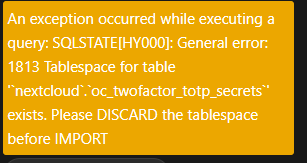
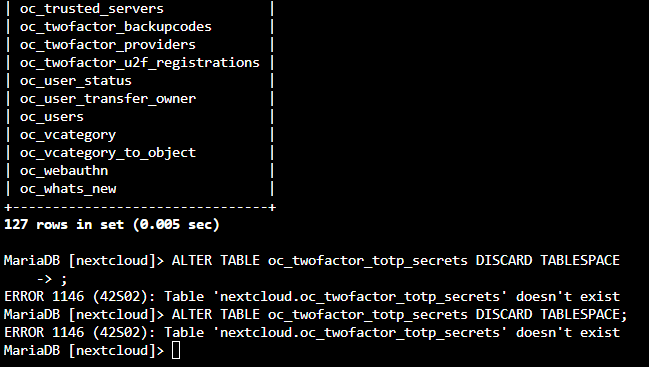
-
Hi guys, I had a some issues with the docker image. I spent some time trying to fix it and then decide to delete and rebuild. I reinstalled the containers I wanted and everything is working well aside from one problem. I had installed Two-Factor TOTP Provider from the Nextcloud App store prior to the docker image rebuild. Now when I log into Nextcloud I am not prompted for the TOTP code but I have access with only user and password. I have tried to reinstall the TOTP App but get this error. The column 'last_counter' on table 'oc_twofactor_totp_secrets' already exists. I have tried to disable and remove the app restarting the container each time. I feel as if this is somewhere not in the app data folder but rather in the Nextcloud share where the user data is stored. In the user data share I did find and deleted a folder named "2factor" after disabling and removing the app from within the Nextcloud UI. I have attached the config file. Thanks in advance for the help. config.php
-
I don't know if the docker imagine is different in synology but the template page for ApacheGuacamole in unRAID says this, Initial username and password are guacadmin
-
That was it. Thank you fro the help.
-
Good Day All I am new to DelugeVPN. I have it installed and running with the NordVPN OpenVPN config file. It seemingly works. But I have an issue I cannot find the answer to. I have searched this forum and only 3 posts come up with the error I am experiencing. My desktop runs Ubuntu. When I try to proxy the desktop through the DelugeVPN Docker the VPN works but I cannot access any GUI via LAN address like unRAID or my pfSense router. unRAID returns a 503 error and the router page times out. As soon as I disable the manual proxy settings the wed Guis return. Thanks in advance
-
I too would like to know if this was figured out. I've had this problem for a while. Win1o VM preventing disk 13 from unmounting. root@BlackHole:~# lsof /mnt/disk13 COMMAND PID USER FD TYPE DEVICE SIZE/OFF NODE NAME qemu-syst 13078 root 13r REG 0,73 4250861568 30466 /mnt/disk13/isos/Windows/Windows 10/Windows 10.iso qemu-syst 13078 root 14r REG 0,73 316628992 30467 /mnt/disk13/isos/Windows/virtio-win-0.1.141-1.iso I was told to install the guest agent and set VM to hibernate in the VM manager. That was done when the VM was first set up. I made sure the VM was on the latest version of the VIRTIO driver.
-
I too have this working now. Thank you
-
I did and it broke. In Nextcloud, setting, CODE, the server would show reachable. But when trying to open a document from within Nextcloud I would get a "Document Failed To Download Error". I am now on 6.4.9.3 it seems to work but the Collabora log reports messages like this, wsd-00007-00043 2021-07-05 17:5xxx67 [ websrv_poll ] WRN FileServerRequestHandler: File not found: Invalid URI request: [/loleaflet/0b3211b/undefined].| wsd/FileServer.cpp:487 sh: 1: /usr/bin/loolmount: Operation not permitted frk-00039-00039 2021-07-05 17:xxxxxx27 [ forkit ] ERR Failed to unmount [/opt/lool/child-roots/MYVtxquZPEzEwk4h/tmp].| common/JailUtil.cpp:68 sh: 1: /usr/bin/loolmount: Operation not permitted frk-00039-00039 2021-07-05 17:xxxxx9 [ forkit ] ERR Failed to unmount [/opt/lool/child-roots/MYVtxquZPEzEwk4h/lo].| common/JailUtil.cpp:68 sh: 1: /usr/bin/loolmount: Operation not permitted frk-00039-00039 2021-07-05 17:5xxxxx945 [ forkit ] ERR Failed to unmount [/opt/lool/child-roots/MYVtxquZPEzEwk4h].| common/JailUtil.cpp:68even though I am able to open and edit a document in Nextcloud even though I am able to open, edit, and save a document. P.S. I never really looked at the Collabora logs much before as it worked without issue before the last update that broke it. So I have no idea what the logs should look like.
-
Collabora stopped working for me after updating the container. I spent most of the day trying to fix, uninstall, re-install the container. looking at config files. This fixed it for me. Why does this happen? Where did you find the answer? And thank you!
-
Squid thanks for the reply. I have just reinstalled virtio guest tool on the VM. I am certain this was done in the past. I have also reconfirmed all the settings in the wiki here. I rebooted the VM and then tried to stop the array with the same result as before.

