






cybrnook
Members
-
Joined
Everything posted by cybrnook
-
Sorry for the delay, life..... PR has been opened: https://codeberg.org/nwithan8/unraid_templates/pulls/454/commits
-
@Rysz thank you for taking over and maintaining NUT on unraid for us. It's been a critical part of my installation for years, and I know it's a thankless job on your side that I just depend on...... I saw your notice yesterday, and wanted to ask with that transition to Fedora coming up, are you aware of a new NUT package that will be available after the transition? Or will it be a loss for the time being, until someone else wants to pick it up and run with maintaining a plugin for unraid on Fedora?
-
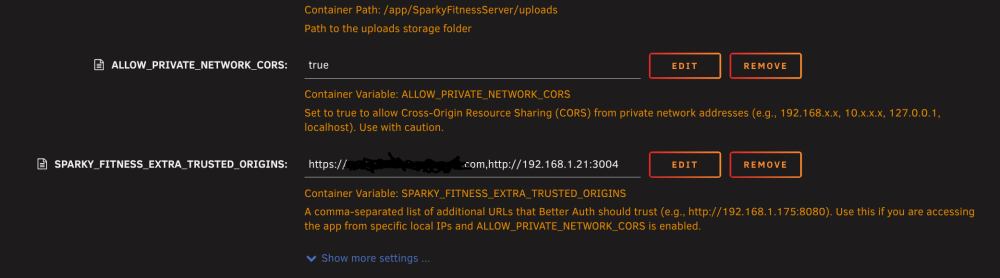
@[email protected] I wanted to add that with the initial setup, I am hosting my sparky instance behind a cloudflare tunnel, so I can get to it both locally at home using IP's or externally using my CF domain. In order for this to work, there is another variable for the BE Server that very much compliments the NETWORK_CORS value we added, and it's SPARKY_FITNESS_EXTRA_TRUSTED_ORIGINS, which allows us to add comma sperated domains where the backend auth system will allow authentication. If you'd like, I can create a PR for this to be added to the default template, just let me know.
-
I've had one in my unraid system for about a year and it's been fine. Very easy to take it for granted :-) And I bought about ~40 more when they were at $3 a pop and haven't had an issue with any of them. Got one for Ventoy, one for general stuff, give them away as stocking stuffers :-)
-
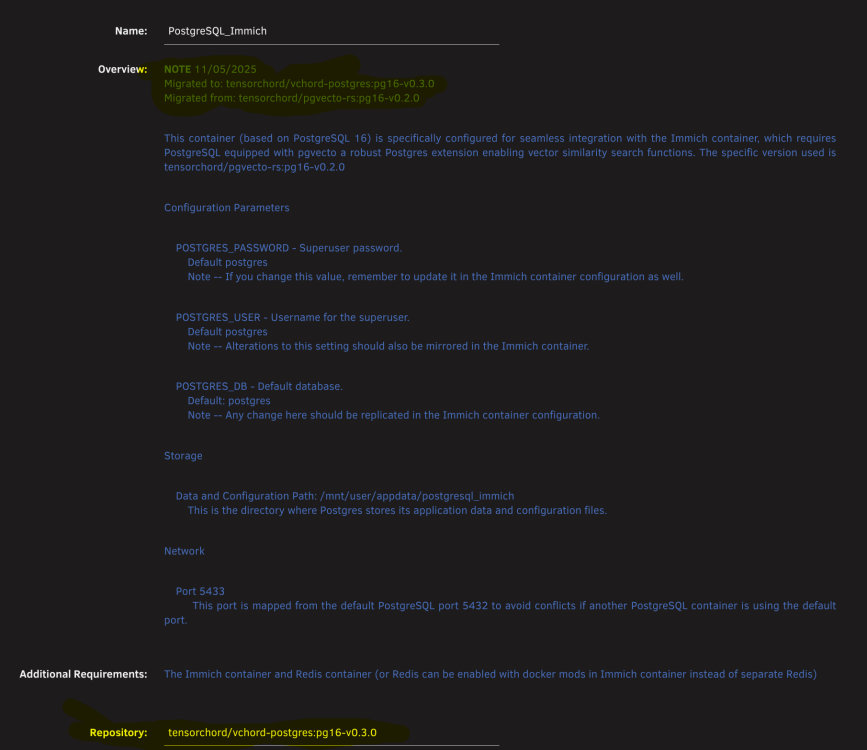
Was in the same boat end of last year. I made a note for myself in the docker template: NOTE 11/05/2025 Migrated to: tensorchord/vchord-postgres:pg16-v0.3.0 Migrated from: tensorchord/pgvecto-rs:pg16-v0.2.0 And it looks like I just changed the repo to: tensorchord/vchord-postgres:pg16-v0.3.0
-
@[email protected] , wanted to thank you for publishing the templates for the Sparky Fitness frontend and backend. I just went through an installation and came out the other end successful after working with CodeWithCJ. I think we identified an issue in the template for the front end. Your template has the backend port defaulted to 3004 in the Frontend template (at least your sample default value is 3004), when in fact it seems it should be 3010: Between that and then setting force email to "true" in the backend, everything else seemed to be good to go. Here is the convo between the dev and I: https://github.com/CodeWithCJ/SparkyFitness/issues/2082 Also, I had to add "ALLOW_PRIVATE_NETWORK_CORS" to "true" as a value in the Backend template in order to allow connections from my local network (192.68.1.0/24 for example).


-
Yeah, seems on this new listing the floor is $3.50.
-
I've bought way more of these than I need at the moment, but at the price it's a no brainer. I will say, seller typically auto accepts offers of $3.
-
Also confirming I am using a B50, and it's working fine as of RC1 (and now also on RC2). At least for VM rendering using VirtIO(3D) as well as transcoding against docker containers. I am guessing user is assuming it will just work. You still need to do the basics of passing /dev/dri through as a device to your containers.
-
I think the below is what you were asking. fTPM is TPM built into the CPU (AMD)
-
I believe it represents the versions of "Connect" that is installed on the Unraid box, at least last reported. Checking mine, I am on the latest version "2025.12.19.2020" and in Connect mine is also showing as blank. Perhaps a bug in the current version.
-
Apologies, marking this as solved for anyone else maybe having this issue. Seems it's an issue with the "ZFS Master" plugin and the latest releases of unraid. @Iker Removing ZFS master allows the "main" tab to function properly again. Noticed someone else now also mentioned this in the ZFS Master thread: https://forums.unraid.net/topic/122261-plugin-zfs-master/page/28/#findComment-1584670 Again, sorry for the noise but will leave this for anyone else maybe seeing the same thing. @Squid Plugin might need to be marked as broken for the time if it's no longer being supported, which seems it may be the case.
-
@elibosley noticed an issue with connect (tested on Chrome and Brave) that when the connect icon is pressed while on the "Main" tab it disappears and the formatting in the header seems to shift a bit. If I switch to any other tab (Dashboard or Shares) clicking the Connect icon work as expected. Uploading a video to show what I am seeing. I first noticed this on 7.2.0, but could have been there longer, and have since upgraded to 7.2.2 and seems to have been there over the past few Unraid connect releases as well, before and after USB backups not working as expected. Unraid_Connect_Button_Main.mp4
-
Backup issue has been solved in the latest version of unraid connect.
-
Not trying to be difficult on my part by any means, but can you confirm this is actually an acknowledged issue? I saw you mentioned in the other thread that you "think" it was, but that was a few a weeks ago. Just doing my part reporting issues.....
-
Like I mentioned in my first post, "similar to this, but not quite exactly matching". I am not stating that backups are not happening, which is what is being said there. Two different issues.....
-
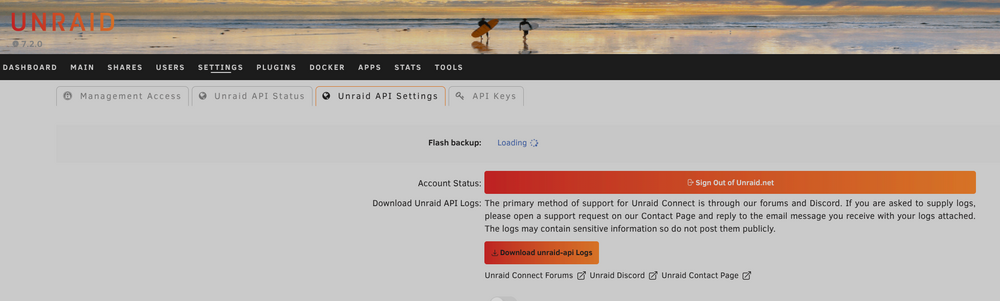
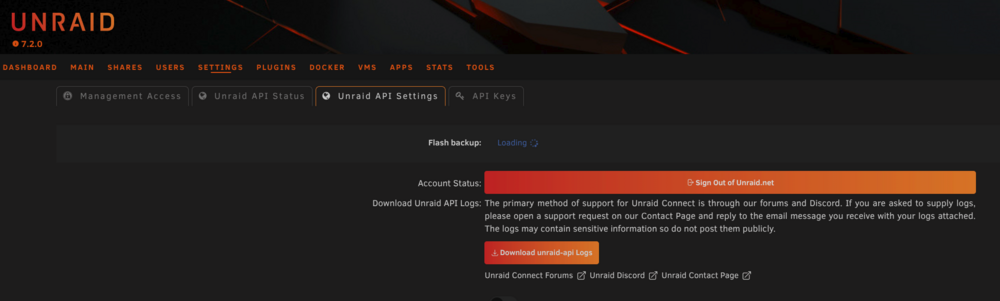
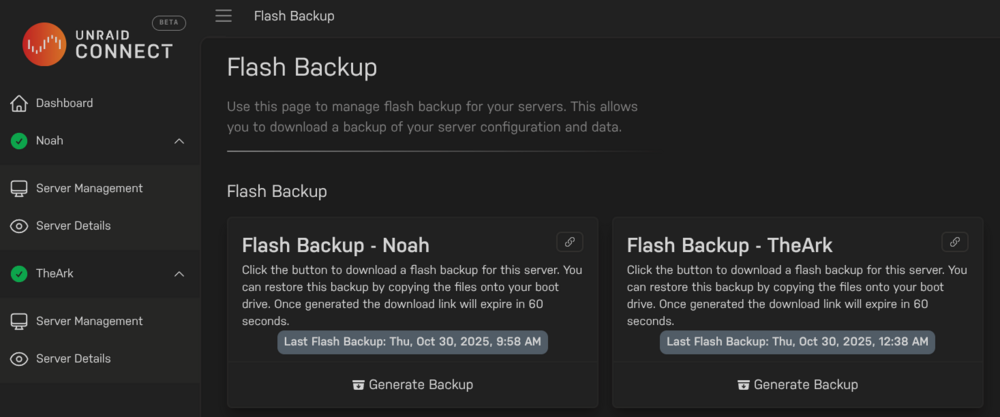
I have a seen a few topics in here similar to this, but not quite exactly matching. Since the 7.2.0 Beta and RC, and now the subsequent release if 7.2.0 I have noticed that when looking at the flash backup status page, the status wheel just continually spins. It appears that the backups are/have happened, but the status wheel just keeps spinning..... I have noticed this behavior on both of my unraid systems. @elibosley maybe you have an idea? theark-diagnostics-20251031-1005.zip
-
Apologies, you're absolutely correct. It all looks the same after a while as I just see it as all being part of the unraid core team.
-
One small issue I've noticed, even during the RC's is that the flash backup icon never stops spinning though connect shows current flash backups. I see this on both of my systems. Backups seem current though
-
looks like Memcached has moved to a hardened image. https://hub.docker.com/r/bitnami/memcached setting the repo to: bitnamisecure/memcached:latest and the registry URL to: https://hub.docker.com/r/bitnamisecure/memcached gets it going again on the new image it seems, FYI.
-
Thanks for this. At first I was sad as you are already stating, I saw the error message again during upgrade. But then it clicked that it was still using the older logic one more time..... and I assumed that NEXT update should be clean. Thanks for driving that point home.
-
@Rysz Thanks for carrying Nut forward, it is an excellent UPS tool and it's hard to think of Unraid without it, so thank you. I had a question I wanted to run by you, and it may just be noise in the logs... but something that has always irk'd me is whenever I update the plugin I see the verbose log as the update happens in Unraid, and I always see this: Executing hook script: pre_plugin_checks Checking for other installed NUT versions... Making sure all existing NUT services are stopped (before install/upgrade)... WARNING: WARNING: The NUT installation script was not able to stop all NUT services gracefully. WARNING: IN CASE OF PROBLEMS, please REBOOT YOUR SYSTEM to complete any upgrades. WARNING:I took a look at the code you're running on shutdown prior to update: echo "Making sure all existing NUT services are stopped (before install/upgrade)..." if [ -x /etc/rc.d/rc.nut ]; then if ! /etc/rc.d/rc.nut stop >/dev/null 2>&1; then echo "WARNING:" echo "WARNING: The NUT installation script was not able to stop all NUT services gracefully." echo "WARNING: IN CASE OF PROBLEMS, please REBOOT YOUR SYSTEM to complete any upgrades." echo "WARNING:" fi killall nut-poller >/dev/null 2>&1So you're checking if /etc/rc.d/rc.nut exists and if it does then you run /etc/rc.d/rc/nut stop and check to see if it's return code $1, got it. So on my system when I manually stop Nut, I get this: root@TheArk:~# /etc/rc.d/rc.nut stop Writing NUT configuration... Updating permissions for NUT... Checking if the NUT Runtime Statistics Module should be enabled... Enabling the NUT Runtime Statistics Module... Stopping the NUT services... Network UPS Tools upsmon 2.8.4 release Network UPS Tools upsdrvctl - UPS driver controller 2.8.4 release Can't open /var/run/nut/snmp-ups-CyberPower.pid: No such file or directory Can't open /var/run/nut/snmp-ups-auto.pid either: No such file or directoryAnd because of the two lines at the end I end with a return code 1, not 0 even though Nut has stopped. So I decided to look a little more this morning. Overall, I have a Cyberpower UPS that I use an RM Card to connect to, so Unraid is a slave connection to the RM Card over the network. I made sure this morning that the driver being used is snmp-ups (was usbhid-ups prior) though I think the driver isn't really at fault here. If I look inside /var/run/nut when Nut is running, all I have is upsmon.pid. Is there a way to suppress these warnings/errors on shutdown so I get a clean return code $0?
-
Had no idea. Thanks for helping explain to me.
-
Just want to say thanks for continuing to maintain this awesome plugin! Just started using external volumes as well as backup groups and it just works! Thanks. EDIT: FYI Your Paypal donate link is broken in the settings page of the plugin (https://www.paypal.com/donate/?hosted_button_id=KE7Z3KLEEY484)

-









