





fonzie
Members
-
Joined
-
Last visited
Everything posted by fonzie
-
lol, didn't even realize it
-
Here are some icons I made a while back. Just figured I'd share 'em here






-
This would definitely be nice.
-
Thanks Squid. That worked.
-
The issue I'm having is that once I do that in the docker settings, the "apply" option is still greyed out as if it didn't notice that I made a change. The only option I can click is "done" but no changes take effect on the docker screen.
-
I am trying to move my appdata folders to my unassigned device but I am unable to select the share when adding the docker. I can only assign dockers under: mnt/user/appdata I want to assign it to dockers to: mnt/disks/500_mSATA/appdata What is the workaround to get this to run?
-
I have two questions: 1. What are the recommended dimensions and resolution for the thumbs? Is there a standard? 2. Can I simply create a PNG and drop it into a folder on unRAID and have it appear in the VM icon manager or is it necessary to install this script to get it done? If there is a drag and drop location, what is the directory?
-
Thanks for the support, it's working fine now!
-
Woops. My mistake
-
I changed the VPN_PORT to 443 deleted the supervisord.log and ran the docker again. Result is the same. I copied the entire contents of the log file: delugevpn4.txt
-
I'm guessing it has to be a problem with communication with the VPN judging by this line: 2017-04-20 14:04:25,201 DEBG 'start-script' stdout output: [debug] Waiting for valid IP address from tunnel... but I have no idea. delugevpn3.txt
-
Okay, so I made the change to "custom" and added the cert and ovpn files from ipvanish back into the OPENVPN folder within Deluge but the webui is still not loading. The last thing on the log says "openvpn started" delugevpn2.txt
-
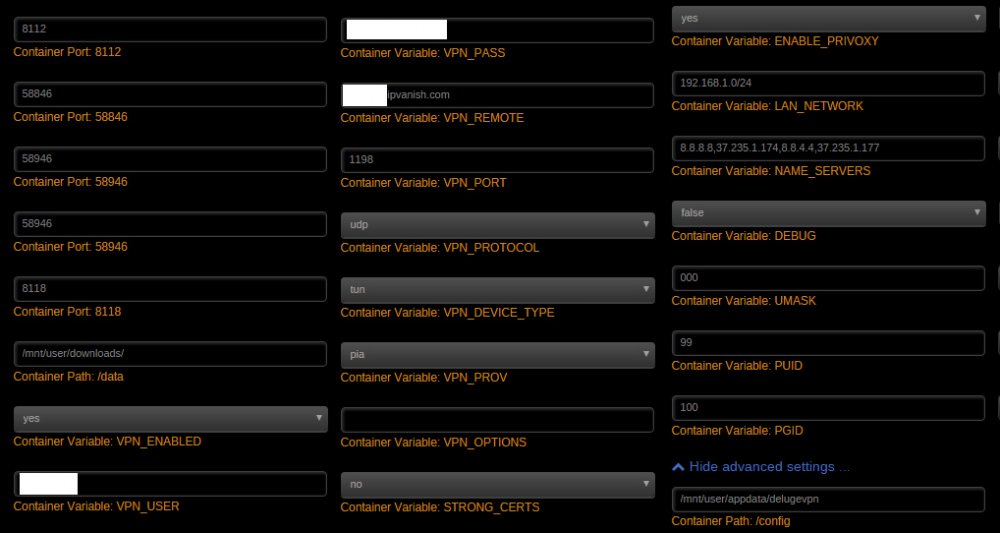
I used to have DelugeVPN docker working fine but had to delete the docker/container and reinstall. Now I'm having trouble loading the webui. I've attached the log for the docker and screenshots of the settings I input during setup. I'm using an IPVanish VPN. What did I do wrong? delugeVPN.txt
-
I had similar issues in the past and I think I narrowed the incomplete files down to having my drone search folder interval set too low. I had it check every minute for downloaded files. This would prompt a move to the TV share folder on files that were currently being extracted and as a result, incomplete.
-
haha no I deleted my original post to include your quote and by the time I had re-posted, your response was above mine. I hope this mysterious issue doesn't cause any more hiccups down the line.

-
You're right. Strangely enough, I input it the incorrect way and it still seemed to fix my issue. Welp, I'm not going to question it any further. lol
-
that worked like a charm! thanks for the help, bobbintb.
-
So if my Sonarr folder is located in an Appdata share, it would be: chmod 755 -R -f /user/mnt/appdata/sonarr where would I input this?
-
I noticed that error. It has happened to me before where there was write permissions and I had to reset them. How do I go about doing so without breaking the other dockers?
-
My Sonarr has been working perfectly for quite some time now up until about an hour ago. It stopped responding so I restarted it but I didn't have access. I removed the docker and the image thinking that would do the trick, but it is still giving me an error saying: [Info] AppFolderInfo: Data directory is being overridden to [/config][Error] PidFileProvider: Unable to write PID file /config/nzbdrone.pid and notably: [Fatal] ConsoleApp: EPIC FAIL! I uploaded the full log with more info in case it is needed. How can I fix this? Thanks. sonarr error.txt
-
I restarted unRAID but the issue persisted. However, I just gave it about an hour and now the issue has resolved itself. I'm guessing something just needed to refresh. All is well now.
-
Sounds like you did some setup on the Arris before, that you haven't replicated now ... most likely you're not forwarding a port from Arris to the unRAID server running the docker. Sorry, I meant modem not router. I'll fix my original post.
-
I've had my DuckDNS docker working for well over a year now, up until this morning. I just upgraded my modem from an Arris 6141 to an Arris 6183 and now I cannot get duckdns to link my url to my server. I've checked and my external IP address is the same as before. Everything else on my system is working (internet access, etc) What could the problem be?
-
I used to have DelugeVPN working perfectly with my IPVanish vpn provider. They recently changed something so I went and updated the certificate for my vpn provider and now my Deluge won't connect to any peers. I can post the docker log or any other information to hep resolve the issue. Thanks.
-
I have a drive that just finished the preclear script successfully and I want to mount it to my unassigned devices. The problem is that I do not see that option. Under FS (file system) it says precleared and the format button is greyed out. I can only add it to the array if stopped or run another preclear on it. How do I format it to xfs so that I can mount it to my unassigned devices? Thanks. Edit: I found the answer. You must turn on destructive mode from the settings page under Unassigned Devices.


