






Drider
Members
-
Joined
-
Last visited
-
This is great news! Thank you both for your effort on this. I've got a backlog of things to catch up on this week, but I'm definitely going to find time to install the new container, copy data over and give this a test. Thanks again!
-
Ok, that all makes sense, and I appreciate your explanation in such detail. I may start diving in to this in the next few weeks, but I'm much farther behind in the learning process as I'd be starting from basics. If I can find anything relevant or helpful, I'll do what I can to offer it up here, in hope that it may also help you in the long run. Thanks again!
-
So,.. If I understand correctly, what you are trying to get working is the "update available" recognition of unRaid, and this to some degree does require automation, so that the GUI can recognize there is indeed an update available? Sorry I've I'm still misunderstanding, I read your reply like 5 times, trying to get what you're saying. Like I said, I've never built a container, but just installed via CA. Though I do feel like I'm getting to point I may invest to the time to learn how to do this stuff manually, as it might be a skill worth learning, for the future administration of my several servers.
-
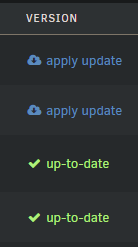
you know,.. I was just thinking.. It doesn't' exactly have to be automated updates. Even just that it checks the image for updates, and reports back in the unRaid GUI there's an update available, and gives the user the option to apply update would be enough, (basically, the normal docker update behavior, see image). Of course automation of image update would be nice, as the host of the sever might not be checking daily, but I personally don't feel entirely necessary, as long as we can run the update process through he GUI, and not have to rebuild the container manually each update.
-
Yeah, I only linked it as I thought maybe it might give you an idea or two. Glad to hear it did, and look forward to seeing if you can find progress for automation. Good luck!
-
Maybe what he's done here can shed some light. Maybe you can build off his Image? pfeiffermax/windrose-dedicated-server - Docker Image The Nerdy Tech Blog I tried my damnest to get a docker working from his, but I've honestly never setup a docker outside of Community Apps, and I just didn't have the time to invest learning what the hell I'm doing. He's gotten it set up where his docker will update, as long as Kraken Express pushes updates to the Linux distro (Which it looks like they are maintaining). I'm confident they will eventually set a SteamCMD distro, its' just a question of when. I personally am interested in a Linux binary without the WINE on top purely because of server resources. Just as an example, Running a Palworld Docker, (which is very similar to WR), in pure Linux Binaries vs Wine is a night and day difference when it come to resources. I'm hoping to see a similar difference with Windrose.
-
No problem at all, thanks for the reply, and get well!
-
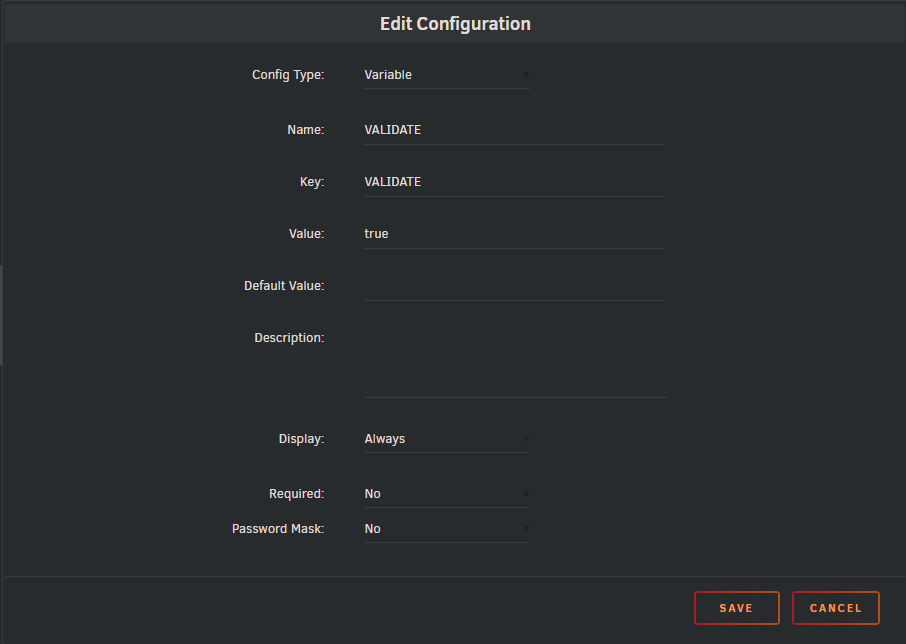
I was looking around for a Palworld Docker container and found this. I just wanted to add, we were having the same issues with SteamCMD not recognizing updates for a Windrose docker container, and having to also delete the Appmanifest_*.acf however after adding a Validate variable to the container, it forces a refresh check for updates each time the server is restarted . Not saying it will be the solution here, but it might, and won't hurt anything to add:
-
The new update was pushed, with the Linux based version for docker, any chance you might be pushing a new version?
-
I think the question is being asked because a new update is around the corner that is going to now support/Add Docker Images with Linux server support. Windrose - Patch Notes, version: 0.10.0.7 - Steam News Patch Notes, version: 0.10.0.7 Linux Dedicated Server Support + Small Improvements Hey, everyone! We are releasing another batch of small improvements and fixes for the current build. Please note that we'll also be performing some backend maintenance, which means the game will be temporarily unavailable. We apologize for the inconvenience and appreciate your patience. Patch notes, version: 0.10.0.7 Added Docker images with Linux server support. For setup instructions, see DedicatedServer.md in the dedicated server root directory. Added Traditional Chinese language support. Sails can once again be damaged by cannonball hits. P.S. Another development blog is coming soon. Stay tuned! So I guess the question should've been, Will you be updating/adding the docker for the full Linux version that may avoid the need for WINE, and possibly reduce overhead / increase server performance? I for one would prefer to use your container if so, as I've had near zero issues with your Dockers
-
You either miss-understood, miss-read, or didn't read the FAQ's from the second post I linked you in my fist reply. It's gives pretty clearly 3 options to solve the SteamCMD update error your are receiving, non of them telling you to delete your save data OR anything about editing the ServerDescritpion.json. I would suggest you read it again, there is really no other way to summarize the solutions.
-
Check the FAQ's in the second post. https://forums.unraid.net/topic/151809-support-nodiaque-gameserver-docker/#findComment-1358893 Clear the .json as described, set the +Validate Flag, and never worry about it again.
-
The errors are the product of the last patch Kraken Express put out last week. They are calls to the Development Libraries on the actual dev machines that we don't have as server hosts / players. It's widely known the verbosity of the logs and the amount of null reporting due to issue like this make reading the actual errors of the log files hard as hell. These errors should not be an issue, however, Kraken Express does need to address this, and soon, as the logfiles could get out of hand with the number of errors recorded per hour. I'd just keep an eye on the size of your log files if you have a few players and your server runs 24/7. It really should not be a problem you need to worry about. Regarding your saves/world: This is not an issue of the docker or the server, this is an issue of the Update Kraken Express put out back on May 5th If you join the discord server for Windrose, and look at this guide post I had pinned: https://discord.com/channels/1260209458924224542/1493764667074412797/1501115366062035065 You'll find solutions in the guide, links to discussions, and links to the FAQ's from Kraken Express with solutions to your World save issue. All have solved this for numerous users.
-
Couple quick questions regarding the Enshrouded containers: I'm currently running the Windrose docker, I assume if I install enshrouded it's going to reinstall SteamCMD over top my existing SteamCMD install, but that shouldn't effect anything? Or is there a way to skip the SteaMCMD installation since I've already installed from Windrose's docker? Which version is the better option Enshrouded or Enshrouded_Proton ? I'm looking for the least amount of overhead and stability, based on the little I read so far in this thread that would be the Proton version?
-
Would you mind posting a screen of what this would look like? I'd actually like to test this.

