





riff.79
Members
-
Joined
-
Last visited
Everything posted by riff.79
-
Legend!
-
Hey @Kilrah , love your work, could we please get an update?
-
Ahh understand. Thanks for this docker once again.
-
Hey @Kilrah , great docker thank you, quick question - how long after an update before you push out a new template?
-
Wow, just came across this plugin randomly! Great work! I've used snapraid for years on other servers and its been an indispensable tool, and it's great I can add this to unraid. Now I'll need to upgrade my servers lol. Thanks again!
-
Check out https://github.com/imagegenius/docker-immich/issues/254 - it has a new Postgres repository as they are now using a plugin that is not in the default package.
-
Same here I am afraid: bad file SHA256: /boot/config/plugins/dynamix.my.servers/unraid-api.tgz
-
@CK Villa LEGEND!! Thank you so much for providing this repo.
-
Is it advised to use the disk shares or users shares for this application?
-
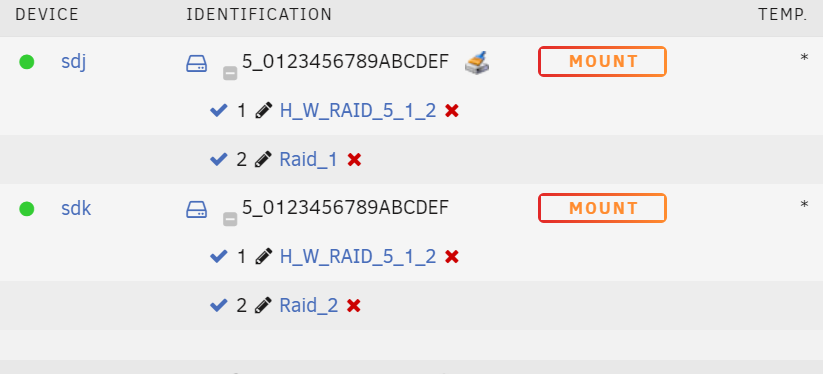
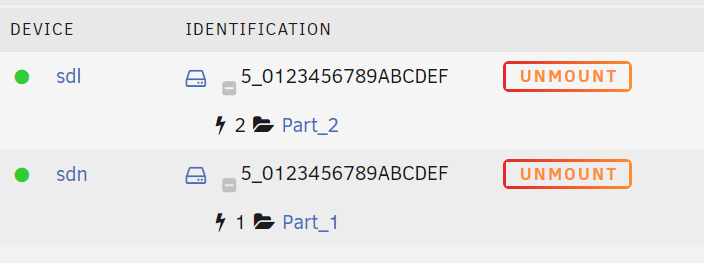
So i have continued to look at this as I had it working beforehand 1. Added clean EXT4 pariitions via Gparted. Initially detected fine, and then when I started changing mount paths it started duplicating. Tried repeating this process by creating new paritions but continued to fail. 2. Added a small empty parition to 1 of the disks via gparted, and then formatted with Unraid to XFS, and have been able to continually change mount path names with no issue. Since they are on seperate partitions, it looks to solve the Id duplication.
-
Ill try creating the partitions similar and see if that resolves the issue: Sep 4 16:55:46 Server unassigned.devices: Adding disk '/dev/sdh2'... Sep 4 16:55:46 Server unassigned.devices: Adding disk '/dev/sdg1'... Sep 4 16:55:46 Server unassigned.devices: Adding disk '/dev/sdh1'... Sep 4 16:55:46 Server unassigned.devices: Adding disk '/dev/sdg2'... Sep 4 16:55:46 Server unassigned.devices: No filesystem detected on '/dev/sdg1'. Sep 4 16:55:46 Server unassigned.devices: Mount drive command: /sbin/mount -t 'ext4' -o rw,auto,noatime,nodiratime,async,nodev,nosuid '/dev/sdh2' '/mnt/disks/Part_1' Sep 4 16:55:46 Server unassigned.devices: No filesystem detected on '/dev/sdh1'. Sep 4 16:55:46 Server unassigned.devices: Mount drive command: /sbin/mount -t 'ext4' -o rw,auto,noatime,nodiratime,async,nodev,nosuid '/dev/sdg2' '/mnt/disks/Part_2' Sep 4 16:55:46 Server unassigned.devices: Partition 'H_W_RAID 5-part1' cannot be mounted. ### [PREVIOUS LINE REPEATED 1 TIMES] ### Sep 4 16:55:46 Server kernel: EXT4-fs (sdg2): mounted filesystem with ordered data mode. Opts: (null) Sep 4 16:55:46 Server unassigned.devices: Successfully mounted '/dev/sdg2' on '/mnt/disks/Part_2'. Sep 4 16:55:46 Server unassigned.devices: Adding SMB share 'Part_2'. Sep 4 16:55:46 Server kernel: EXT4-fs (sdh2): mounted filesystem with ordered data mode. Opts: (null) Sep 4 16:55:46 Server unassigned.devices: Successfully mounted '/dev/sdh2' on '/mnt/disks/Part_1'. Sep 4 16:55:46 Server unassigned.devices: Adding SMB share 'Part_1'. Sep 4 16:57:08 Server emhttpd: spinning down /dev/sdc Sep 4 17:00:07 Server crond[1678]: exit status 1 from user root /usr/local/sbin/mover &> /dev/null Sep 4 17:07:51 Server webGUI: Successful login user root from 192.168.1.240 Sep 4 17:07:51 Server emhttpd: H_W_RAID_5_0123456789ABCDEF-0:1 (sdh) 512 23441768448 Sep 4 17:07:51 Server emhttpd: H_W_RAID_5_0123456789ABCDEF-0:0 (sdg) 512 23441768448 Sep 4 17:07:52 Server emhttpd: read SMART /dev/sdh Sep 4 17:07:52 Server emhttpd: read SMART /dev/sdg Sep 4 17:08:06 Server emhttpd: read SMART /dev/sdd Sep 4 17:08:06 Server emhttpd: read SMART /dev/sdb
-
I've just expereced this after using my 8 bay mediasonic probox (2 x raid 5) device for more than 2 years. I wish i had a screenshot of my partition layout right now. Did this get resolved at all?
-
Ive been using this same encloure for 3 years with no issues til I reformatted it this week. I wonder whats changed.
-
Further to this - here is now unraid identifies them without the plugin / and in the diag: There is two disk there, but maybe the -x:x:x at the end of the ID is unsupported\truncated? No idea to be honest, but its impacting me as I can't back up my primary unraid.


-
Hey team. Small issue: I reformated my external USB device - its a 8 bay Proraid box - 2 raid 5 arrays. But they are identifying the same, and when I try to change the mount point they both change. This has not happened before and I am at a loss on how to resolve. I have also updated UUIDs. server-diagnostics-20211110-0937.zip
-
I ran Memtest86 for 24 hours, no problems. Any ideas anyone?
-
No Vms, 1 Docker - QdirStat - but its only running when I need to run reports. Its a very Vanila server - used to backups, and is offline most of the time.
-
Hey Team! I am having an out of memory issue on my backup unraid server. Can I please have some help deciphering the logs. tower-diagnostics-20210910-1503.zip
-
Working well!
-
Thanks, ill take a look! I appreciate this. I need to learn how to do this myself.
-
I can see the base docker has been updated in github. But not in community apps.
-
Indeed! I see you bet me to it! Fingers crossed.
-
Hey has anyone tried updating the goodsync docker to the latest version? The one in apps is an older version and according to the release notes it should auto update. 11.3.2 is on the website, but 10.9.32.2 is what is within the docker.
-
Yes! 100% CPU, slow indexing and unpredictable network speed.
-
Yeah Rowanhs - same here. Resilio is full speed, but Syncthing not so.



