





riff.79
Members
-
Joined
-
Last visited
-
I’m seeing what looks like the same issue on two systems, but there the firmware actually writes to the disk, without prompting and without logging any error. I’m posting because I don’t think “cosmetic” is a safe assumption, and your diagnostics suggest you could be exposed. (Disclaimer - I did use some Ai to assist on my journey) My systems: two NAS OEM motherboards from a Chinese manufacturer, each with two onboard ASM1166 controllers and an AMI-based BIOS. One has 4TB disks (7,814,037,168 sectors each) and the other has 10TB disks. What I found: during startup, the firmware writes each disk’s backup GPT (33 sectors) at a wrong address. It uses (total sectors − 33) mod 2^32, which is the correct address with the upper 32 bits dropped. On a 4TB disk, the backup GPT belongs at sector 7,814,037,135. The firmware writes a byte-for-byte copy at 3,519,069,839 instead, which is about 1.8TB into the disk and inside the data partition. 10TB disks are hit at the address that formula predicts for them. How I confirmed it: on the 4TB unit, I wrote a known marker over those 33 sectors on every disk, rebooted, and read them back. Cold power-on: the marker was replaced by the GPT copy on every disk on one of the two controllers. The disks on the other controller kept their markers. Repeated three times. Warm restart: every disk, on both controllers, was overwritten. Repeated twice. With Fast Boot enabled: only the boot disk was overwritten. Errors: across 11 boots, the kernel logs show no SATA errors, resets or I/O errors, and SMART is clean. sgdisk -v also reports nothing, because the real primary and backup GPTs are fine. The damage is to whatever data was at the wrapped address. It shows up in Unraid parity checks. When I ran Unraid on these units, non-correcting parity checks kept reporting sync errors at the same sectors, and I couldn’t explain them at the time. They match the wrapped address exactly: 10TB disks, partition start 64: sync errors at 2,353,004,440 / 448 / 456 / 464 / 472. That’s exactly the 33 wrapped sectors, in Unraid’s 4K steps. 4TB disks, partition start 64: sync errors at 3,519,069,768 to 3,519,069,800. The first was in February 2025, a few months after I bought the unit. 4TB disks whose partition started at 21,257,952: sync errors at 3,497,811,880 to 3,497,811,912. That’s the same physical address, because Unraid reports sectors relative to where each partition starts. Why one check showed only 2 errors, not 5: on a two-disk array (parity plus one data disk), both disks get their own GPT copy at the same spot. The copies only differ in the first and last 4K blocks, so parity only disagrees there. My theory (not proven): it matches JorgeB’s option ROM idea. If the ASM1166 UEFI path gets disk addresses wrong above 2TB, the firmware reads the backup GPT from the wrong place and decides it’s corrupt. EDK2’s partition driver restores an invalid backup GPT automatically. I haven’t confirmed that AMI’s code does the same. If it does, it would write to that same wrong address, which is exactly what I’m seeing. Your BIOS asks first, which is why I’d check rather than assume nothing has been written. From your diagnostics: Disk1 (WD40EFZZ) is on the ASM1166 card. It’s a 61%-full XFS array disk, so if the BIOS has ever written at the wrapped address, it has very likely written over file data. Your 4TB disks are the same size as mine (7,814,037,168 sectors), so the wrapped address is identical: sector 3,519,069,839. Your logs don’t include a completed parity check, so they can’t show whether anything has been written yet. Why it matters on Unraid: XFS array disks have no data checksums. If this write happens, nothing reports it. If it has happened on disk1, a non-correcting parity check should show sync errors at sectors 3,519,069,768 to 3,519,069,800, which is your partition start of 64 plus 4K steps. A correcting check would rewrite parity to match the damaged data, and then the original can’t be rebuilt. Please don’t run a correcting check until you’ve confirmed either way. Read-only check (it only reads, it doesn’t write anything). It reports whether each disk over 2TiB has its backup GPT copy at the wrapped address: for d in /dev/sd?; do N=$(blockdev --getsz $d); [ "$N" -le 4294967296 ] && continue REAL=$((N-33)); WRAP=$((REAL % 4294967296)) a=$(dd if=$d bs=512 skip=$WRAP count=33 iflag=direct 2>/dev/null | md5sum | cut -c1-32) b=$(dd if=$d bs=512 skip=$REAL count=33 iflag=direct 2>/dev/null | md5sum | cut -c1-32) h=$(dd if=$d bs=512 skip=$((WRAP+32)) count=1 iflag=direct 2>/dev/null | head -c 8 | tr -cd '[:print:]') [ "$a" = "$b" ] && r="MATCH - backup GPT copy found at wrapped address" || r="no match" echo "$d N=$N WRAP=$WRAP $r [$h]" done“MATCH” with [EFI PART]: the firmware has written there, and whatever data was at that spot has been overwritten. “no match”: nothing has been written there, at least so far. I’d run it on all your disks. Anything that has ever been on the ASM1166 card matters most, including the unassigned 4TB. Anyone else with an ASM1166: if you’ve had unexplained parity sync errors that come back at the same sectors, calculate (disk sectors − 33) mod 4294967296, subtract your partition start (usually 64), and compare. I’ve reported this to the manufacturer with the full test data. Results from other hardware would help show whether this is down to the ASM1166 itself or the vendor’s firmware.
-
Legend!
-
Hey @Kilrah , love your work, could we please get an update?
-
Ahh understand. Thanks for this docker once again.
-
Hey @Kilrah , great docker thank you, quick question - how long after an update before you push out a new template?
-
Wow, just came across this plugin randomly! Great work! I've used snapraid for years on other servers and its been an indispensable tool, and it's great I can add this to unraid. Now I'll need to upgrade my servers lol. Thanks again!
-
Check out https://github.com/imagegenius/docker-immich/issues/254 - it has a new Postgres repository as they are now using a plugin that is not in the default package.
-
Same here I am afraid: bad file SHA256: /boot/config/plugins/dynamix.my.servers/unraid-api.tgz
-
@CK Villa LEGEND!! Thank you so much for providing this repo.
-
Is it advised to use the disk shares or users shares for this application?
-
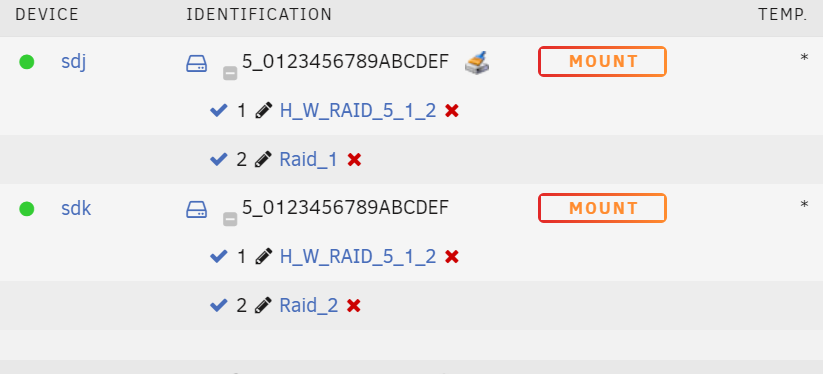
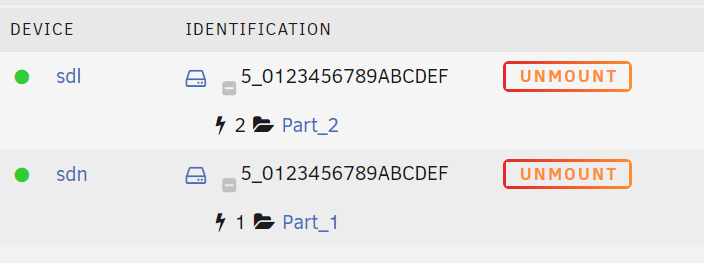
So i have continued to look at this as I had it working beforehand 1. Added clean EXT4 pariitions via Gparted. Initially detected fine, and then when I started changing mount paths it started duplicating. Tried repeating this process by creating new paritions but continued to fail. 2. Added a small empty parition to 1 of the disks via gparted, and then formatted with Unraid to XFS, and have been able to continually change mount path names with no issue. Since they are on seperate partitions, it looks to solve the Id duplication.
-
Ill try creating the partitions similar and see if that resolves the issue: Sep 4 16:55:46 Server unassigned.devices: Adding disk '/dev/sdh2'... Sep 4 16:55:46 Server unassigned.devices: Adding disk '/dev/sdg1'... Sep 4 16:55:46 Server unassigned.devices: Adding disk '/dev/sdh1'... Sep 4 16:55:46 Server unassigned.devices: Adding disk '/dev/sdg2'... Sep 4 16:55:46 Server unassigned.devices: No filesystem detected on '/dev/sdg1'. Sep 4 16:55:46 Server unassigned.devices: Mount drive command: /sbin/mount -t 'ext4' -o rw,auto,noatime,nodiratime,async,nodev,nosuid '/dev/sdh2' '/mnt/disks/Part_1' Sep 4 16:55:46 Server unassigned.devices: No filesystem detected on '/dev/sdh1'. Sep 4 16:55:46 Server unassigned.devices: Mount drive command: /sbin/mount -t 'ext4' -o rw,auto,noatime,nodiratime,async,nodev,nosuid '/dev/sdg2' '/mnt/disks/Part_2' Sep 4 16:55:46 Server unassigned.devices: Partition 'H_W_RAID 5-part1' cannot be mounted. ### [PREVIOUS LINE REPEATED 1 TIMES] ### Sep 4 16:55:46 Server kernel: EXT4-fs (sdg2): mounted filesystem with ordered data mode. Opts: (null) Sep 4 16:55:46 Server unassigned.devices: Successfully mounted '/dev/sdg2' on '/mnt/disks/Part_2'. Sep 4 16:55:46 Server unassigned.devices: Adding SMB share 'Part_2'. Sep 4 16:55:46 Server kernel: EXT4-fs (sdh2): mounted filesystem with ordered data mode. Opts: (null) Sep 4 16:55:46 Server unassigned.devices: Successfully mounted '/dev/sdh2' on '/mnt/disks/Part_1'. Sep 4 16:55:46 Server unassigned.devices: Adding SMB share 'Part_1'. Sep 4 16:57:08 Server emhttpd: spinning down /dev/sdc Sep 4 17:00:07 Server crond[1678]: exit status 1 from user root /usr/local/sbin/mover &> /dev/null Sep 4 17:07:51 Server webGUI: Successful login user root from 192.168.1.240 Sep 4 17:07:51 Server emhttpd: H_W_RAID_5_0123456789ABCDEF-0:1 (sdh) 512 23441768448 Sep 4 17:07:51 Server emhttpd: H_W_RAID_5_0123456789ABCDEF-0:0 (sdg) 512 23441768448 Sep 4 17:07:52 Server emhttpd: read SMART /dev/sdh Sep 4 17:07:52 Server emhttpd: read SMART /dev/sdg Sep 4 17:08:06 Server emhttpd: read SMART /dev/sdd Sep 4 17:08:06 Server emhttpd: read SMART /dev/sdb
-
I've just expereced this after using my 8 bay mediasonic probox (2 x raid 5) device for more than 2 years. I wish i had a screenshot of my partition layout right now. Did this get resolved at all?
-
Ive been using this same encloure for 3 years with no issues til I reformatted it this week. I wonder whats changed.
-
Further to this - here is now unraid identifies them without the plugin / and in the diag: There is two disk there, but maybe the -x:x:x at the end of the ID is unsupported\truncated? No idea to be honest, but its impacting me as I can't back up my primary unraid.





