





opentoe
Members
-
Joined
-
Last visited
Everything posted by opentoe
-
This is the twilight zone. I've always had these type issues with Teracopy. And it crashing on me all the time. I never mentioned anything cause everyone praised it so much.
-
For the client we would need to rely on the docker creator to update it. It doesn't update automatically. So we wait and hope it gets done or we figure out how to do it ourselves. I'm just speaking about the MATE docker. I don't like to screw with my client on my Windows computer. No reason to really if there is a docker mate. But if the day comes when gfjarmin doesn't want to update or loses interest I'll probably setup the Windows client. Hey, I'll just load up a small Windows VM on unraid.
-
I have the Crashplan family plan. That includes unlimited computers and storage. Between all my computers I have about 10TB online at Crashplan. When I first signed up I asked them how much space does 'unlimited' really mean and they basically said, unlimited. It has been a few years so the TOS may have changed. I would read their TOS very closely, there always is a catch somewhere since unlimited is never really unlimited.
-
Was there a default md_write_limit ? I'm trying different numbers and backup file says the default was 1152, but that doesn't look right. I may boot up my other pro key and see what the defaults were. Anyway, I ran the script and it indicated 108MB/sec read speeds. With the defaults I got 111MB/sec. So I changed the tunable numbers anyway to give it a shot, rebooted and my read speeds were horrible! They were at 25MB/sec! Went back to defaults, reboot and they went back to 111MB/sec. I think I'm done with playing around with this script. I'll stick with 111MB/sec read speeds.
-
I'll give it another try. I'll revert all back to defaults and try again. The default test only takes less then an hour so I'll give it shot.
-
I ran the script after I made the changes it recommended and the results were slower! I don't believe it works too well. Unless I got the whole procedure wrong here. First time I ran the script I took all the defaults. Gave me the numbers, which only two are available to change with V6, so I changed them. Rebooted the server and ran the script again and the results were 10MB/sec slower. I think I just want to go back to the original numbers.
-
In fact I prefer fine tuning manually after first pass... Great tool anyway... I think this should be sticky too +1 Only one answer... I've got the impression that fine tuning give great gains on systems with mixed data disks and little gains on systems with identical data disks... Could it be this way? Was pointed to this thread and to run this script. I ran it last night, it completed. It gave me back three suggestions to try. md_num_stripes md_write_limit md_sync_window Looked at the webgui in Unraid V6 and only two of the options were there. num_stripes and sync_window. There is another setting there called poll_attributes, but no write_limit. Is this test accurate now? Should I just keep poll_attributes default and change the other two settings?
-
Hey good news! The Antec 1200 (twelve hundred V3) dropped back down to $119 with a $20 rebate card on Newegg so I jumped on it. Just yesterday it was $170. http://www.newegg.com/Product/Product.aspx?Item=N82E16811129100&cm_re=antec_twelve_hundred_v3-_-11-129-100-_-Product
-
I've tried the Norco rack mount units before and hated them. Too big, ugly and just not my cup of tea. I looked at the Antec 1200, but leaning more towards the Cooler Master Trooper. It is a larger case, deeper and roomier and less expensive. Has all the fans I would need so I think that will be the one. The C-clamp idea is good. When I had to bend all my CM 590 tabs down the metal in that case was thicker (all cases were made heavier and thicker metal years ago) and I had was a small hammer at the time. I'll manage somehow. This is the one I'm going to give a shot. http://www.newegg.com/Product/Product.aspx?Item=N82E16811119297&cm_re=coolermaster_trooper-_-11-119-297-_-Product p.s. I usually miss out on sales so I don't even look for them anymore.
-
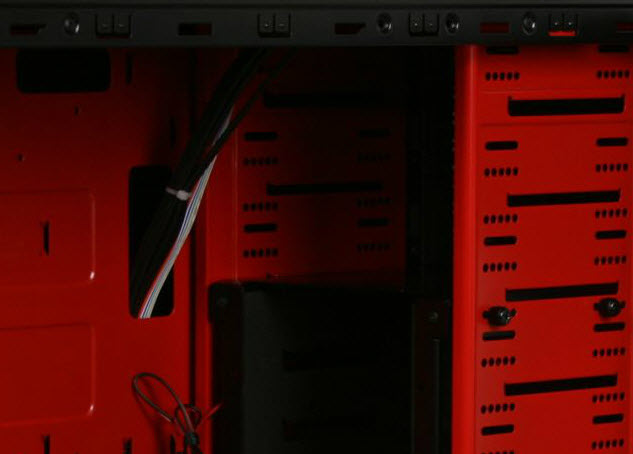
Found a cheap case that will work with cages, but still need to bang down all the metal lips, which is a pain to do. http://www.newegg.com/Product/Product.aspx?Item=N82E16811517006&nm_mc=AFC-C8Junction&cm_mmc=AFC-C8Junction-_-na-_-na-_-na&cm_sp=&AID=10446076&PID=3938566&SID= I've included a picture to show you what I mean.
-
Very cool looking case, but way overkill for what I need. Heck, the only thing you can't do is install two motherboards in there. I'm slowly finding out any case I buy and want to use hard drive cages with with need some modification. Even if you have a clear empty hole with 9 external drives could fit you still need to bang down those metal tabs. At least from all the visual's that's what I noticed. I remember having to bang them all down on my Coolermaster 590 case which isn't sold anymore, but I want a larger box anyway.
-
I'd rather use 3x5 hard drive cages since you only need to use two power connections to power 5 drives. What a cable nightmare if you had that case full of drives. I'm still on the hunt for a large case with the ability to take 3 3x5 hard drive cages and have some room for maybe 1 or 2 SSD drives or temp drive. I do want to keep the price around $200. I saw the Lian-Li case, PC-A79 but read the reviews on Newegg which turned me off. I'm really looking into the CoolerMaster Storm Trooper case. I need to find out if you can remove the black panels that block you from inserting a HD cage and mount them to the side of the case so you have somewhere to mount the cages.
-
Like right now. Updates are available, thanks for waiting. Thanks for the update. Is this something you need to do on all the dockers you create? As said before by someone else, this is probably my most used docker and hate to be without now. Is the process on updating the docker MATE hard? Not something anyone can do, right?
-
I believe my engine was upgraded also, but the client I think is static at the old version. Only one that can update that is someone that knows how or the docker creator.
-
I believe my engine is still on 3.7 as well. How did you get that to display the version? My client is also at 3.7, which is probably static and the docker creater would need to update the docker to get the latest version, right?
-
When I start the docker MATE, this is what it reads in my syslog. What does yours say? Jun 16 20:37:13 SUN php: /usr/bin/docker start CrashPlan-Desktop Jun 16 20:37:13 SUN kernel: device veth0dc855d entered promiscuous mode Jun 16 20:37:13 SUN kernel: docker0: port 1(veth0dc855d) entered forwarding state Jun 16 20:37:13 SUN kernel: docker0: port 1(veth0dc855d) entered forwarding state Jun 16 20:37:14 SUN avahi-daemon[8498]: Withdrawing workstation service for veth7fd4821. Jun 16 20:37:14 SUN kernel: docker0: port 1(veth0dc855d) entered disabled state Jun 16 20:37:14 SUN kernel: eth0: renamed from veth7fd4821 Jun 16 20:37:14 SUN kernel: docker0: port 1(veth0dc855d) entered forwarding state Jun 16 20:37:14 SUN kernel: docker0: port 1(veth0dc855d) entered forwarding state Jun 16 20:37:14 SUN php: CrashPlan-Desktop Jun 16 20:37:22 SUN emhttp: /usr/bin/tail -n 42 -f /var/log/syslog 2>&1 Jun 16 20:37:29 SUN kernel: docker0: port 1(veth0dc855d) entered forwarding state
-
What does your docker page look like?

-
The only options for the MATE is the port number. You can try to use another port and see what happens? Or you can run a port scan on your server to make sure you see port 3389 is listening and open. I'm not a MAC person but should work the same way. Gotta be something simple, usually is.
-
When you try to connect to the service using remote desktop and port 3389, what happens exactly? Do you get a prompt or anything? Are you using a Windows computer to connect? When I enter the IP information into the Windows remote desktop I just enter "192.168.1.120:3389" and that instantly connects me to the ubuntu webgui docker mate. What happens when you try to connect, anything? Also, make sure nothing else is using port 3389. I believe that is the default port the MATE uses, but can be changed.
-
So you are running the Crashplan client from another computer other than your unRaid server? After I upgraded to RC6, I ran the GUI mate and Crashplain puts up a notice at the top asking me if I want to "adopt" the currently saved files to this computer. You can either adopt or just close that box. Took more then a week to upload all my important stuff, so I'm hesitant to do anything. I just closed that box and nothing happened. Everything looks normal and the GUI indicates all my files are there in the cloud. Does upgrading to RC6 make Crashplan think it is a new computer or something?
-
Wanted to say my Docker Crashplan has been working good! I have only 1 more day until the upload finishes. It was over 500GB and I throttled the upload also, but it has been steady and working as expected. My most useful Docker by far. I'd like to try them all!
-
Is this still a "thing"? We were told to not try to manually edit any config files or xml files so real world results can be shown and then fixed.
-
Trust me, it is me most of the time asking the questions and being confused. Glad I could help!
-
Once you install the main Crashplan docker and the Crashplan docker mate you can connect to the MATE/GUI via Windows Remote Desktop. Once you load Windows Remote Desktop input the connection info. As with mine, it would be 192.168.1.120:3389. Then it will prompt you for a username and password. The username is 'ubuntu' and the password is 'PASSWD'. Since I installed the Crashplan MATE docker I didn't have to fool around with editing files or taking over my Windows desktop GUI. Well worth to install the MATE docker in my opinion.
-
If you already have Crashplan on your other machines it is easiest to just install the Crashplan docker MATE GUI. You just connect to it via RDP on port 3389. It uses ubuntu and has been a pleasure to use.

