





crowdx42
Members
-
Joined
-
Last visited
Everything posted by crowdx42
-
Does this mean the motherboard is downgrading the PCIe connection with the 310 or the expander?
-
Below are the results of the second command: root@Tower:~# lspci -d 1000: -vv 01:00.0 Serial Attached SCSI controller: Broadcom / LSI SAS2008 PCI-Express Fusion-MPT SAS-2 [Falcon] (rev 03) Subsystem: Dell 6Gbps SAS HBA Adapter Control: I/O+ Mem+ BusMaster+ SpecCycle- MemWINV- VGASnoop- ParErr- Stepping- SERR- FastB2B- DisINTx+ Status: Cap+ 66MHz- UDF- FastB2B- ParErr- DEVSEL=fast >TAbort- <TAbort- <MAbort- >SERR- <PERR- INTx- Latency: 0, Cache Line Size: 64 bytes Interrupt: pin A routed to IRQ 16 IOMMU group: 1 Region 0: I/O ports at e000 Region 1: Memory at f7140000 (64-bit, non-prefetchable) Region 3: Memory at f7100000 (64-bit, non-prefetchable) Expansion ROM at f7000000 [disabled] Capabilities: [50] Power Management version 3 Flags: PMEClk- DSI- D1+ D2+ AuxCurrent=0mA PME(D0-,D1-,D2-,D3hot-,D3cold-) Status: D0 NoSoftRst+ PME-Enable- DSel=0 DScale=0 PME- Capabilities: [68] Express (v2) Endpoint, MSI 00 DevCap: MaxPayload 4096 bytes, PhantFunc 0, Latency L0s <64ns, L1 <1us ExtTag+ AttnBtn- AttnInd- PwrInd- RBE+ FLReset+ SlotPowerLimit 0W DevCtl: CorrErr- NonFatalErr- FatalErr- UnsupReq- RlxdOrd+ ExtTag+ PhantFunc- AuxPwr- NoSnoop+ FLReset- MaxPayload 256 bytes, MaxReadReq 512 bytes DevSta: CorrErr+ NonFatalErr- FatalErr- UnsupReq+ AuxPwr- TransPend+ LnkCap: Port #0, Speed 5GT/s, Width x8, ASPM L0s, Exit Latency L0s <64ns ClockPM- Surprise- LLActRep- BwNot- ASPMOptComp- LnkCtl: ASPM Disabled; RCB 64 bytes, Disabled- CommClk+ ExtSynch- ClockPM- AutWidDis- BWInt- AutBWInt- LnkSta: Speed 5GT/s, Width x4 (downgraded) TrErr- Train- SlotClk+ DLActive- BWMgmt- ABWMgmt- DevCap2: Completion Timeout: Range BC, TimeoutDis+ NROPrPrP- LTR- 10BitTagComp- 10BitTagReq- OBFF Not Supported, ExtFmt- EETLPPrefix- EmergencyPowerReduction Not Supported, EmergencyPowerReductionInit- FRS- TPHComp- ExtTPHComp- AtomicOpsCap: 32bit- 64bit- 128bitCAS- DevCtl2: Completion Timeout: 50us to 50ms, TimeoutDis- LTR- 10BitTagReq- OBFF Disabled, AtomicOpsCtl: ReqEn- LnkCtl2: Target Link Speed: 5GT/s, EnterCompliance- SpeedDis- Transmit Margin: Normal Operating Range, EnterModifiedCompliance- ComplianceSOS- Compliance Preset/De-emphasis: -6dB de-emphasis, 0dB preshoot LnkSta2: Current De-emphasis Level: -6dB, EqualizationComplete- EqualizationPhase1- EqualizationPhase2- EqualizationPhase3- LinkEqualizationRequest- Retimer- 2Retimers- CrosslinkRes: unsupported Capabilities: [d0] Vital Product Data pcilib: sysfs_read_vpd: read failed: No such device Not readable Capabilities: [a8] MSI: Enable- Count=1/1 Maskable- 64bit+ Address: 0000000000000000 Data: 0000 Capabilities: [c0] MSI-X: Enable+ Count=15 Masked- Vector table: BAR=1 offset=0000e000 PBA: BAR=1 offset=0000f800 Capabilities: [100 v1] Advanced Error Reporting UESta: DLP- SDES- TLP- FCP- CmpltTO- CmpltAbrt- UnxCmplt- RxOF- MalfTLP- ECRC- UnsupReq- ACSViol- UEMsk: DLP- SDES- TLP- FCP- CmpltTO- CmpltAbrt- UnxCmplt- RxOF- MalfTLP- ECRC- UnsupReq- ACSViol- UESvrt: DLP+ SDES+ TLP- FCP+ CmpltTO- CmpltAbrt- UnxCmplt- RxOF+ MalfTLP+ ECRC- UnsupReq- ACSViol- CESta: RxErr- BadTLP- BadDLLP- Rollover- Timeout- AdvNonFatalErr+ CEMsk: RxErr- BadTLP- BadDLLP- Rollover- Timeout- AdvNonFatalErr+ AERCap: First Error Pointer: 00, ECRCGenCap+ ECRCGenEn- ECRCChkCap+ ECRCChkEn- MultHdrRecCap- MultHdrRecEn- TLPPfxPres- HdrLogCap- HeaderLog: 04000001 00000003 01010000 5f710ee2 Capabilities: [138 v1] Power Budgeting <?> Kernel driver in use: mpt3sas Kernel modules: mpt3sas
-
I am getting no such directorty for the first command: root@Tower:~# cat /sys/class/sas_host/host5/device/port-5\:0/sas_port/port-5\:0/num_phys cat: '/sys/class/sas_host/host5/device/port-5:0/sas_port/port-5:0/num_phys': No such file or directory
-
I believe so, I have attached diagnostic file below. tower-diagnostics-20221211-0734.zip
-
So as a last ditch effort I updated the firmware, it was not on the latest version. So speeds have increased after the firmware updat but I am still questioning the results. At 10 WD 4tb drives I am at 150mb/s but when I add an additional 2 WD 4tb drives speed drop down to 130mb/s . If I add all the drive, so an additional 4 WD 8tb drives speed drop down to 99mb/s. This is way better than before the firmware upgrade but it is still way behind what 2 Dell Perc 310 cards are doing with the same drives. Am I expecting too much from the expander card? With this config I am actually not gaining anything, if I was to hook up all drivs to the expander I would lose a link from the Dell 310 and so speeds would also drop. Thoughts??
-
I bought it off eBay and I have contacted the seller, so we will see if they will replace the card. Maybe I will get lucky, who knows.
-
So I disconnected one of the ports coming from the 310 to the SAS expander and I have attached the diagnostics. tower-diagnostics-20221209-1119.zip
-
Yes, I already tried with a single cable and had the exact same issue, with the speed dropping by half, which is expected. There is a post from back in 2013 about flashing the firmware in these cards but I would think the card I just got should have a newer firmware regardless. I guess I need to check that out. Below is the link to that thread.
-
Here are the diagnostics. I did a little more testing and everything seems ok up until I add disk 11 to the array and try to build the parity drive. At that point regardless of what drive I use, the speeds drop off a cliff. tower-diagnostics-20221209-0933.zip
-
Hi all, so I have installed an Intel RES2SV240 SAS Expander in my test setup and I am getting really low speeds on parity build. Speeds with 16 drives on the expander and a single drive on the motherboard SATA port are running at 30mb/s. Without the Expander I am getting 150mb/s with the same drive setup. What I have is a Dell Perc 310 flashed to IT mode connected to the SAS expander via both ports and using the first two ports on the expander card. The 310 is plugged into the main 16x PCIe on the motherboard. The main error I am seeing in the logs is the screenshot below. Anyone got any ideas on what is going on? I have tried moving through the ports on the SAS card to see if disconnecting any of the ports and the drives attached is making an impact and it did not help. The only time I have seen reasonable speeds is when only 8 drives are connected. The drives are all 4 tb WD green drives with and additional 4 8tb WD white drives (shucked). The drives have all tested fine in Scrutiny plugin. Thoughts?
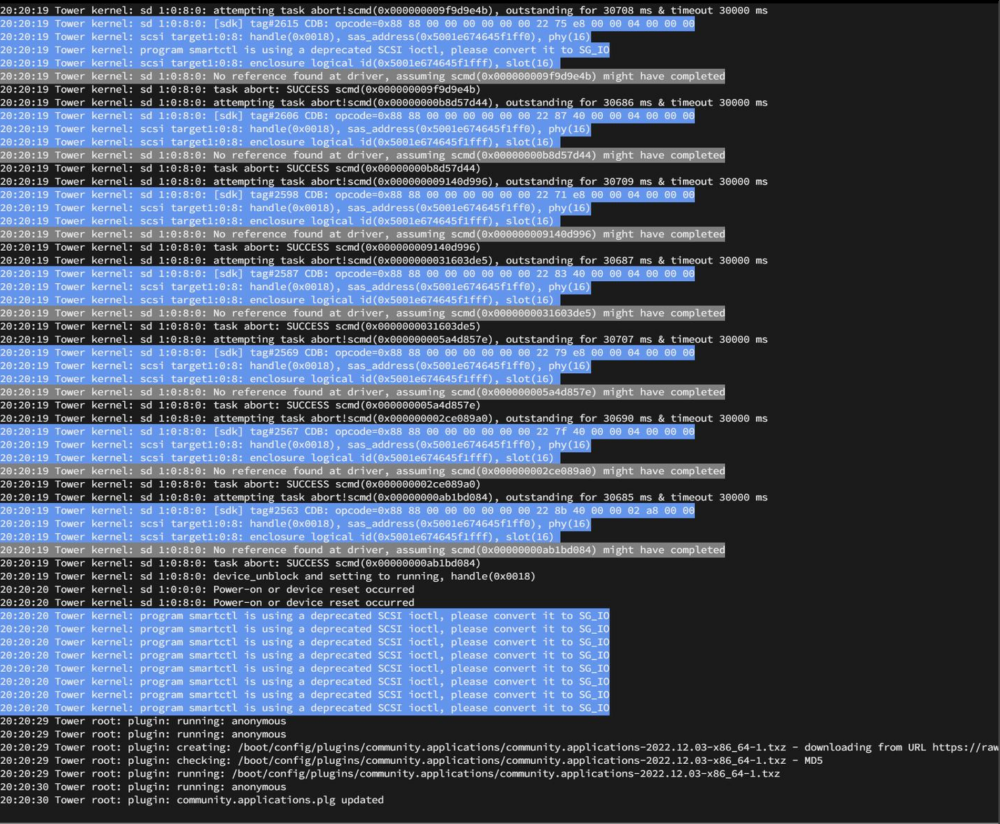
-
So I have been doing a little bit of testing on peformance and I am getting strange numbers. If I plug in all 16 drives in a test machine (8th x 4 and the rest 4tb by Western Digital and Hitachi), the parity build dives to about 30mb/s . With only the 8tb drives I am getting 185mb/s and with WD 4tb drives alone I am getting 175mb. I have also tried the parity drive on the MB Sata port and also on the SAS expander and it does not seem to make a great deal of difference. I also notice that the cpu is spiking a lot to 100% (i3 G4400 @ 3.3ghz. I wonder if the cpu could be bottlenecking the system when I try to to a parity build with all drives attached? My other thought is that one of the drives might also have issues and causing read issues, unlikely, but they are not the newest of drives. From the linked data above I would think 16 drives attached to the SAS expander should not be an issue at all for it, I have it connected via 2 mini SAS cables which I believe should give the best performance. Thoughts?
-
Well I dug up a cable and connected the Expander to the Dell 310 card. It looks like it is working fine, all drives that I have attached to the card are showing up. Is there anything else I should be watching out for? I know in a previous configuration with an LSI HBA card I had, I would get errors on the parity checks, this went away when I moved to the 310. Is there anything like this to watch for OR does the expander just simply receive data from the drive and forward to the 310 with no data manipulation occuring and so acts more like a splitter than an actual card processing data? Not sure if I am being clear here Patrick
-
Excellent info. I have already ordered two mini SAS cables and so I should be able to utilize the most out of the 310 card. Being that I can use the 310 in the x16 slot, I would think I should see a performance increase as I currently can only use a single 310 in the x16 and the other is in the x8 slot. I have noticed during drive rebuilds that speed slows down for the last few hours of the rebuild. I wonder is it the drive that is being rebuilt that causes this slow down or is it the bandwidth for the parity drive. Again, thanks for the help. Patrick
-
So I looked this up and it does seem they connect via cable. My last question is, on my motherboard I have a 16x PCIe and 2 8x PCIe slots. Which slot should the expander go into? I think the 8x share with each other and so if both 8x slots were used they would drop to 4x. So, should the 310 be in the fastest slot or the expander? Also, is there a performance hit using the expander vs 2 310s? Currently I have 16 drives on the 310s and another 4 drives on the motherboards SATA ports. Patrick
-
So I would need a SAS cable connecting between the 310 and the expander OR do they connect over the pci express bus?
-
Hi al, so I picked up the Intel RES2SV240 SAS 2 Expander card on eBay. My intent being to replace my two Dell Perc 310 cards which are flashed to IT mode. I received the card today but I am not seeing any confiog screen for the card on boot and none of the drives are being detected that are attached to it on my test machine. Will this card work without working in RAID mode? Is there something I am missing with setting it up? Help!! Patrick
-
Are all your drives connected by the boards SATA ports? I have a similar setup but have two SAS cards and my system is idling at 80watts, intel i5 12600k and 16gig of memory on a Z690 motherboard with more drives BUT at idle, I don't believe that should have much of an impact.
-
So I am getting the error below when I run auto tune. The system is a brand new setup with a 12600k and MSI Z690 motherboard. I have two Dell Perc 310 SAS controllers and a marvel SATA card in the machine. There are 20 hard drives and I am getting around 100 watts idle which I would love to get lower. root@UNRAID:~# powertop --auto-tune powertop: /lib64/libncursesw.so.6: no version information available (required by powertop) powertop: /lib64/libtinfo.so.6: no version information available (required by powertop) modprobe cpufreq_stats failed Loaded 0 prior measurements Cannot load from file /var/cache/powertop/saved_parameters.powertop File will be loaded after taking minimum number of measurement(s) with battery only RAPL device for cpu 0 RAPL device for cpu 0 Devfreq not enabled glob returned GLOB_ABORTED Cannot load from file /var/cache/powertop/saved_parameters.powertop File will be loaded after taking minimum number of measurement(s) with battery only Leaving PowerTOPcan you list the cards and setup you used? I am thinking about getting a used disk shelf and I am wondering what I will need to get it all working?Cool, thank youHi all, so one of my cache drives failed, I have two drives in mirror mode for cache. I replaced the failed drive and now I am seeing new device (blue square) beside the new drive in the list for cache. Does this mean the new drive is still copying data from the mirrored drive? Going forward I intend to replace both cache drive, am I correct to assume I should replae one drive at a time and this will result in the new drive getting data from the existing drive and so no need to do any manual copying of data? PatrickHi all, I have just gotten an X570 and a Ryzen 5600 and I am wondering will this config boot UNRAID without a video card. I know historically some boards require a video signal and so I am wondering will this be an issue with this new config. The board is an ASRock X570 PHANTOM GAMING 4 AM4. My hope is that I can swap out the board/cpu and memory and power back on the system without any issues. The current system is a Haswell cpu, so it will be an Intel to AMD move. PatrickHi all, so I am a long time UNRAID user and I currently run an Intel® Core™ i5-4590 CPU @ 3.30GHz with a ASRock Z97 Extreme4 motherboard. I now want to upgrade to a processor with a bit more oomph but I am also mindful of how much power the server consumes. Can anyone provide and recommendations? I have an i7 7700 with a Gigabyte Gaming 7 motherboard but I think it might be too much of a power hog. Thoughts?Well you could try running 1.bat again and check the adapters.txt file to see what it shows. I finally got two 310s flashed with tons of help from Fireball, the second card I had was a bad one and I had to buy another, I now have two fully functioning 310s and also seems to be fine.
