





rjstott
Members
-
Joined
-
Last visited
Everything posted by rjstott
-
In the last 48 hours 6.6.1 has crashed twice during periods of no user activity. I don't have a Ryzen (I3 3240) and I don't run VMs, just Plex Docker and a couple of other minor dockers. It seems I'm not alone and I wonder why the release hasn't been pulled and why testing wasn't better. This is a mature 'paid for' product that deserves improved support and shouln't be putting out products that fail. I've reverted to 6.5.3 so I hope that's the end for now. It might be a good idea to flag releases that have recorded major bugs so that your customers are better informed!
-
Hi, Many thanks, and yes you are right about posting, however as there are numerous error messages in the Plex startup log it is not always easy to know what is important and what isn't. I like lots of others suffer dreadfully when changes are made such that what we had stops working, the instructions for setting up no longer match reality and because it is so long since we actually set things up we are a bit blase about doing it. IMHO a missing / shouldn't cause so much grief and if it is so vital or obvious it should get better error reporting (perhaps you ommitted the / in the path definition). As a quick work around 'for example' I just tried to install the Plex server on my Mac. All went well BUT similarly the client refused to see the Media! The only thing that worked was to use 'Analyze' which I've never ever used before! Really appreciate the help
-
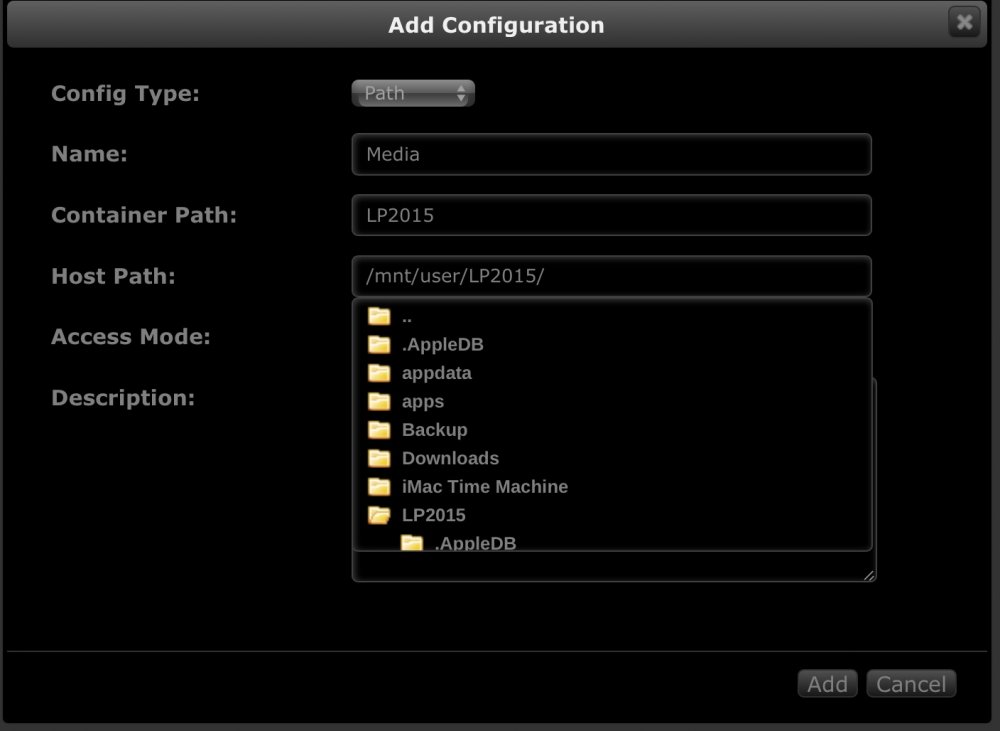
Hi, here is the data you asked for and a short commentary. 1) Add Docker without path to Media (attach 1) 2) Plex start up, some network errors, I think I can ignore? (attach 2). Plex runs with Metadata but no Media 3) Add path to Media (attach 3) 4) Click done and Docker command fails and orphans the image (attach 4) I understand the path process and although it has changed this surely right? The Media is in sub-folders below LP2015 which I can map in Plex Plex_Docker_install.txt Plex_Log.txt Add_path_result.txt
-
I just switched to this docker and I'm encountering some problems. 1) I don't see anywhere to tell Plex where my media is. Previously I created paths to each Plex Category but there doesn't seem to be anywhere to add even a single path by default although the instructions imply there is 2) So I add a simple Path config and the following error pops up - Says something about 'Invalid volume destination path: 'LP' mount path must be absolute.' but I use all I did was provide a name and use the path select process /mnt/user etc 3) Then the Docker disappears and I am left with an empty orphan image file needing deleting? 4) The default config file should be on the cache but it isn't so this needs correcting every install? 5) Adding the Media path after a start (which Plex does though no media files just metadata) kills the image as per 2) I did visit the Linuxserver.io forum where there are reports of others with problems. Just tried the needo version and get this same error 'Invalid volume destination path: 'LP' mount path must be absolute' Advice/help please
-
Thanks for the pointer. Changing this docker setting from Bridge to Host fixes both of my problems and now I just have to decide which devices I will use to generate the sound output! I have to say I do like the Raspberry Picore solution with an audio amp board addon. This gives both a player and airplay output solution. The Chromecast produces some video to show what is playing and I might go with this for my main in-house sound. The error message I reported is still there but an old post somewhere said this might be a red herring!
-
Logitech Media Player (Airplay and Chromecast Bridges) I have LMS happily working but want to integrate Airplay and Chromecast devices. The approprate LMS Plugins have been installed and appear to run but neither finds any device to bridge. I get the following errors "[16-08-14 15:20:28.0236] Slim::Networking::Async::Socket::UDP::mcast_add (48) Error: While adding multicast membership, UPnP may not work properly: Invalid argument" in the LMS docker log. This may or may not be relevant. Both plug-ins have an option to set the LMS IP address or auto-discover. Which IP address would I set, the internal 172... or the external 192... Can the plugins find the airplay and chromecast devices from the docker? I see someone else wanting airplay, had any success?
-
I did the update but I still have the Black Screen.
-
Well I updated and like those above my Blackscreen persists. Please, has anyone got the cure for this?
-
I tried the suggestion above, here is the logfile, it didn't help and the alternate browser gives the same black window! There are some errors in there but are they significant? Is this log what should be expected? The banner at the top of the Black window says connected to Crashplan but I somehow doubt I have that connection? Xvnc TigerVNC 1.6.0 - built Dec 24 2015 16:05:46 Copyright © 1999-2015 TigerVNC Team and many others (see README.txt) See http://www.tigervnc.org for information on TigerVNC. Underlying X server release 11202000, The X.Org Foundation Sun Apr 10 00:18:43 2016 vncext: VNC extension running! Apr 10 00:18:43 Media syslog-ng[46]: syslog-ng starting up; version='3.5.3' vncext: Listening for VNC connections on all interface(s), port 4239 vncext: created VNC server for screen 0 Warning: could not find self.pem Using local websockify at /opt/novnc/utils/websockify/run Starting webserver and WebSockets proxy on port 4280 Openbox-Message: Unable to find a valid menu file "/var/lib/openbox/debian-menu.xml" Starting CrashPlan Desktop... Navigate to this URL: http://Media:4280/vnc.html?host=Media&port=4280 Press Ctrl-C to exit WARNING: no 'numpy' module, HyBi protocol will be slower Sun Apr 10 00:31:26 2016 Connections: accepted: 127.0.0.1::41542 SConnection: Client needs protocol version 3.8 Sun Apr 10 00:31:27 2016 SConnection: Client requests security type VncAuth(2) Sun Apr 10 00:31:35 2016 VNCSConnST: Server default pixel format depth 24 (32bpp) little-endian rgb888 VNCSConnST: Client pixel format depth 24 (32bpp) little-endian rgb888 Sun Apr 10 00:32:19 2016 Connections: accepted: 127.0.0.1::41602 SConnection: Client needs protocol version 3.8 SConnection: Client requests security type VncAuth(2) Sun Apr 10 00:32:29 2016 VNCSConnST: Server default pixel format depth 24 (32bpp) little-endian rgb888 VNCSConnST: Client pixel format depth 24 (32bpp) little-endian rgb888 Sun Apr 10 00:32:50 2016 Connections: closed: 127.0.0.1::41602 (Clean disconnection) EncodeManager: Framebuffer updates: 1 EncodeManager: Tight: EncodeManager: Solid: 1 rects, 786.432 kpixels EncodeManager: 16 B (1:196609 ratio) EncodeManager: Bitmap RLE: 1 rects, 160 pixels EncodeManager: 69 B (1:9.44928 ratio) EncodeManager: Total: 2 rects, 786.592 kpixels EncodeManager: 85 B (1:37016.4 ratio)
-
I can't get started with Crashplan. I'm running 6.1.9 and Crashplan installs ok but when I start it I get a black screen which say is is logged in but won't do anything. I did exacly the same installation on a friends 6.1.9 and it installed and let me create a login into Crashplan etc. I've downloaded the Docker a number of times, I've removed it and reset the Community entry nothing gets the VNC screen to access the Crashplan site. The only clue I have is that the Docker setup screen isn't the same as the one that worked, as it has additional Container Volume entries which seem redundant (i.e. one is named UNRAID?). Has anyone a clue?
-
Still playing with Homebridge on a Rasp PI but plugins are installed using 'npm' which is an incremental process on the pi (i.e. you add each plugin as you need it) but for a docker I guess a start script could scan a plugin directory and install all the plugins at start up time? Otherwise, there isn't a UI and other than a log file the setup should be easy, though try as I might I have never managed to get a docker working unless some kind sole creates the necessary and adds it into the 'community'.
-
And here is another +1
-
Hi, All deleted and a fresh start. This is the log: => Installing MySQL ... Installing MySQL system tables... OK Filling help tables... OK To start mysqld at boot time you have to copy support-files/mysql.server to the right place for your system PLEASE REMEMBER TO SET A PASSWORD FOR THE MySQL root USER ! To do so, start the server, then issue the following commands: /usr/bin/mysqladmin -u root password 'new-password' /usr/bin/mysqladmin -u root -h 5e73e4deab69 password 'new-password' Alternatively you can run: /usr/bin/mysql_secure_installation which will also give you the option of removing the test databases and anonymous user created by default. This is strongly recommended for production servers. See the manual for more instructions. You can start the MySQL daemon with: cd /usr ; /usr/bin/mysqld_safe & You can test the MySQL daemon with mysql-test-run.pl cd /usr/mysql-test ; perl mysql-test-run.pl Please report any problems at http://bugs.mysql.com/ Waiting for MySQL to start... Waiting for MySQL to start... Waiting for MySQL to start... Waiting for MySQL to start... Waiting for MySQL to start... Waiting for MySQL to start... Waiting for MySQL to start... Waiting for MySQL to start... And of course it goes on this way. Here are the mappings: /var/lib/phpfiwa /mnt/cache/apps/Docker/apps/emon/fiwa/ /var/lib/phpfina /mnt/cache/apps/Docker/apps/emon/fina/ /var/lib/phptimeseries /mnt/cache/apps/Docker/apps/emon/time/ /etc/mysql /mnt/cache/apps/Docker/apps/emon/mysql/ /var/lib/mysql /mnt/cache/apps/Docker/apps/emon/mysqllib/ The environment variable MYSQL_PASSWORD is set to emoncms but yet there is still no GUI. The log implies I should be doing some extra things directly, should I?
-
Hi thanks but I created the additional folders so each fas its own. The CMS log has changed to look like => Using an existing volume of MySQL Waiting for MySQL to start... Waiting for MySQL to start... Waiting for MySQL to start... Waiting for MySQL to start... Waiting for MySQL to start... Waiting for MySQL to start... Waiting for MySQL to start... Waiting for MySQL to start... I think I did see it start once in the log but now it is a long wait! I don't have sql anywhere else, unless Emby or Plex hide it. The WebUI still doesn't run. The unRaid main log file now has this for Start through to Stop Nov 28 20:09:30 Media autofan: Highest disk temp is 29°C, adjusting fan speed from: OFF (0% @ 0rpm) to: 372 (145% @ 903rpm) Nov 28 20:09:34 Media php: /usr/local/emhttp/plugins/dynamix.docker.manager/scripts/docker 'start' 'Emoncms' Nov 28 20:09:34 Media kernel: device vethce9f7e9 entered promiscuous mode Nov 28 20:09:34 Media kernel: docker0: port 1(vethce9f7e9) entered forwarding state Nov 28 20:09:34 Media kernel: docker0: port 1(vethce9f7e9) entered forwarding state Nov 28 20:09:34 Media avahi-daemon[21294]: Withdrawing workstation service for vetha0b9f82. Nov 28 20:09:34 Media kernel: docker0: port 1(vethce9f7e9) entered disabled state Nov 28 20:09:34 Media kernel: eth0: renamed from vetha0b9f82 Nov 28 20:09:34 Media kernel: docker0: port 1(vethce9f7e9) entered forwarding state Nov 28 20:09:34 Media kernel: docker0: port 1(vethce9f7e9) entered forwarding state Nov 28 20:09:36 Media ntpd[1424]: Listen normally on 9 docker0 172.17.42.1:123 Nov 28 20:09:36 Media ntpd[1424]: new interface(s) found: waking up resolver Nov 28 20:09:38 Media emhttp: cmd: /usr/local/emhttp/plugins/dynamix.docker.manager/scripts/docker logs --tail=350 -f Emoncms Nov 28 20:09:49 Media kernel: docker0: port 1(vethce9f7e9) entered forwarding state Nov 28 20:11:39 Media emhttp: cmd: /usr/local/emhttp/plugins/dynamix/scripts/tail_log syslog Nov 28 20:12:21 Media emhttp: cmd: /usr/local/emhttp/plugins/dynamix.docker.manager/scripts/docker logs --tail=350 -f Emoncms Nov 28 20:12:26 Media emhttp: cmd: /usr/local/emhttp/plugins/dynamix.docker.manager/scripts/docker logs --tail=350 -f Emoncms Nov 28 20:12:52 Media php: /usr/local/emhttp/plugins/dynamix.docker.manager/scripts/docker 'stop' 'Emoncms' Nov 28 20:13:02 Media kernel: vetha0b9f82: renamed from eth0 Nov 28 20:13:02 Media kernel: docker0: port 1(vethce9f7e9) entered disabled state Nov 28 20:13:02 Media kernel: docker0: port 1(vethce9f7e9) entered disabled state Nov 28 20:13:02 Media avahi-daemon[21294]: Withdrawing workstation service for vetha0b9f82. Nov 28 20:13:02 Media kernel: device vethce9f7e9 left promiscuous mode Nov 28 20:13:02 Media kernel: docker0: port 1(vethce9f7e9) entered disabled state Nov 28 20:13:02 Media avahi-daemon[21294]: Withdrawing workstation service for vethce9f7e9. Nov 28 20:13:04 Media ntpd[1424]: Deleting interface #9 docker0, 172.17.42.1#123, interface stats: received=0, sent=0, dropped=0, active_time=208 secs Thanks for your help
-
I pointed all the volume mappings to a folder called emon on my cache drive.Below is the list from the Docker page.: /var/lib/phpfina /mnt/cache/apps/Docker/apps/emon/ /var/lib/phptimeseries /mnt/cache/apps/Docker/apps/emon/ /etc/mysql /mnt/cache/apps/Docker/apps/emon/mysql /var/lib/mysql /mnt/cache/apps/Docker/apps/emon/mysql /var/lib/phpfiwa /mnt/cache/apps/Docker/apps/emon/ This is probably hopelessly wrong. Could you let me know what I need or where to find info? Most installs 'probably' aren't like unRaid so being a novice and a User rather than a developer shows my limits!
-
I just set up this docker (or at least I think I did), two problems. 1) "Waiting for MySQL to start" is repeating in the log file so startup isn't right (probably 'cos I got the setup wrong) 2) The WEBUI isn't running so no way to get into the package. Anyone got this working and could elaborate on the setup requirement? If I can get this working then I can move on to buy some of the "Openenergymonitor" kit! Thanks
-
OK recreated the Docker.img and can now run openhab without log errors as below. Note I deliberately restarted the openhab because the UI is back to complaining there is no config file. "NO openhab.cfg CONFIGURATION FOUND" Anyway if I type http://192.168.1.103:8080/openhab.app?sitemap=demo then it works. Any chance this could be corrected in the script that starts the wenGUI or is this something I need to do somewhere. Anyways now I can have a play! Thanks. And deleting the img file and re-creating it is a breeze as all previous settings are retained!
-
Thanks for the quick reply. You're almost certainly right. Selecting the advanced docker view shows up four old docker image files but the remove command doesn't remove them. So I researched increasing the docker.img file size and came across "btrfs filesystem resize +20G /docker.img" but trying that gave an error that basically states the wrong action will happen if the command is completed. <trfs filesystem resize +20G /mntimgche/apps/Docker/docker. s ERROR: resize works on mounted filesystems and accepts only directories as argument. Passing file containing a btrfs image would resize the underlying filesystem instead of the image. So I think I will have to delete the image and start again. That will have to wait as Plex is currently being used and I have to schedule downtime!
-
Hi, I thought I had this cracked but 'user' error has defeated me again. I re-installed this latest version and then realised I should have created a proper place for the openhab config directory. So I did this and then got a load of errors about python and something being full. The error didn't say what was full. Anyway this has now killed the installation and I get this error whenever I try to create a new docker image? root@localhost:# /usr/bin/docker run -d --name="openhab" --net="bridge" -e TZ="Europe/Berlin" -p 8080:8080/tcp -v "/mnt/user/apps/Docker/apps/openhab/config/":"/etc/openhab":rw jshridha/openhab Error response from daemon: EOF Has anyone any clues as to what might have been full abd what I should do to fix it. Could it be the Docker.img file isn't big enough at 10GB as I also have three other docker apps (Plex, Emby and Uboquity) installed and running?
-
Problem accessing /openhab.app. Reason: Sitemap 'default' could not be found Having a problem with the OpenHAB install. It installs fine but it can't find either the default or demo config or indeed any other that I try. It seems that there are perhaps two configuration methods? .cfg files and a folder (configurations) of more detailed files which are now at release 18. Anyway, I continually get the sitemap not found message so I'm obviously not putting it in the right place? I loaded an addons.cfg file which is being found and Openhab seems to be running, just the Web UI won't work? I have had a similar problem trying to run Openhab under OS X and there I'm sure the problem is ports and difficulty in start/stopping Openhab. That's easy with the Docker. Anyone else got this working and can help to get me started?

