





CHBMB
Community Developer
-
Joined
Everything posted by CHBMB
-
@gacpac Please don't ping me, this isn't my job, I help out when I can, I'm currently in bed. Also, @gacpac whilst your enthusiasm is admirable, I'm not certain you understand this stuff as well as you think you do, and no disrespect, you're sometimes confusing the issue even more. The issue looks to me to be that of NAT reflection/Hairpin NAT. @Lynxphp Try adding this in pfsense in the custom options of DNS resolver. server: local-zone: "xxx.duckdns.org" redirect local-data: "xxx.duckdns.org 3600 IN A 19.16.17.101"
-
TL:DR I remoted in, fixed it.
-
Personally I wouldn't, but I spend enough time here to kind of have my finger reasonably on the pulse without having to resort to RSS. Plus, I don't read the blog posts, but I don't feel I need to to as they tend to be about what Unraid can do, and I kind of know what it can do, and do everything I need it to, and there's nothing I want it to do that it doesn't do, if that makes sense. And if there's something new I want it to do, I can generally get it to do it...... In fact, I should have married my Unraid server instead of my wife, she does none of the above and costs more money...... 🤣
-
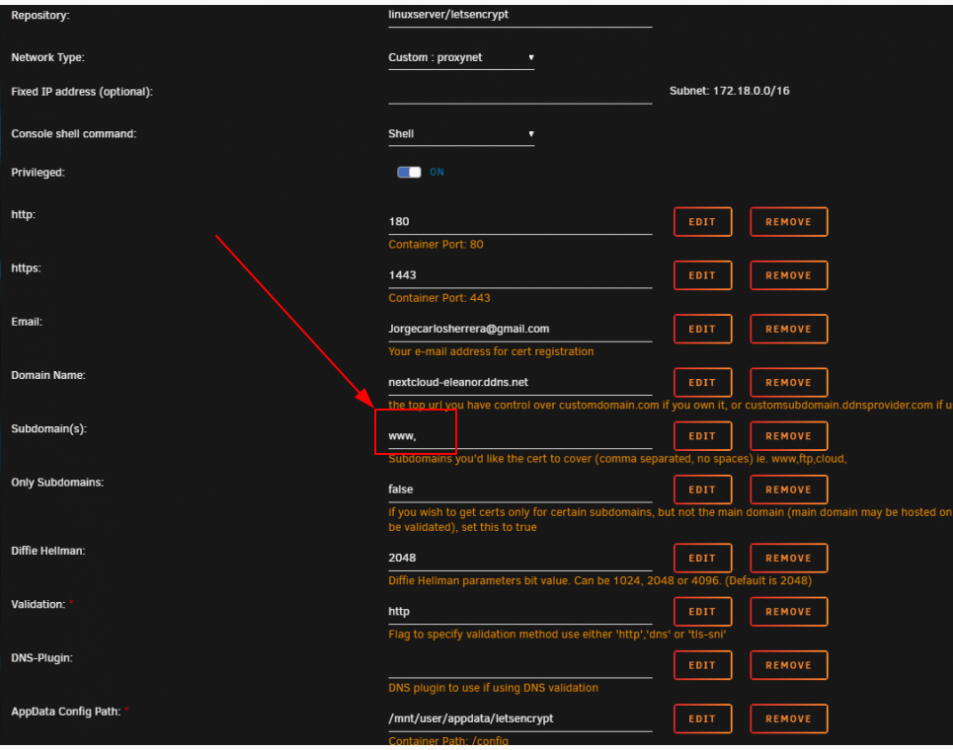
@Tucubanito07 See the box named REMOVE, click it. The one next to the Subdomain line

-
The issue is that the docker command being run (repeatedly) is wrong and they're trying to grab a cert for www. @Tucubanito07 Maybe pics will work better. Delete this....
-
Dude, don't complicate things. It's not a Cname issue
-
Would help if you actually did what I asked..... From your logs: URL=nextcloud-eleanor.ddns.net SUBDOMAINS=www, EXTRA_DOMAINS= ONLY_SUBDOMAINS=false And shown on your screenshot. Look, I'm not being funny here, but it would help if you actually read things properly. STOP POSTING screenshots
-
Actually ignore me. It should be: URL=nextcloud-eleanor.ddns.net SUBDOMAINS= EXTRA_DOMAINS= ONLY_SUBDOMAINS=false
-
URL=ddns.net SUBDOMAINS=nextcloud-eleanor EXTRA_DOMAINS= ONLY_SUBDOMAINS=true This is how it should be configured. You don't own the www.ddns.net url so you can't grab a cert for it.
-
@Tucubanito07 Where's the docker run command as I requested that's the log only.
-
@ijuarez Yeah, I know, problem is there's errors at every point in the chain and first principles have long been forgotten. If it doesn't grab a cert, then Nginx doesn't start, and then Nextcloud isn't going to work. Until he/she gets LetsEncrypt working it's just wasting everyones time with a load of noise about Nextcloud. @Tucubanito07 Here's what happens 1. You open the relevant ports on your router - you now have that correct 2. You start the LetsEncrypt container and it tries to grab certs 3. If certs are grabbed successfully Nginx starts up 4. Then you can setup Nextcloud and the reverse proxy side of things 5. Then once that's setup it should all work. Problem is you're failing at step 1 and 2 and keep looking to step 5 to see if it's working.
-
@Tucubanito07 Your port forwarding is now correct, it looks to me as though your nextcloud config is wrong. Right, this is getting out of control. Lets stop for a moment, and forget about Nextcloud. Because unless LE is setup properly it isn't going to work. I want you to remove the LetsEncrypt container, then recreate it and post the logs and for the love of God, please paste text and wrap it with code tags rather than post screenshots, reason being, if something then needs changing, we can copy and edit, whereas with screenshots we have to type it out. I suggest you read this as well so you can post a docker run command and logs rather than screenshots.
-
I don't think the problem is with the kernel and docker, but I can't help you as I don't use swarm. Here's a reference to a working .config for swarm and as you can see with the last patched version there are all the same kernel modules present and some that aren't present in their config. https://blog.hypriot.com/post/verify-kernel-container-compatibility/
-
The only thing missing from that last build was filesystem stuff that isn't relevant to Unraid and CGROUP_HUGETLB Which I tried to activate, but couldn't..... Disclaimer: I have no real idea what HUGETLB is and only a rudimentary understanding of C Groups. Might take another look tonight.
-
@Lynxphp Use the preconfigured reverse proxy conf for Nextcloud and see if that works before you do anything else.
-
Try this one..... root@matrix:/mnt/disk1/dvb# check-config.sh .config-swarm info: reading kernel config from .config-swarm ... Generally Necessary: - cgroup hierarchy: properly mounted [/sys/fs/cgroup] - CONFIG_NAMESPACES: enabled - CONFIG_NET_NS: enabled - CONFIG_PID_NS: enabled - CONFIG_IPC_NS: enabled - CONFIG_UTS_NS: enabled - CONFIG_CGROUPS: enabled - CONFIG_CGROUP_CPUACCT: enabled - CONFIG_CGROUP_DEVICE: enabled - CONFIG_CGROUP_FREEZER: enabled - CONFIG_CGROUP_SCHED: enabled - CONFIG_CPUSETS: enabled - CONFIG_MEMCG: enabled - CONFIG_KEYS: enabled - CONFIG_VETH: enabled (as module) - CONFIG_BRIDGE: enabled - CONFIG_BRIDGE_NETFILTER: enabled - CONFIG_NF_NAT_IPV4: enabled (as module) - CONFIG_IP_NF_FILTER: enabled (as module) - CONFIG_IP_NF_TARGET_MASQUERADE: enabled (as module) - CONFIG_NETFILTER_XT_MATCH_ADDRTYPE: enabled - CONFIG_NETFILTER_XT_MATCH_CONNTRACK: enabled - CONFIG_NETFILTER_XT_MATCH_IPVS: enabled (as module) - CONFIG_IP_NF_NAT: enabled (as module) - CONFIG_NF_NAT: enabled (as module) - CONFIG_NF_NAT_NEEDED: enabled - CONFIG_POSIX_MQUEUE: enabled Optional Features: - CONFIG_USER_NS: enabled - CONFIG_SECCOMP: enabled - CONFIG_CGROUP_PIDS: enabled - CONFIG_MEMCG_SWAP: enabled - CONFIG_MEMCG_SWAP_ENABLED: enabled (cgroup swap accounting is currently enabled) - CONFIG_LEGACY_VSYSCALL_EMULATE: enabled - CONFIG_BLK_CGROUP: enabled - CONFIG_BLK_DEV_THROTTLING: enabled - CONFIG_IOSCHED_CFQ: enabled - CONFIG_CFQ_GROUP_IOSCHED: enabled - CONFIG_CGROUP_PERF: enabled - CONFIG_CGROUP_HUGETLB: missing - CONFIG_NET_CLS_CGROUP: enabled (as module) - CONFIG_CGROUP_NET_PRIO: enabled - CONFIG_CFS_BANDWIDTH: enabled - CONFIG_FAIR_GROUP_SCHED: enabled - CONFIG_RT_GROUP_SCHED: enabled - CONFIG_IP_NF_TARGET_REDIRECT: enabled (as module) - CONFIG_IP_VS: enabled (as module) - CONFIG_IP_VS_NFCT: enabled - CONFIG_IP_VS_PROTO_TCP: enabled - CONFIG_IP_VS_PROTO_UDP: enabled - CONFIG_IP_VS_RR: enabled (as module) - CONFIG_EXT4_FS: enabled (as module) - CONFIG_EXT4_FS_POSIX_ACL: enabled - CONFIG_EXT4_FS_SECURITY: missing enable these ext4 configs if you are using ext3 or ext4 as backing filesystem - Network Drivers: - "overlay": - CONFIG_VXLAN: enabled (as module) Optional (for encrypted networks): - CONFIG_CRYPTO: enabled - CONFIG_CRYPTO_AEAD: enabled - CONFIG_CRYPTO_GCM: enabled (as module) - CONFIG_CRYPTO_SEQIV: enabled - CONFIG_CRYPTO_GHASH: enabled (as module) - CONFIG_XFRM: enabled - CONFIG_XFRM_USER: enabled - CONFIG_XFRM_ALGO: enabled - CONFIG_INET_ESP: enabled - CONFIG_INET_XFRM_MODE_TRANSPORT: enabled - "ipvlan": - CONFIG_IPVLAN: enabled (as module) - "macvlan": - CONFIG_MACVLAN: enabled (as module) - CONFIG_DUMMY: enabled (as module) - "ftp,tftp client in container": - CONFIG_NF_NAT_FTP: enabled (as module) - CONFIG_NF_CONNTRACK_FTP: enabled (as module) - CONFIG_NF_NAT_TFTP: enabled (as module) - CONFIG_NF_CONNTRACK_TFTP: enabled - Storage Drivers: - "aufs": - CONFIG_AUFS_FS: missing - "btrfs": - CONFIG_BTRFS_FS: enabled - CONFIG_BTRFS_FS_POSIX_ACL: enabled - "devicemapper": - CONFIG_BLK_DEV_DM: enabled (as module) - CONFIG_DM_THIN_PROVISIONING: enabled (as module) - "overlay": - CONFIG_OVERLAY_FS: enabled - "zfs": - /dev/zfs: missing - zfs command: missing - zpool command: missing Limits: - /proc/sys/kernel/keys/root_maxkeys: 1000000 Unraid-v6.7.1rc1-swarm-v2.zipswarm-v2.patch
-
Try again, I've deleted it from our repository, Sent from my Mi A1 using Tapatalk
-
Then just rename it .sample Sent from my Mi A1 using Tapatalk
-
On mobile at the moment. Post the contents of the quassel-web.subfolder.conf file Sent from my Mi A1 using Tapatalk
-
Don't take this the wrong way, but I don't need the hint..... Like I said, I know what I'm doing here. Sent from my Mi A1 using Tapatalk
-
You're missing a very very important point here. Containers are immutable, the container I run, is the same as the container you run, which is the same as the container @OOmatrixOO is running. I think we both know he wouldn't know where to start with that link, and Ubuntu doesn't necessarily translate well to an Alpine docker container. Instead I remoted in and just pulled a fresh container, typed the commands as I set out and it worked fine.
-
PM sent, I dunno what you're doing, but something ain't right....
-
@OOmatrixOO Have you got this working now?
-
Docker DNS as far as I know works fine as long as you create a custom docker network and run all the containers on that. It's what we use in the letsencrypt reverse proxy configs. Did a diff on that working config versus the default Unraid one. Essentially these are the missing components on Unraid CONFIG_NETFILTER_XT_MATCH_IPVS: missing CONFIG_CGROUP_HUGETLB: missing CONFIG_NET_CLS_CGROUP: missing CONFIG_CGROUP_NET_PRIO: missing CONFIG_IP_VS: missing CONFIG_IP_VS_NFCT: missing CONFIG_IP_VS_PROTO_TCP: missing CONFIG_IP_VS_PROTO_UDP: missing CONFIG_IP_VS_RR: missing CONFIG_EXT4_FS_SECURITY: missing CONFIG_IPVLAN: missing CONFIG_DUMMY: missing CONFIG_NF_NAT_FTP: missing CONFIG_NF_CONNTRACK_FTP: missing CONFIG_AUFS_FS: missing Which ones of these are important I couldn't say. But it does illustrate nicely that things aren't just as simple as flicking a switch to enable a single kernel module. I activated the top one in that build I made earlier in the this thread. How essential the others are to your requirements I don't know, and I'm reluctant to f**k with stuff I don't understand at a kernel level on the Nvidia build.
-
There's no point in elevating with sudo in your example as by definition when you run a touch command in the container the file is owned by root. The purpose of sudo -u abc is to run the command as the abc user, so sudo touch and touch are essentially the same thing. Sent from my Mi A1 using Tapatalk



