





mgladwin
Members
-
Joined
-
Last visited
Everything posted by mgladwin
-
Thank you
-
Hi @Squid, I have a duplicate file that FCP has found and its located on the cache and disk 5. Is the cache considered a 'lower' disk number to the data disks in general? Just trying to work out which one should be removed. Thanks.
-
Just closed the connection. And now Disk 9 has disabled after I restarted which I know is due to bad cables so I will leave this for the time being until I can get the breakout cables replaced. I haven't touched sleep at all. What do you mean when you say 'from the monitor'? And by 'from the VM', I assume you mean in the Windows 10 VM sleep settings?
-
Tight VNC seems fine so far. I've gone in and out of the VM a few times etc to test and no errors in the syslog yet. I'll keep using it for now I and see how it goes. EDIT: LOL, literally as I wrote the above, libvert has locked up and I wasn't even connected to the VNC. So same issues with VNC as RDP.
-
Sure. Will give it a shot tomorrow and let you know.
-
It actually seems fine as long as I don't RDP into the VM at all.
-
I'll be frank, I don't know much about this at all but I am also getting the freezing when trying to run Blue Iris in a Windows 10 VM. Runs fine for a time, and then libvert crashes and I have to restart unRAID to get it back. This in turn causes an unclean shutdown as I assume libvert wont exit in time before it forces the shutdown. I have tried both i915-GVTg_V5_4 and i915-GVTg_V5_8 which give the same result. This is the only VM I use so wouldn't have thought it was overloaded but Blue Iris is set up to use QuickSync so maybe that's contributing. Running an Intel Corporation Xeon E3-1200 v5/E3-1500 v5/6th Gen Core Processor I assume there isn't much I can do apart from upgrade the CPU etc?
-
It is/was the cables causing the issue. I have it working for now and was able to get both drives mounted and rebuilt from parity. New cables are on the way. Thanks for your help.
-
Its as if unRAID can see Disk 9 but cant read/write to it. Must be something to do with the LSI SAS card maybe as both disks are on this same card. However other disks are also on this card and working fine.
-
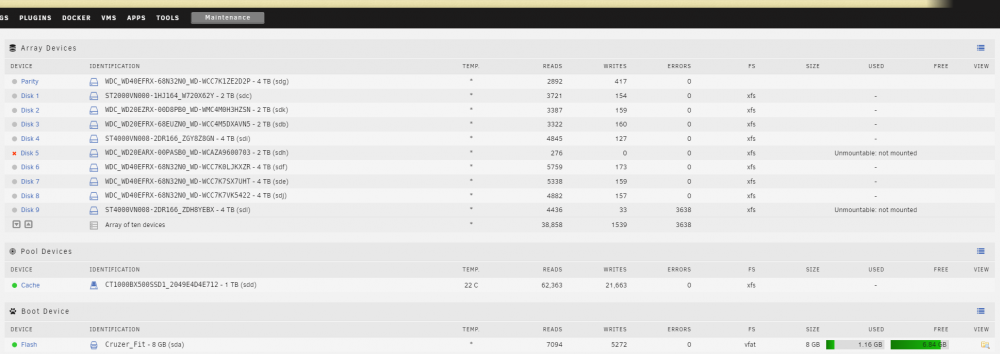
Hi all, I went to simply add an SSD into my server for Blue Iris just now and upon the GUI coming back up, I could see the SSD in Unassigned Devices but I also had two array disks unmountable and one of them had been disabled. I shutdown, unplugged the new SSD and started up again but both disks are still unmountable and one of them is still disabled (says its being emulated). I have tried xfs_repair in maintenance mode on Disk 9 which is the one not disabled and the check seemingly doesn't find any issues. I tried first with -n and then without -n. Still same results. Disk 5 is emulated so I figure I can just re-build it once I sort out Disk 9 but I don't really know how to sort out Disk 9. Diagnostics attached but they are after a restart or two. Cheers for any help as not sure what to do now. EDIT: Syslog seems to note that it cant read superblock on /dev/md9. Also added a screenshot of Main tab if it helps. Sep 12 22:52:48 Tower kernel: md: disk9 read error, sector=7814037056 Sep 12 22:52:48 Tower kernel: XFS (md9): last sector read failed Sep 12 22:52:48 Tower root: mount: /mnt/disk9: can't read superblock on /dev/md9. Sep 12 22:52:48 Tower emhttpd: shcmd (814): exit status: 32 Sep 12 22:52:48 Tower emhttpd: /mnt/disk9 mount error: not mounted Sep 12 22:52:48 Tower emhttpd: shcmd (815): umount /mnt/disk9 Sep 12 22:52:48 Tower root: umount: /mnt/disk9: not mounted. tower-diagnostics-20210912-2312.zip
-
Thanks Squid. Didn't even know this was a thing. Running the balance command now and will report back if i have any further issues. Thanks for the tip about btrfs as well. @SquidSo ran balance command using:- btrfs balance start -dusage=75 /mnt/cache and got output of:- Done, had to relocate 86 out of 115 chunks Checked using:- btrfs fi df -h /mnt/cache/ and got:- Data, single: total=45.00GiB, used=44.83GiB System, single: total=4.00MiB, used=16.00KiB Metadata, single: total=1.01GiB, used=521.22MiB GlobalReserve, single: total=70.16MiB, used=0.00B But ia m still having same issue after an NZBGet container restart. UPDATE: For some reason it is now working! Thanks all.
-
root@localhost:# /usr/local/emhttp/plugins/dynamix.docker.manager/scripts/docker run -d --name='NZBGet' --net='bridge' -e TZ="Australia/Adelaide" -e HOST_OS="Unraid" -e 'PUID'='99' -e 'PGID'='100' -p '6789:6789/tcp' -v '/mnt/cache/appdata/nzbget/':'/config':'rw' -v '/mnt/user/MEDIA/DOWNLOADS/':'/downloads':'rw' -v '/mnt/cache/appdata/nzbget/ppscripts':'/scripts':'rw' -v '/mnt/user/MEDIA/DOWNLOADS/completed/music/':'/music-downloads':'rw' 'linuxserver/nzbget' tower-diagnostics-20190324-0749.zip
-
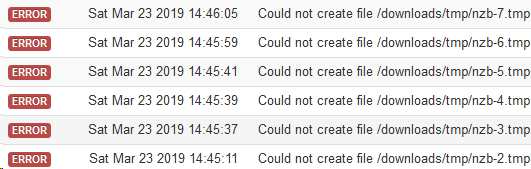
Hey all, just started getting this error in NZBGet, nothing has changed as far as config is concerned and a container restart wont fix it. Ive checked permissions while ssh'ed into the container and all seems OK. Not sure what to look at next?? EDIT: So last week I had a disk fill up and NZBGet couldn't write to the disk due to no space left. I have now given all disks some more space but maybe NZBGet hasn't seen this or something? I used Unbalance plugin to move some files from the full disk to one that had some space left on it.
-
i'll look to see if this can be fixed simply and if so I will apply an update. However if it is going to be hard to do without major changes to the script I probably will not bother. No worries. I didn't expect anything I just thought it was worth mentioning in case others were having issues now or in the future. Thanks itimpi and great script! Sent from my SM-G930F using Tapatalk I've worked out what line the message comes from. It appears to be a quirk of the way bash handles wildcard expansion. I will have to look up my bash special character handling to see if I can see a way of avoiding the issue. Thanks itimpi. Please don't waste your time if it's to much work though. It's only my OCD that makes me want a clean error free log file. Cheers Sent from my SM-G930F using Tapatalk
-
i'll look to see if this can be fixed simply and if so I will apply an update. However if it is going to be hard to do without major changes to the script I probably will not bother. No worries. I didn't expect anything I just thought it was worth mentioning in case others were having issues now or in the future. Thanks itimpi and great script! Sent from my SM-G930F using Tapatalk
-
Yeah I guess it's not. I have fix common problems but my issue was duplicate empty directories on random disks which this script picked up very well and I manually deleted. I had no duplicate files. Sent from my SM-G930F using Tapatalk
-
Sorry for reviving an old thread but just tried this out today and realised the script doesn't like apostrophes in file names. Not sure if it's worth fixing or not? ls: cannot access '/mnt/disk*/STORAGE/laptop backup/Dropbox/EMPLOYEES/example': No such file or directory The full directory is /mnt/disk*/STORAGE/laptop backup/Dropbox/EMPLOYEES/example's/
-
One thing I have noticed playing around with this today is all your movies have to be in a directory inside your movie share. They cant just be a movie file on its own in your movie share. So for example:- /movies/example.mkv needs to be /movies/example/example.mkv Cheers.
-
There was a previous bug in the plugin where the SMB settings on the Disk Shares would not properly restore. Just manually go to the Disk Shares (Shares - Disk) and reset the permissions you had originally (And delete the comment) I have re-set the permissions no worries. My issue is I cant find anywhere I can remove the comment that the Ransomware plugin has put there. User shares have a comment section which can be changed in the share settings. I cant find this setting for the Disk shares. Maybe an unRAID thing? hmm Never actually noticed, and since I'm using a VM at the moment its a pain to check (since I can't stop the array to enable disk shares). But, you can edit the file config/disk.cfg on the flash drive (any editor will work) and remove those comments in it manually. Cool that worked. One thing to note, it changed the comment for all the unassigned disks as well. ie, Disk 6, Disk 7, Disk 8 and so on which I don't even have. Thought I would mention it just in case it wasn't supposed to do that Speed is the issue. Faster for me to just set all the disks / shares to be read-only rather than try and figure out what's valid or not. Thought you might say something like that. Thanks again!
-
There was a previous bug in the plugin where the SMB settings on the Disk Shares would not properly restore. Just manually go to the Disk Shares (Shares - Disk) and reset the permissions you had originally (And delete the comment) I have re-set the permissions no worries. My issue is I cant find anywhere I can remove the comment that the Ransomware plugin has put there. User shares have a comment section which can be changed in the share settings. I cant find this setting for the Disk shares. Maybe an unRAID thing? hmm Never actually noticed, and since I'm using a VM at the moment its a pain to check (since I can't stop the array to enable disk shares). But, you can edit the file config/disk.cfg on the flash drive (any editor will work) and remove those comments in it manually. Cool that worked. One thing to note, it changed the comment for all the unassigned disks as well. ie, Disk 6, Disk 7, Disk 8 and so on which I don't even have. Thought I would mention it just in case it wasn't supposed to do that
-
There was a previous bug in the plugin where the SMB settings on the Disk Shares would not properly restore. Just manually go to the Disk Shares (Shares - Disk) and reset the permissions you had originally (And delete the comment) I have re-set the permissions no worries. My issue is I cant find anywhere I can remove the comment that the Ransomware plugin has put there. User shares have a comment section which can be changed in the share settings. I cant find this setting for the Disk shares. Maybe an unRAID thing?
-
Hey Squid, First of all great work on the plugin and thank you for sharing all that you do with the community. (I just read a few other posts of yours which helped me out with a couple of other issues) Anyway, I installed this plugin to have a look and had it running for a while. Didn't have any issues but decided i didn't need it right now so i uninstalled the plugin. One thing has remained and that is the comment section on the disk shares in the Shares tab. I still have :- Read Only Mode. Restore normal settings via Ransomware Protection Settings - But I cant find anywhere to change/remove this. Any ideas? Cheers.

-
Password protection if you haven't set it up already. See the docker hub page about htpasswd Yep I'm using htpasswd for all of the reverse proxies apart from plex requests. Anything else you can think of? Sent from my SM-G930F using Tapatalk
-
Hi all, I have this docker setup nicely and its doing everything i want it to do, ie. reverse proxy for a few dockers over https:// and serving some game files over standard http://. My question is about security and what, if anything, I need to make sure i'm doing to prevent security issues. Seeing that this docker is on my main unRAID machine with all my personal stuff on it as well as all my media is concerning me. I don't know enough about it and its keeping me up at night! The server has a A+ rating on SSL Labs which I assume is a good start but after that I need some guidance/reassurance. Can anyone shed some light on this for me? Cheers.
-
Thanks again! That worked a treat. Cheers



