





Kosti
Members
-
Joined
-
Last visited
Everything posted by Kosti
-
Thanks @wgstarks Let me try and test Cheers Kosti
-
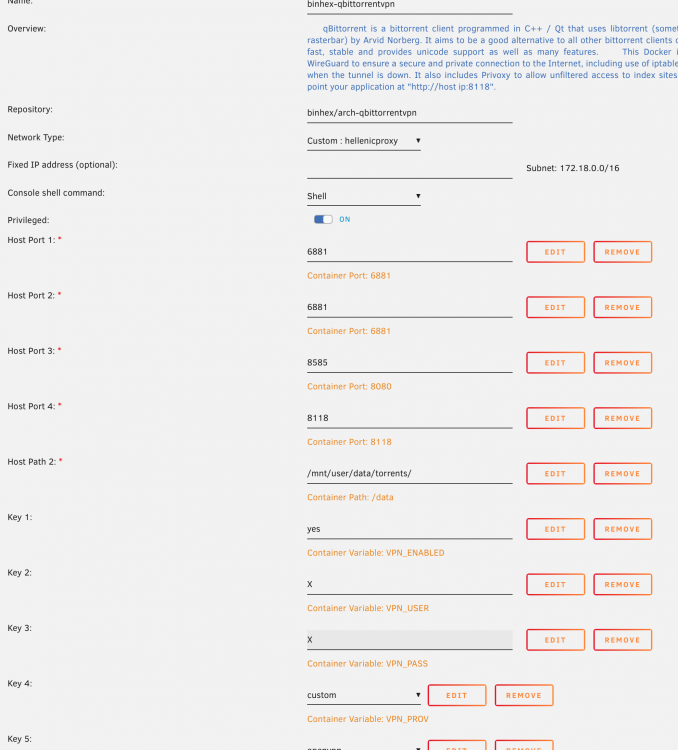
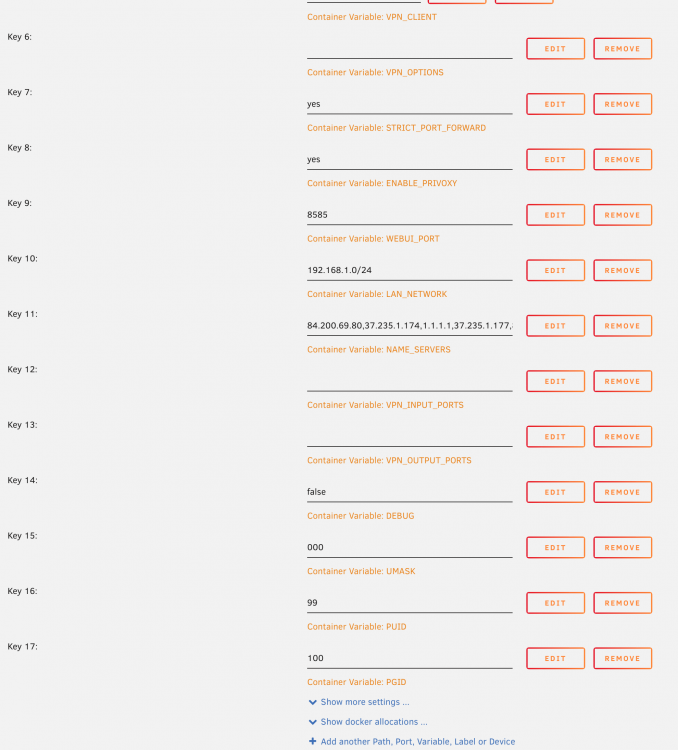
Anyone able to decipher this error, I am trying to use qbittorrent with vpn but no luck log file shows https://hub.docker.com/u/binhex/ 2022-01-23 11:18:04.075528 [info] Host is running unRAID 2022-01-23 11:18:04.088876 [info] System information Linux Unraid #1 SMP Wed Apr 7 08:23:18 PDT 2021 x86_64 GNU/Linux 2022-01-23 11:18:04.105725 [info] OS_ARCH defined as 'x86-64' 2022-01-23 11:18:04.120779 [info] PUID defined as '99' 2022-01-23 11:18:04.136815 [info] PGID defined as '100' 2022-01-23 11:18:04.451208 [info] UMASK defined as '000' 2022-01-23 11:18:04.465584 [info] Permissions already set for '/config' 2022-01-23 11:18:04.480955 [info] Deleting files in /tmp (non recursive)... 2022-01-23 11:18:04.499044 [info] VPN_ENABLED defined as 'yes' 2022-01-23 11:18:04.514234 [info] VPN_CLIENT defined as 'openvpn' 2022-01-23 11:18:04.528900 [info] VPN_PROV defined as 'custom' 2022-01-23 11:18:04.546205 [info] OpenVPN config file (ovpn extension) is located at /config/openvpn/au-syd.prod.surfshark_openvpn_udp.ovpn 2022-01-23 11:18:04.567833 [crit] VPN configuration file /config/openvpn/au-syd.prod.surfshark_openvpn_udp.ovpn does not contain 'remote' line, showing contents of file before exit... content of .ovpn client dev tun proto udp remote au-syd.prod.surfshark.com 1194 resolv-retry infinite remote-random nobind tun-mtu 1500 tun-mtu-extra 32 mssfix 1450 persist-key persist-tun ping 15 ping-restart 0 ping-timer-rem reneg-sec 0 remote-cert-tls server auth-user-pass #comp-lzo verb 3 pull fast-io cipher AES-256-CBC auth SHA512
-
duplicate post
-
sorry wrong thread
-
Update - Preclear shows as completed successfully I think Dec 27 09:26:12 Medusa preclear_disk_3551483156325046[20654]: Post-Read: progress - 90% verified @ 119 MB/s Dec 27 12:33:38 Medusa preclear_disk_3551483156325046[20654]: Post-Read: dd - read 12000105070592 of 12000105070592 (0). Dec 27 12:33:38 Medusa preclear_disk_3551483156325046[20654]: Post-Read: elapsed time - 21:16:26 Dec 27 12:33:38 Medusa preclear_disk_3551483156325046[20654]: Post-Read: dd exit code - 0 Dec 27 12:33:38 Medusa preclear_disk_3551483156325046[20654]: Post-Read: post-read verification completed! Dec 27 12:33:39 Medusa preclear_disk_3551483156325046[20654]: S.M.A.R.T.: Cycle 1 Dec 27 12:33:39 Medusa preclear_disk_3551483156325046[20654]: S.M.A.R.T.: Dec 27 12:33:39 Medusa preclear_disk_3551483156325046[20654]: S.M.A.R.T.: ATTRIBUTE INITIAL NOW STATUS Dec 27 12:33:39 Medusa preclear_disk_3551483156325046[20654]: S.M.A.R.T.: Reallocated_Sector_Ct 0 0 - Dec 27 12:33:39 Medusa preclear_disk_3551483156325046[20654]: S.M.A.R.T.: Power_On_Hours 84 125 Up 41 Dec 27 12:33:39 Medusa preclear_disk_3551483156325046[20654]: S.M.A.R.T.: Temperature_Celsius 38 38 - Dec 27 12:33:39 Medusa preclear_disk_3551483156325046[20654]: S.M.A.R.T.: Reallocated_Event_Count 0 0 - Dec 27 12:33:39 Medusa preclear_disk_3551483156325046[20654]: S.M.A.R.T.: Current_Pending_Sector 0 0 - Dec 27 12:33:39 Medusa preclear_disk_3551483156325046[20654]: S.M.A.R.T.: Offline_Uncorrectable 0 0 - Dec 27 12:33:39 Medusa preclear_disk_3551483156325046[20654]: S.M.A.R.T.: UDMA_CRC_Error_Count 0 0 - Dec 27 12:33:39 Medusa preclear_disk_3551483156325046[20654]: S.M.A.R.T.: SMART overall-health self-assessment test result: PASSED Dec 27 12:33:39 Medusa preclear_disk_3551483156325046[20654]: Cycle: elapsed time: 41:08:31 Dec 27 12:33:39 Medusa preclear_disk_3551483156325046[20654]: Preclear: total elapsed time: 41:08:32 BUT the below logs worries me a fair bit as to why is this popping up? Can anyone pls tell me why this is occurring and if this is normal? Dec 27 05:35:57 Medusa kernel: usb 1-14: USB disconnect, device number 10 Dec 27 05:35:57 Medusa kernel: usb 1-14: new full-speed USB device number 11 using xhci_hcd Dec 27 05:35:57 Medusa kernel: input: MSI MYSTIC LIGHT as /devices/pci0000:00/0000:00:14.0/usb1/1-14/1-14:1.0/0003:1462:7D17.0006/input/input9 Dec 27 05:35:57 Medusa kernel: hid-generic 0003:1462:7D17.0006: input,hiddev96,hidraw2: USB HID v1.10 Device [MSI MYSTIC LIGHT ] on usb-0000:00:14.0-14/input0 Any idea chaps?? I really want to start using this new unraid build but fear its not stable enough? PEACE Kosti
-
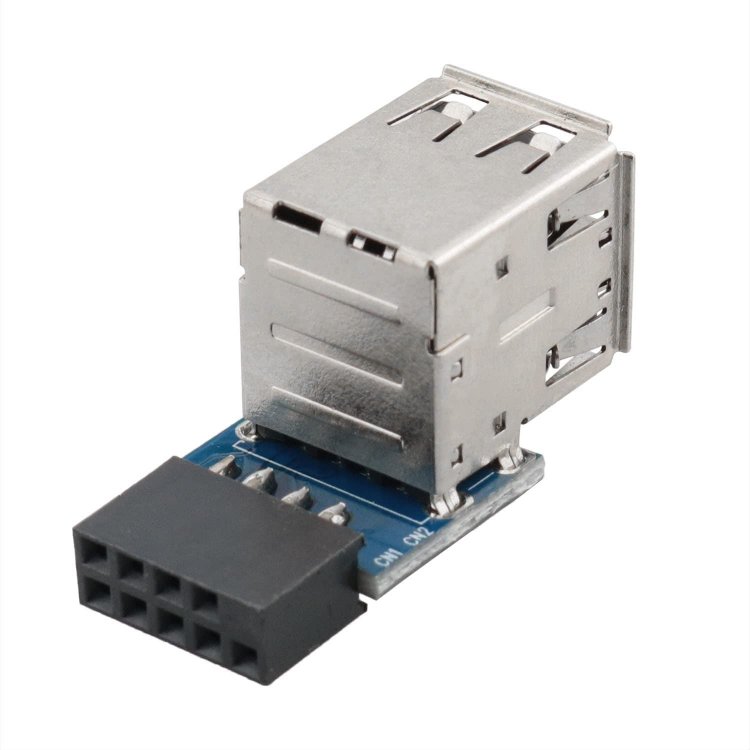
update So far by adding this mkdir /boot/config/modprobe.d/ echo -e 'blacklist btusb\nblacklist bluetooth' > /boot/config/modprobe.d/bluetooth.conf and reboot will disable BT drivers also changing onboard USB header adapter like this one Error log looks clean and pre-clear has continued operating without dropping out, phew, maybe this is the winning combination.. Thanks again for the support Simon&Squid fingers crossed I can start the array once pre clear is done
-
I have added in this to the USB boot and will try and run pre clear again for the 3rd time and see what happens. Logs look good at the moment no more BT errors or USB issues yet? Dec 25 19:01:08 Medusa nmbd[9746]: ***** Dec 25 19:01:10 Medusa webGUI: Successful login user root from 192.168.1.134 Dec 25 19:06:11 Medusa ntpd[1964]: kernel reports TIME_ERROR: 0x41: Clock Unsynchronized Not sure about the clock issues, but will see how my Google fu goes to fix it PEACE Kosti
-
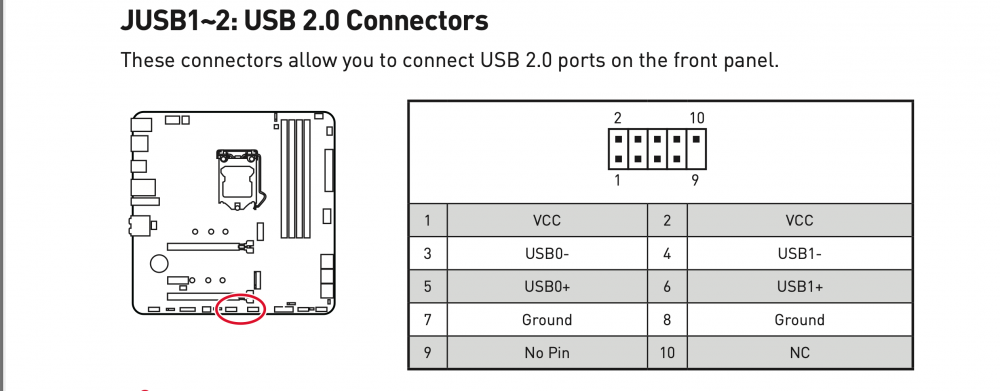
Thanks Mr @Squid I do find this so strange while using a HP Gen8 fully loaded never had one issue, moved to latest GEN hardware and nothing but issues Same USB Flash drive, prob only seen s a few reboots at best, as for using a USB2 I will try and find one and run a unregistered version before I try and tie my licence to another flash stick I I'm using an onboard USB2 port connector which is USB2 as shown in the attachment using a USB3 Flash that was used flawlessly in the HP like I mentioned bugger all use? I've never seen so much hardware issues with virtually brand new hardware, just think the unraid OS isn't compatible with what I have put together? Very frustrating trying to get this to play nice, but will now try and find a USB2 Flash drive for use on the onboard USB2 instead of the current one I have my license on PEACE Kosti BTW - Merry XMAS folks! EDIT - is there a way to test the USB flash drive in unraid?
-
Hi @SimonF Thanks for the reply, no I do not use BT at all, this is a new build But more issues and lost the pre clear drive Dec 24 11:06:12 Medusa kernel: Bluetooth: hci0: Reading Intel version information failed (-22) Dec 24 11:06:12 Medusa kernel: Bluetooth: hci0: Intel Read version failed (-22) Dec 24 11:06:12 Medusa kernel: Bluetooth: hci0: Intel reset sent to retry FW download Dec 24 11:06:12 Medusa kernel: usb 1-2: USB disconnect, device number 32 Dec 24 11:06:17 Medusa kernel: xhci_hcd 0000:00:14.0: xHCI host not responding to stop endpoint command. Dec 24 11:06:17 Medusa kernel: xhci_hcd 0000:00:14.0: USBSTS: Dec 24 11:06:17 Medusa kernel: xhci_hcd 0000:00:14.0: xHCI host controller not responding, assume dead Dec 24 11:06:17 Medusa kernel: xhci_hcd 0000:00:14.0: HC died; cleaning up Dec 24 11:06:17 Medusa kernel: usb 2-2: USB disconnect, device number 2 Dec 24 11:06:17 Medusa kernel: usb 2-2.1: USB disconnect, device number 3 Dec 24 11:06:17 Medusa kernel: sd 0:0:0:0: [sda] tag#0 UNKNOWN(0x2003) Result: hostbyte=0x07 driverbyte=0x00 cmd_age=5s Dec 24 11:06:17 Medusa kernel: sd 0:0:0:0: [sda] tag#0 CDB: opcode=0x88 88 00 00 00 00 02 7a 49 e0 00 00 00 08 00 00 00 Dec 24 11:06:17 Medusa kernel: blk_update_request: I/O error, dev sda, sector 10641596416 op 0x0:(READ) flags 0x80700 phys_seg 220 prio class 0 Dec 24 11:06:17 Medusa kernel: blk_update_request: I/O error, dev sda, sector 10641598464 op 0x0:(READ) flags 0x80700 phys_seg 199 prio class 0 Dec 24 11:06:17 Medusa kernel: blk_update_request: I/O error, dev sda, sector 0 op 0x0:(READ) flags 0x0 phys_seg 1 prio class 3 Dec 24 11:06:17 Medusa kernel: blk_update_request: I/O error, dev sda, sector 23437705215 op 0x0:(READ) flags 0x0 phys_seg 1 prio class 3 Dec 24 11:06:17 Medusa kernel: blk_update_request: I/O error, dev sda, sector 1504556004 op 0x0:(READ) flags 0x0 phys_seg 1 prio class 3 Dec 24 11:06:17 Medusa kernel: blk_update_request: I/O error, dev sda, sector 20592783 op 0x0:(READ) flags 0x0 phys_seg 1 prio class 3 Dec 24 11:06:17 Medusa kernel: blk_update_request: I/O error, dev sda, sector 10641596416 op 0x0:(READ) flags 0x0 phys_seg 1 prio class 0 Dec 24 11:06:17 Medusa kernel: Buffer I/O error on dev sda, logical block 1330199552, async page read Dec 24 11:06:17 Medusa kernel: blk_update_request: I/O error, dev sda, sector 3068526668 op 0x0:(READ) flags 0x0 phys_seg 1 prio class 3 Dec 24 11:06:17 Medusa kernel: usb 1-3: USB disconnect, device number 3 Dec 24 11:06:17 Medusa kernel: usb 1-7: USB disconnect, device number 4 Dec 24 11:06:17 Medusa rc.diskinfo[9889]: SIGHUP received, forcing refresh of disks info. Dec 24 11:06:17 Medusa kernel: usb 1-8: USB disconnect, device number 5 Dec 24 11:06:17 Medusa acpid: input device has been disconnected, fd 5 Dec 24 11:06:17 Medusa emhttpd: shcmd (89378): rmmod md-mod Dec 24 11:06:17 Medusa kernel: md: unRAID driver removed Dec 24 11:06:17 Medusa emhttpd: shcmd (89379): modprobe md-mod super=/boot/config/super.dat Dec 24 11:06:17 Medusa kernel: md: unRAID driver 2.9.17 installed Dec 24 11:06:17 Medusa kernel: sd 1:0:0:0: [sdb] tag#0 access beyond end of device Dec 24 11:06:17 Medusa kernel: blk_update_request: I/O error, dev sdb, sector 590696 op 0x0:(READ) flags 0x80700 phys_seg 1 prio class 0 Dec 24 11:06:17 Medusa kernel: sd 1:0:0:0: [sdb] tag#0 access beyond end of device Dec 24 11:06:17 Medusa kernel: blk_update_request: I/O error, dev sdb, sector 590696 op 0x0:(READ) flags 0x0 phys_seg 1 prio class 0 Dec 24 11:06:17 Medusa kernel: read_file: read error 5 Dec 24 11:06:17 Medusa kernel: md: could not read superblock from /boot/config/super.dat Dec 24 11:06:17 Medusa kernel: md: initializing superblock Dec 24 11:06:17 Medusa emhttpd: Unregistered - flash device blacklisted (EBLACKLISTED2) Dec 24 11:06:17 Medusa kernel: usb 1-11: USB disconnect, device number 6 Dec 24 11:06:17 Medusa kernel: usb 1-11.2: USB disconnect, device number 8 Dec 24 11:06:17 Medusa kernel: Buffer I/O error on dev sdb1, logical block 1, lost async page write Dec 24 11:06:17 Medusa kernel: Buffer I/O error on dev sdb1, logical block 536651, lost async page write Dec 24 11:06:17 Medusa kernel: Buffer I/O error on dev sdb1, logical block 551626, lost async page write Dec 24 11:06:17 Medusa kernel: usb 1-14: USB disconnect, device number 7 Dec 24 11:06:17 Medusa emhttpd: Device inventory: Dec 24 11:06:17 Medusa emhttpd: Samsung_SSD_970_EVO_Plus_1TB_S4EWNF0M319641V (nvme1n1) 512 1953525168 Dec 24 11:06:17 Medusa emhttpd: ST4000DM000-2AE166_WDH0PS6T (sdd) 512 7814037168 Dec 24 11:06:17 Medusa emhttpd: TOSHIBA_MG04ACA400N_X9PUKDAEFSYC (sdc) 512 7814037168 Dec 24 11:06:17 Medusa emhttpd: Samsung_SSD_970_EVO_Plus_1TB_S6P7NG0R727537X (nvme0n1) 512 1953525168 Dec 24 11:06:17 Medusa emhttpd: Error: (sdb) not present Dec 24 11:06:17 Medusa kernel: mdcmd (1): import 0 Dec 24 11:06:17 Medusa kernel: mdcmd (2): import 1 Dec 24 11:06:17 Medusa kernel: mdcmd (3): import 2 Dec 24 11:06:17 Medusa kernel: mdcmd (4): import 3 Dec 24 11:06:17 Medusa kernel: mdcmd (5): import 4 Dec 24 11:06:17 Medusa kernel: mdcmd (6): import 5 Dec 24 11:06:17 Medusa kernel: mdcmd (7): import 6 Dec 24 11:06:17 Medusa kernel: mdcmd (8): import 7 Dec 24 11:06:17 Medusa kernel: mdcmd (9): import 8 Dec 24 11:06:17 Medusa kernel: mdcmd (10): import 9 Dec 24 11:06:17 Medusa kernel: mdcmd (11): import 10 Dec 24 11:06:17 Medusa kernel: mdcmd (12): import 11 Dec 24 11:06:17 Medusa kernel: mdcmd (13): import 12 Dec 24 11:06:17 Medusa kernel: mdcmd (14): import 13 Dec 24 11:06:17 Medusa kernel: mdcmd (15): import 14 Dec 24 11:06:17 Medusa kernel: mdcmd (16): import 15 Dec 24 11:06:17 Medusa kernel: mdcmd (17): import 16 Dec 24 11:06:17 Medusa kernel: mdcmd (18): import 17 Dec 24 11:06:17 Medusa kernel: mdcmd (19): import 18 Dec 24 11:06:17 Medusa kernel: mdcmd (20): import 19 Dec 24 11:06:17 Medusa kernel: mdcmd (21): import 20 Dec 24 11:06:17 Medusa kernel: mdcmd (22): import 21 Dec 24 11:06:17 Medusa kernel: mdcmd (23): import 22 Dec 24 11:06:17 Medusa kernel: mdcmd (24): import 23 Dec 24 11:06:17 Medusa kernel: mdcmd (25): import 24 Dec 24 11:06:17 Medusa kernel: mdcmd (26): import 25 Dec 24 11:06:17 Medusa kernel: mdcmd (27): import 26 Dec 24 11:06:17 Medusa kernel: mdcmd (28): import 27 Dec 24 11:06:17 Medusa kernel: mdcmd (29): import 28 Dec 24 11:06:17 Medusa kernel: mdcmd (30): import 29 Dec 24 11:06:20 Medusa kernel: FAT-fs (sdb1): Directory bread(block 29352) failed Dec 24 11:06:20 Medusa kernel: FAT-fs (sdb1): Directory bread(block 29353) failed Dec 24 11:06:20 Medusa kernel: FAT-fs (sdb1): Directory bread(block 29354) failed Dec 24 11:06:20 Medusa kernel: FAT-fs (sdb1): Directory bread(block 29355) failed Dec 24 11:06:20 Medusa kernel: FAT-fs (sdb1): Directory bread(block 29356) failed Dec 24 11:06:20 Medusa kernel: FAT-fs (sdb1): Directory bread(block 29357) failed Dec 24 11:06:20 Medusa kernel: FAT-fs (sdb1): Directory bread(block 29358) failed Dec 24 11:06:20 Medusa kernel: FAT-fs (sdb1): Directory bread(block 29359) failed Dec 24 11:06:20 Medusa kernel: FAT-fs (sdb1): Directory bread(block 29360) failed Dec 24 11:06:20 Medusa kernel: FAT-fs (sdb1): Directory bread(block 29361) failed Dec 24 11:06:29 Medusa preclear_disk_3551483156325046[20546]: Post-Read: dd - read 5448497364992 of 12000105070592 (6551607705600). Dec 24 11:06:29 Medusa preclear_disk_3551483156325046[20546]: Post-Read: elapsed time - 7:54:07 Dec 24 11:06:29 Medusa preclear_disk_3551483156325046[20546]: Post-Read: dd command failed, exit code [1]. Dec 24 11:06:29 Medusa preclear_disk_3551483156325046[20546]: Post-Read: dd output: 2588975+0 records in Dec 24 11:06:29 Medusa preclear_disk_3551483156325046[20546]: Post-Read: dd output: 2588974+0 records out Dec 24 11:06:29 Medusa preclear_disk_3551483156325046[20546]: Post-Read: dd output: 5429472002048 bytes (5.4 TB, 4.9 TiB) copied, 28329.1 s, 192 MB/s Dec 24 11:06:29 Medusa preclear_disk_3551483156325046[20546]: Post-Read: dd output: 2589991+0 records in Dec 24 11:06:29 Medusa preclear_disk_3551483156325046[20546]: Post-Read: dd output: 2589990+0 records out Dec 24 11:06:29 Medusa preclear_disk_3551483156325046[20546]: Post-Read: dd output: 5431602708480 bytes (5.4 TB, 4.9 TiB) copied, 28341.4 s, 192 MB/s Dec 24 11:06:29 Medusa preclear_disk_3551483156325046[20546]: Post-Read: dd output: 2590957+0 records in Dec 24 11:06:29 Medusa preclear_disk_3551483156325046[20546]: Post-Read: dd output: 2590956+0 records out Dec 24 11:06:29 Medusa preclear_disk_3551483156325046[20546]: Post-Read: dd output: 5433628557312 bytes (5.4 TB, 4.9 TiB) copied, 28353.6 s, 192 MB/s Dec 24 11:06:29 Medusa preclear_disk_3551483156325046[20546]: Post-Read: dd output: 2591951+0 records in Dec 24 11:06:29 Medusa preclear_disk_3551483156325046[20546]: Post-Read: dd output: 2591950+0 records out Dec 24 11:06:29 Medusa preclear_disk_3551483156325046[20546]: Post-Read: dd output: 5435713126400 bytes (5.4 TB, 4.9 TiB) copied, 28366 s, 192 MB/s Dec 24 11:06:29 Medusa preclear_disk_3551483156325046[20546]: Post-Read: dd output: 2592951+0 records in Dec 24 11:06:29 Medusa preclear_disk_3551483156325046[20546]: Post-Read: dd output: 2592950+0 records out Dec 24 11:06:29 Medusa preclear_disk_3551483156325046[20546]: Post-Read: dd output: 5437810278400 bytes (5.4 TB, 4.9 TiB) copied, 28378.3 s, 192 MB/s Dec 24 11:06:29 Medusa preclear_disk_3551483156325046[20546]: Post-Read: dd output: 2593987+0 records in Dec 24 11:06:29 Medusa preclear_disk_3551483156325046[20546]: Post-Read: dd output: 2593986+0 records out Dec 24 11:06:29 Medusa preclear_disk_3551483156325046[20546]: Post-Read: dd output: 5439982927872 bytes (5.4 TB, 4.9 TiB) copied, 28390.5 s, 192 MB/s Dec 24 11:06:29 Medusa preclear_disk_3551483156325046[20546]: Post-Read: dd output: 2595041+0 records in Dec 24 11:06:29 Medusa preclear_disk_3551483156325046[20546]: Post-Read: dd output: 2595040+0 records out Dec 24 11:06:29 Medusa preclear_disk_3551483156325046[20546]: Post-Read: dd output: 5442193326080 bytes (5.4 TB, 4.9 TiB) copied, 28402.9 s, 192 MB/s Dec 24 11:06:29 Medusa preclear_disk_3551483156325046[20546]: Post-Read: dd output: 2596064+0 records in Dec 24 11:06:29 Medusa preclear_disk_3551483156325046[20546]: Post-Read: dd output: 2596063+0 records out Dec 24 11:06:29 Medusa preclear_disk_3551483156325046[20546]: Post-Read: dd output: 5444338712576 bytes (5.4 TB, 5.0 TiB) copied, 28415.3 s, 192 MB/s Dec 24 11:06:29 Medusa preclear_disk_3551483156325046[20546]: Post-Read: dd output: 2597060+0 records in Dec 24 11:06:29 Medusa preclear_disk_3551483156325046[20546]: Post-Read: dd output: 2597059+0 records out Dec 24 11:06:29 Medusa preclear_disk_3551483156325046[20546]: Post-Read: dd output: 5446427475968 bytes (5.4 TB, 5.0 TiB) copied, 28427.6 s, 192 MB/s Dec 24 11:06:29 Medusa preclear_disk_3551483156325046[20546]: Post-Read: dd output: dd: error reading '/dev/sda': Input/output error Dec 24 11:06:29 Medusa preclear_disk_3551483156325046[20546]: Post-Read: dd output: 2598045+0 records in Dec 24 11:06:29 Medusa preclear_disk_3551483156325046[20546]: Post-Read: dd output: 2598045+0 records out Dec 24 11:06:29 Medusa preclear_disk_3551483156325046[20546]: Post-Read: dd output: 5448495267840 bytes (5.4 TB, 5.0 TiB) copied, 28445 s, 192 MB/s Dec 24 11:06:29 Medusa preclear_disk_3551483156325046[20546]: Post-Read: post-read verification failed! Dec 24 11:06:29 Medusa preclear_disk_3551483156325046[20546]: /usr/local/emhttp/plugins/preclear.disk/script/preclear_disk.sh: line 1780: /boot/config/plugins/preclear.disk/4312537425768.sreport: No such file or directory Dec 24 11:06:30 Medusa preclear_disk_3551483156325046[20546]: S.M.A.R.T.: Error: Dec 24 11:06:30 Medusa preclear_disk_3551483156325046[20546]: S.M.A.R.T.: Dec 24 11:06:30 Medusa preclear_disk_3551483156325046[20546]: S.M.A.R.T.: ATTRIBUTE INITIAL NOW STATUS Dec 24 11:06:30 Medusa preclear_disk_3551483156325046[20546]: S.M.A.R.T.: Reallocated_Sector_Ct 0 - Dec 24 11:06:30 Medusa preclear_disk_3551483156325046[20546]: S.M.A.R.T.: Power_On_Hours 38 - Dec 24 11:06:30 Medusa preclear_disk_3551483156325046[20546]: S.M.A.R.T.: Temperature_Celsius 33 - Dec 24 11:06:30 Medusa preclear_disk_3551483156325046[20546]: S.M.A.R.T.: Reallocated_Event_Count 0 - Dec 24 11:06:30 Medusa preclear_disk_3551483156325046[20546]: S.M.A.R.T.: Current_Pending_Sector 0 - Dec 24 11:06:30 Medusa preclear_disk_3551483156325046[20546]: S.M.A.R.T.: Offline_Uncorrectable 0 - Dec 24 11:06:30 Medusa preclear_disk_3551483156325046[20546]: S.M.A.R.T.: UDMA_CRC_Error_Count 0 - Dec 24 11:06:30 Medusa preclear_disk_3551483156325046[20546]: error encountered, exiting... Something is going on and I do not think unraid likes this motherboard? Any ideas where to start ?
-
Hey All Problems still persist with my new build - I just follow some tube videos to setup a new unraid My SPECS CPU - Intel 11th Gen Core i5-11400 Motherboard - MSI MAG B560M Mortar Wi-Fi LGA 1200 mATX Motherboard RAM - G.Skill 2x16G F4-3200C16D-32GIS PC4-25600 DDR4 3200 Mhz DISKS 2 X 1TB 970 EVO ; 3 x 12TB Elemental Drives, some 4TB which will be removed soon I started a new pre clear last night on a single drive connected via USB3 and today no records of this being completed or finished or even started? I see the following in the logs below on repeat since 4AM, but I started the pre clear much earlier so I suspect the server rebooted? Dec 23 09:32:13 Medusa kernel: Bluetooth: hci0: Reading Intel version information failed (-22) Dec 23 09:32:13 Medusa kernel: Bluetooth: hci0: Intel Read version failed (-22) Dec 23 09:32:13 Medusa kernel: Bluetooth: hci0: Intel reset sent to retry FW download Dec 23 09:32:13 Medusa kernel: usb 1-2: USB disconnect, device number 114 Dec 23 09:32:13 Medusa kernel: xhci_hcd 0000:00:14.0: WARN Event TRB for slot 19 ep 4 with no TDs queued? Dec 23 09:32:13 Medusa kernel: xhci_hcd 0000:00:14.0: WARN Cannot submit Set TR Deq Ptr Dec 23 09:32:13 Medusa kernel: xhci_hcd 0000:00:14.0: A Set TR Deq Ptr command is pending. Dec 23 09:32:13 Medusa kernel: xhci_hcd 0000:00:14.0: WARN Set TR Deq Ptr cmd failed due to incorrect slot or ep state. Dec 23 09:32:13 Medusa kernel: usb 1-2: new full-speed USB device number 115 using xhci_hcd Dec 23 09:32:14 Medusa kernel: Bluetooth: hci0: Reading Intel version information failed (-22) Dec 23 09:32:14 Medusa kernel: Bluetooth: hci0: Intel Read version failed (-22) Dec 23 09:32:14 Medusa kernel: Bluetooth: hci0: Intel reset sent to retry FW download Dec 23 09:32:14 Medusa kernel: usb 1-2: USB disconnect, device number 115 Not sure how to fix this and not sure if this is causing my system to report these errors? Do I need to add options in my kernel parameters? This is a new fresh build and I first encounter issues due to bad ram, replaced this and now the above Any guidance on what I can do to make sure my system is stable for unraid use? PEACE Kosti
-
Hey, So new unraid box, all new, and ran in to issues with pre-clear, after some trouble shooting isolated the issue to possible ram, as ran a few memtest and one of the 16GB pairs failed the test Now server is running 32GB instead of 64GB while I RMA the suspect 32GB Kit, since the pre-clear failed, when I try to run again it details a previous PRCLR, should I resume it or start fresh clear and skip pre read? Thanks preclear_disk_3551483156325046_21811.txt
-
Should I resume the pre clear or start a new clear and skip pre and post read?
-
My update..I removed 32Gb of ram from the total of 64GB and ran a MEMtest of 4 passes, 1st 32GB kit PASS no issues. Removed this 32GB Kit and swapped them for the other new 32GB kit and restarted MEMtest, this has failed!!! Can't believe brand new RAM is running errors! I will set up UNRAID with 32GB and try the PRE-Clear again
-
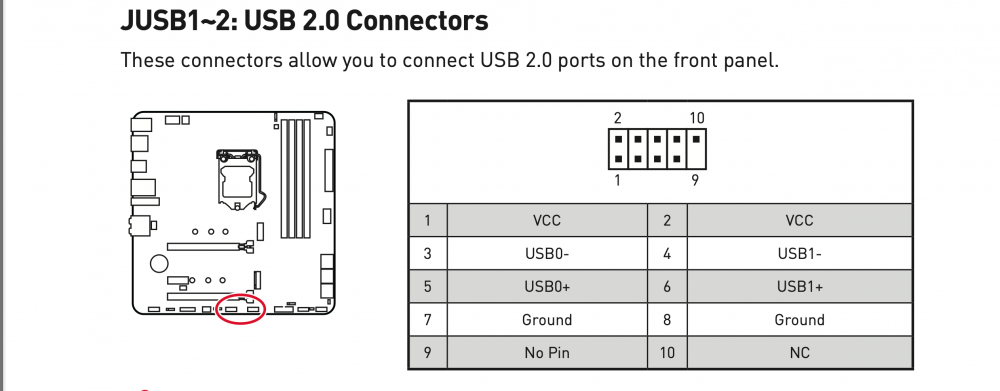
Hey, thanks for the reply gents, But I am a little confused with these responses, so if you have time to re-address ? @JorgeB[1] Is the method I used to pre-clear the cause of the failure because I do not have the array started and these are all unassigned disks and nothing is mapped yet as parity etc?? Should I use the above plugin you shown, is this different from what I used and followed guides from ibracorl to install top 20 apps, Does the one I installed the pre clear plugin in terms of the behaviour and tasks that different? @Squid[2]FYI I'm using a USB2 port and I have a USB onboard connector which is USB2 as shown in the attachement [thanks for the tip] so we're going to lean towards the USB flash drive for having an issue? So its in a USB2 using a USB3 Flash now the issue here or something else within my hardware? Should I use something like HIRENS CD and run MEM tests and stress test anything else considering everything is brand new? PEACE Kosti
-
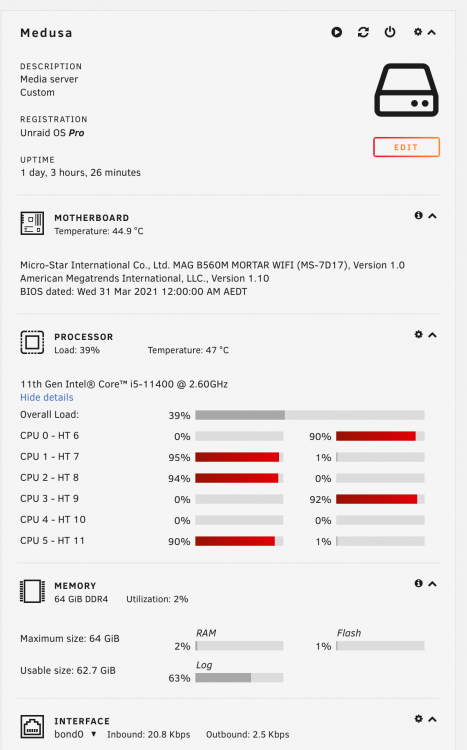
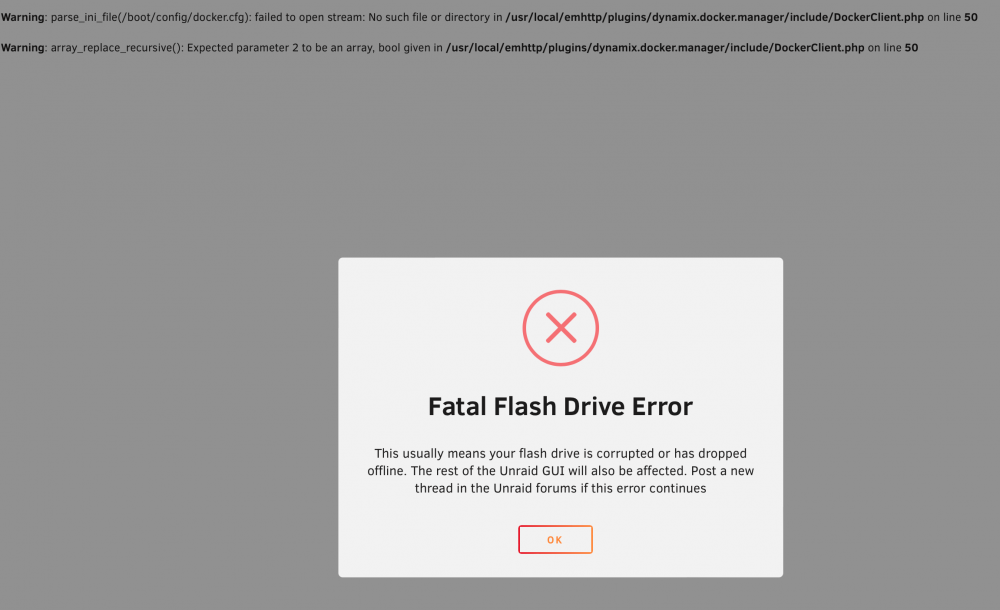
OK a bit of an update, seems something went horribly wrong, now the 2nd 12TB has also failed the pre-clear? But now I also got a fatal error from the flash drive I can try another USB stick although this one is a USB 3 type, never had any issues in the HP while it was under test before moving to this new hardware, Very strange! Thoughts? preclear.disk.txt
-
Hey All Been a while, I retired my HP GEN8 and with the sale of that machine I purchased and updated to a whole new system which I just booted it up last night for the first time, using a fresh install of unraid on the same USB so I could tie my licence to it easy. My SPECS CPU - Intel 11th Gen Core i5-11400 2.60GHz LGA1200 Desktop Processor - Retail Box comes with HSF Motherboard - MSI MAG B560M Mortar Wi-Fi LGA 1200 mATX Motherboard RAM - G.Skill 64G [(2x16G) X 2 ] F4-3200C16D-32GIS PC4-25600 DDR4 3200 Mhz CASE - Fractal Design Node 804 DISKS 2 X 1TB 970 EVO ; 3 x 12TB Elemental Drives, some 4TB which will be removed soon Since the 12TB came from Amazon and from overseas, I ran it through a pre clear, I just ran the 2 x 12TB in their USB enclosures and once has just failed? See attached file I am not sure if its my new PC or the actual drive? I only ran it preclear with clear and post check only and started both 12TB drives a few seconds after each other Have I got a bad 12TB or I should not run these together and run them one at a time Let me know what you guys think? PEACE Kosti preclear_disk_3551483156325046_21811.txt
-
As my current USB and the unraid OS is well over 30days, does this cause any problems if the trial license has expired or that I never aquired a trial licence? Meaning is this somehow crippling my system up? The plan was to test some features but life got in the way and with COVID I managed to test this on a ESXI prior to moving this as a stand alone, now I want to move this to another USB which there lies the next problem in that I just purchased 2 sandisc ultrafit usb 3.1 flash drive but the UBS creator doesn't recognize it ? I've used another similar USB3.0 stick (current) one just fine, and yes I've read that USB2 is preferred etc but what is the creator looking for? Given I purchased these 2 usb sticks to be identical for the purpose to be used for unRaid and both are not being detected by the creator, this is something I would've expected back in 2014 when I first looked unraid not in 2020 when I come back to check in? Is the manual install the only way to install unraid on these USB units and would I be able to transfer from current details from the old one to the new USBs given the tool doesn't work?
-
I have no idea, if the GUI knows where it has stopped it would have been nice for a continue where it left off, as to why they all show up as ok is not a good indication since I have + sign on some and not on others that have been done in the past Spewing
-
I tried the -t option but they all show up as DISK /dev/SDx IS PRECLEARED with GPT Protective MBR But I have not rebooted so can I trust it as all 8 drives show the same even the 2 drives still currently running which are almost complete on stage 10 Thanks mate appreciate you trying to calm me down Here is a snapshot of in mymain, the two in the middle (3TB) /dev/sde & /dev/sdd are the drives I accidently stopped by control C
-
Well I just precleared the same drive twice in error and I also now accidentally stopped it at at step 10 and another drive I stopped it at step 2 98% complete What do I do, I don't know if its possible to resume, as I was doing this via screen and using the Cntrl+a and somehow I hit C instead and it terminated the script, NO VERY HAPPY right now! These drives were already previously precleared and added them in th mix by error, since i was adding in more drive What will occur when I add them in UNRAID will it try to preclear them again? FFS EDIT - so read a fair bit and conclusion I am stuffed! So I can't "resume" the pre-clear, and this now pretty much left a sour taste in my mouth with pre-clearing, Damn my stupid figers and those damn screens control keeys of using ctrl A + C or N or P to go back and forth basically killed two of my sessions of which I should not have started in the first place since I had already spent all that time preclearing them already but you can, as noted, selectively run parts of it so how can I get a preclear signiture so the unRAID allows me to add them straight in the arry with a simple format not have to wait more hours? Why couldn't it tell me I'd already run preclear in those damn drives - arrgghhhhh I'm hating this right now - damn it its so hot where I am right now even the drives are sweating at 42C do no more preclearing again Listed my pro lic in the FS section :'(
-
@Traxxus Cool i though that was just my drives and controller setup doing tha, phew!! Q for devs, is there a way to speed this preclear process up? I don't pretend to understand any of the mechanics behind but damn, imagine how long it would take for 8TB / 10TB HDD & possibly larger ones Seem you would need a spare machine just for preclear process if your going to be adding in large amounts of huge sized HDD Cheers Kosti
-
Cheers Traxxus, I have been advised of the same and to stick to one thread about the same question, I just got paranoid...I am currently running preclear on another 1TB HDD which I had a backup of a back up, so its redundant for now, so will end up sing this as my cache drive instead of the 500G as I feel it will be to slow for caching Thanks again! EDIT My Samsung 1TB has finished the preclear - please let me know if this is safe to use as a cache drive as I noticed a few of these alarms in syslog prior to the preclear Jan 4 04:16:45 Matrix kernel: end_request: critical medium error, dev sdg, sector 7100176 One last thing I also notice the speed drops considerably, is this due to heat? The 500GB was worse Cheers Kosti syslog-2015-01-04.txt smart_start_1TB_sdg.txt smart_finish_1TB_sdg.txt
-
Finally completed the spare 500GB WD Blue (not Black as I thought) Drive I found in the draw - The plan is to use this is my cache, since I am not sure using the SDD as a cache is a good idea as it would most likely shorten it's life Anyways here are the logs for the 500G, is it safe to use? I guess asking about the duplication of HDD display in unmenu is not seen by anyone else so i should just ignore it right Cheers Kosti syslog_mod_2015-01-03.txt smart_start_sdg.txt smart_finish_sdg.txt
-
Kosti- When you preclear the drive, you can add it to the array "quickly" because all you do is stop the array (without powering down), assign the freshly precleared drive to the array, then restart the array. It will take unRAID just a couple of minutes to do its housekeeping, and you're back in business. If you don't preclear the drive, then you stop the array, assign the new drive to the array, restart the array, then wait hours and hours for unRAID to write zeros to every byte on the disk. During this time, your array is inaccessible, so you can't read from or write to it at all during that time. The "pre" clear process allows you to write the zeros to the new disk(s) while the array is still online, instead of doing it while it's offline. NOTE: both of these scenarios presume that you've powered down the machine and physically installed the drive. Thanks for taking the time to provide further information As I am starting a new build there is no array as yet Also I am not sure why all my drives are showing up twice as in the picture above?? Cheers Kosti
-
Thanks itimpi, I wasn't sure (in fact still not sure) if it's ok then to power down the server and add in another drive - preclear that and then setup the array, I assume unRAID will see/read the zero's and do it's thing a lot quicker so it's save to turn it off, move the drives as I please and install/build the array once I'm happy with the setupof disc's right Also forgive me for asking this in here, but just on adding this additional drive to be used as cache, it is better to be plugged into the MB SATA port or put this on the same HBA controller for speed performance? Would the use of an SSD be more suitable for a cache drive or will the constant writing to this drive kill it before it's normal usage life time? Many Thanks Kosti


