





jrdnlc
Members
-
Joined
-
Last visited
Everything posted by jrdnlc
-
Doesn't look the same that's why I asked to post screenshot.
-
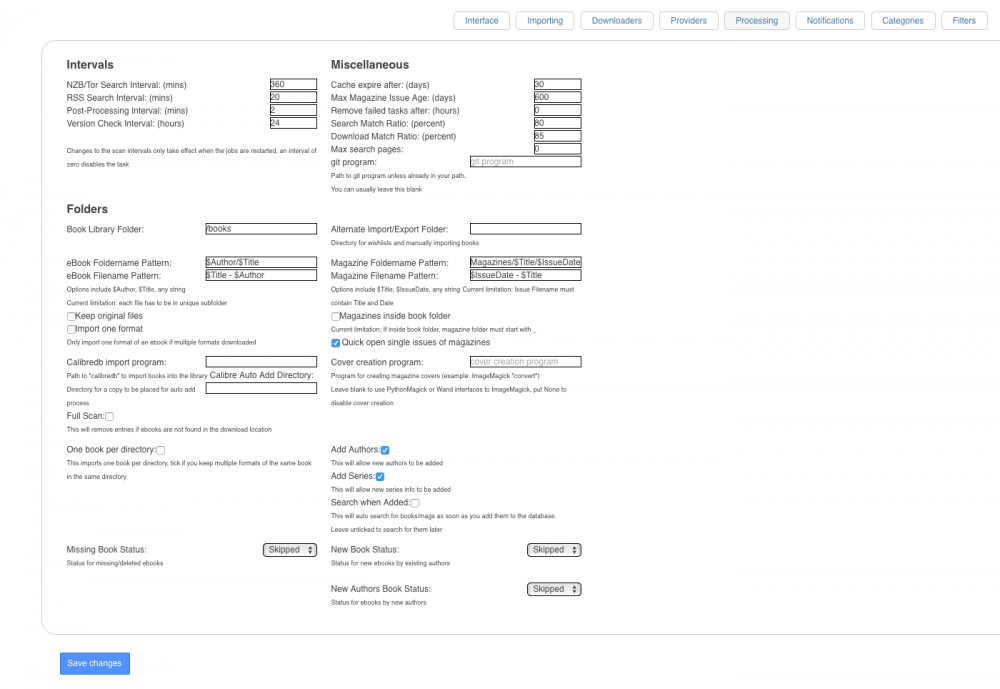
Post a screenshot of your post-process webui
-
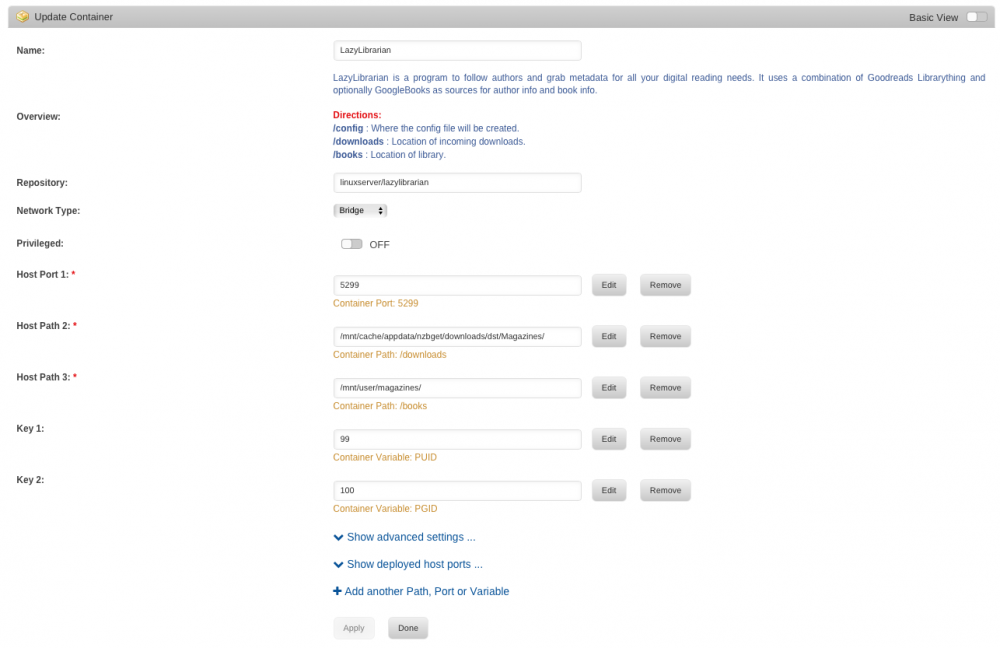
NZBget. Just add your mappings same as I had mine. Refer to the screenshots I posted and you should be able to reproduce it.
-
What do you mean? I just created a magazines share and mapped it in the docker.
-
Permissions denied. Refused to create the folder. It won't create it outside of the /books folder
-
root@localhost:# /usr/local/emhttp/plugins/dynamix.docker.manager/scripts/docker run -d --name="LazyLibrarian" --net="bridge" -e TZ="America/Los_Angeles" -e HOST_OS="unRAID" -e "PUID"="99" -e "PGID"="100" -p 5299:5299/tcp -v "/mnt/cache/appdata/nzbget/downloads/dst/Books/":"/downloads":rw -v "/mnt/user/books/":"/books":rw -v "/mnt/cache/appdata/lazylibrarian":"/config":rw linuxserver/lazylibrarian 654532fad7397e5116c63701f3e2411621c2b4338bc49003b961f2b73221b848
-
The docker wasn't letting me use /magazines for some reason but after changing it to /books It worked instantly. Not sure if the permission is due to the docker. Maybe adding a default /magazine mapping to the template would help?
-
Fixed it. Thanks for helping @CHBMB
-
Share is magazines so I changed it to /magazines. No luck same error
-
Sure here you go
-
It's a magazine.
-
I changed it now to /Magazines and same error. Permissions denied and won't create the folder
-
It's it already on Host Path 3 or am I doing it wrong?
-
Anyone have this successfully setup using magazines? I can't get the post-processing to work. It won't move them to a magazines share I created. EDIT: I think I figured it out but post-processing won't work. It tries to create directory and says permissions denied. PUID is set to 99 and PGID 100 in the docker container. 2017-07-16 12:07:29 ERROR Postprocessing for 2016-11-01 - Magpi has failed: Unable to create directory Magazines/Magpi/2016-11-01: Permission denied
-
I don't use the ddclient docker. I use my router dynamic dns service to update my IP. Let me know how that goes. Feel free to message me
-
What's the fix for this? Should I just ignore the error? gyp WARN EACCES user "undefined" does not have permission to access the dev dir "/root/.node-gyp/6.4.0" gyp WARN EACCES attempting to reinstall using temporary dev dir "/usr/lib/node_modules/homebridge/node_modules/curve25519-n2/.node-gyp" make: Entering directory `/usr/lib/node_modules/homebridge/node_modules/curve25519-n2/build' CXX(target) Release/obj.target/curve/node_curve.o SOLINK_MODULE(target) Release/obj.target/curve.node COPY Release/curve.node make: Leaving directory `/usr/lib/node_modules/homebridge/node_modules/curve25519-n2/build' > [email protected] install /usr/lib/node_modules/homebridge/node_modules/ed25519 > node-gyp rebuild gyp WARN EACCES user "undefined" does not have permission to access the dev dir "/root/.node-gyp/6.4.0" gyp WARN EACCES attempting to reinstall using temporary dev dir "/usr/lib/node_modules/homebridge/node_modules/ed25519/.node-gyp" make: Entering directory `/usr/lib/node_modules/homebridge/node_modules/ed25519/build'
-
docker exec -it homebridge bash is not working for me root@unRAID:~# docker exec -t homebridge bash bash: docker: command not found EDIT: I got it to work. The correct command is docker exec -it Homebridge /bin/bash
-
If you need help setting this up with Google Domains let me know. I just switched my domains to Google and took me a about a day to figure things out. All good now though
-
Is this a bug? Jul 6 18:00:09 unRAID Plugin Auto Update: ca.docker.autostart.plg version 2017.07.06 does not meet age requirements to updateJul 6 18:00:10 unRAID Plugin Auto Update: enhanced.log.plg version 2017.07.06 does not meet age requirements to updateJul 6 18:00:11 unRAID Plugin Auto Update: preclear.disk.plg version 2017.07.05c does not meet age requirements to update I'm on 6.3.5
-
That worked. Thanks!
-
I can't get this docker to start. I get the following error *** Killing all processes... *** Running /etc/my_init.d/00_regen_ssh_host_keys.sh... *** Running /etc/my_init.d/40_install_xeoma.sh... grep: /config/xeoma.conf: No such file or directory /etc/my_init.d/40_install_xeoma.sh: line 131: /config/xeoma.conf: No such file or directory *** /etc/my_init.d/40_install_xeoma.sh failed with status 1
-
How do I update netdata and setup notifications? webUI says there's an update available but I checked for updates on the unraid gui and t says up-to-date.
-
Is this docker still being updated? I can't upgrade to the latest version and docker app stops working sometimes out of nowhere. If someone can make an official unraid docker for this I will paypal some money as a thank you and support
-
Where are the MCE events logged? I installed mcelog using Nerdpack but I don't see it being logged on the syslog.
-
Got it. Thanks for the help!


