





Acps
Members
-
Joined
-
Last visited
Everything posted by Acps
-
Just another observation, I reinstalled Windows 10, and firefox. And still cannot get pass the password login. Any suggestions?
-
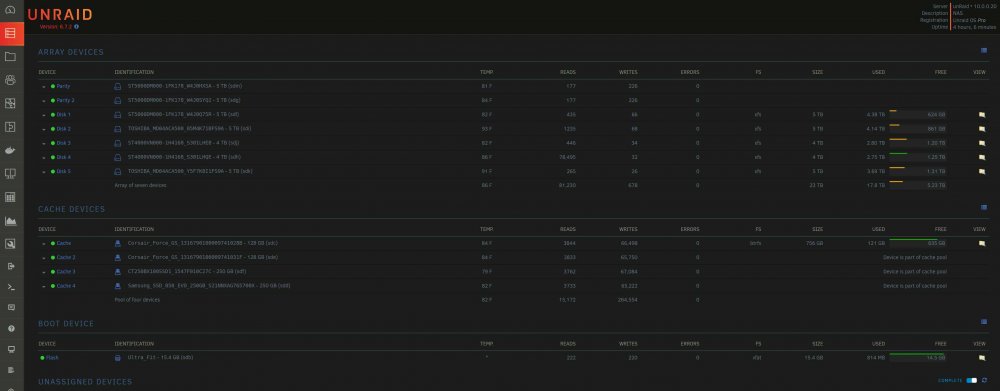
My array is only sitting at about 25tb, and almost 1tb for ssd cache pool. 90% of my data on my array is media, aka movies/tv shows for my plex server. And just about any piece of software for windows thats popular, as well as 100's of iso images of different windows 10 builds. I use P2P to download all my data on my terribly slow dsl speeds at 12Mbps/750Kbps. I dont delete anything and i prolly have several 100gbs of duplicate data lol. I only have 3 dockers installed, Plex, deluge and krusader. My server is severely under utilized, and i need to lookup and expand my dockers/plugins to take advantage of whats out there. My current struggle is I am using a unsupported sas controller, that drop disks often, causes read and write errors, and often needs to be rebooted to ensure performance doesnt struggle due to in adequate drivers that fail or disable for no reason. Also my i5 cpu is getting taxxed pretty hard by Plex transcoding. I installed at the start just a basic heatsink, but now that doesnt seem to be enough as I am getting a ton of CPU overheating errors and its being throttled down to prevent damage. My case is very well ventilated with x8 120mm and x4 140mm. But when all the drives are spun up doing work it gets faily warm. I wanna know what you guys need arrays that are well over 100tb, is it for enterprise type of setups? Cost has to be enormous lol.
-
So i have had the issue before where i can no longer login to the deluge docker with the default password "deluge". I am using firefox as my web browser, it seems to work no problem after a fresh install of windows 10, but some weeks/months later it no longer lets me login. Ive tried reinstalling the docker. deleteing my docker image, using every other deluge docker on the app store, but they all end up with the same problem. A work around i found was to use Microsoft Edge browser, and itll let me login with the default "deluge" password with no issues, So its related to firefox somehow. I just tried uninstalling and reinstalling firefox but that didnt work either. Gonna post my logs, would appreciate any help trying to solve this. Thanks in advance! ~Acps unraid-diagnostics-20190913-1912.zip
-
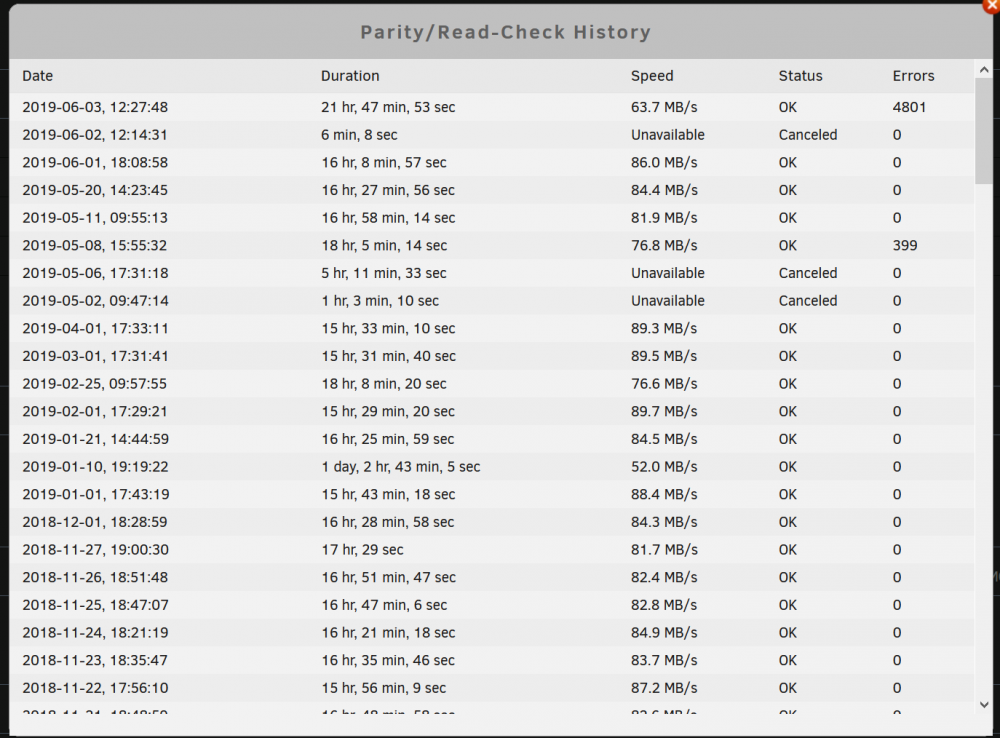
Well just today I ran into some problems with my Parity 2 drive, its disabled now, and it had over 4801 errors after my most current parity check. So I might have some other serious issues going on, anyone have any direction for me to try and troubleshoot to see what is exactly going on? Here is my latest diagnostic reports. Ty in advance! ~Acps P.S> I attached my Enhanced Log Viewer results too. If anyone has a few min to look it over for me please. Ty guys! unraid-diagnostics-20190603-2247.zip unraidenhancedlogviewer-02JUN19.txt
-
Anyone able to take a few mins to take a peek at my logs for me, its extremely inconvenient and I dont know where to start to try and fix it. Thanks in advance! ~Acps
-
Here is my run command i think: The issue didnt start until i dicked up my cache pool when i installed 2 more ssds a few weeks ago. I lost all my appdata and had to resinstall dockers. I made a new docker image file too krusaderdockerlog.zip unraid-diagnostics-20190531-1425.zip
-
I'm still having this issue where Krusader acts like its a fresh install and several prompts to set it up for the first time. It happens everytime i start the docker. Can anyone take a look at my log to see if there is any glaring issues? Ty in advance ~Acps
-
I had to reinstall my cache pool of ssds this week, and i didnt have a backup saved since it was setup as raid 0. I reinstalled Krusader, however everytime i launch it, it prompts me a bunch of windows thinking its being setup for the first time, not sure what to try to fix it, so i attached my logs if you could take a peek. Thanks in advanced! ~Acps unraid-diagnostics-20190506-2052-06MAY19.zip krusader-binhex-logs-06MAY19.zip
-
Accidentally posted this in another thread: Just like to mention I was able to fix it myself, by deleting the perms file and restarting the docker!
-
Mighta been to high to realize that lol, sorry
-
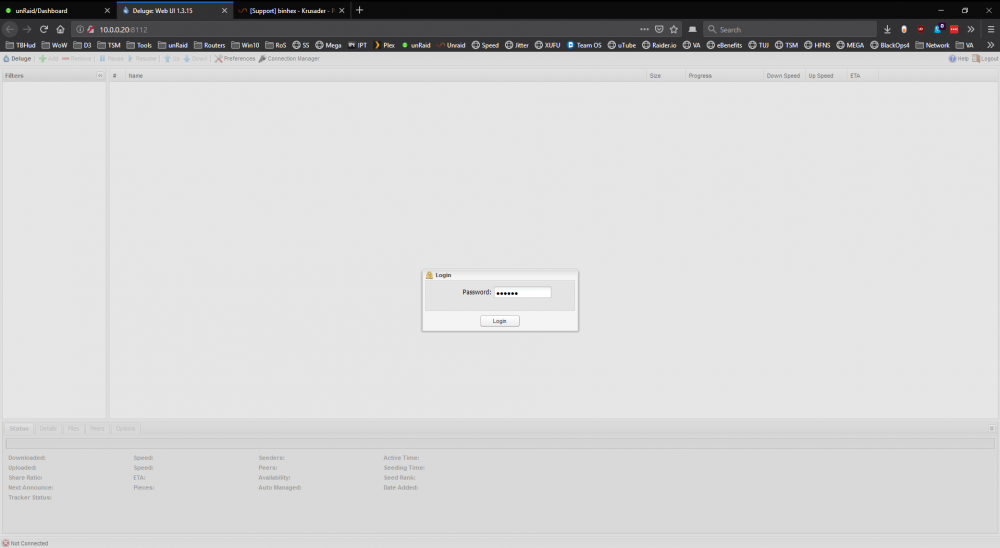
Ok Ive run into this issue before where I cannot login to the webgui of deluge. I get this far and hit enter, and then it just re-prompts me for the password again. I cant remember what I did last time to fix this. Any ideas?
-
From experience I can tell you it's very hard to brick a modern motherboard these days. Specifically gigabyte boards. Gigabyte puts a backup copy of the bios that can't be accessed by the user. Only able to copy it if and when you brick your motherboard and corrupt your primary bios. I had bricked my motherboard for a few days and about gave up until I found something like this: http://www.overclockers.com/forums/showthread.php/697533-GUIDE-Forcing-backup-BIOS-on-Gigabyte-motherboards I found a very nasty flaw with z77-hd3 original bios firmware that would brick it and had nothing to do with trying to update it. Once I learned how to system restore the bios once its corrupt. I repeated it a few times, motherboard is still being used without any problems. Similar thing happened when I was messing with DD-WRT on my Asus router. Thing was bricked for a few days until I uncovered a way to recover my router. Main thing is if you do brick something, don't lose hope. Spend some time searching online for a recovery method. Most tech within the last 10 years is fairly brick proof to the average user. Acps
-
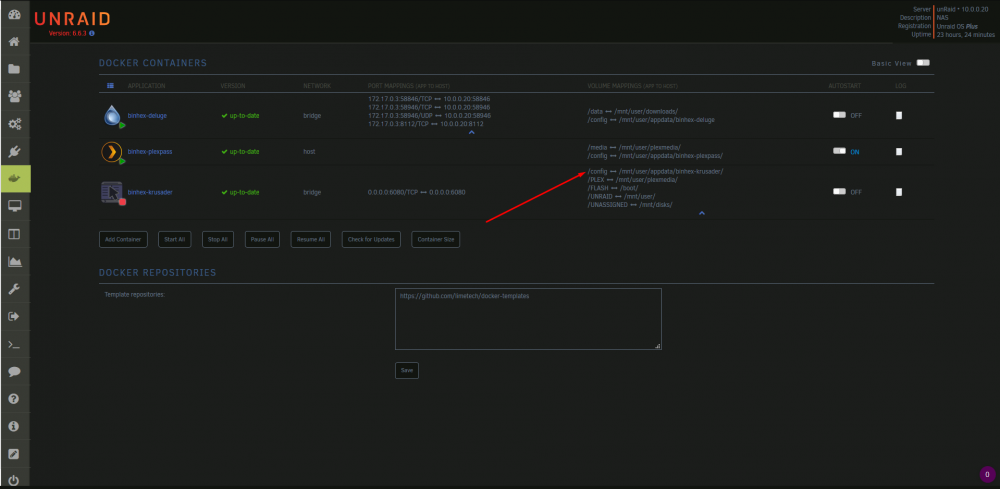
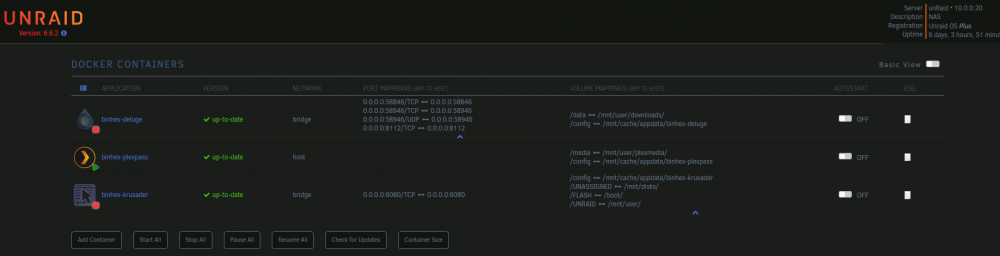
Ok so I tried multiple things to try and fix this, including delete the docker and reinstalling, deleting the docker template, resetting and installing with default settings, deleting the dock image itself and rebuilding it. None of which fixed the issue. Until I found this post: And looking at my docker logs I could see it was having permission issues, so I did 2 things, first was to set my appdata folder "cache" settings to Prefer instead of Only. And I adjusted the appdate install path within the template from to So this is what my docker tab looks like now: The permission issues in the log stopped and the errors I was getting every time I launched the docker have stopped as well. Can able tell me whether or not this is how your supposed to set the path for the "appdata /config"? I switched my other docker apps to /mnt/user/ as well instead of /mnt/cache/. The whole reason why this even popped up for me was because I swapped out some ssds for my cache drive and reinstalled all my dockers from scratch. It had been running fine before that for atleast a year or so. Thanks in advance! ~Acps
-
I am having this same issue after swapping cache drives and choosing to rebuild my dockers from scratch. I think there is some sort of permission error going on, not only do I get this same error each time but it also walks me through the tutorial for the first time each time. Here is what my dockers look like I have also tried with all default settings as well as deleting my docker user template on my flash drive and trying another install, but nothing helps. Here is my docker log as well: supervisord.rar I thought that this might be related: https://forums.unraid.net/topic/72736-fix-common-problems-binhex-krusader-newbie-question/ But i still have issue without mapping anything but the default and excluding Unassigned devices to see if it would help. If anyone could point me in the right direction to try and fix this I would really appreciate it. P.S. I had a very much similar issue with deluge docker awhile back as well: https://forums.unraid.net/topic/62206-dockerappdata-permission-issue/ Thanks in advance for the help as always! ~Acps
-
Was going over some settings in my dockers, and was wondering if Privileged was needing to be turned on since the docker is ran as a Host type network?
-
i have no idea how hard/easy this is as ive never used google drive, for now i will add it to the list of requests and take a look at some point to see if its doable. Binhex, Thanks for the great work, been using your plexpass plugin for sometime now! Any chance you looked at a possibility for a google drive, realizing it takes quite a bit of time and resources to make a docker from scratch. I happen to be in a position where I rely heavily on cloud drives, and having several desktops, laptops and devices at home on a extremely slow DSL connection, having a centralized shared folder for easy access is ideal then downloading files to every device and for each update! If it is something that just will need some spare time from you I totally understand, but if it not doable I would like to start looking for an alternative, possible OneDrive? Gross Microsoft, and I only use Google out of habit and the fact I have several GBs stored there! Thanks for your time in advance. bro! ~Acps
-
Thought I would point anyone experiencing latency issues to the following thread: https://lime-technology.com/forum/index.php?topic=47414.0 It looks like plex server may be causing some latency/lag on slower networks. I just updated binhex's plugin and it seems to possibly resolved? As of this moment I am not showing issues, but it was very random before. Ill keep an eye on it and post any updates if needed! Good Luck
-
Most likely a dumb question, but is there a way to have PMS transcode to memory instead of a tmp folder?
-
that makes sense, since they do something different. im rebuilding my server tonight. installing sata controller card, new hdd and a new ssd for cache pool going to rebuild docker image and start from scratch. app will be rebuilt too, so ill have it set permissions. I want to say I tried at 1 point deleting the folder completely, not creating it but specifying it in the folder path, so that when it pulled from container it created the folder too. OK, I got it working now. I can't say for sure what fixed it as I did a couple things. After expanding my cache drive, I started from scratch with a new docker image, as well as new directories. I am fairly certain it was a permission issue, whether it really was that or the docker. A fresh new install with new folder names and letting the docker create and assign permissions seemed to work. PIA VPN worked without a hitch again, thanks for the help.
-
Any chance for a Google Drive docker? I notice there are a lot of one drives not 0 Google Drive, is that because it is hard to integrate or just the Microsoft bandwagon?
-
that makes sense, since they do something different. im rebuilding my server tonight. installing sata controller card, new hdd and a new ssd for cache pool going to rebuild docker image and start from scratch. app will be rebuilt too, so ill have it set permissions. I want to say I tried at 1 point deleting the folder completely, not creating it but specifying it in the folder path, so that when it pulled from container it created the folder too.
-
Attached In the Deluge docker, set the download path to /data I thought it was a little ironic that I ran into the same issue as this. I cannot get any torrents to save to mapped downloads dir, it appears it is unavailable and then it just resorts to saving inside the docker file itself??? As a fallback I guess?? I can't see in the dockerfile, but I searched for hours in user shares, spun down all drives and only one running was cache drive as my app/docker/vm disk. I did quite a bit of testing trying to figure this out. So first I will upload a few logs and a pic of my setup so you guys can see where i stand and then ill go into what I found! Logs TLDR: "core:187 Failed to load lt state: [Errno 2] No such file or directory:" Now, this is definitely related to the config and data mappings. But it is not full on broke/not working, LOL. I tried the using just the /data and /data/ and / and /data/downloads and /data/downloads, and a lot of other combinations. After several hours and getting no where I decided to revert back to deluge without VPN. After several more hours i found that it was the exact same issue, I then realized I did not use binhex repo before, I used linuxserver's. So i loaded it up using the same mappings path as binhex and it worked right off the bat first try. I was somewhat relieved that it wasn't myself being an idiot, yet. Use same mappings and paths inside the docker I could not get it to work. Now what I did find, was that I could have a path setup in configuration for a path to save .torrents, that worked without a hitch in several locations I tried. I tried settings the paths the same for torrents and data, but only the .torrent ever showed up. Then I setup the move to when completed, that worked like a charm as well, and could be used as a TEMP fix right now. But I want to get it downloading in the right dir to begin with. I also fiddled with trying to mount to user shares and then disks/cache, neither seemed to work. To top it all off, I did test my VPN torrent setup, and that is working right out of the box LOL. So once I get this figured out I will be rolling. Would appreciate any help in trying to get this resolved! Thanks in advance! I am still having this issue, it is quite frustrating. Is this a deluge issue? Docker issue? Or is it an id10t self made issue?
-
~3rd~ I changed it to 192.168.1.1/24 , should have just left it at 192.168.1.0/24, was thinking of my gateway IP lol. My unRaid is 192.168.1.250, but I believe we are just specifying the subnet and 255 range we are in?
-
Attached In the Deluge docker, set the download path to /data I thought it was a little ironic that I ran into the same issue as this. I cannot get any torrents to save to mapped downloads dir, it appears it is unavailable and then it just resorts to saving inside the docker file itself??? As a fallback I guess?? I can't see in the dockerfile, but I searched for hours in user shares, spun down all drives and only one running was cache drive as my app/docker/vm disk. I did quite a bit of testing trying to figure this out. So first I will upload a few logs and a pic of my setup so you guys can see where i stand and then ill go into what I found! Logs TLDR: "core:187 Failed to load lt state: [Errno 2] No such file or directory:" Now, this is definitely related to the config and data mappings. But it is not full on broke/not working, LOL. I tried the using just the /data and /data/ and / and /data/downloads and /data/downloads, and a lot of other combinations. After several hours and getting no where I decided to revert back to deluge without VPN. After several more hours i found that it was the exact same issue, I then realized I did not use binhex repo before, I used linuxserver's. So i loaded it up using the same mappings path as binhex and it worked right off the bat first try. I was somewhat relieved that it wasn't myself being an idiot, yet. Use same mappings and paths inside the docker I could not get it to work. Now what I did find, was that I could have a path setup in configuration for a path to save .torrents, that worked without a hitch in several locations I tried. I tried settings the paths the same for torrents and data, but only the .torrent ever showed up. Then I setup the move to when completed, that worked like a charm as well, and could be used as a TEMP fix right now. But I want to get it downloading in the right dir to begin with. I also fiddled with trying to mount to user shares and then disks/cache, neither seemed to work. To top it all off, I did test my VPN torrent setup, and that is working right out of the box LOL. So once I get this figured out I will be rolling. Would appreciate any help in trying to get this resolved! Thanks in advance! deluged1.txt deluged4.txt
-
archedraft, I have a few more things I would like to see if you could help me. I went ahead a bought a PCIe USB 3.0 expansion card. I installed it and started testing all the 3.0 ports. There are 7 total, 5 external and 2 internal, all 3.0. Here is what I have so far. lspci | grep USB: 00:14.0 USB controller: Intel Corporation 9 Series Chipset Family USB xHCI Controller 00:1a.0 USB controller: Intel Corporation 9 Series Chipset Family USB EHCI Controller #2 00:1d.0 USB controller: Intel Corporation 9 Series Chipset Family USB EHCI Controller #1 06:00.0 USB controller: Fresco Logic Device 1100 (rev 10) The Intel controller is my onboard USB ports, and the Fresco Logic Device is my PCIe USB 3.0 expansion card. Internal - lsusb: Bus 003 Device 004: ID 154b:00ad PNY Bus 004 Device 008: ID 154b:00ad PNY External - lsusb: Bus 004 Device 003: ID 154b:00ad PNY Bus 004 Device 004: ID 154b:00ad PNY Bus 004 Device 005: ID 154b:00ad PNY Bus 004 Device 006: ID 154b:00ad PNY Bus 004 Device 007: ID 154b:00ad PNY readlink /sys/bus/usb/devices/usb: ../../../devices/pci0000:00/0000:00:14.0/usb1 ../../../devices/pci0000:00/0000:00:14.0/usb2 ../../../devices/pci0000:00/0000:00:1c.4/0000:06:00.0/usb3 ../../../devices/pci0000:00/0000:00:1c.4/0000:06:00.0/usb4 ../../../devices/pci0000:00/0000:00:1a.0/usb5 ../../../devices/pci0000:00/0000:00:1d.0/usb6 System Devices - IOMMU Groups: /sys/kernel/iommu_groups/0/devices/0000:00:00.0 /sys/kernel/iommu_groups/1/devices/0000:00:01.0 /sys/kernel/iommu_groups/1/devices/0000:01:00.0 /sys/kernel/iommu_groups/1/devices/0000:01:00.1 /sys/kernel/iommu_groups/2/devices/0000:00:02.0 /sys/kernel/iommu_groups/3/devices/0000:00:03.0 /sys/kernel/iommu_groups/4/devices/0000:00:14.0 /sys/kernel/iommu_groups/5/devices/0000:00:16.0 /sys/kernel/iommu_groups/6/devices/0000:00:1a.0 /sys/kernel/iommu_groups/7/devices/0000:00:1b.0 /sys/kernel/iommu_groups/8/devices/0000:00:1c.0 /sys/kernel/iommu_groups/8/devices/0000:00:1c.2 /sys/kernel/iommu_groups/8/devices/0000:00:1c.3 /sys/kernel/iommu_groups/8/devices/0000:00:1c.4 /sys/kernel/iommu_groups/8/devices/0000:03:00.0 /sys/kernel/iommu_groups/8/devices/0000:04:00.0 /sys/kernel/iommu_groups/8/devices/0000:06:00.0 /sys/kernel/iommu_groups/9/devices/0000:00:1d.0 /sys/kernel/iommu_groups/10/devices/0000:00:1f.0 /sys/kernel/iommu_groups/10/devices/0000:00:1f.2 /sys/kernel/iommu_groups/10/devices/0000:00:1f.3 System Devices - PCI Devices: 00:00.0 Host bridge: Intel Corporation 4th Gen Core Processor DRAM Controller (rev 06) 00:01.0 PCI bridge: Intel Corporation Xeon E3-1200 v3/4th Gen Core Processor PCI Express x16 Controller (rev 06) 00:02.0 VGA compatible controller: Intel Corporation Xeon E3-1200 v3/4th Gen Core Processor Integrated Graphics Controller (rev 06) 00:03.0 Audio device: Intel Corporation Xeon E3-1200 v3/4th Gen Core Processor HD Audio Controller (rev 06) 00:14.0 USB controller: Intel Corporation 9 Series Chipset Family USB xHCI Controller 00:16.0 Communication controller: Intel Corporation 9 Series Chipset Family ME Interface #1 00:1a.0 USB controller: Intel Corporation 9 Series Chipset Family USB EHCI Controller #2 00:1b.0 Audio device: Intel Corporation 9 Series Chipset Family HD Audio Controller 00:1c.0 PCI bridge: Intel Corporation 9 Series Chipset Family PCI Express Root Port 1 (rev d0) 00:1c.2 PCI bridge: Intel Corporation 9 Series Chipset Family PCI Express Root Port 3 (rev d0) 00:1c.3 PCI bridge: Intel Corporation 9 Series Chipset Family PCI Express Root Port 4 (rev d0) 00:1c.4 PCI bridge: Intel Corporation 9 Series Chipset Family PCI Express Root Port 5 (rev d0) 00:1d.0 USB controller: Intel Corporation 9 Series Chipset Family USB EHCI Controller #1 00:1f.0 ISA bridge: Intel Corporation 9 Series Chipset Family Z97 LPC Controller 00:1f.2 SATA controller: Intel Corporation 9 Series Chipset Family SATA Controller [AHCI Mode] 00:1f.3 SMBus: Intel Corporation 9 Series Chipset Family SMBus Controller 01:00.0 VGA compatible controller: NVIDIA Corporation GM107 [GeForce GTX 750 Ti] (rev a2) 01:00.1 Audio device: NVIDIA Corporation Device 0fbc (rev a1) 03:00.0 Ethernet controller: Realtek Semiconductor Co., Ltd. RTL8111/8168/8411 PCI Express Gigabit Ethernet Controller (rev 0c) 04:00.0 PCI bridge: Intel Corporation 82801 PCI Bridge (rev 41) 06:00.0 USB controller: Fresco Logic Device 1100 (rev 10) [\code] System Devices - USB Devices: [code] Bus 006 Device 002: ID 8087:8001 Intel Corp. Bus 006 Device 001: ID 1d6b:0002 Linux Foundation 2.0 root hub Bus 004 Device 002: ID 2109:0812 Bus 004 Device 001: ID 1d6b:0003 Linux Foundation 3.0 root hub Bus 003 Device 002: ID 2109:2812 Bus 003 Device 001: ID 1d6b:0002 Linux Foundation 2.0 root hub Bus 005 Device 002: ID 8087:8009 Intel Corp. Bus 005 Device 001: ID 1d6b:0002 Linux Foundation 2.0 root hub Bus 002 Device 001: ID 1d6b:0003 Linux Foundation 3.0 root hub Bus 001 Device 004: ID 0781:5567 SanDisk Corp. Cruzer Blade Bus 001 Device 003: ID 051d:0002 American Power Conversion Uninterruptible Power Supply Bus 001 Device 002: ID 046d:c52b Logitech, Inc. Unifying Receiver Bus 001 Device 001: ID 1d6b:0002 Linux Foundation 2.0 root hub I tried passing through: 06:00.0 USB controller: Fresco Logic Device 1100 (rev 10), however that did not work, multiple errors. My unRaid USB is the SanDisk Cruzer, on Bus 01, which is located on a 2.0 USB port on the motherboard. A few things I have noticed is that "readlink /sys/bus/usb/devices/usb" for Bus 3 and 4, produce an extra address that the other ones do. I think this might be related to : 00:1c.0 PCI bridge: Intel Corporation 9 Series Chipset Family PCI Express Root Port 1 (rev d0) 00:1c.2 PCI bridge: Intel Corporation 9 Series Chipset Family PCI Express Root Port 3 (rev d0) 00:1c.3 PCI bridge: Intel Corporation 9 Series Chipset Family PCI Express Root Port 4 (rev d0) 00:1c.4 PCI bridge: Intel Corporation 9 Series Chipset Family PCI Express Root Port 5 (rev d0) Which makes some sense, however that is only 5 of the 7 USB ports. I am assuming that these are the 5 external ports. Then there are the 2 internal ports. The extremely odd thing is the fact that all 5 of the external ports are on Bus 4, which makes sense, but then the internal ports, one is on Bus 3 and one is on Bus 4. So a total of 6 on Bus 4 and 1 on Bus 3. So I am lost at what to do next, maybe there is something I need to do in the Bios??? Or could it be a driver issue? I don't know what I should try next to pass through this USB card. Any help I would greatly appreciate it. Thanks again for the help from before! Look forward to hearing from you!


