






Ryoko
Members
-
Joined
-
Last visited
Everything posted by Ryoko
-
Sorry, quick question, how does one go about doing this? (also having the same issue as the previous "update") EDIT- I removed the image, then tried docker pull linuxserver/openvpn-as:2.6.1-ls11 Which seemed like it gave me the previous version (just fumbling about using google here). However, still have the same issue. EDIT 2- Removed that image, added the container again via the unRAID GUI, changed the repository to "linuxserver/openvpn-as:2.6.1-ls11", worked like a charm! Back up and running ^_^v
-
2 PCs from 6.6.5 -> 6.6.6 no issues
-
Hmm, *thinking* interesting way to work around it! I'll take a look at that when I get home tonight and let you know how it goes. Thank you for the suggestion! EDIT- Seems to have worked out Thank you again bonienl!
-
I have an M.2 nvme drive that is mounted in the go file and resides in Unassigned Devices. I love that I can now see temps and all the work done in this area (thank you for that!). Previously, I got help solving Array and Cache drive temp warning spam on another machine from johnie.black, but the method of clicking into the drive name and setting individually doesn't seem to be available under UD. Specifically there are not any temp or utilization threshold option/textboxes. I'm sure I could probably set this globably in disk settings, but since the drive can regularly run at/around/over 50C, I am not comfortable with the other drives having to get this hot before sending me a notification (not that they do-but incase of an issue). Is there anyway to add this into UD? Or some other way of doing this that I am missing?
-
The way I am handling this is by having my SSDs setup in a btrfs RAID-0 cache pool, then syncing the information off onto the array for redundacy nightly. Of course, between syncs&movers the data on this cache pool is vunerable, but having 1TB of space available at SSD access speeds is worth it to me. I really only use it for cacheing and my Steam games library. So if you are just using it for your audio and video files, something like this might be a viable option for you.
-
If you have 4 SSDs setup as a BTRFS RAID 0 in your cache pool and wanted to move that over. Would you have to keep the same serial drives as the same drive assignment? Or would unRAID be able to figure that one out too? I ask as I intend to do a server migration over the next week or so.
-
Worked like a charm! Thank you very much for your efforts and hard work, its very much appreciated!
-
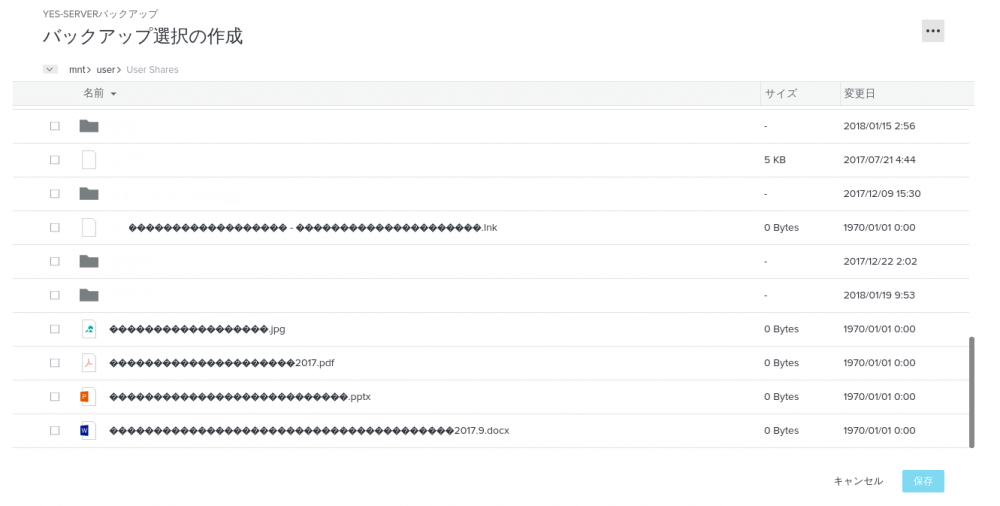
Hey Djoss, thank you for the responce. I ran the above, and while it seemed to install, I still have the "?" marks after a restart of the docker. Even if I change the application language to Japanese in options, the file names still show up "?" EDIT - ps, the blank file/folder names are because I redacted them from the image
-
I was just looking for a file (someone deleted something they shouldn't have) and noticed that none of my files/folders written in Japanese are showing up in the backup. I went in to Add Backup Set and any folder/file with Japanese is showing up as a "?" for the character. How do I add Japanese language support to the docker? Or, could I request that Japanese character support be added to the docker? The files look like this

-
Updated- first log in attempt seemed to hang. So I stopped and restarted the docker. 2nd, 3rd, and 4th attempts gave me a blank white screen with a "could not connect to server error." Retarted this time and got the login prompt again. Logged in and the program began syncing the files again. Hopefully everything will go well without a need to reupload. Posting this just to doc my experiences, will update if there are any issues EDIT - So after it synced the files the total size was significantly less than previously. I had no compression selected before, so Im wondering if they are forcing compression now on their side of things? It seems like all of my folders are still correctly selected, so I'm not sure what might have changed (1.7TB ->.5TB) EDIT2 - I may have missed it, but looking deeper into the options it would seem that we no longer have the option to change the compression size of our backups.
-
This has been a reaccuring problem for a while on my gaming VM. Sometimes after only a few minutes of play, sometimes after a few hours of play. The VM will seemingly at random lock up and become unresponsive. The exact error I see in the syslog is ul 6 21:11:33 BEAST kernel: vfio_bar_restore: 0000:02:00.0 reset recovery - restoring bars This refers to the GTX960 in the 1st 2nd PCIe slot. This card is using the rom bar method which has a rom pulled from the 2nd identical gpu in the 2nd PCIe. I think this issue has been with me intermitently for quite some time now but have never been able to pindown any rhyme or reason to it. Many versions of unRAID ago, it would bring down the whole server. Luckily now though, after a crash a simple force stop and start will bring the VM back up. Open to any and all help on this. Diags attached. System for my house with specs in the sig. Thanks in advance! beast-diagnostics-20170706-2112.zip EDIT/CORRECTED- the VM is run headless (HDMI out to TV but rarely used). All interaction is either via Steam In-Home Streaming, or NoMachine. Here is also the VM xml in case its needed. <domain type='kvm' id='3'> <name>VM-GAMING</name> <uuid>####sANDletters#$@#$</uuid> <~~~~not important ^_^v <description>Gaming VM</description> <metadata> <vmtemplate xmlns="unraid" name="Windows 10" icon="windows.png" os="windows10"/> </metadata> <memory unit='KiB'>8388608</memory> <currentMemory unit='KiB'>8388608</currentMemory> <memoryBacking> <nosharepages/> </memoryBacking> <vcpu placement='static'>8</vcpu> <cputune> <vcpupin vcpu='0' cpuset='8'/> <vcpupin vcpu='1' cpuset='9'/> <vcpupin vcpu='2' cpuset='10'/> <vcpupin vcpu='3' cpuset='11'/> <vcpupin vcpu='4' cpuset='20'/> <vcpupin vcpu='5' cpuset='21'/> <vcpupin vcpu='6' cpuset='22'/> <vcpupin vcpu='7' cpuset='23'/> </cputune> <resource> <partition>/machine</partition> </resource> <os> <type arch='x86_64' machine='pc-i440fx-2.7'>hvm</type> <loader readonly='yes' type='pflash'>/usr/share/qemu/ovmf-x64/OVMF_CODE-pure-efi.fd</loader> <nvram>/etc/libvirt/qemu/nvram/3e511485-5f55-c443-3968-0015259b40a3_VARS-pure-efi.fd</nvram> </os> <features> <acpi/> <apic/> <hyperv> <relaxed state='on'/> <vapic state='on'/> <spinlocks state='on' retries='8191'/> <vendor_id state='on' value='none'/> </hyperv> </features> <cpu mode='host-passthrough'> <topology sockets='1' cores='4' threads='2'/> </cpu> <clock offset='localtime'> <timer name='hypervclock' present='yes'/> <timer name='hpet' present='no'/> </clock> <on_poweroff>destroy</on_poweroff> <on_reboot>restart</on_reboot> <on_crash>restart</on_crash> <devices> <emulator>/usr/local/sbin/qemu</emulator> <disk type='file' device='disk'> <driver name='qemu' type='raw' cache='writeback'/> <source file='/mnt/nvme/vDisks/VM-GAMING/vdisk1.img'/> <backingStore/> <target dev='hdc' bus='virtio'/> <boot order='1'/> <alias name='virtio-disk2'/> <address type='pci' domain='0x0000' bus='0x00' slot='0x05' function='0x0'/> </disk> <disk type='file' device='cdrom'> <driver name='qemu' type='raw'/> <source file='/mnt/user/ISOs/virtio-win-0.1.135.iso'/> <backingStore/> <target dev='hdb' bus='sata'/> <readonly/> <alias name='sata0-0-1'/> <address type='drive' controller='0' bus='0' target='0' unit='1'/> </disk> <controller type='usb' index='0' model='nec-xhci'> <alias name='usb'/> <address type='pci' domain='0x0000' bus='0x00' slot='0x07' function='0x0'/> </controller> <controller type='pci' index='0' model='pci-root'> <alias name='pci.0'/> </controller> <controller type='sata' index='0'> <alias name='sata0'/> <address type='pci' domain='0x0000' bus='0x00' slot='0x03' function='0x0'/> </controller> <controller type='virtio-serial' index='0'> <alias name='virtio-serial0'/> <address type='pci' domain='0x0000' bus='0x00' slot='0x04' function='0x0'/> </controller> <interface type='bridge'> <mac address='52:54:00:98:03:dd'/> <source bridge='br0'/> <target dev='vnet0'/> <model type='virtio'/> <alias name='net0'/> <address type='pci' domain='0x0000' bus='0x00' slot='0x02' function='0x0'/> </interface> <serial type='pty'> <source path='/dev/pts/0'/> <target port='0'/> <alias name='serial0'/> </serial> <console type='pty' tty='/dev/pts/0'> <source path='/dev/pts/0'/> <target type='serial' port='0'/> <alias name='serial0'/> </console> <channel type='unix'> <source mode='bind' path='/var/lib/libvirt/qemu/channel/target/domain-3-VM-GAMING/org.qemu.guest_agent.0'/> <target type='virtio' name='org.qemu.guest_agent.0' state='connected'/> <alias name='channel0'/> <address type='virtio-serial' controller='0' bus='0' port='1'/> </channel> <input type='mouse' bus='ps2'> <alias name='input0'/> </input> <input type='keyboard' bus='ps2'> <alias name='input1'/> </input> <hostdev mode='subsystem' type='pci' managed='yes'> <driver name='vfio'/> <source> <address domain='0x0000' bus='0x02' slot='0x00' function='0x0'/> </source> <alias name='hostdev0'/> <address type='pci' domain='0x0000' bus='0x00' slot='0x06' function='0x0'/> </hostdev> <hostdev mode='subsystem' type='pci' managed='yes'> <driver name='vfio'/> <source> <address domain='0x0000' bus='0x02' slot='0x00' function='0x1'/> </source> <alias name='hostdev1'/> <address type='pci' domain='0x0000' bus='0x00' slot='0x08' function='0x0'/> </hostdev> <memballoon model='virtio'> <alias name='balloon0'/> <address type='pci' domain='0x0000' bus='0x00' slot='0x09' function='0x0'/> </memballoon> </devices> <seclabel type='none' model='none'/> <seclabel type='dynamic' model='dac' relabel='yes'> <label>+0:+100</label> <imagelabel>+0:+100</imagelabel> </seclabel> </domain>
-
Oh no worries Squid, I actually liked that the message was there. It let me know that something wasn't 100% on par. I was more curious if the plug-in was supposed to clear out the custom cron listing, or if I had borked something along the way, lol. Thank you for clearing that up for me though ^_^v
-
Possible Bug, possible user error: Was testing out rsync with this and made a super simplistic script called "rsync test". I told it to run in the background and had set it to run every minute while testing. When I got done testing, I deleted the script and forgot about it for a few days. Today I rebooted the server and later manually clicked mover, now every minute I have “Jun 2 16:45:01 YES-MEDIASERVER root: User Scripts: /boot/config/plugins/user.scripts/scripts/rsync test/script not found” popping up in the log file. Though, User Scripts no long has the script, so looks like it wasn’t completely removed. EDIT: Was mistaken, checked the actual sys log and found that it had been running ever since the reboot this morning. Found the cron job for the deleted script was still listed in... /boot/config/plugins/user.scripts/customSchedule.cron So it looks like when I deleted the script it didn't remove the cron entry.
-
I'm not sure if this is a Manjaro issue or something I'm not setting up correctly in the VM settings, but every edition of Manjaro 16.10.3 that I've tried to make a VM of reacts the same way. Some bootup text with many [OK]s, but ultimately stopping at a black screen with a white blinking cursor in the top left corner of the screen. The install grub never even shows up, so I'm never even prompted to do anything. I've tried installing with 5 different editions on two separate machines, using different VM machines, and different core assignments, all with the same result. Googling found some other people with similar issues dating a few years back, but those solutions do not seem viable in the context of a VM. I'm curious if anyone else has had any issues installing Manjaro into their unRAID VMs? If so, did you have to use specific machine settings to get it to work? Is anyone else seeing the same issues I am? Additional information, I have not had any issues installing various other Linux distros using the same VM settings (ARCH default template with additional cores and memory). I've also properly installed other Arch based distros such as Antergos and Apricity with no issues. Whatever is causing it only seems to be related specifically to Manjaro.
-
Hey dlandon, wanted to give you some feedback on how my experience working with an nvme drive handled under UD. Using a Plextor M8Pe PX-256M8PeG-08 NVM Express SSD M.2 2280 256GB. After install and initial boot, UD was able to detect the M.2 drive and gave me the option to format it as XFS. I formatted it and could see the partition from the GUI main page, but if I tried to mount the partition nothing would seem to happen. I added the mount to the go file, but after a reboot found an error in the syslog stating that the partition was invalid. At this point I couldn’t get UD to reformat the drive, so I then followed the instructions given in dAigo’s post. When I gdisk’d the device it showed MBR:present and GPT:invalid (if I recall correctly). I finished partitioning, formatting, and mounting the drive via ssh then rebooted. UD now shows the drive, its partition, file size and space remaining, though temp is not displayed. The option to unmount is available as well, but I haven’t played with that. I’m not sure if it was something I did, or if there was a glitch when it formatted the drive, but wanted to pass you the info. Also, I had a migraine when I was doing this, so my apologies if my steps aren’t clear or if I missed something.
-
Well, I tried mixing it up and just like you said I was able to get mixed upper/lowercase. Something like [Game SSD] worked fine. Tried GAME SSD, and also like you said, Windows dorked out and made it all lowercase. I'm not sure why the space wouldn't work for me before, but that was probably just user error on my part. Good find on those other links as well, making a bookmark in case I end up needing to make a share in all caps again sometime. Thanks for the help!
-
in my experience this is a Windows issue, not an unRAID one!. With the latest Windows 10 it appears to lower case share names which are all uppercase. Mixed case seems to be respected. Cool! Thanks for the info! I'll try mixing it up when I get home and let you know how it goes
-
Just out of curiousity, is there a way to have the share show up with uppercase letters? Specifically when being viewed from Windows? I may be doing something wrong, or missing something, but I label the drive as 250GB_SSD but it shows up as 250gb_ssd when viewed over the network from a Win10 VM. Via the unRAID GUI, UD still shows the drive as 250GB_SSD though. unRAID seems to be able to name shares using caps and also spaces. Is this an ability in UD? If not, might I ask if it could be added?
-
Going to hold off on this for a bit till VM management is fully implemented, as that is where the bulk of my unRAID use is. I would also be very interested if the ability to simultaneously/securely/remotely access multiple unRAID servers running on different networks via the app ever came to fruition. Might be asking for way too much, but it would surely be a selling point for me. That being said, I will definitely be keeping my eye on this one. Good job, looking good so far!
-
32GB in my home gaming/theater/storage server, and 16GB in the office media server.
-
Well, I'm very happy to say that I was able to get this sorted out after I ran this past the people over on the ASRock forum. RobJ, I was initially of the same thinking (forgive my cut and paste from my ASRock post) but """After pulling the entire machine apart and trying all parts (including the CPU) in another (personal) machine I was unable to reproduce the errors outside of this motherboard. After rebuilding the server using this motherboard I am still receiving the MCEs during boot, though now the VMs do not seem to crash....... I have tried changing setting in BIOS to try and isolate and disable the issue to no avail. The mcelog (logged below) denotes the error as being related to the cpu cache, but I'm of the thinking that it has more to do with how the MB communicates with those banks, than some issue with the cpu itself.""" After posting that a user named Xaltar simply asked what BIOS version I was using, which lead me to reflash to the newest version, and bam, no more MCE's. Had it not been for dmacias putting mcelog into the NERDpack and RobJ's help, I wouldn't have even had a starting point of what to search for as MCEs cover so many things. Being able to pin it down via hardware troubleshooting and having the mcelog ultimately led me to the ASRock website (probably after reading some of the same search results, lol). I would have never imagined it to be an outdated BIOS issue as she was running fine for like 2 months. So thank you very much again dmacias, RobJ, and Xaltar (from other forum). Lifesavers
-
I can confirm that on a system that has MCEs, running unRAID 6.2b21, mcelog does infact produce the log file with hardware issue(s) noted. The produced log appears in the format noted below (using my own mcelog as reference.) ~# mcelog Hardware event. This is not a software error. MCE 0 CPU 0 BANK 17 MISC 8cf00031e0000086 ADDR 5f000000 TIME 1466125355 Fri Jun 17 10:02:35 2016 MCG status: MCi status: Error overflow Uncorrected error MCi_MISC register valid MCi_ADDR register valid Processor context corrupt MCA: Generic CACHE Level-2 Eviction Error STATUS ee2000000004017a MCGSTATUS 0 MCGCAP 7000c16 APICID 0 SOCKETID 0 CPUID Vendor Intel Family 6 Model 63 Hardware event. This is not a software error. MCE 1 CPU 0 BANK 18 MISC 1cf00031e0000086 ADDR 5f100040 TIME 1466125355 Fri Jun 17 10:02:35 2016 MCG status: MCi status: Error overflow Uncorrected error MCi_MISC register valid MCi_ADDR register valid Processor context corrupt MCA: Generic CACHE Level-2 Eviction Error STATUS ee2000000004017a MCGSTATUS 0 MCGCAP 7000c16 APICID 0 SOCKETID 0 CPUID Vendor Intel Family 6 Model 63 Hardware event. This is not a software error. MCE 2 CPU 0 BANK 19 MISC 54f00031e0000086 ADDR 5f100000 TIME 1466125355 Fri Jun 17 10:02:35 2016 MCG status: MCi status: Error overflow Uncorrected error MCi_MISC register valid MCi_ADDR register valid Processor context corrupt MCA: Generic CACHE Level-2 Eviction Error STATUS ee2000000004017a MCGSTATUS 0 MCGCAP 7000c16 APICID 0 SOCKETID 0 CPUID Vendor Intel Family 6 Model 63 Thank you so much for adding this in dmacias, it's exactly what I was hopeing for, and I'm sure that there are other users who are having MCEs that will find this useful as well.
-
Good to know, and good feedback as well! When I got home from work I started doing some testing on my home 12 core xeon. I tried out some different setups with my 2 Win10 gaming VMs and I have to say that I agree with your suggestion of using emulatorpin for the first pair only on the VMs. Its a bit late here now, so I hope what I write will make sense, but here goes. Keeping in mind I have hyper-v on in all these instances as I know some people have had issues using it. After adding isolcpus for all but the 1st two pairs, and using my original vcpupin setups, I tried emulatorpin on the first pair solely, and then again with the first two pairs combined. I then tested the visual performance and checked fps in game for Warthunder and also Black Desert. I tried different vcpupin setups, using 5 pairs, 4 pairs, 2 pairs, and repeated tests of the above without allocating the 2nd thread. In every test using emulatorpin on only the first pair, it gave better performance and stability for me as compared with using the first two pairs. Running the VMs without the 2nd thread allocated with vcpupin, gave me a pretty bad stutter. I didn't seem to have any over allocation issues and ultimately found that 5cores 2 threads with the 1st pair emulatorpin'd is the sweet spot for my VMs at the moment. 4 pairs caused stuttering in game. 2 pairs had roughly the same fps as 5pairs, but would have latency if the cpu spiked; war thunder wouldn't even load.
-
Hey dlandon, I had a quick question about the emulator pinning. I've noticed on my system that the Dashboard's System Status in the unRAID webGUI can frequently show the first pair (0, topping out at 2400/2400MHz on my 8 core xeon. I know that you recommended using only the first pair for emulator pinning (even with multiple VMs), but I was curious if it's possible to emulator pin more than one pair per VM? Also, what would the xml for a VM like that look like? I have all the other pairs (sans 0,1,8,9) isolated in the syslinux config. I'm currently using this xml for the VM in question. <emulatorpin cpuset='0,8'/> Could I emulator pin more pairs using something like this? <emulatorpin cpuset='0,1,8,9'/> Bit of a side note; I've also noticed that though 1,9 isn't explicitly assigned to anything, that it idles around 2200/2200MHz since I isolated and pinned the other cpus. Normally they all rest at 1200/1200MHz.


