





DDock
Members
-
Joined
-
Last visited
Everything posted by DDock
-
I had to completely disable the C-States and then everything started working again. I'm back up to 128GB ECC and have been stable. I believe I do have the RAM back at 3200mhz instead of 2667mhz as well.
-
I remember coming across that post and messing with the C-States and DRAM Timings. I definitely remember using that to set the speed. I'm not sure if I did the C-States after doing the BIOS reset a few months ago. I also don't remember the part about the increasing CPU voltage, so I will give that a try as well. Thanks!
-
TL;DR: Feb 18 22:47:04 Tower kernel: mce: [Hardware Error]: Machine check events logged Feb 18 22:47:04 Tower kernel: [Hardware Error]: Corrected error, no action required. Feb 18 22:47:04 Tower kernel: [Hardware Error]: CPU:0 (19:21:2) MC18_STATUS[Over|CE|MiscV|AddrV|-|-|SyndV|CECC|-|-|Scrub]: 0xdc2041000000011b Feb 18 22:47:04 Tower kernel: [Hardware Error]: Error Addr: 0x0000000ebb89e200 Feb 18 22:47:04 Tower kernel: [Hardware Error]: IPID: 0x0000009600150f00, Syndrome: 0x22ae00020a800d02 Feb 18 22:47:04 Tower kernel: [Hardware Error]: Unified Memory Controller Ext. Error Code: 0, DRAM ECC error. Feb 18 22:47:04 Tower kernel: EDAC MC0: 1 CE Cannot decode normalized address on mc#0csrow#2channel#1 (csrow:2 channel:1 page:0x0 offset:0x0 grain:64 syndrome:0x2) Feb 18 22:47:04 Tower kernel: [Hardware Error]: cache level: L3/GEN, tx: GEN, mem-tx: RD Hardware: Motherboard: Asus Pro WS X570-ACE CPU: AMD Ryzen 9 5900X RAM: 4x32GB DDR4 ECC 3200mhz (Had down-clocked most of the time to 2400mhz as it was an early testing step) HBA: LSI 9305-16i NIC: Intel X520-DA2 (Dual 10G SFP) GPU: NVIDIA GTX 1650 I've been fighting random crashing for about a year. Generally it would crash within 2 weeks of a reboot, but then progressively get worse. One thing to note on the crashes, it would NEVER crash during a parity check. At the worst times, it would crash within 12 hours of the parity check finishing. My parity checks take just over 24 hours. When the server was good, it would usually be just after I had to manually power it down (power outage, etc.) that it would start acting up again. I would fuss with it and then it would become "stable" again. History (I'm trying to be as detailed as possible): I bought my first home back in March and installed Home Assistant. Was using Samsung SmartThings and wanted to expand with the house. I had added a Z-Wave and Zigbee radio USB devices. This is around the time it first started crashing "regularly". As part of troubleshooting I reset the BIOS and set it up again. Ran MemTest64 on the system and no errors. Then I down-clocked the RAM as I remembered I had done that before and the BIOS reset would have set it back to default. Seemed to work better for about a month. My UPS died and when I got everything back up and running it started crashing a new way. When it would crash, I would have an error on the screen saying it couldn't write to the flash drive and I would have to "press any key" and then the system would reboot. The USB drive would not show up in the BIOS after reboot and I would have to completely power off the system or unplug the drive. Thought this might have been because my USB drive was failing as it was around 10 years old at this point. Once replaced, the system started working alright again, but after about 3 weeks, it started crashing again. It went back to just rebooting again. Thought it might have been the new USB drive causing issues, even though it was a brand new one. Replaced with a second drive and things seemed to improve once again. No crashes until... it started again. My next thought was it might have be a faulty USB controller on the motherboard. With HA and the two USB devices, I moved HA to a dedicated machine. This seemed to be a really good improvement. My system was stable for nearly two months. With it being stable I decided I might go ahead and make some improvements to grow. Last weekend, I moved everything over to a new case, and now the issues have returned. Random reboots after the parity check finished. One other thing I had done was upgrade to a 16i HBA instead of my old 4i4e HBA. Started the internal logging server to try to catch errors and found a bunch of the error messages under the TL;DR as shown above. Seeing that, I removed two sticks of RAM bringing my system from 128GB ECC to 64GB ECC to see if that helps. If not, I plan on swapping out the two sticks I removed. I have not ran a MemTest since transferring hardware. One other thing that I had done "recently" was install Immich on the server, so this could also be increasing the memory load on the system. Thank you for reading and helping if you are able.
-
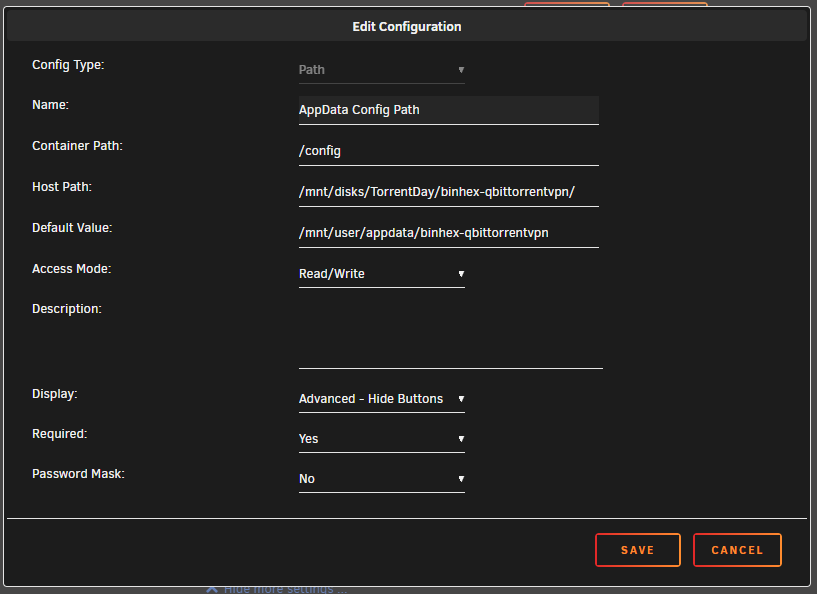
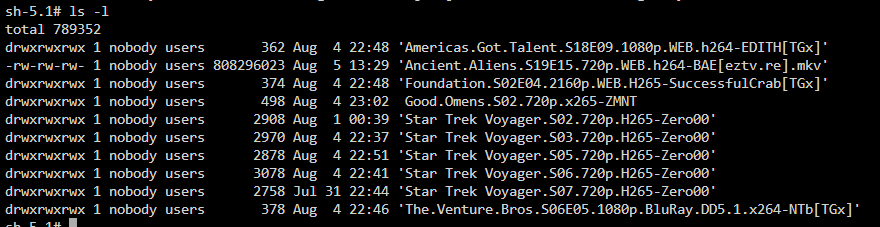
Recently started having issues after upgrading to 6.12.2 where Sonarr/Radarr will stop moving files from qBittorrent. I've had this setup running for a couple years now without issues. All dockers are up to date Binhex versions. I have a spare drive mounted via Unassigned Devices used as a scratch disk to download files from qBittorrent as not to put extra write cycles on my Cache SSDs. qBittorrent is installed natively to this scratch disk and then Sonarr/Radarr are installed on my Cache SSDs. I have tried changing the Access Mode to various RW/Slave/Shared between them all and nothing seems to work. I had first changed it all to RW-Slave as Fix Common Problems didn't like that those were mounted using RW and not RW-Slave. I've checked all kinds of things and can't seem to get Sonarr to work. I think Radarr is working, but hasn't been queued to download anything recently. No other connection errors between the dockers. Is there something I'm missing? Thanks for any help the community can provide.




-
We have used Cloudberry at work for awhile and they have now rebranded over to MSP360. They are concentrating on MSP's at this point. This might be what you guys are looking for: https://www.msp360.com/free-products/ I have gotten the Linux licenses from here and setup new unRAID backups since.
-
Thank you. I didn't see the update still, so I forced update and BAM, now it finally got updated to the 3.3.xx. Not sure why it wasn't showing updates, but we are all good now. Thank you again.
-
I am having an issue with a new install of Cloudberry Backup. It ran fine for a few days and now whenever it tries to backup I get a SSL Cert Problem; Cert has expired error. I did try to contact Cloudberry support, but they told me that I need to update. I tried to run the update from within the docker using the webGUI, but it seems to try but then gets stuck updating until I reboot the docker container. I did see a mention from a month ago that you were working on updating to the 3.2.xxx version. Is there any progress on this? Is there something I could do to assist?
-
Yep! must have been a bug. Thanks. Had me a bit worried that you might have discontinued the project or something. Cheers and thanks for all the hard work!
-
Any ideas why this is showing up for this docker? None of my other dockers show this: I have not made any changes but noticed this has changed to not available. I haven't checked things in about a week, so it would have happened between then and now.

-
Just to make sure I'm running the proper command I'm just deleting the attribute user.sha256 and not the other user.xxx attributes? Thank You for sending me down the correct path.
-
I'm having an issue that since I installed the plugin again like 1-2 months ago. I had used this plugin a long time ago and decided to install it again. It has consistently shows 5 files that are corrupted ever since I reinstalled it. Not sure if these are because there were some files left behind from the previous install of this plugin. 4 of them are just NFO's and one is an MKV. Is there a way to acknowledge the error so it stops reporting it or what is the best way to handle it.
-
I can't seem to find a way to search this thread. I haven't done much posting recently. I just added this plugin to my 6.5 unRAID server. I am having some issues with a VM that runs my Security Camera Software. I am thinking the issue is the slower write speeds to the array so I am wanting to offload the VM onto a single mount. All seems to be working well with the exception that my Shares in the normal unRAID GUI are not showing up. Any thoughts?

-
That was it, I must have borked something up somewhere. I put those 3 files in there again and it seems to work now. Thanks for the help. I did grab the UDP server download zip from another part of the site, maybe that one is not quite right somehow.
-
Nope, didn't help at all... still back to: 2016-10-14 06:59:44,834 DEBG 'start-script' stdout output: Fri Oct 14 06:59:44 2016 UDPv4 link local: [undef] Fri Oct 14 06:59:44 2016 UDPv4 link remote: [AF_INET]104.129.28.66:1912 2016-10-14 07:00:44,834 DEBG 'start-script' stdout output: Fri Oct 14 07:00:44 2016 [uNDEF] Inactivity timeout (--ping-restart), restarting 2016-10-14 07:00:44,834 DEBG 'start-script' stdout output: Fri Oct 14 07:00:44 2016 SIGUSR1[soft,ping-restart] received, process restarting 2016-10-14 07:00:46,884 DEBG 'start-script' stdout output: Fri Oct 14 07:00:46 2016 UDPv4 link local: [undef] Fri Oct 14 07:00:46 2016 UDPv4 link remote: [AF_INET]104.129.28.42:1912 2016-10-14 07:01:46,903 DEBG 'start-script' stdout output: Fri Oct 14 07:01:46 2016 [uNDEF] Inactivity timeout (--ping-restart), restarting Fri Oct 14 07:01:46 2016 SIGUSR1[soft,ping-restart] received, process restarting 2016-10-14 07:01:48,946 DEBG 'start-script' stdout output: Fri Oct 14 07:01:48 2016 UDPv4 link local: [undef] Fri Oct 14 07:01:48 2016 UDPv4 link remote: [AF_INET]104.129.29.34:1912 Could it be because the UDPv4 link local: [undef] is supposed to have an IP in it like the UDPv4 link remote: [AF_INET]104.129.29.34:1912. I'm guessing the Remote is to the vpn and the local would be how I would connect?
-
Ok, was trying to do that, but for some reason TorGuard's site is being really slow on the login portion right now. I'll do it when it lets me, and let you know how it goes.
-
Well I can change the password, but the username is set to be my email address and can't be changed. Here is the screenshot you requested.
-
Seems like this may have been skipped over, I still have this issue. Is there anyone that could assist?
-
I'm having a strange issue. First, I am currently at work using a VPN to connect into my home network. I am connected just fine. I can use the docker just fine without VPN enabled. When I try and use it with VPN enabled to my Torguard account, I am unable to access using the LAN. Looking at the logs it seems to be restarting a bunch and I'm not quite sure why. Here is the output of my log, with the last two lines repeating. Here is also the OpenVPN config that Torguard gives me to use. Time codes on the last few lines are wrong - I did copy pasta from another log to show how it repeats. Update, I've tried a few other things like changing the openvpn.opvn file to the one that Torguard supplies. I put the certificate in the openvpn folder. But still having the same issue. client dev tun proto udp remote chi.central.usa.torguardvpnaccess.com 1912 resolv-retry infinite nobind persist-key persist-tun ca ca.crt tls-auth ta.key 1 auth SHA256 cipher AES-128-CBC remote-cert-tls server auth-user-pass comp-lzo verb 1 reneg-sec 0 fast-io # Uncomment these directives if you have speed issues ;sndbuf 393216 ;rcvbuf 393216 ;push "sndbuf 393216" ;push "rcvbuf 393216" usermod: no changes [info] Env var PUID defined as 99 [info] Env var PGID defined as 100 [info] Permissions already set for /config and /data [info] Starting Supervisor... 2016-10-12 08:47:35,980 CRIT Set uid to user 0 2016-10-12 08:47:35,980 INFO Included extra file "/etc/supervisor/conf.d/delugevpn.conf" during parsing 2016-10-12 08:47:35,984 INFO supervisord started with pid 23 2016-10-12 08:47:36,985 INFO spawned: 'start-script' with pid 26 2016-10-12 08:47:36,986 INFO spawned: 'webui-script' with pid 27 2016-10-12 08:47:36,988 INFO spawned: 'deluge-script' with pid 28 2016-10-12 08:47:36,989 INFO spawned: 'privoxy-script' with pid 29 2016-10-12 08:47:36,999 DEBG 'privoxy-script' stdout output: [info] VPN is enabled, checking VPN tunnel local ip is valid 2016-10-12 08:47:36,999 INFO success: start-script entered RUNNING state, process has stayed up for > than 0 seconds (startsecs) 2016-10-12 08:47:36,999 INFO success: webui-script entered RUNNING state, process has stayed up for > than 0 seconds (startsecs) 2016-10-12 08:47:36,999 INFO success: deluge-script entered RUNNING state, process has stayed up for > than 0 seconds (startsecs) 2016-10-12 08:47:36,999 INFO success: privoxy-script entered RUNNING state, process has stayed up for > than 0 seconds (startsecs) 2016-10-12 08:47:37,000 DEBG 'deluge-script' stdout output: [info] deluge config file already exists, skipping copy 2016-10-12 08:47:37,000 DEBG 'deluge-script' stdout output: [info] VPN is enabled, checking VPN tunnel local ip is valid 2016-10-12 08:47:37,003 DEBG 'start-script' stdout output: [info] VPN is enabled, beginning configuration of VPN 2016-10-12 08:47:37,014 DEBG 'start-script' stdout output: [info] VPN provider defined as custom [info] VPN config file (ovpn extension) is located at /config/openvpn/openvpn.ovpn 2016-10-12 08:47:37,017 DEBG 'start-script' stdout output: [info] Env vars defined via docker -e flags for remote host, port and protocol, writing values to ovpn file... 2016-10-12 08:47:37,031 DEBG 'start-script' stdout output: [info] VPN provider remote gateway defined as chi.central.usa.torguardvpnaccess.com [info] VPN provider remote port defined as 1912 [info] VPN provider remote protocol defined as udp 2016-10-12 08:47:37,040 DEBG 'start-script' stdout output: [info] VPN provider username defined as <EMAIL> 2016-10-12 08:47:37,045 DEBG 'start-script' stdout output: [warn] Username contains characters which could cause authentication issues, please consider changing this if possible 2016-10-12 08:47:37,049 DEBG 'start-script' stdout output: [info] VPN provider password defined as <PASSWORD> 2016-10-12 08:47:37,054 DEBG 'start-script' stdout output: [warn] Password contains characters which could cause authentication issues, please consider changing this if possible 2016-10-12 08:47:37,076 DEBG 'start-script' stdout output: [info] Default route for container is 172.17.0.1 2016-10-12 08:47:37,084 DEBG 'start-script' stdout output: [info] Setting permissions recursively on /config/openvpn... 2016-10-12 08:47:37,095 DEBG 'start-script' stdout output: [info] Adding 10.32.87.0/24 as route via docker eth0 2016-10-12 08:47:37,095 DEBG 'start-script' stdout output: [info] ip route defined as follows... -------------------- 2016-10-12 08:47:37,096 DEBG 'start-script' stdout output: default via 172.17.0.1 dev eth0 10.##.##.0/24 via 172.17.0.1 dev eth0 172.17.0.0/16 dev eth0 proto kernel scope link src 172.17.0.4 2016-10-12 08:47:37,096 DEBG 'start-script' stdout output: -------------------- 2016-10-12 08:47:37,100 DEBG 'start-script' stdout output: [info] iptable_mangle support detected, adding fwmark for tables 2016-10-12 08:47:37,133 DEBG 'start-script' stdout output: [info] iptables defined as follows... -------------------- 2016-10-12 08:47:37,135 DEBG 'start-script' stdout output: -P INPUT DROP -P FORWARD ACCEPT -P OUTPUT DROP -A INPUT -i tun0 -j ACCEPT -A INPUT -s 172.17.0.0/16 -d 172.17.0.0/16 -j ACCEPT -A INPUT -i eth0 -p udp -m udp --sport 1912 -j ACCEPT -A INPUT -i eth0 -p tcp -m tcp --dport 8112 -j ACCEPT -A INPUT -i eth0 -p tcp -m tcp --sport 8112 -j ACCEPT -A INPUT -s 10.##.##.0/24 -i eth0 -p tcp -m tcp --dport 58846 -j ACCEPT -A INPUT -p udp -m udp --sport 53 -j ACCEPT -A INPUT -p icmp -m icmp --icmp-type 0 -j ACCEPT -A INPUT -i lo -j ACCEPT -A OUTPUT -o tun0 -j ACCEPT -A OUTPUT -s 172.17.0.0/16 -d 172.17.0.0/16 -j ACCEPT -A OUTPUT -o eth0 -p udp -m udp --dport 1912 -j ACCEPT -A OUTPUT -o eth0 -p tcp -m tcp --dport 8112 -j ACCEPT -A OUTPUT -o eth0 -p tcp -m tcp --sport 8112 -j ACCEPT -A OUTPUT -d 10.##.##.0/24 -o eth0 -p tcp -m tcp --sport 58846 -j ACCEPT -A OUTPUT -p udp -m udp --dport 53 -j ACCEPT -A OUTPUT -p icmp -m icmp --icmp-type 8 -j ACCEPT -A OUTPUT -o lo -j ACCEPT 2016-10-12 08:47:37,135 DEBG 'start-script' stdout output: -------------------- 2016-10-12 08:47:37,135 DEBG 'start-script' stdout output: [info] nameservers 2016-10-12 08:47:37,136 DEBG 'start-script' stdout output: nameserver 8.8.8.8 nameserver 8.8.4.4 2016-10-12 08:47:37,136 DEBG 'start-script' stdout output: -------------------- [info] Starting OpenVPN... 2016-10-12 08:47:37,142 DEBG 'start-script' stdout output: Wed Oct 12 08:47:37 2016 OpenVPN 2.3.11 x86_64-unknown-linux-gnu [sSL (OpenSSL)] [LZO] [EPOLL] [MH] [iPv6] built on May 12 2016 Wed Oct 12 08:47:37 2016 library versions: OpenSSL 1.0.2h 3 May 2016, LZO 2.09 Wed Oct 12 08:47:37 2016 WARNING: file 'credentials.conf' is group or others accessible 2016-10-12 08:47:37,185 DEBG 'start-script' stdout output: Wed Oct 12 08:47:37 2016 UDPv4 link local: [undef] Wed Oct 12 08:47:37 2016 UDPv4 link remote: [AF_INET]104.129.28.154:1912 2016-10-12 08:53:52,101 DEBG 'start-script' stdout output: Wed Oct 12 08:53:52 2016 [uNDEF] Inactivity timeout (--ping-restart), restarting Wed Oct 12 08:53:52 2016 SIGUSR1[soft,ping-restart] received, process restarting 2016-10-12 08:53:54,154 DEBG 'start-script' stdout output: Wed Oct 12 08:53:54 2016 UDPv4 link local: [undef] Wed Oct 12 08:53:54 2016 UDPv4 link remote: [AF_INET]104.129.29.2:1912
-
I finally got it to come up. I ended up removing the template and the image a couple times and then FINALLY it worked. Took me around a dozen times to get it to finally work. Kinda strange IMO. There was a post saying this issue was fixed, but I guess it still lingers with a few system configs.
-
Doing a quick search I have not found anything about this issue. I have tried this on a server without ProFTPD, but logging in as root and it works. Maybe on my home server I am not doing things correctly. I have sshfs setup on a VM for my brother to use and I am trying to mount his FTP share within the VM. We do this for CrashPlan on my work server and it works fine when logging in as root. Here is the command I'm using for my brother's VM. sshfs [email protected]: /home/brother/FTP All I am getting is "remote host has disconnected".
-
Anyone else have any thoughts as to why I am just getting a black screen when trying to open the UI via unRAID or VNCing straight into it using TightVNC?
-
Another update -- I have tried increasing the memory (since there are a few issues with this build it seems) but that did not help. Here is an oddity... While using TightVNC and the built in Docker UI still have a black screen, but I do have a mouse! If I move the mouse on one screen, the other moved, but very slowly and jerky, but it moves. Add that to the list.
-
I just recently got home from work. I was VPN'd into my home network working on all this. I tried to use the CrashPlan docker web GUI here and it still did not work. But if you remember from my previous post, a connection via TightVNC resulted in the same. I have uninstalled and reinstalled it probably a half dozen times, messing with different attributes each time with no luck. At this point I have no idea what is going on. I tried to look into the logs and nothing has been written into the xxx_error.log(s). Does having data already in the backup destination cause it to fail? I have my mounts like this: /unraid /mnt/cache (also tried /mnt/user) /unassigned /mnt/disks/ /config /mnt/cache/appdata/CrashPlan backup destination is /mnt/user/cache-backup
-
That is what I meant by "open the docker", it opens it's own VNC viewing application. Still only shows a black screen.
-
I just started using the CrashPlan docker. I am trying to use it to backup my cache drive to my array. I saw you can make scripts in unRAID's go file to do it, but I'd rather have a bit more control. Right now when I try to open the docker (vnc) or try to VNC into it using TightVNC I am just getting a black screen. Is there something I have configured wrong? I have not updated to 6.2.1, still on 6.2.



