




tiny-e
Members
-
Joined
-
Last visited
Everything posted by tiny-e
-
How do I know if it's working? I can access the server interface via the ngrok link, but it doesn't seem to care about the access token. Should plex be showing me the custom access URL that the container should be generating? Thanks again for any help!
-
OK -- I was able to try this out today (also a starlink person). Could not connect to the plex-web interface unless I changed the NGROK_PROTOCOL variable to HTTP. Is that normal? Otherwise the link generated by ngrok wouk be like tcp://blah.blah.io and wouldn't go anywhere. Please let me know if, for some reason, I shouldn't use for http for this. Thanks!

-
So... is this project dead?
-
I didn't change / move anything... doesn't the 'main' image contain 2 volumes? Also 'Mojave-opencore.img' exists in /mnt/user/isos... Shouldn't that be it? Thanks for helping out !
-
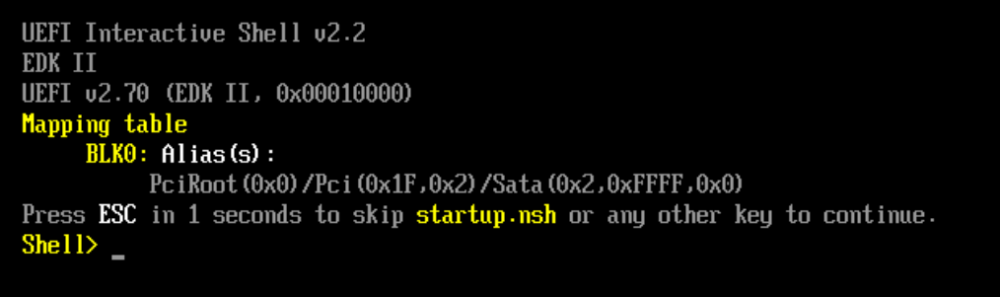
Well. I'm stuck. Once running system (Mojave) is now failing to boot. (open spoiler to see logs) I've tried editing the XML in the gui to "re bork" it and then allowing the helper script to finish it. Helper script says it's done its thing. But VM won't even try to boot. Really don't want to have to redo this whole thing if possible. Any help?
-
Cool -- and thanks for the response-- I was just wondering how often one would need to do this -- Plex says that token is temporary.. (not sure if you know)
-
Hi-- Which plex token are you grabbing? One seems pretty easy... the other less so. I'm a little confused by the steps required to get a more-permanent auth token from plex. My server does work from behind Starlink, but I'm wondering if this would make things more stable as plex keeps thinking it's disconnected (fixed immediately with a manual refresh).
-
Just installed the container and am getting "Database is not running or unreachable" -- Haven't changed anything in the template... am I missing something?
-
Does anyone know how in the world to get ShinobiCCTV to use my nvidia GPU so it doesn't beat up my CPU? Card is in and working fine with my Plex server container. TIA for any help!
-
Here's a health-check script that you can run via userscripts/cron. Note: This is mostly not my work, @CIA was kind enough to provide the main function and I added the prowl stuff for phone notifications. #!/bin/bash ##############################################PROWL STUFF######################################################### _app="Unraid Server NordVPN" _priority="2" _event1="VPN Connection Issue: " _event2="VPN Health Check: " ## Currently unused _description1="VPN Client reports connection is down or docker isn't running. Trying to fix that..." _description2="Running VPN Health Check (only notifies if debug mode enabled)" _apikey="PROWL-API-KEY-GOES-HERE" ##############################################PROWL STUFF######################################################### _debug=true _notifyatrun=true _docker=nordvpn _connected="Status: Connected" _now=$(date +"%m_%d_%Y_%H%M") _delay=1 #enter your docker container names (other than NordVPN) in the array below #fires in order, you can add more -just follow the same syntax declare -a _dependents _dependents=( [1]=docker_1 [2]=docker_2 [3]=docker_3 ) if [[ "$_notifyatrun" == "true" ]]; then curl https://prowl.weks.net/publicapi/add -F apikey=$_apikey -F priority=$_priority -F application="$_app" -F event="$_event2" -F description="$_description2" > /dev/null 2>&1; fi docker_func() { _cmd=$1 for KEY in "${!_dependents[@]}"; do if [[ "$_debug" == "true" ]]; then echo ${_dependents[$KEY]} "Container" $_cmd; fi docker $_cmd ${_dependents[$KEY]} sleep $_delay done } if [ "$(docker ps -q -f name=$_docker)" ]; then _check_connection=$(docker exec $_docker nordvpn status) if [[ "$_debug" == "true" ]]; then echo $_check_connection; fi if [[ "$_check_connection" == *"$_connected"* ]]; then if [[ "$_debug" == "true" ]]; then echo "VPN Connected: " $_now; fi exit 0 else docker stop $_docker sleep $_delay fi fi echo "VPN NOT running or Failed Connection: Restarting Services " $_now if [[ "$_useprowl" == "true" ]]; then curl https://prowl.weks.net/publicapi/add -F apikey=$_apikey -F priority=$_priority -F application="$_app" -F event="$_event1" -F description="$_description1" > /dev/null 2>&1; fi #Stop all dependents docker_func stop #Start VPN docker start $_docker sleep 15 #Start all dependents docker_func start I'm currently running it every 5 minutes via cron, all is working as expected.
-
-
Not sure how to pull this off... but I'd think a script could (possibly?)-..... Get the public ip of the server via something like ifconfig.io bash into the nordvpn docker container and run some commands (nordvpn status, curl ifconfig.io, etc., ) See if nordvpn status reports "connected" Get the external IP and compare to the public ip restart nordvpn or the container, or a list of containers, etc., if needed. I'm doing something like this: (I'm a total noob, so please excuse if it's clunky) #!/bin/bash echo Restarting NordVPN docker restart nordvpn sleep 10 for value in prowlarr headphones lidarr Overseerr radarr readarr sonarr sabnzbd transmission do echo Restarting: $value docker restart $value sleep 1 done
-
I've been noticing that this container seems to lose connectivity, which borks connectivity for other containers, more and more lately. Is there a keep alive function, or can there be one (feature request) that would restart the container/vpn connection and possibly call a script / restart other containers? TIA for any help/suggestions.
-
Deleting the old docker image did the trick. Hopefully there will be an official fix for this as mine was complaining about high utilization that I couldn't actually find anywhere...
-
fingers crossed... 🤞...
-
Actually, it looks like it nuked all of them.. root@localhost:# /usr/local/emhttp/plugins/dynamix.docker.manager/scripts/docker run -d --name='plex-linuxserver' --net='host' -e TZ="America/Chicago" -e HOST_OS="Unraid" -e 'VERSION'='docker' -e 'NVIDIA_VISIBLE_DEVICES'='' -e 'TCP_PORT_222'='222' -e 'TCP_PORT_32400'='32400' -e 'TCP_PORT_3005'='3005' -e 'TCP_PORT_8324'='8324' -e 'TCP_PORT_32469'='32469' -e 'UDP_PORT_1900'='1900' -e 'UDP_PORT_32410'='32410' -e 'UDP_PORT_32412'='32412' -e 'UDP_PORT_32413'='32413' -e 'UDP_PORT_32414'='32414' -e 'PUID'='99' -e 'PGID'='100' -v '/mnt/user/Media/':'/media':'rw' -v '':'/tv':'rw' -v '':'/music':'rw' -v '/mnt/disks/ScratchDrive/PMS':'/transcode':'rw,slave' -v '':'/movies':'rw' -v '/mnt/disks/PlexData/plex/':'/config':'rw,slave' 'linuxserver/plex' docker: Error response from daemon: stat /var/lib/docker/btrfs/subvolumes/00004f57903e9d539379506531d2472859171afdef7ef3502d49e2f5c19200e6: no such file or directory. See 'docker run --help'.
-
So, how would one know if which, if any, of the subvolumes to keep? I tried this and it look like it nuked a couple of containers.. they won't reinstall and complain about not finding the subvolume. oof. (I thought something like this might happen, but did it anyhow... lol)
-
Nobody else is seeing this?
-
Hi- I was able to install, config, and run the Torless AIO client, but for some reason the net speeds I get through it are terrible. Like 1/10 of what I see if I just use the VPN provider's app on a PC on my LAN. I'm not really sure how to troubleshoot that. Any ideas?
-
I'm also getting login issues. Seemingly no matter what I do, I get Invalid Username or password OpenVPN or NordLynx, changed my password, changed it again to eliminate any special characters. No idea...
-
@SpaceInvaderOne Thanks for all of your hard work with unraid/virtualization -- Have you experienced the VNC / Splashtop graphics issues that I mentioned here: https://forums.unraid.net/topic/84601-support-spaceinvaderone-macinabox/?do=findComment&comment=820154 Sorry to bump/ask again. I'm just curious to know if you have a thought about why this is. Thanks!
-
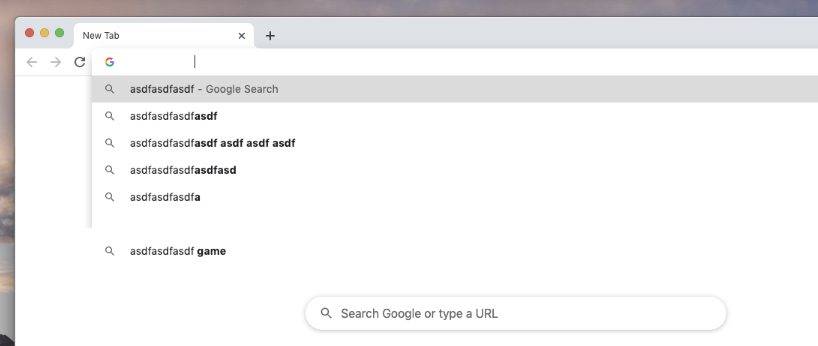
Many thanks SpaceInvaderOne for the tutorial and container I'm up and running, but I have a couple of weird issues related to graphics (no actual GPU in system) when I access the system remotely: VNC - (Via browser) - I get disappearing text or blocked-out screen elements ARD - Same Splashtop - Same --See attached image for example in the address bar of chrome. Other than this, things seem to work really well. Didn't have this issue in other Older KVM installs (SpaceInvaderOne instructions). Any ideas as to what's up? TIA! (xml here:) http://ecklund.us/paste/?9d8d1ceed586f3e3#kauMS0SvxZFzg3DNUpYgTSltmK2daPMdSo8T38Nxm6g=
-
Just installed. Any time I try to queue or convert I get an error complaining about can't read/write to the directory (ones I chose in the setup).
-
One more request for the Public version of Jackett. Please, and thank you!



