





kri kri
Members
-
Joined
-
Last visited
Everything posted by kri kri
-
Yeah I did that, I created the user using the GUI as well. Do I create the user in the CLI and then again in the GUI and set the password at the same time?
-
Woops! I blame the coffee. I used the GUI to create my VPN user, so I am not sure what I am missing. Yeah, I am totally at a loss. Do I need to disable the OpenVPN server on my asus router to make this work?
-
But in one of the replies above it says to use the GUI. I will try again with using the commandline.
-
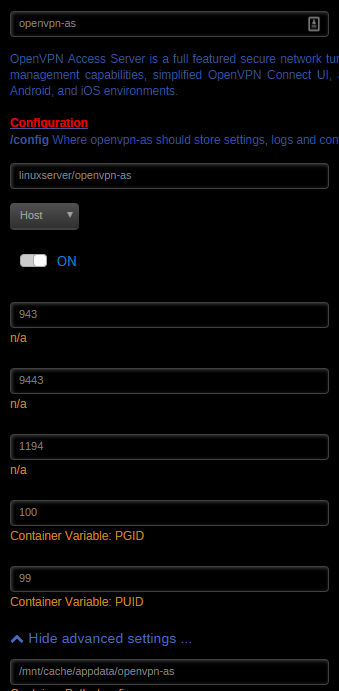
Sorry if this is too general a question but my google-fu is weak today. I followed Spaceinvader's youtube video along with the recent posts. I tried a clean install with the following steps: 1. Changed admin password using putty 2. Switched authentication to Local from PAM 3. Changed the server name to my duckdns url. 4. Forwarded port 1194 UDP on my router to my server IP 5. Created my VPN user in the Gui, and set my password. 6. Installed the OpenVPN gui app on my Windows machine. I then downloaded my .ovpn and am trying to login but I keep getting this error: Mon Jun 12 10:35:45 2017 TLS Error: cannot locate HMAC in incoming packet from [AF_INET]MYIP:1194 MYIP is my WAN IP, and that is correct. I am running OpenVPN on my router but I am testing this to set up my friend's Unraid server for him. I attached my docker settings. Bonding is disabled in my unRaid server.
-
That seems to have worked, thanks.
-
I am see lots of these errors today, I just started using LL again. I performed a clean install and I am still getting these errors: 07-Apr-2017 11:30:20 - DEBUG :: ADDAUTHOR : getBookCover: Error getting google image https://encrypted-tbn2.gstatic.com/images?q=tbn:ANd9GcTCd0uboozGJHnCgHgmgK2QVgTXVBV_h96PHv9lziS4Mxt84VN9FHqozjaK, [[Errno 2] No such file or directory: '/config/cache/book/18742609.jpg'] Screenshot of my LL setup attached.

-
That makes sense, thanks squid!!
-
This is odd, I wonder if this can be fixed because it will probably confuse a lot of people. I had my LL set up exactly the same as sonarr, radarr, CP etc and it wasn't working for me. Thanks for posting a fix.
-
This is what I use, and I love it. Some people might not like the Plex kodi addon, but its great for the WAF.
-
That doesn't look correct, no. Download folders should all be mapped to the same location. More info is in the docker FAQ.
-
Pretty please with sugar on top?
-
Apologies!!
-
It does not, not with this docker.
-
You have to wait until the emby team publishes the update.
-
Do I need to change anything within my dockers? Also can you add the HTpasswd step?
-
LSIO updates their containers weekly. Please read back in this thread, I already posted and received a response about it.
-
I have disabled the auto-updater in radarr and am letting the updates come in from the LSIO team. Look back in this thread I asked the exact same question.
-
The list support is so good, I would just use imdb/trakt lists.
-
I am using it as my daily driver and have replaced couchpotato. It has a few niggly bugs, but nothing earth shattering for me. I haven't added my movie collection yet, I am waiting for the bulk-add update to drop for me. I have been using the List featured to grab Trakt lists I like, and my own personal imdb/trakt lists came in just fine. Pretty impressive for how new the project is. Not sure what you mean by the subfolders, my setup is \media\movies and then each movie gets its own folder, so movie (2010) etc
-
I would read the Docker FAQ, everything is explained there in great detail. It's kind of a lot to wrap your head around but easy once you get it.
-
Tangent (sorry) but does this apply to Sonarr LSIO docker as well? Yeah, don't update using the Radarr webui, just wait for our weekly updates.
-
Just noticed this on the Radarr wiki, do I need to change regarding this docker? https://github.com/Radarr/Radarr/wiki/Docker---Why-not-to-use-Develop-or-Nightly
-
Weird, my other dockers seem to be updating fine. I have the CA auto-update plugin so I usually use that. My DNS is set to my router, which uses google DNS. I will play around with it. e: a reboot fixed it
-
Umm already said, 6.2.4
-
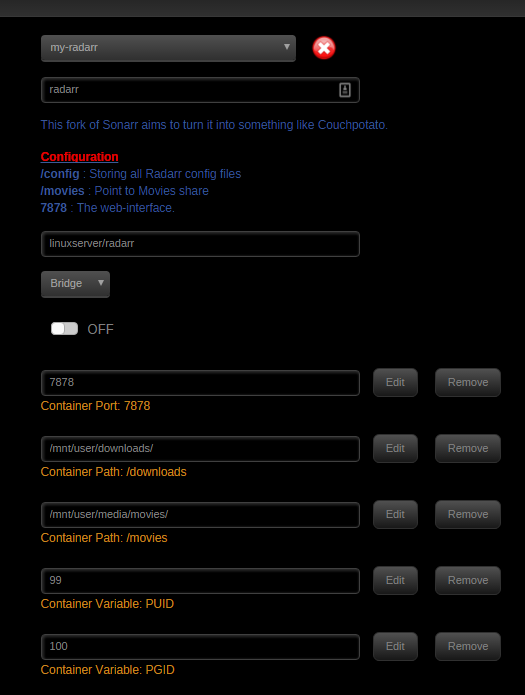
unRaid 6.2.4, screenshot attached.



