rpowers
Members
-
Joined
-
Last visited
Everything posted by rpowers
-
This has done the trick! Thanks!
-
Hi, I recently had some problems with some apps and managed to screw them up. I reinstalled the OS on the flash drive and replaced config with a backup but I now have this error. Can someone help? Diagnostics are attached. tower-diagnostics-20230809-1229.zip
-
I was hoping someone could help with an connection refused error I get when running onlyoffice in nextcloud behind nginx. I've attached the error log file. nginx.error.log
-
Ok, well I figured it out in case any one else runs into this issue. I had to edit the config.php file which can be found in appdata nextcloud\www\nextcloud\config. I had to change the ip in the array and in the dbhost.
-
I connect via reverse proxy.
-
Hi, I recently changed the LAN and IP of my server and for some reason I can't launch Nextcloud. All other dockers are working fine. Any idea what setting I'm missing or what I have to do?
-
I managed to fix this error. It seems the error occurs because I was backing up the Duplicati Temp folder. I have since removed it from the backup and has been working for 8 days now with no error.
-
Error: Detected non-empty blocksets with no associated blocks! Anyone else get this error? It happens with one of my backups which runs fine the first couple of times but inevitably gives me this error after a couple days. I see others getting this error on their forums but no fix. Does anyone here have any suggestions? Thanks in advance, Ryan.
-
I'm not sure why I overlooked something so obvious. I mapped the template properly and it's now working. Thanks for the help.
-
No, sorry. Thanks for the help, I'll keep trying.
-
Hi, Yes, I can click on that and it will pop up and I can see the folders I have created but when I use that path in duplicati I get the error message.
-
I manually enter the /mnt/disks/nameofdrive but the error returns Access to the path "/mnt/disks" is denied. I should also say that the first message is a create folder: The folder /mnt/disks/nameofdrive does not exist. Create it now?
-
Hi, I'm trying to backup to a mounted unassigned device formatted with xfs. I can't seem to find the path to browse to the disk and if I manually enter the path I get an error: /mnt/disk/ access is denied. Any idea what I'm doing wrong here? Thanks in advance.
-
Thanks.
-
Hi, I have what is probably a stupid question but I can't figure it out. I set up my list with IMDB but forgot to change the folder path so it moved the movie to the default location which is something like /opt/radarr. I realized the error then changed the folder. Now I can't find the original file because I can't find the radarr path via Dolphin or MC. Can someone tell me where I can find this path? Thanks in advance, Ryan
-
Ok, I appreciate the help again.
-
Jan 22 12:29:24 Tower root: Using command: /usr/bin/rsync -avXHq --delete --excl ude "/mnt/cache/docker.img" --log-file="/var/lib/docker/unraid/ca.backup.datast ore/appdata_backup.log" "/mnt/user/appdata/" "/mnt/user/Documents/appdatabackup" > /dev/null 2>&1
-
Diagnostics attached. It does seem to be only the usb and vm_xml. It's possible that my settings are wrong. tower-diagnostics-20170122-1231.zip
-
Those are set as backup to the same destination as appdata. I'll post the diagnostics shortly.
-
Attached BackupOptions.txt
-
Hi, I created a appdata backup folder on my array and pointed to this folder in the settings. I manually ran a backup which saved the backup data to the created folder but it also created a backup of the appdata in my appdata folder. I have no idea why it did this. Is this normal behaviour? I can't see a setting where it would also create a backup in my appdata folder in addition to the folder I created in my user share on my array. Thanks in advance, Ryan.
-
Hi, I have a question regarding transcoding. Sorry if this has already been answered, I did a search but was not able to find an answer. I noticed when I try to play a movie through the Emby app on an ipad it will max out a single core of my cpu while the other 3 cores remain around 2-3% load. The movie will sometimes pause to buffer as a result. Is this normal behaviour when playing through the emby app? Is there any way to allow it to use more cores? Is there another transcode setting I should be looking at? I have a core i5-6500 and 16GB of RAM. I should also mention that if I open the same file with VLC on the ipad I get flawless playback an it barely registers on my cpu load. Thanks in advance, Ryan.
-
That worked! I appreciate the prompt reply and help.
-
Attached
-
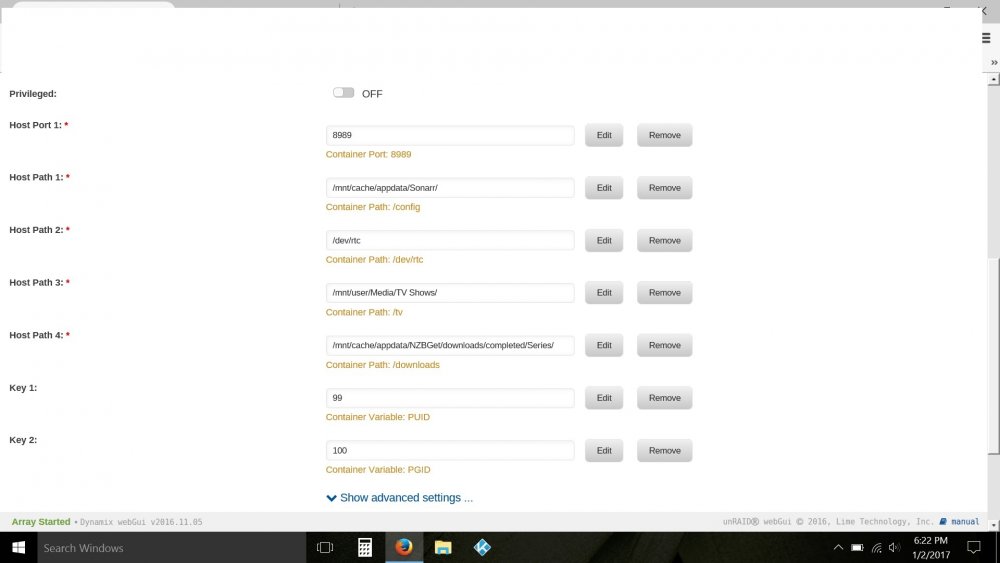
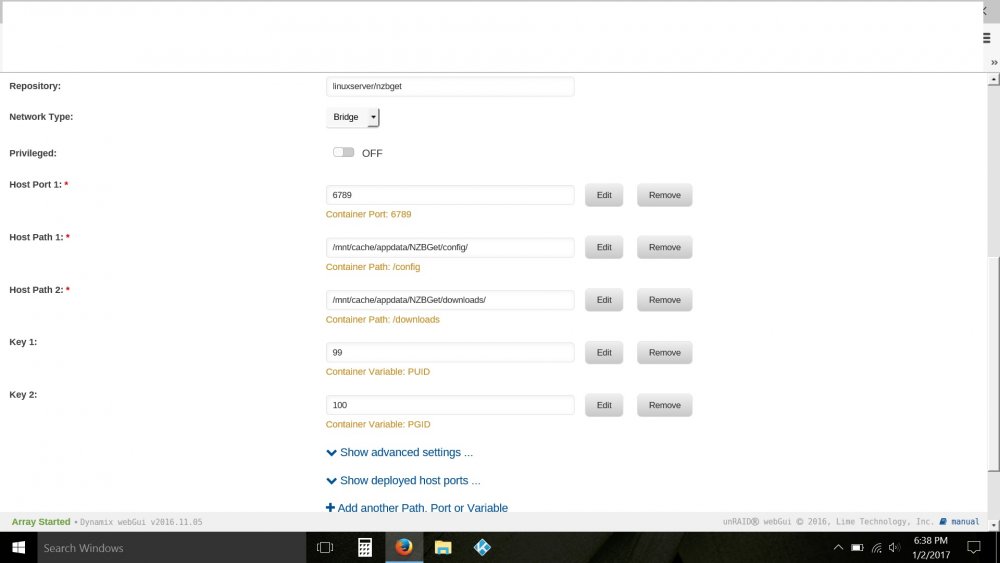
Hi, I was hoping someone could help me with my Sonarr config. Everything actually works ok but it only works if I have Drone Factory pointing to my downloads and a the interval set to 1. When processing the download I actually get an error 'Intermediate Download Path inside Drone Factory, Ignoring'. The error quickly goes away and everything is then processed, renamed etc. I've read that Drone Factory should not be used as it is a legacy import system but if I remove the above from the Drone Factory setting I get an error and processing, renaming doesn't happen. I have attached a screenshot of my setup. Any help would be appreciated. Thanks, Ryan.