






bubbl3
Members
-
Joined
-
Last visited
Everything posted by bubbl3
-
v0.5 released Config V2 support for firmware v4: new 96-byte config struct with UiConfigStructV2 Color pickers for primary, secondary, highlight, and background colors (replaces theme dropdown) Default screen selector Display inversion toggle Fix config size auto-detection (72/74/96 bytes) Update upstream submodule to wireview-hwmon v1.3
-
v0.1.34 Security and reliability fixes The service keeps serving when /var/log is full. A failed write to /var/log/unraidclaw.log used to raise an error inside the request logger, whose shutdown then retried the same write forever. The service stayed listening on its port but never completed a TLS handshake, never answered a request and ignored rc.unraidclaw stop until it was killed. Log lines that cannot be written are now dropped and the service carries on. Thanks to @golgoth85 for the report and the diagnosis in #18. rc.unraidclaw stop always ends the service. If closing open connections stalls, the process exits on its own after five seconds instead of waiting for the SIGKILL the script sends after ten. rc.unraidclaw start warns when /var/log has no free space, since the service log will explain nothing in that state. /var/log/unraidclaw.log is rotated at 5 MB through Unraid's daily logrotate run, so the request log cannot fill /var/log on its own. Upgrade notes Nothing to configure. If your /var/log is full, the service now starts and answers, but its log stays empty until space is freed. On Unraid 7.3.2, a full /var/log is often nginx/error.log growing from the missing question.png container icon; clearing the rotated logs frees it. v0.1.33 MCP support New Streamable HTTP endpoint at /mcp on the service port, off by default and switched on with Enable MCP in Settings. It exposes the same 55 tools with the same API key, permissions, input validation and activity logging as the REST API. REST and the OpenClaw plugin keep working as before. Activity log entries for MCP tool calls name the tool and show the outcome of the API route it ran. Successful MCP handshakes and GET/DELETE responses with status 405 are left out of the log; other failed connection requests are still logged. Setup for Claude Code, Codex and other clients is described in the MCP section of the README. Command-line client The plugin now installs the unraidclaw command at /usr/local/bin/unraidclaw, with the same tools and permissions as OpenClaw and MCP. On the server it finds the local gateway and trusts its certificate on its own; set the API key once with unraidclaw config set-key. For other machines, the same client is published as unraidclaw-cli on npm and as unraidclaw-cli-0.1.33.tar.gz on this release. It needs Node.js 22 or newer. Connection errors name the cause (untrusted certificate, address not in the certificate, nothing listening, protocol mismatch or DNS), and invalid arguments name the failing flag and rule. Tables and help are shorter, logs and nested values are formatted for reading, certificate details are shown once when trusting in table mode, and supported dry runs proceed without confirmation. See the CLI guide for install, credentials, certificate trust, all commands and exit codes. TLS certificate Generated certificates now list the server's host name, its .local name, loopback and stable global addresses in subjectAltName, so clients that trust the certificate can verify the host name. Settings shows the certificate's subject, alternative names, expiry and SHA-256 fingerprint, so remote CLI users can compare the fingerprint before trusting it. A Regenerate certificate button replaces the certificate when the server's address or host name changed. It keeps the old pair as .bak files (older backups get numbered suffixes) and restarts the service. Security and reliability fixes A parity check started with correct sent as the text "false" no longer runs as a correcting check. The field must now be true or false. Share comments containing quotes, backslashes, $, backticks or control characters are rejected, since they could write extra keys into the share's config file. Share settings are now written atomically and read back. Docker, VM, array, parity and notification actions reject malformed input and unknown fields, refuse IDs that start with -, time out instead of hanging, and check the real state afterwards. Responses include a verified field; a VM shutdown or reboot still in progress returns verified: false. A container created through the API keeps its Unraid template even when it exits right after starting, and a failed create reports Docker's error without echoing environment values. Requests to paths that do not exist return 404 instead of 401 when sent without a key, and no longer count toward the failed-login limit. MCP clients that probe for OAuth metadata locked themselves out before connecting. /api/health stays public and unlogged when called with a query string. /api/health no longer reports the previous version after an upgrade until the service restarted again. The package now records its own version instead of the service reading it from the .plg, which Unraid saves only after the install script restarts the service. Other changes Settings Apply reports when the service did not end up running or stopped, and no longer restarts the service when the settings file could not be written. The Disk Info permission description no longer mentions SMART data, which the disk endpoints do not return. The unused vms:create permission is removed from the VM Manager preset. Upgrade notes MCP is off after the upgrade. Turn it on with Enable MCP in Settings if you want the /mcp endpoint. A certificate created by an earlier version has no subjectAltName and is replaced once on the first service start after the upgrade. The previous pair is kept as cert.pem.bak and key.pem.bak in /boot/config/plugins/unraidclaw/tls. Clients that pinned or trusted the old certificate must trust the new one; the OpenClaw plugin with tlsSkipVerify: true is not affected. Regenerating the certificate from Settings has the same effect: clients that trusted the old certificate must trust the new one. Docker, VM, array, parity, share and notification routes now reject unknown fields and wrongly typed values that earlier versions accepted. Check API scripts that send extra or loosely typed fields, and note that responses from these routes now carry a verified field. Unknown paths answer 404 without a key where they previously answered 401. v0.1.32 Fixes Check /etc/rc.d after upgrading Earlier packages carried directory entries for shared paths. Installing one could replace Unraid's /etc/rc.d symlink with a plain directory holding only rc.unraidclaw. That hides rc.0 and rc.6, so a reboot can't shut the array down cleanly. 0.1.32 builds the package without directory entries and installs it with --keep-directory-symlink --no-overwrite-dir. A new archive safety test runs in the release workflow against a host where /etc/rc.d is a symlink. The upgrade doesn't repair a server that was already hit. Run ls -ld /etc/rc.d. If it shows a directory instead of a symlink, stop the array from the WebGUI before you reboot. Unraid rebuilds its root filesystem from the boot image on every start, so the symlink is back after that reboot. Features Community Applications You can search the CA catalog, read an app's template, and install it with overrides. Installed apps can be updated and removed. An update rebuilds the container from the template saved on the flash drive, not from today's catalog, so the ports, paths and variables you set stay as they are. Volumes attached to the running container are carried over. Removal keeps appdata, volumes, images and the saved template. If the replacement container fails, UnraidClaw tries to put the old one back. Anything it can't reproduce exactly is refused with a blocker code instead of being dropped. Extra Parameters, device passthrough, custom networks, privileged containers and resource limits the template doesn't describe all fall in that group. The new operations accept dryRun: true. Masked template values such as passwords and API keys are redacted from update previews and errors. Plugin Management A separate Plugins category lists, inspects, installs, checks, updates and removes Unraid plugins. Permissions New keys: ca:read, ca:create, ca:update, ca:delete, plugins:read, plugins:create, plugins:update, plugins:delete. The Docker Manager preset includes the CA permissions and Read Only includes plugins:read. Plugin write permissions need an explicit checkbox or Full Admin. ca:update and ca:delete are off in a default permission file. Unraid 7.4 Unraid 7.4 adds a memory limit and Additional Networks to Docker templates. Installs and updates pass the template's memory limit to docker as --memory. An update is refused if the running container's limit doesn't match the template. On Unraid before 7.4, which ignores the field, an install with a memory limit is refused. Templates with Additional Networks are refused rather than installed on a single network. VM listings no longer query the deprecated uuid GraphQL field. The uuid in responses now comes from the VM id and keeps the same value. OpenClaw plugin 0.1.14 Published to npm as [email protected]. It adds 11 tools, 55 in total: unraid_ca_search, unraid_ca_app, unraid_ca_install, unraid_ca_update, unraid_ca_remove, unraid_plugins_list, unraid_plugin_info, unraid_plugin_install, unraid_plugin_check_updates, unraid_plugin_update, unraid_plugin_remove The new tools call endpoints that exist only in gateway 0.1.32, so upgrade the Unraid plugin first. The plugin README and SKILL.md had stale tool counts, a 6.12+ requirement where 7.0.0+ is correct, and outdated config examples. Those are fixed. The repo also has a CONTRIBUTING.md and an AGENTS.md now. v0.1.31 Fixes Parity-check status now reflects reality (#14, thanks @rodaballo) /api/array/parity/status previously read Unraid's GraphQL array.parityCheckStatus, which doesn't reflect parity checks started outside Connect (via mdcmd, cron, or the webGUI) — so it reported no activity during a running check. It now reads live md-driver state from mdcmd status (the same source the webGUI uses, consistent with how start/pause/resume/cancel already shell out to mdcmd). API Backward compatible — the existing keys keep their names and now carry real data, with new fields added: Field Source running mdResyncPos>0 ‖ mdResync>0 progress mdResyncPos / mdResyncSize (0–100) speed / speedHuman mdResyncDb / mdResyncDt (KiB/s) / MB/s string errors sbSyncErrs paused (new) in progress but not advancing correcting (new) mdResyncCorr action (new) mdResyncAction (e.g. "check P Q") position / size (new) KiB done / total lastCheck (new) start/finish/duration/exit of the previous check No changes required for existing API consumers (OpenClaw included) v0.1.30 Important Critical fix. v0.1.27–v0.1.29 silently chowned host root paths (/, /usr, /usr/local, /usr/local/emhttp, ...) to UID 1001 on install, breaking SSH key authentication on systems with default StrictModes yes. All users on those versions should upgrade. Fixes Stop chowning host paths (#13) The build's tar invocation lacked --owner=root --group=root, so the GitHub Actions runner's UID 1001 was baked into every directory entry of the .txz. upgradepkg then preserved that ownership on the host's matching paths. Build now uses tar --owner=root --group=root --numeric-owner. All archive metadata is root:root. Heal existing installs Postinstall step issues a corrective chown root:root on the affected host paths. Upgrading to v0.1.30 fixes already-broken systems automatically. No-op on healthy systems. After upgrade, you can safely revert any StrictModes no workaround in /etc/ssh/sshd_config. Huge thanks to @justinmeader for the exceptional bug report, root cause and fix included. v0.1.29 Fixes Fix POST /api/docker/containers rejecting valid registry-prefixed image references (#12) Now accepts host[:port]/path/name:tag (e.g. 192.168.178.158:5000/homelab/myapp:latest) Now accepts digest references (e.g. nginx@sha256:...) The previous validator only allowed a single : and didn't permit @, which blocked everyone running a local/private Docker registry. v0.1.28 Fix min/max version to align with XML v7 minimum by @mstrhakr in #11 v0.1.27 Add memory stats (total, used, free, percent) to /api/system/info and /api/system/metrics Add CPU load averages (1m, 5m, 15m) to /api/system/info and /api/system/metrics Add disk usage (used, free, percent) to /api/disks endpoints via df Make /api/system/metrics a lightweight endpoint for polling (memory + CPU load only) v0.1.26 Security Hardening Release Fix command injection in syslog and notification endpoints (execSync to execFileAsync) Fix path traversal in notification archive/delete and docker template filename Restrict CORS to local network origins only Stop exposing Unraid API key in settings page HTML Remove internal error details from API error responses Add rate limiting on API authentication (10 attempts/min per IP) Add input validation on docker:create parameters (image, ports, volumes, env, network) Validate share update fields (floor, splitLevel, comment) Set restrictive file permissions on config, permissions, and log files Enforce strict boolean types in permission saves Require WebGUI authentication on activity log PHP endpoints Move CSRF token from global JS variable to data attribute v0.1.25 Add Unraid WebUI Port setting for non-standard port configurations GraphQL URL is now constructed automatically from the port (no more manual URL editing) v0.1.24 Remove GraphQL URL from settings (hardcode to http://localhost/graphql) Prevents misconfiguration that caused 500 errors on all GraphQL-based endpoints v0.1.23 Fix /api/health reporting hardcoded version "0.1.0" instead of actual installed version Version is now read from the .plg file automatically, so it always matches the installed release v0.1.22 Fix Docker inspect, logs, and all actions (start/stop/restart/pause/unpause) failing with 400 Bad Request Switch all Docker and VM operations from GraphQL to CLI for compatibility with Unraid 7.2.3 Add docker:create endpoint for deploying containers via AI agents (thanks @bitcryptic-gw) Fix OpenAI function calling compatibility Fix global TLS bypass in OpenClaw plugin (now scoped per-connection) Fix XML injection in docker:create template generation Add ADMIN API key requirement to documentation Correct API route paths in README OpenClaw plugin also updated to v0.1.3 on npm: rm -rf ~/.openclaw/extensions/unraidclaw && npm pack unraidclaw && openclaw plugins install unraidclaw-*.tgz && rm unraidclaw-*.tgz openclaw gateway restart On the OpenClaw side, multi server support has been added, config is backwards compatible, but you can have multiple servers configured this way: { "plugins": { "allow": ["unraidclaw"], "entries": { "unraidclaw": { "config": { "servers": [ { "name": "home", "serverUrl": "https://192.168.1.100:9876", "apiKey": "...", "tlsSkipVerify": true, "default": true }, { "name": "work", "serverUrl": "https://10.0.0.50:9876", "apiKey": "..." } ] } } } } }With multi-server, every tool accepts an optional server parameter (e.g. unraid_docker_list(server: "work")). If omitted, the default server is used.
-
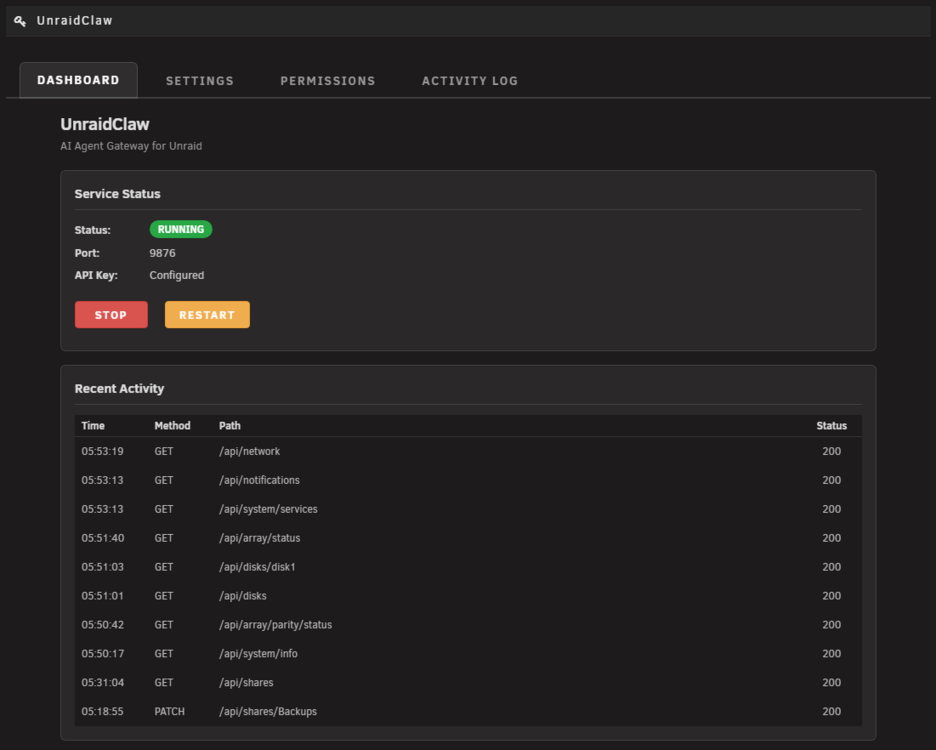
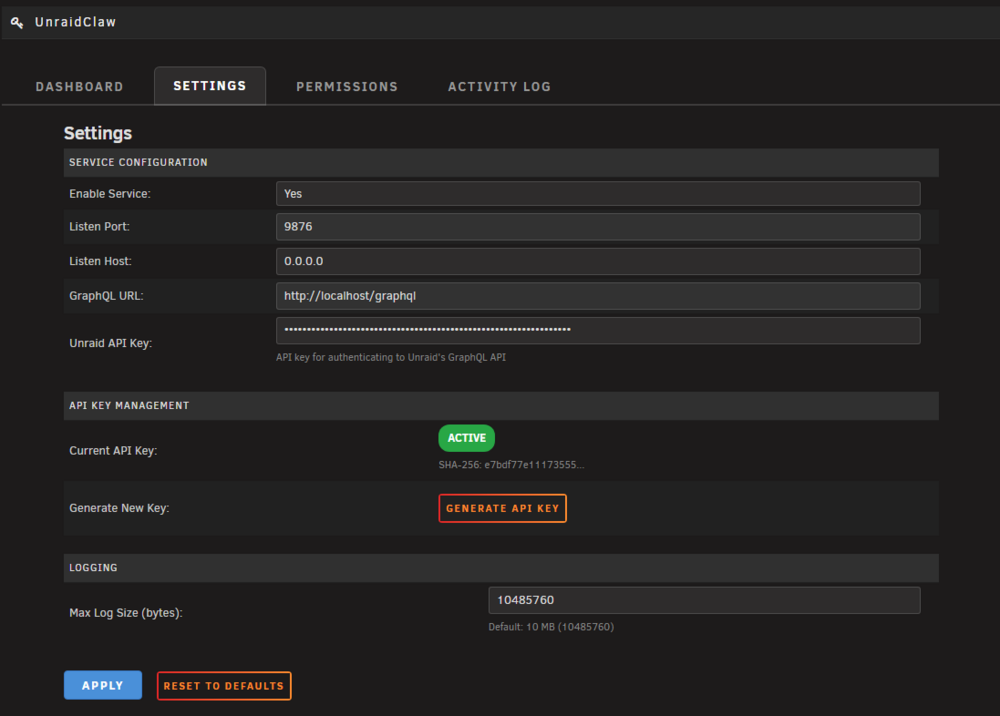
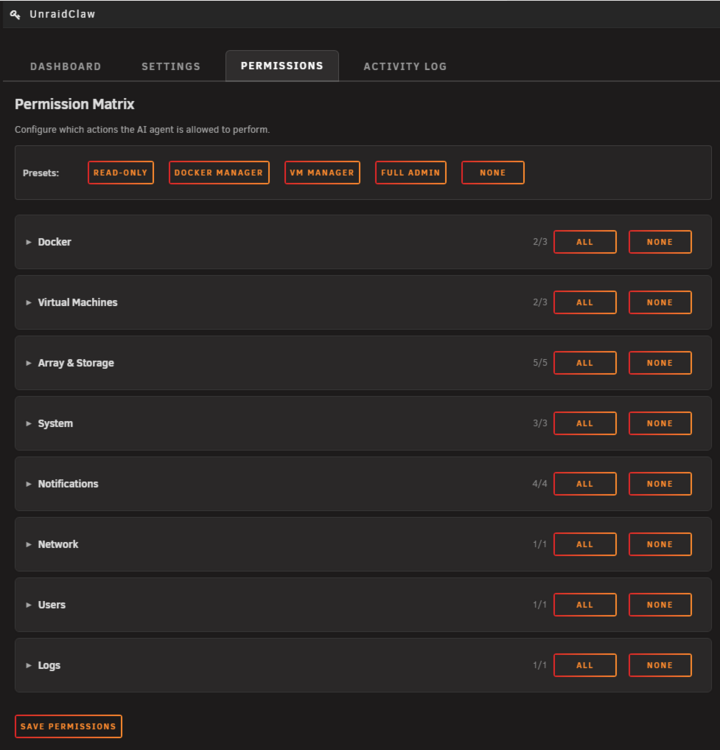
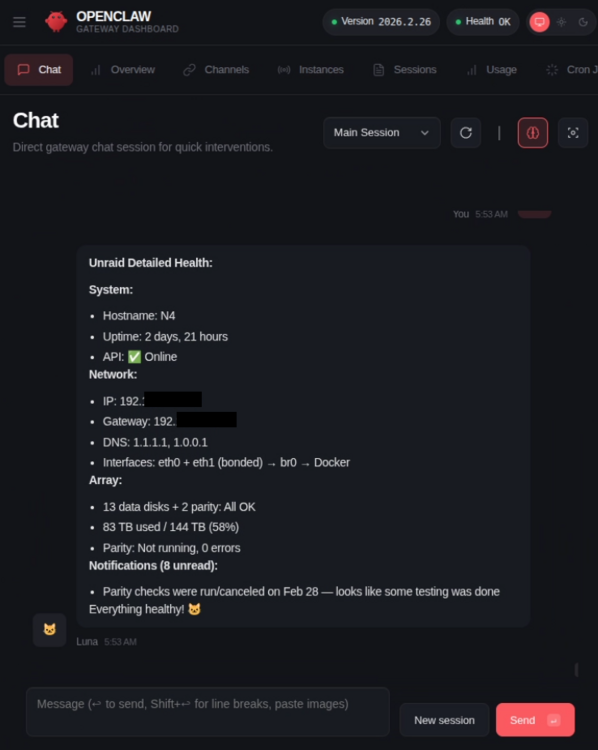
OverviewUnraidClaw is a permission-enforcing REST API gateway that lets AI agents manage your Unraid server. It sits between AI tools and your server, providing a unified API with fine-grained access control, authentication, and activity logging. Instead of giving AI agents direct access to Unraid internals, UnraidClaw acts as a controlled gateway. It combines Unraid's GraphQL API with direct system integration (CLI commands for parity checks, reboot/shutdown, and syslog; filesystem operations for share config editing and notification management; network introspection via ip) to expose capabilities that no single Unraid API covers. It works with any AI agent that speaks HTTP, and ships with an OpenClaw plugin for plug-and-play integration. What does it do?The plugin installs a Node.js server and a web interface that together give you: 43 tools across 11 categories: Docker – List, inspect, logs, start, stop, restart, pause, unpause, remove containers Virtual Machines – List, inspect, start, stop, force stop, pause, resume, reboot VMs Array – Status, start/stop array, parity check start/pause/resume/cancel Disks – List disks, view individual disk details and SMART data Shares – List shares, view details, edit settings (comment, allocator, split level, floor) System – System info, CPU/memory metrics, list services, reboot, shutdown Notifications – List, create, archive, delete notifications Network – View interfaces, routes, and DNS configuration Users – View current user info Logs – Read syslog entries Settings Page (Settings > UnraidClaw) with four tabs: Dashboard – Service status, server info, quick health check Settings – Service enable/disable, port configuration, API key generation Permissions – Full resource:action permission matrix with presets (Read Only, Docker Manager, VM Manager, Full Admin, None). 21 individual permission toggles across 8 categories Activity Log – Searchable log of all API requests with timestamps, endpoints, methods, and results Security: HTTPS with auto-generated self-signed TLS certificate (EC prime256v1, 10-year validity) API keys hashed with SHA-256 before storage; the plaintext key is never persisted Every request authenticated via API key ( x-api-key header ) and checked against the permission matrix All activity logged in JSONL format Runs locally on your Unraid box, no cloud dependencies OpenClaw Plugin (npm) – For AI agents that support the OpenClaw protocol: npm pack unraidclaw && openclaw plugins install unraidclaw-*.tgz && rm unraidclaw-*.tgzRegisters all 43 tools automatically. Configure with your server URL and API key in ~/.openclaw/openclaw.json. { "plugins": { "entries": { "unraidclaw": { "config": { "serverUrl": "https://YOUR_UNRAID_IP:9876", "apiKey": "YOUR_API_KEY", "tlsSkipVerify": true } } } } }RequirementsUnraid 7.0.0 or later (Node.js 22+ is built-in) InstallationCommunity Applications (coming soon, waiting for approval) Search for UnraidClaw in the CA plugin store. Manual Install Go to Plugins > Install Plugin and paste: https://raw.githubusercontent.com/emaspa/unraidclaw/main/packages/unraid-plugin/unraidclaw.plgQuick StartGo to Settings > Management Access in the Unraid WebGUI, scroll to the API section, and copy your Unraid API key Go to Settings > UnraidClaw, paste the Unraid API key into the Unraid API Key field Generate an UnraidClaw API key (save it, it won't be shown again) Configure permissions on the Permissions tab Set Service to Enabled and click Apply The server starts on port 9876 over HTTPS. TroubleshootingService won't start: Check that Node.js 22+ is available. Run node --version in the Unraid terminal. Connection refused: Verify the service is running: /etc/rc.d/rc.unraidclaw status TLS certificate errors: If your AI client doesn't accept self-signed certs, set tlsSkipVerify: true in the OpenClaw config. Permission denied on API call: Check the Activity Log tab to see which permission was denied, then enable it on the Permissions tab. API key not working: The key is shown only once during generation. If lost, generate a new one from the Settings tab. Support & FeedbackPlease report bugs and feature requests on the GitHub Issues page. For general discussion, questions, support and feedback, feel free to post in this thread. Source code: github.com/emaspa/unraidclaw
-
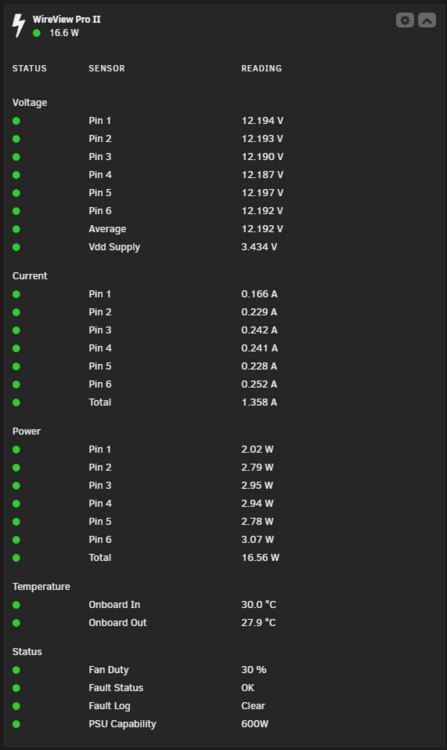
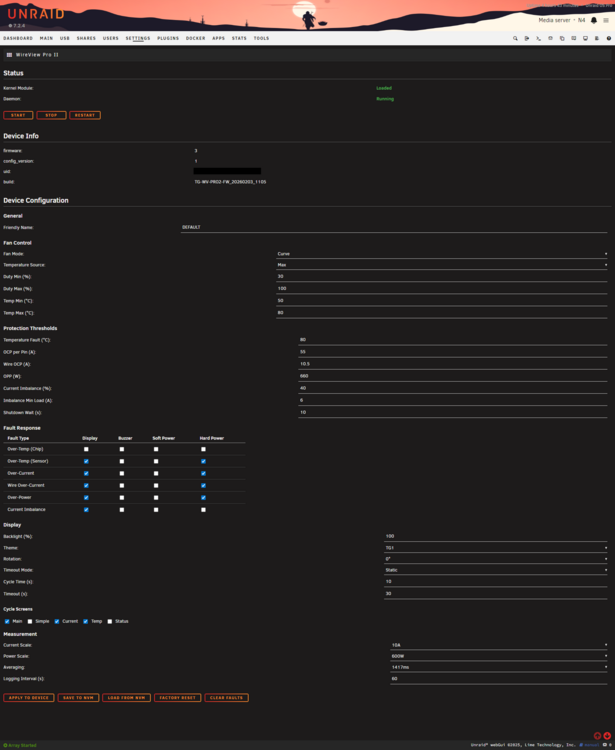
OverviewThis plugin brings full integration of the Thermal Grizzly WireView Pro II GPU power monitor into Unraid, exposing real-time voltage, current, power, and temperature readings through the Linux hwmon subsystem with a native web GUI on the Unraid dashboard. If you've got a WireView Pro II sitting between your PSU cables and GPU, this plugin lets you monitor and configure it directly from the Unraid web UI — no Windows app, no VM passthrough needed. It's built on top of the wireview-hwmon kernel module project. What does it do?The plugin installs a kernel module, a userspace daemon, and a web interface that together give you: Dashboard Tile — A live, movable tile on the Unraid dashboard showing: Per-pin and average voltage readings Per-pin and total current readings Per-pin and total power readings Onboard and external probe temperature readings Status info including fan duty, fault status/log, and PSU capability Auto-refreshes every 2 seconds with color-coded status indicators (green/orange/red) Settings Page (Settings > Utilities > WireView Pro II) — Full device configuration matching what you'd get in the official WireView II Pro GUI app: Daemon start/stop/restart Device info (firmware, UID, build string) Fan control (curve/fixed mode, temp source, duty/temp min/max) Protection thresholds (OCP, wire OCP, OPP, temperature fault, current imbalance) Fault response (per-type enable/disable for display, buzzer, soft power, hard power) Display settings (backlight, theme, rotation, timeout, screen cycling) Measurement config (current/power scale, averaging period, logging interval) NVM save/load/factory reset Clear faults Fault Alerts — A background monitor polls the device every 30 seconds and sends Unraid notifications on fault state transitions and high temperature warnings (above 80°C). CLI Tool (wireviewctl) — For those who prefer the command line: wireviewctl info # Device info wireviewctl read-config # Read config (hex) wireviewctl write-config <f> # Write config from file wireviewctl nvm store # Save to NVM wireviewctl clear-faults # Clear fault log wireviewctl screen main|temp|pause|resumeRequirementsUnraid 7.2.3 or later Thermal Grizzly WireView Pro II connected via USB directly to the Unraid host (must not be passed through to a VM) InstallationCommunity Applications (coming soon, waiting for approval)Search for WireView in the CA plugin store. Manual InstallGo to Plugins > Install Plugin and paste: https://raw.githubusercontent.com/emaspa/wireview-hwmon-unraid/main/wireview-hwmon.plgThe plugin automatically downloads the correct package for your kernel version. TroubleshootingPlugin installs but no sensor data appears: Make sure the WireView Pro II is connected via USB directly to the Unraid host, not passed through to a VM Run lsusb and look for vendor 0483 product 5740 Check daemon status: /etc/rc.d/rc.wireviewd status "Failed to download package for kernel X.Y.Z-Unraid": Your kernel version may not have a pre-built package yet — check the releases page You can also build from source (instructions on GitHub) Module fails to load: Run dmesg | tail -20 and check for errors Verify the module matches your kernel: uname -r Support & FeedbackPlease report bugs and feature requests on the GitHub Issues page. For general discussion, questions, support and feedback, feel free to post in this thread. If you find this plugin useful, consider buying me a coffee ☕
-
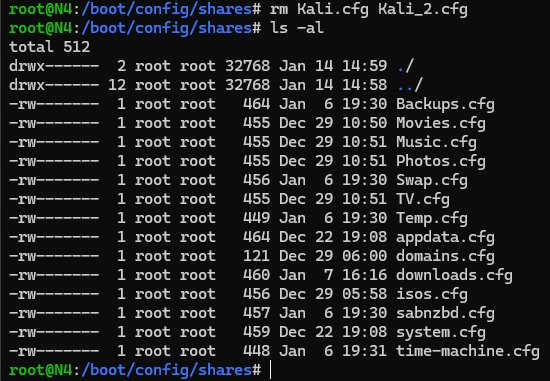
Decided to dig in, stopped the array and deleted the .cgf files manually Started the array and shares were in the UI, deleted them again, stopped the array. Verified cfg files were not there anymore, started the array again and now they're gone. I had them since RC1, so may be a fixed issue as new VMs don't create random shares anymore unless i define them.
-
I get that, but it doesn't really explain my issue, the VMs do not exist anymore, i deleted those 2 shares configuration wise and removed the folders. But they're gonna be recreated the next time i start the array. It's puzzling.
-
That's the thing, I did not setup shares for them.
-
I noticed them too since 7.0, even after deleting the VMs they're still there and if I delete the folders they are recreated at the next boot, don't think this is normal behavior.

-
Fixed in 6.12.9
-
That's not what I asked, can you try to boot a different USB drive with a different OS?
-
Ok, but what about now, does another bootable usb boot automatically?
-
Did you try another bootable USB? Like another drive and/or another OS, or both at the same time. Just to make sure it's a bios issue.
-
Recommended steps if you have the ability to get another drive: Take disk out of the server and keep in safe space Install new 6TB drive and follow rebuild process If rebuild successful proceed RMA faulty drive When drive comes back from RMA, keep it as spare
-
For sake of completion, disabling SMT seems to be a better workaround if that's an option in your setup: https://forums.unraid.net/bug-reports/stable-releases/6128-no-webgui-run-full-r2854/?do=findComment&comment=27345
-
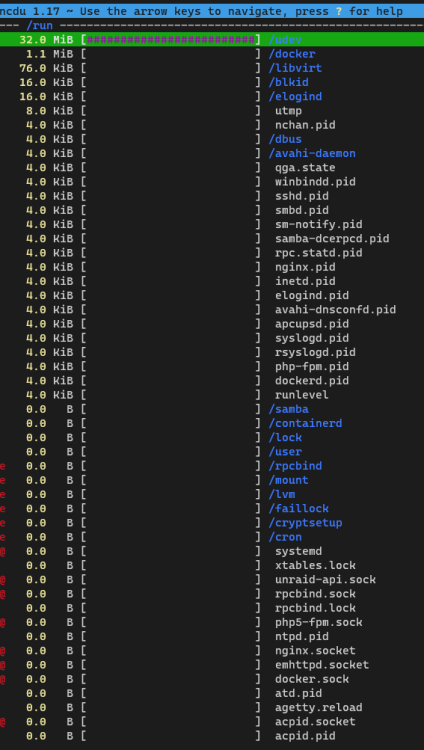
Thanks, but this is not a solution, just a workaround. Would also suggest you to check your syslog after the change as you may also have DBUS failing (it starts before the GO file), which will cause all sort of underlaying issues: At least this confirms why the bug is affecting us, you're on a 64 cores Threadripper and I'm on a 64 cores EPYC, we have more devices creating UDEV files than others, I bet their /run/udev is probably abnormally big as well even if it doesn't affect them.
-
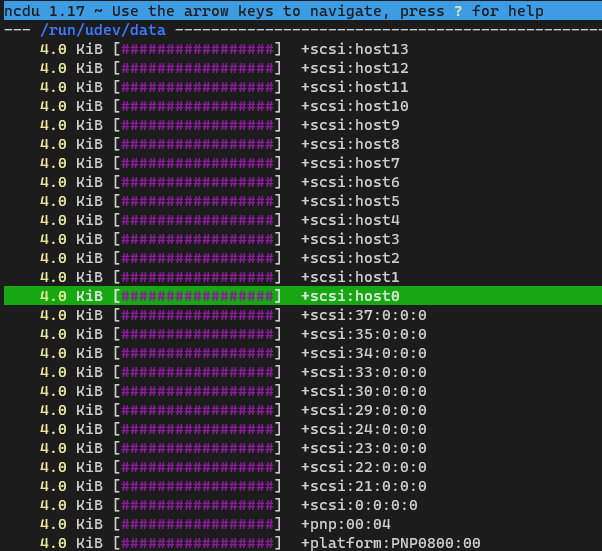
Also look here, all 0 bytes files in /run/udev/data are using 4KB:
-
That is correct, most of the files are 0 bytes and the total data that can be read from them is 512KB (confirmed by the output of tree --du -h -a /run > run.txt , attached here) , that said the block size is 4KB so every file will consume that amount of space on the partition. If you multiply the number of files for the minimum allocation you get a rough idea of why so much space is being taken: 9843 x 4 = 39372 If I learned anything in my years of working with file systems is that disk usage with small files gets often out of hand due to the default block size, NCDU is actually great for this, with tree or df you would be chasing ghosts as they just list the actual size. This also doesn't happen with 6.12.6, so it must be some change made between that and 6.12.8 run.txt
-
Bunch of 4KB files in there, weird:

-
Looks like udev is taking all the space:
 root@Tower:/# ls -la /run/ total 80 drwxr-xr-x 19 root root 1040 Feb 17 17:59 ./ drwxr-xr-x 21 root root 460 Feb 17 14:55 ../ -rw-r--r-- 1 root root 0 Feb 17 14:52 acpid.pid srw-rw-rw- 1 root root 0 Feb 17 14:52 acpid.socket= -rw------- 1 root root 0 Feb 17 14:53 agetty.reload -rw-r--r-- 1 root root 6 Feb 17 14:53 apcupsd.pid -rw-r--r-- 1 root root 0 Feb 17 14:52 atd.pid drwxr-xr-x 2 avahi avahi 80 Feb 17 14:54 avahi-daemon/ -rw-r--r-- 1 root root 6 Feb 17 14:54 avahi-dnsconfd.pid drwxr-xr-x 2 root root 80 Feb 17 14:55 blkid/ drw------- 3 root root 60 Feb 17 14:54 containerd/ drwxr-xr-x 2 root root 40 Feb 17 14:52 cron/ drwx------ 2 root root 40 Feb 17 14:53 cryptsetup/ drwxr-xr-x 2 root root 80 Feb 17 14:53 dbus/ drwx------ 8 root root 180 Feb 17 14:54 docker/ srw-rw---- 1 root docker 0 Feb 17 14:54 docker.sock= -rw-r--r-- 1 root root 5 Feb 17 14:54 dockerd.pid drwxr-xr-x 8 root root 160 Feb 17 14:54 elogind/ -rw-r--r-- 1 root root 6 Feb 17 14:53 elogind.pid srw-rw-rw- 1 root root 0 Feb 17 14:53 emhttpd.socket= drwxr-xr-x 2 root root 40 Feb 17 14:52 faillock/ -rw-r--r-- 1 root root 6 Feb 17 14:53 inetd.pid drwxr-xr-x 12 root root 440 Feb 17 14:54 libvirt/ drwxr-xr-x 4 root root 80 Feb 17 14:52 lock/ drwx------ 2 root root 40 Feb 17 14:52 lvm/ drwxr-xr-x 2 root root 40 Feb 17 14:51 mount/ -rw-r--r-- 1 root root 216 Feb 17 17:30 nchan.pid -rw-r--r-- 1 root root 6 Feb 17 14:53 nginx.pid srw-rw-rw- 1 root root 0 Feb 17 14:53 nginx.socket= -rw-r--r-- 1 root root 0 Feb 17 14:52 ntpd.pid -rw-r--r-- 1 root root 5 Feb 17 14:53 php-fpm.pid srw-rw---- 1 root users 0 Feb 17 14:53 php5-fpm.sock= -rw------- 1 root root 25 Feb 17 14:53 qga.state -rw-r--r-- 1 rpc rpc 6 Feb 17 14:53 rpc.statd.pid drwxr-x--- 2 rpc root 40 Feb 17 14:53 rpcbind/ -r--r--r-- 1 root root 0 Feb 17 14:53 rpcbind.lock srw-rw-rw- 1 root root 0 Feb 17 14:53 rpcbind.sock= -rw-r--r-- 1 root root 5 Feb 17 14:54 rsyslogd.pid -rw-r--r-- 1 root root 1 Feb 17 14:52 runlevel drwxr-xr-x 4 root root 80 Feb 17 14:52 samba/ -rw-r--r-- 1 root root 6 Feb 17 17:58 samba-dcerpcd.pid -rw------- 1 root root 6 Feb 17 14:53 sm-notify.pid -rw-r--r-- 1 root root 6 Feb 17 14:54 smbd.pid -rw-r--r-- 1 root root 6 Feb 17 14:53 sshd.pid -rw-r--r-- 1 root root 5 Feb 17 14:54 syslogd.pid lrwxrwxrwx 1 root root 7 Feb 17 14:52 systemd -> elogind/ drwxr-xr-x 8 root root 180 Feb 17 16:56 udev/ srwxr-xr-x 1 root root 0 Feb 17 14:53 unraid-api.sock= drwxr-xr-x 3 root root 60 Feb 17 14:55 user/ -rw-rw-r-- 1 root utmp 4224 Feb 17 14:55 utmp -rw-r--r-- 1 root root 6 Feb 17 14:54 winbindd.pid -rw------- 1 root root 0 Feb 17 14:52 xtables.lockI agree, but since the upgrade to 6.12.8 the 32MB of the /run mount are not enough and there's no other way to increase it, if I don't do that many services won't start, not to mention i have to manually start dbus as it runs before the go file and fails to create a .pid. Have a thread open but no help so far 🤷♂️That worked 👍root@Tower:/etc/samba/unassigned-shares# cat /etc/samba/unassigned-shares/ZCH0859H.conf [ZCH0859H] comment = ZCH0859H path = /mnt/disks/ZCH0859H browseable = yes valid users = emanuele write list = emanuele vfs objects = catia fruit streams_xattr fruit:encoding = native case sensitive = auto preserve case = yes short preserve case = yes [global] root@Tower:/etc/samba/unassigned-shares# cat /etc/samba/smb-unassigned.conf include = /etc/samba/unassigned-shares/ZCH0859H.confLooks like it's not there: root@Tower:~# ls /etc/samba/unassigned.devices/ /bin/ls: cannot access '/etc/samba/unassigned.devices/': No such file or directory The one there is called unassigned-shares root@Tower:/etc/samba# ls lmhosts smb-fruit.conf smb-names.conf smb-shares.conf smb-unassigned.conf smb.conf unassigned-shares/ root@Tower:/etc/samba# cd unassigned-shares/ root@Tower:/etc/samba/unassigned-shares# ls ZCH0859H.conf




