





AnyColourYouLike
Members
-
Joined
-
Last visited
-
Just got around to updating today and immedietely went looking for a solution. Notifications are completely out of site now and I really don't like it. I have temperature alerts set up that usually notify me when drives get too warm and now they sit docked in that little bell icon to be completely missed for hours. My solution is push notifications on my phone but I really miss that telltale red warning on my desktop to anticipate adjusting the A/C.
-
This is my experience a year later. I set everything up with the API and Plex token but the scan results in this and that last line "Can't find ID to match..." over and over for the whole library.
-
Latest update I can't get to webUI, similar errors as others above. 2019-12-23 17:31:39,382 DEBG 'watchdog-script' stderr output: terminate called after throwing an instance of 'std::bad_weak_ptr' what(): bad_weak_ptr 2019-12-23 17:31:39,709 DEBG 'watchdog-script' stderr output: Unable to initialize gettext/locale! 2019-12-23 17:31:39,709 DEBG 'watchdog-script' stderr output: 'ngettext' Traceback (most recent call last): File "/usr/lib/python3.8/site-packages/deluge/i18n/util.py", line 118, in setup_translation builtins.__dict__['_n'] = builtins.__dict__['ngettext'] KeyError: 'ngettext'
-
Ah so that's how you can add commands. I don't have a dedicated cache drive so yeah my appdata is on my main array. Unfortunately that didn't seem to change anything. I'll have to try some more tomorrow, it's getting late. Thanks for being online and so quick to respond. Edit* I think my issue is in particular to xfs, --storage-op size=X isn't a valid command. Hey now I have an excuse to finally buy a cache drive!
-
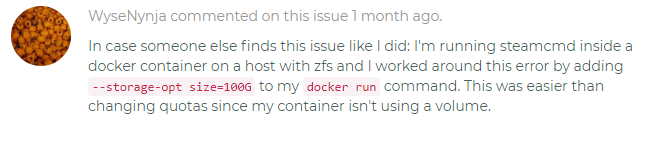
I just kept it default /appdata. Same error trying Don't Starve. It seems like an existing issue with steamcmd incorrectly reading 0 bytes available space. I've found several others via google using steam on Linux. Something about a quota. I just found someone else using docker with the same issue albeit with ZFS (I have XFS) They added a command to docker run for a workaround. (I'm not even sure how to do that?)

-
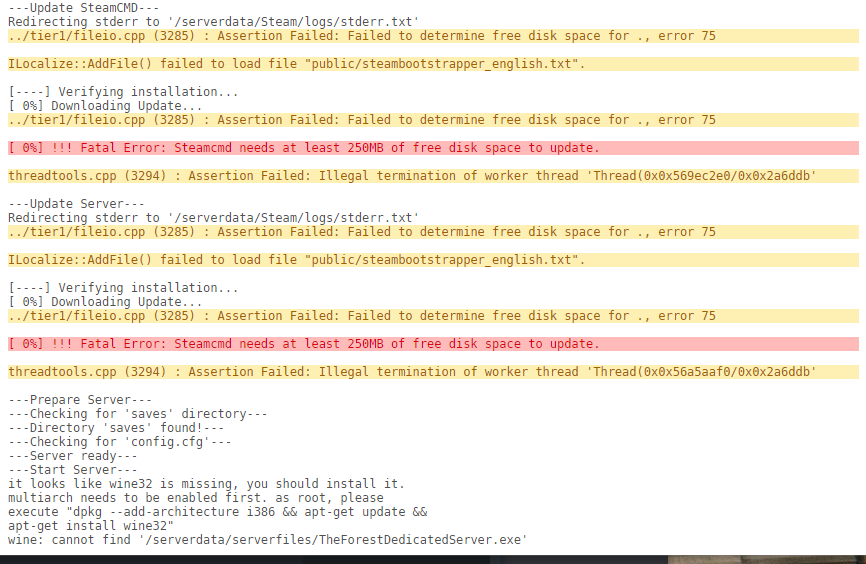
First time trying this, using 'the Forest' as my first attempt. I'm not sure if I'm doing something wrong here. First it says failed to determine free disk space but also says wine32 is missing. I have plenty of disk space available
-
Edit the Docker. The debug flag is in there. There you can check the location of your config files as well.
-
OK ill look in to it. As of right now I can only access it locally I believe. Thanks again!
-
wow ok so it was the https that was the problem. I've never had to do that before... https://192.168.1.XXX:8112 got me to the webgui. Chrome did strike through https saying "not secure" but i was able to log in and can now disable certs. To the best of my knowledge i haven't tinkered with ssl in any cognizant way... Should I be using that? and if so why does chrome browser say it's "not secure"? Thank you so much btw, My queue is all sorts of messed up, my Deluge needs daily maintenance in a bad way lol Back in action!
-
I believe it's "192.168.1.1" I've never seen it end in '.0' but yes it follows that format.
-
Hmm.. Well I'm leaving to school here soon for the day so I'll try more later... but another browser and device was the same result.
-
well I hope I masked what is necessary... I really appreciate you taking the time, as well as your rapid response thus far.
-
"watch out for passwords" Can you elaborate? My log file is yuuuge.
-
I'm having issues similar to pe4nut1989 above. After updated Unraid to 6.3.3 I can't access the webgui. My automated tasks show it's still running/grabbing things, I just can't access webgui. I did take a look at the settings and didn't notice anything awry, or that 'Container Variable: LAN_NETWORK' had changed like pe4nut1989's experience. PIA enabled or otherwise, can't get host ip/8112 page Anyone else?
-
I'm having a similar issue I think. I just grabbed this plugin and setting enable to "yes" does nothing, the "status: stopped" remains. For that reason I've never seen an open web UI button.


