Forusim
Members
-
Joined
-
Last visited
Everything posted by Forusim
-
Thanks johnnie. @dlandon Is my issue posted on Thursday at 10:18 PM a general one for all USB attached drives? Then it would make sense to give a warning at the beginning, when you are talking about "DIsks formated XFS or BTRFS will be partitioned compatible with the array disks and can be installed in the array without a re-format."
-
Wow, that's a bummer. Is there a command, I could use to verify a difference in the partition layout between formatting over USB or SATA?
-
Due to limited SATA Ports on my Motherboard, I used a WD MyBook 8 TB via USB and UD-plugin to offload not very important data. Before I have precleared this drive with the appropriate plugin and formatted to XFS with UD-plugin destructive mode. Now I have replaced 2x SATA SSD with 2x NVME SSD and would like to add this WD Whitelabel 8 TB with 5 TB of data to my array. Therefore I followed the advices here in forums to stop array, make new config with keeping the current assignment. Then added the WD Whitelabel 8 TB as Disk 4 and hit start array. However the new Disk 4 comes up with "Unmountable: Unsupported partition layout" and Unraid offers me to format it, which would delete my existing data. The drive can be mounted with UD without problems and all files are accessible, which should rule out any corruption of the XFS partition. From my understanding drives formatted with UD should have compatible partition layout with the array. I have checked the syslog, but could not find anything helpful. I have attached the diagnostics file, so somebody can hopefully point me into the right direction. tower-diagnostics-20190725-2004.zip
-
Hello @gfjardim When a drive is mounted as unassigned (not even shared), your plugin issues "lsof -- /mnt/disks/tempdrive" command every few seconds. This causes remarkable CPU spikes (30% out of 400%) via process "php" and don´t let that drive ever spin down. Would it be possible not to issue this command when no preclear activity takes place? As workaround I have to uninstall this plugin, when not used. This enhancement is much appreciated.
-
Yes I have. Edit: After uninstallation the spikes are gone, thanks! Don´t understand, why this plugin issue any command without any activity...
-
I like this plugin a lot, however one thing bothers me. When a drive is mounted (not even shared), your plugin issues "lsof -- /mnt/disks/tempdrive" command every few seconds. This causes remarkable CPU spikes (30% out of 400%) via process "php" and don´t let that drive ever spin down. Would it be possible to have an option to disable "Open files" info or at least don´t issue this command when the Main dashboard is not actively displayed? This little enhancement is much appreciated.
-
Is it possible to get this working together with Tampermonkey and solving own ReCaptchaV2?
-
Actually it pretty straight forward, here my configs: /mnt/cache/appdata/letsencrypt/nginx/site-confs/yourdomain.duckdns.org # listening on port 80 disabled by default, remove the "#" signs to enable # redirect all traffic to https #server { # listen 80; # server_name _; # return 301 https://$host$request_uri; #} # main server block server { listen 443 ssl http2; server_name cloud.yourdomain.duckdns.org; root /config/www; index index.html index.htm index.php; ssl_certificate /config/keys/letsencrypt/fullchain.pem; ssl_certificate_key /config/keys/letsencrypt/privkey.pem; ssl_dhparam /config/nginx/dhparams.pem; ssl_ciphers 'ECDHE-RSA-AES128-GCM-SHA256:ECDHE-ECDSA-AES128-GCM-SHA256:ECDHE-RSA-AES256-GCM-SHA384:ECDHE-ECDSA-AES256-GCM-SHA384:DHE-RSA-AES128-GCM-SHA256:DHE-DSS-AES128-GCM-SHA256:kEDH+AESGCM:ECDHE-RSA-AES128-SHA256:ECDHE-ECDSA-AES128-SHA256:ECDHE-RSA-AES128-SHA:ECDHE-ECDSA-AES128-SHA:ECDHE-RSA-AES256-SHA384:ECDHE-ECDSA-AES256-SHA384:ECDHE-RSA-AES256-SHA:ECDHE-ECDSA-AES256-SHA:DHE-RSA-AES128-SHA256:DHE-RSA-AES128-SHA:DHE-DSS-AES128-SHA256:DHE-RSA-AES256-SHA256:DHE-DSS-AES256-SHA:DHE-RSA-AES256-SHA:AES128-GCM-SHA256:AES256-GCM-SHA384:AES128-SHA256:AES256-SHA256:AES128-SHA:AES256-SHA:AES:CAMELLIA:DES-CBC3-SHA:!aNULL:!eNULL:!EXPORT:!DES:!RC4:!MD5:!PSK:!aECDH:!EDH-DSS-DES-CBC3-SHA:!EDH-RSA-DES-CBC3-SHA:!KRB5-DES-CBC3-SHA'; ###Extra Settings### ssl_prefer_server_ciphers on; ssl_session_cache shared:SSL:10m; ### Add HTTP Strict Transport Security ### add_header Strict-Transport-Security "max-age=63072000; includeSubdomains"; add_header Front-End-Https on; client_max_body_size 0; location / { include /config/nginx/proxy.conf; proxy_max_temp_file_size 2048m; proxy_pass https://<nextclouddockerip>:443/; } } You may have to change the root of nextcloud webserver: /mnt/cache/appdata/nextcloud/nginx/site-confs/default # Path to the root of your installation root /config/www/nextcloud/; /mnt/cache/appdata/nextcloud/www/nextcloud/config/config.php <?php $CONFIG = array ( 'memcache.local' => '\\OC\\Memcache\\APCu', 'datadirectory' => '/data', 'instanceid' => '<instance>', 'passwordsalt' => '<salt>', 'secret' => '<secret>', 'trusted_domains' => array ( 0 => '<nextclouddockerip>', 1 => 'cloud.yourdomain.duckdns.org', ), 'overwriteprotocol' => 'https', 'overwritehost' => 'cloud.yourdomain.duckdns.org', 'overwrite.cli.url' => 'https://cloud.yourdomain.duckdns.org', 'version' => '12.0.6.1', 'dbtype' => 'mysql', 'dbname' => 'nextcloud', 'dbhost' => '<mariadbdockerip>:3306', 'dbport' => '', 'dbtableprefix' => 'oc_', 'dbuser' => 'oc_admin', 'dbpassword' => '<pw>', 'installed' => true, 'theme' => '', 'loglevel' => 2, 'maintenance' => false, ); Of course you have to edit your LetsEncrypt docker: Domain Name: yourdomain.duckdns.org Subdomain(s): cloud
-
Hello @Djoss, thank you for the great container. I run my server on ASRock N3150-ITX, which does not have much CPU power for conversion. But using QuckSync would help a lot here, are there any news on this feature? Very appreciated.
-
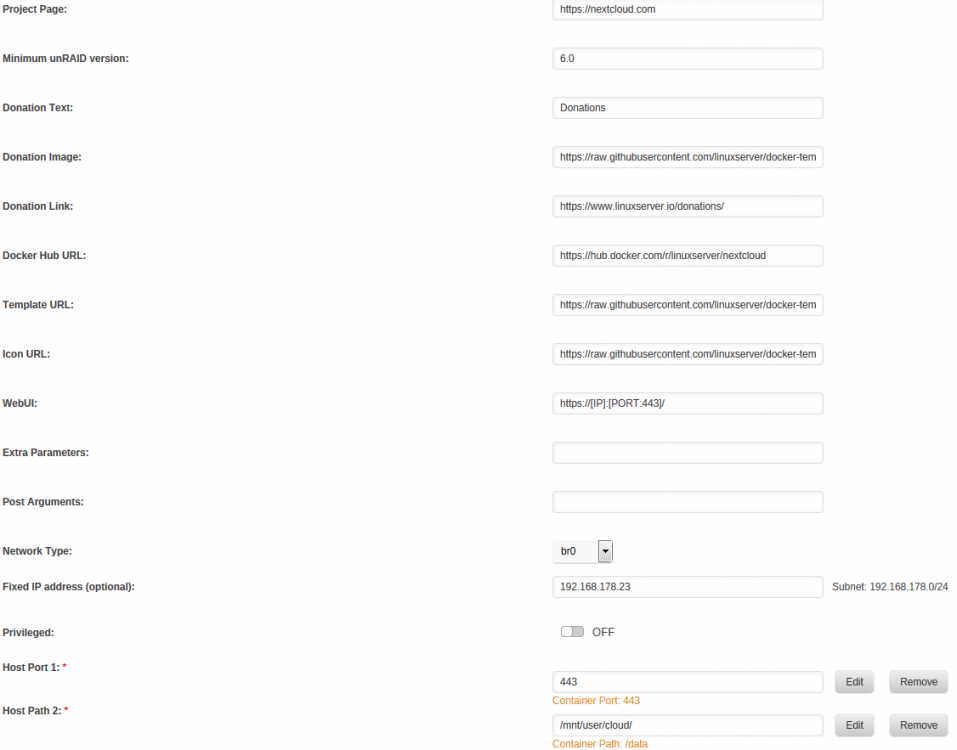
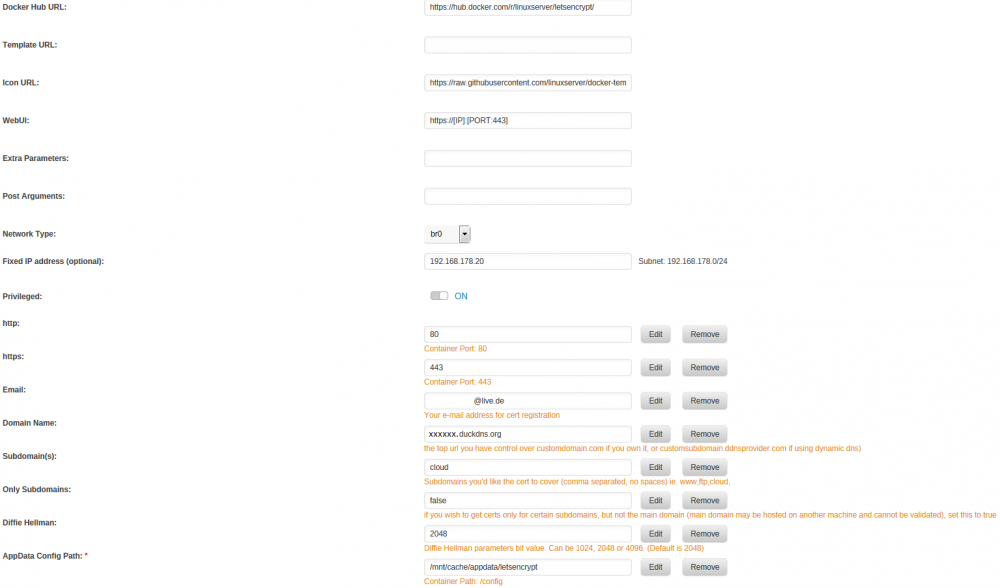
I am using nextcloud with letsencrypt docker without a problem with the bridged adapter. However I would like to set a fixed IP address for both dockers in order to use the default ports 80 and 443 (see attachments): Setting the fixed IP for letsencrypt worked fine, the default web page is available. But setting the fixed IP for nextcloud resolves to HTTP error (status 500), even when accessing over local IP. I have altered the trusted domain from my unraid ip to the new fixed ip (see below): <?php $CONFIG = array ( 'memcache.local' => '\\OC\\Memcache\\APCu', 'datadirectory' => '/data', 'instanceid' => 'xxxxxx', 'passwordsalt' => 'xxxxxxxxxxxxxxxxxxxxx', 'secret' => 'xxxxxxxxxxxxxxxxx', 'trusted_domains' => array ( 0 => '192.168.178.23', 1 => 'cloud.xxxxxxxxxx.duckdns.org', ), 'overwriteprotocol' => 'https', 'overwritehost' => 'cloud.xxxxxx.duckdns.org', 'overwrite.cli.url' => 'https://cloud.xxxxxxx.duckdns.org', 'version' => '12.0.6.1', 'dbtype' => 'mysql', 'dbname' => 'nextcloud', 'dbhost' => '192.168.178.10:3306', 'dbport' => '', 'dbtableprefix' => 'oc_', 'dbuser' => 'oc_admin', 'dbpassword' => 'xxxxxxxxxxxxxxxxx', 'installed' => true, 'theme' => '', 'loglevel' => 2, 'maintenance' => false, ); I have altered the proxy_pass in letsencrypt to the new fixed ip: # listening on port 80 disabled by default, remove the "#" signs to enable # redirect all traffic to https #server { # listen 80; # server_name _; # return 301 https://$host$request_uri; #} # main server block server { listen 443 ssl http2; server_name cloud.xxxxxxx.duckdns.org; root /config/www; index index.html index.htm index.php; ssl_certificate /config/keys/letsencrypt/fullchain.pem; ssl_certificate_key /config/keys/letsencrypt/privkey.pem; ssl_dhparam /config/nginx/dhparams.pem; ssl_ciphers 'ECDHE-RSA-AES128-GCM-SHA256:ECDHE-ECDSA-AES128-GCM-SHA256:ECDHE-RSA-AES256-GCM-SHA384:ECDHE-ECDSA-AES256-GCM-SHA384:DHE-RSA-AES128-GCM-SHA256:DHE-DSS-AES128-GCM-SHA256:kEDH+AESGCM:ECDHE-RSA-AES128-SHA256:ECDHE-ECDSA-AES128-SHA256:ECDHE-RSA-AES128-SHA:ECDHE-ECDSA-AES128-SHA:ECDHE-RSA-AES256-SHA384:ECDHE-ECDSA-AES256-SHA384:ECDHE-RSA-AES256-SHA:ECDHE-ECDSA-AES256-SHA:DHE-RSA-AES128-SHA256:DHE-RSA-AES128-SHA:DHE-DSS-AES128-SHA256:DHE-RSA-AES256-SHA256:DHE-DSS-AES256-SHA:DHE-RSA-AES256-SHA:AES128-GCM-SHA256:AES256-GCM-SHA384:AES128-SHA256:AES256-SHA256:AES128-SHA:AES256-SHA:AES:CAMELLIA:DES-CBC3-SHA:!aNULL:!eNULL:!EXPORT:!DES:!RC4:!MD5:!PSK:!aECDH:!EDH-DSS-DES-CBC3-SHA:!EDH-RSA-DES-CBC3-SHA:!KRB5-DES-CBC3-SHA'; ###Extra Settings### ssl_prefer_server_ciphers on; ssl_session_cache shared:SSL:10m; ### Add HTTP Strict Transport Security ### add_header Strict-Transport-Security "max-age=63072000; includeSubdomains"; add_header Front-End-Https on; client_max_body_size 0; location / { include /config/nginx/proxy.conf; proxy_max_temp_file_size 2048m; proxy_pass https://192.168.178.23/; } } I have not touched "cache/appdata/nextcloud/ngix/site-confs/". Is there any cache or certs inside the nextcloud docker, which prevents the chage of the IP address? Solution: The MariaDB docker have to get also an fixed IP address, otherwise the nextcloud docker will not find it. Somehow the were no errors in logs, because of that...
-
Thank you! Any reason not to use slimmer alpine linux, as http://tools.linuxserver.io/dockers mostly do? Would it be possible to provide the unraid template also?
-
Solved the issue with the help of this guide https://www.linuxserver.io/2017/05/10/installing-nextcloud-on-unraid-with-letsencrypt-reverse-proxy/ As I found out it is possible to use sub-subdomains like "https://cloud.mysubdomain.duckdns.org". No need to change the web configs of the applications any more. As a bonus I get now A+ instead of A from https://scan.nextcloud.com/
-
Hello Fma965, thank you for the guide. I followed it exactly, but still have one issue, I cannot resolve. Following your guide I should be able access my nextcloud server from "https://mysubdomain.duckdns.org/nextcloud" However I have add another slash at the end "https://mysubdomain.duckdns.org/nextcloud/" to login into my nextcloud server. In the chapter "Fixing Nextcloud" you write: It seems like nextcloud nginx webserver expects /nextcloud/ as web root. Did I missed something?
-
German Umlauts and Cyrillic. üäö.txt ?.txt Ok, the forum can´t handle cyrillic also ...
-
First of all thank you for the great plugin. I am using the example script to backup some of my shares to external drive. Everything works fine, but the file names in the script log are not utf8 compatible. Started: Sat Feb 18 23:17:07 CET 2017 sending incremental file list Test/\#303\#274\#303\#244\#303\#266.txt Test/\#320\#266\#320\#276\#320\#277\#320\#260.txt deleting Test/subdir/\#320\#266\#320\#276\#320\#277\#320\#260.txt deleting Test/subdir/\#303\#274\#303\#244\#303\#266.txt sent 234 bytes received 106 bytes 680.00 bytes/sec total size is 0 speedup is 0.00 Completed: Sat Feb 18 23:17:09 CET 2017 How can I get the original names in the script log?
-
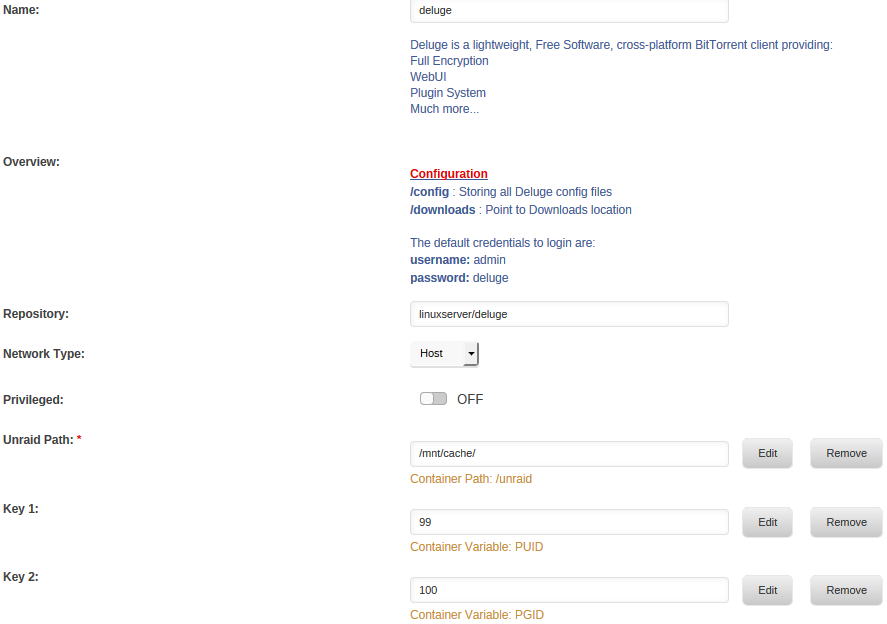
I have exactly the same issue. Deluge is removing the write permission from user group on any folder it gets access. So nobody can write/delete the files via SMB. Haven´t changed anything inside the docker, see my config in attachment.
-
Sorry for the late response. I have forwarded the port 22000/tpc in my router. My other Computer have SyncTrazor installed and no problem with listeners, even without port forwarding. Here the log from the latest (today) version: [s6-init] making user provided files available at /var/run/s6/etc...exited 0. [s6-init] ensuring user provided files have correct perms...exited 0. [fix-attrs.d] applying ownership & permissions fixes... [fix-attrs.d] done. [cont-init.d] executing container initialization scripts... [cont-init.d] 10-adduser: executing... ------------------------------------- _ _ _ | |___| (_) ___ | / __| | |/ _ \ | \__ \ | | (_) | |_|___/ |_|\___/ |_| Brought to you by linuxserver.io We gratefully accept donations at: https://www.linuxserver.io/index.php/donations/ ------------------------------------- GID/UID ------------------------------------- User uid: 99 User gid: 100 ------------------------------------- [cont-init.d] 10-adduser: exited 0. [cont-init.d] done. [services.d] starting services [services.d] done. [N3NR5] 21:05:45 INFO: syncthing v0.14.11 "Dysprosium Dragonfly" (go1.7.3 linux-amd64) root@1d811a9194c4 2016-11-18 23:56:17 UTC [N3NR5] 21:05:45 INFO: My ID: N3NR5IH-32TD7WK-S35GX56-IBEUJCV-GCDTTNG-X2GH3CW-BRAQHR3-2UUW5QD [N3NR5] 21:05:46 INFO: Single thread hash performance is 81 MB/s using minio/sha256-simd (59 MB/s using crypto/sha256). [N3NR5] 21:05:46 INFO: Ready to synchronize eds5j-za7vw (readwrite) [N3NR5] 21:05:46 INFO: Ready to synchronize u1cie-txtwz (readwrite) [N3NR5] 21:05:47 INFO: Ready to synchronize efjk3-qmhgk (readwrite) [N3NR5] 21:05:47 INFO: TCP listener (0.0.0.0:22000) starting [N3NR5] 21:05:47 INFO: Using discovery server https://discovery-v4-2.syncthing.net/v2/?id=DVU36WY-H3LVZHW-E6LLFRE-Y1FN5E2-HILWRYP-OC2M47J-Z4PE62Y-ADIBDQC [N3NR5] 21:05:47 INFO: Using discovery server https://discovery-v4-3.syncthing.net/v2/?id=VK6HNJ3-VVMM66S-HAVWSFR-IXEHL2H-U4AQ4MW-UCPQBWX-J2L2UBK-NVZRDQZ [N3NR5] 21:05:47 INFO: Using discovery server https://discovery-v4-4.syncthing.net/v2/?id=LYXKCHX-VI3NYZR-ALCJBHF-WMZYSPK-QGEQ1A3-MPFYMSO-U56GTUK-NA2MIAW [N3NR5] 21:05:47 INFO: Completed initial scan (rw) of folder u1cie-txtwz [N3NR5] 21:05:47 INFO: Using discovery server https://discovery-v6-2.syncthing.net/v2/?id=DVU36WY-H3LVZHW-E6LLFRE-Y1FN5E2-HILWRYP-OC2M47J-Z4PE62Y-ADIBDQC [N3NR5] 21:05:47 INFO: Using discovery server https://discovery-v6-3.syncthing.net/v2/?id=VK6HNJ3-VVMM66S-HAVWSFR-IXEHL2H-U4AQ4MW-UCPQBWX-J2L2UBK-NVZRDQZ [N3NR5] 21:05:47 INFO: Using discovery server https://discovery-v6-4.syncthing.net/v2/?id=LYXKCHX-VI3NYZR-ALCJBHF-WMZYSPK-QGEQ1A3-MPFYMSO-U56GTUK-NA2MIAW [N3NR5] 21:05:47 INFO: Completed initial scan (rw) of folder eds5j-za7vw [N3NR5] 21:05:47 INFO: Device F6ZVAAX-5EC3UBL-FGWKRAI-4Q66B4K-E27LFXG-KEIEDSF-FN5DSOL-COVHPAL is "Computer1" at [dynamic] [N3NR5] 21:05:47 INFO: Device N3NR5IH-32TD7WK-S35GX56-IBEUJCV-GCDTTNG-X2GH3CW-BRAQHR3-2UUW5QD is "Tower" at [dynamic] [N3NR5] 21:05:47 INFO: Starting usage reporting [N3NR5] 21:05:47 INFO: GUI and API listening on 0.0.0.0:8384 [N3NR5] 21:05:47 INFO: Access the GUI via the following URL: http://127.0.0.1:8384/ 2016/11/20 21:05:47 Supervisor connections.Service: connections.Service: Failed service 'dynamic+https://relays.syncthing.net/endpoint' (1.000000 failures of 5.000000), restarting: true, error: "{dynamic+https://relays.syncthing.net/endpoint dynamic+https://relays.syncthing.net/endpoint} returned unexpectedly", stacktrace: [unknown stack trace] 2016/11/20 21:05:47 Supervisor connections.Service: connections.Service: Failed service 'dynamic+https://relays.syncthing.net/endpoint' (1.997534 failures of 5.000000), restarting: true, error: "{dynamic+https://relays.syncthing.net/endpoint dynamic+https://relays.syncthing.net/endpoint} returned unexpectedly", stacktrace: [unknown stack trace] 2016/11/20 21:05:47 Supervisor connections.Service: connections.Service: Failed service 'dynamic+https://relays.syncthing.net/endpoint' (2.992563 failures of 5.000000), restarting: true, error: "{dynamic+https://relays.syncthing.net/endpoint dynamic+https://relays.syncthing.net/endpoint} returned unexpectedly", stacktrace: [unknown stack trace] 2016/11/20 21:05:47 Supervisor connections.Service: connections.Service: Failed service 'dynamic+https://relays.syncthing.net/endpoint' (3.984105 failures of 5.000000), restarting: true, error: "{dynamic+https://relays.syncthing.net/endpoint dynamic+https://relays.syncthing.net/endpoint} returned unexpectedly", stacktrace: [unknown stack trace] 2016/11/20 21:05:47 Supervisor connections.Service: connections.Service: Failed service 'dynamic+https://relays.syncthing.net/endpoint' (4.974418 failures of 5.000000), restarting: true, error: "{dynamic+https://relays.syncthing.net/endpoint dynamic+https://relays.syncthing.net/endpoint} returned unexpectedly", stacktrace: [unknown stack trace] 2016/11/20 21:05:47 Supervisor connections.Service: Entering the backoff state. 2016/11/20 21:05:47 Supervisor connections.Service: connections.Service: Failed service 'dynamic+https://relays.syncthing.net/endpoint' (5.961885 failures of 5.000000), restarting: false, error: "{dynamic+https://relays.syncthing.net/endpoint dynamic+https://relays.syncthing.net/endpoint} returned unexpectedly", stacktrace: [unknown stack trace] [N3NR5] 21:05:47 INFO: Completed initial scan (rw) of folder efjk3-qmhgk [N3NR5] 21:05:50 INFO: Established secure connection to F6ZVAAX-5EC3UBL-FGWKRAI-4Q66B4K-E27LFXG-KEIEDSF-FN5DSOL-COVHPAL at 172.17.0.2:53692-131.201.90.76:22067 (Relay (Client)) [N3NR5] 21:05:50 INFO: Device F6ZVAAX-5EC3UBL-FGWKRAI-4Q66B4K-E27LFXG-KEIEDSF-FN5DSOL-COVHPAL client is "syncthing v0.14.11" named "Computer1" [N3NR5] 21:05:53 INFO: Connected to myself (N3NR5IH-22TD7WK-S35GX56-IBIUJCV-GCDTTNG-X2GHSCW-BRAQHR3-2UUW5QD) - should not happen [N3NR5] 21:05:53 INFO: Connected to myself (N3NR5IH-22TD7WK-S35GX56-IBIUJCV-GCDTTNG-X2GHSCW-BRAQHR3-2UUW5QD) - should not happen [N3NR5] 21:05:57 INFO: Connected to myself (N3NR5IH-22TD7WK-S35GX56-IBIUJCV-GCDTTNG-X2GHSCW-BRAQHR3-2UUW5QD) - should not happen [N3NR5] 21:05:57 INFO: Connected to myself (N3NR5IH-22TD7WK-S35GX56-IBIUJCV-GCDTTNG-X2GHSCW-BRAQHR3-2UUW5QD) - should not happen [N3NR5] 21:05:58 INFO: Detected 0 NAT devices The log is spammed with following mesages: 2016/11/20 21:20:46 Supervisor connections.Service: Exiting backoff state. 2016/11/20 21:20:46 Supervisor connections.Service: connections.Service: Failed service 'dynamic+https://relays.syncthing.net/endpoint' (1.000000 failures of 5.000000), restarting: true, error: "{dynamic+https://relays.syncthing.net/endpoint dynamic+https://relays.syncthing.net/endpoint} returned unexpectedly", stacktrace: [unknown stack trace]
-
I have the same issue, but could not find a solution on the forums. Is this docker related and can´t be fixed?
-
In case someone like me read this after he bought WD MyBook 8 TB (with Helium NAS HDD). Don´t worry, this output is from the internal HDD:
-
If you live in Germany, I can recommend this site: http://www.mindfactory.de/Highlights/MindStar They have often good discounts on various computer parts like: Mainboard (older and newer ones) CPU (also for server) RAM (also ECC) Drives (SSD/HDD)
-
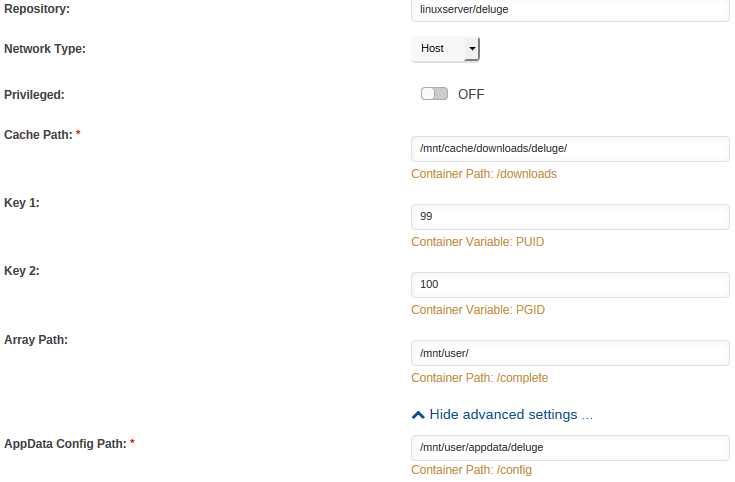
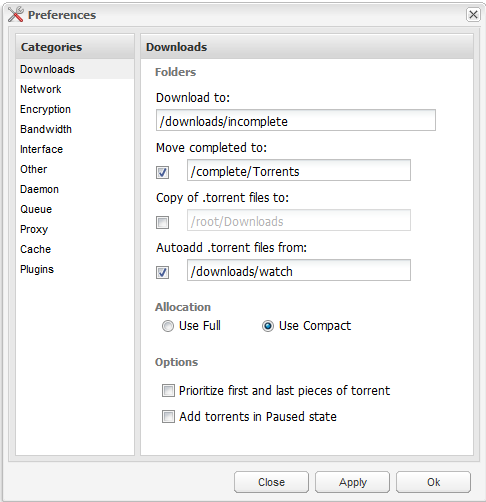
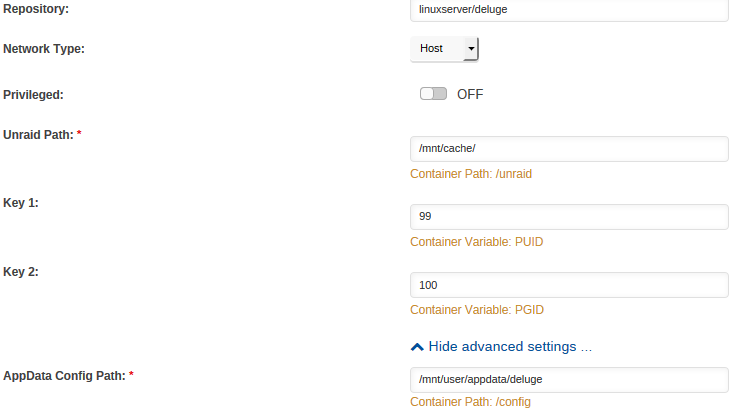
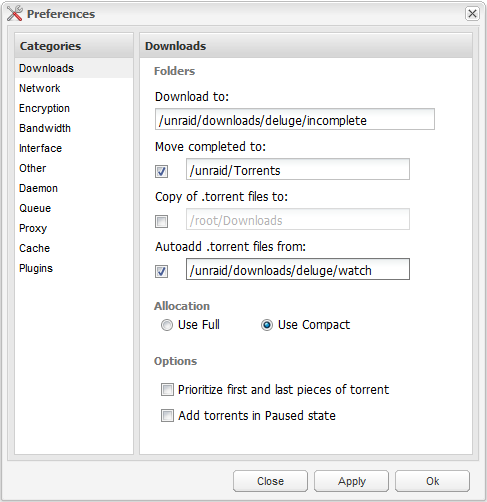
Below if my final deluge config - see attachments. Mapping explanation: /unraid/downloads points to a cache only share. /unraid/Torrents or /unraid/Media or /unraid/Software point to the cache storage of a regular array share (cache=yes required) How should it work: Deluge is watching and downloading to cache only share => Array Disks are not spinning Deluge finished downloading => rename the file from /unraid/downloads/deluge/incomplete/movie.mp4 to /unraid/Torrent/movie.mp4 (as default download direction) The file resides in the cache pool at /mnt/cache/Torrent/movie.mp4 until the Mover Script starts The Mover Script move the file to the array => will be deleted from /mnt/cache/Torrent/movie.mp4 Users can access the file at /mnt/user/Torrent/movie.mp4 directly after deluge finished download Upside: Write only once to cache pool => no extra move operation on SSD Mover can move it to array for long term storage Possible to set downloads final destination on the array at "Add Torrents" Downside: Torrents moved to array have to be remapped, if longer seeding is required Thanks Squid for guidance.
-
Ok now I got it, /mnt/cache sounds reasonable. You are probably right about SSD wearing, but there is still unnecessary write operation, which is avoidable as we found out now. My cache pool is formatted btrfs, do I still need need those TRIM plugins? According to https://lime-technology.com/exciting-new-developments-with-unraid-6/ this should happen automatically? EDIT: Or maybe I misunderstood something?
-
Let me translate it to my use case. I would map the docker /unraid to /mnt/user. I deluge I would set the following Download to: /unraid/downloads/deluge/incomplete (cache=only share) Move completed to: /unraid/Torrents (or any other cache=yes share) Autoadd: /unraid/downloads/deluge/watch (cache=only share) From deluge perspective the operation after finished download is just rename. Will unraid handle it the same way?
-
Are there any possibilities to avoid double writing to the SSD? For example my incomplete downloads stay on cache until finished and then moved to the user shares on the array?
-
I have searched the forum, but I could not find the answer to my (technical) question. What I have: 2x SSD as cache pool 1x HDD, 1x Parity one cache=only user share "downloads" several cache=yes user shares like "Media", "Software" or "Torrents" Please see my mappings in the screenshots below. I want to use the cache=only share /downloads for watch and incomplete torrents, so my array is not spinning during the download. When I add a new torrent, my default complete destination should be cache=yes /mnt/user/Torrents. However I would also like to sort the downloads, If know where the download should go in the end. Therefore I map /mnt/user as /complete into the Docker, so I am also able to select /complete/Media or /complete/Software or whatever directory on my cache=yes user shares. How will Unraid behave, when deluge completes a download and start transferring from cache=only /downloads/incomplete to cache=yes /complete/Media? Will the files just get renamed (path change) and stay on the cache pool until mover script starts? Or will they be copied to cache=yes /complete/Media and deleted from cache=only /downloads/incomplete? If the later, this would generate unneeded operation on the cache pool and double the wear of the SSD´s. I hope you can give me some insight. EDIT: For Solution go to https://lime-technology.com/forum/index.php?topic=43430.msg512787#msg512787