






ich777
Community Developer
-
Joined
Everything posted by ich777
-
Did you also remove the entire image, so to speak container, and also tried it with the default settings.
-
It might be possible that the savegame is too old and so the server doesn't run properly anymore. Can you try to set up a completely new install, of course back up your old instance first, and see if the new instance is running?
-
Can you try to set up a completely fresh installation from Satisfactory, of course backup your old instance first, and see if the new instance is running?
-
I'll look into that but if I can't get it running I might have to deprecate the container. I now tried it with a new instance and everything seems to work just fine without restarting.
-
My containers are self maintaining and look for updates on a container restart. If it doesn't update on a container restart do the following: Stop the container Delete the folder steamapps in the main directory from the container Start the container Open the log and look if it pulls a new update After that the container should be up to date.
-
Are you also sure that you are on the latest BIOS version? Such issues are usually related to Hardware/Firmware incompatibility. I'm not the biggest fan from AMD since they have done some funky stuff in the past with the PCIe bus and that issue could be a outcome of that, don't know if they fixed that already.
-
Please don‘t overthink that, you know that I have the driver version 4xx in the plugin available? This is basically the old legacy driver which has support for pretty old cards (GTX 7xx series cards, these cards are now about 10 years old) and I will continue to compile that driver version as long as it compiles against newer Kernel versions and I will continue that for the new legacy cards. Please don‘t panic that hard. …and no there are no cli tools for that. The plugin just downloads precompiled drivers for your Unraid version that I have to compile in the first place and upload. You can compile drivers yourself yes bit you have to set up your own development environment for that which is not necessary.
-
Please give more information which card do you have and what you want to do with it. Please also see this recommended post: https://forums.unraid.net/topic/98978-plugin-nvidia-driver/page/87/#findComment-1164123
-
I agree, the simplicity of setting up something real quick or try something out stands out as main benefit for me from LXC with the downside of course you have to update everything you do with the apps in the containers manually and of course the containers themselves too.
-
Nein leider. Mach am besten einen post im General Subforum. Gilt noch immer als bleeding edge... :)
-
Musst warten auf eine neuere Unraid version mit neuerem Kernel soweit ich weiß.
-
The TPM related files are already stored in the libvirt image file and the image file is simply mounted to the libvirt directory for persistent storage, but as said, it is way easier to recreate the TPM, with all the steps that @alturismo mentioned above before recreating the VM, than to backup and restore all files because they rely on UUIDs and so on and you can definitely mess up things if a file is not in place. That makes no sense to keep the TPM files inside the vdisk from the VM itself since this would defeat the purpose from a TPM, which it kind of does already since we are emulating the TPM in the VM.
-
I think your post would be better be suited (alongside with Diagnostics) in the General Subforums.
-
Contact @Squid if you want to publish templates in CA.
-
Exactly, easy means often times also unsafe. :) What this does is basically drops no capabilities and has (almost) full access to the system.
-
I'm not sure if I'm following. If you want to backup your TPM states you have to backup your state dir which lives in the libvirt.img but I would not recommend doing that since this is a really manual process and many things can go wrong. I would rather recommend that you simply disable Bitlocker in Windows, then recreate the VM with a new TPM, start the VM, it then should complain that your hardware has changed an your PIN is not working any more, you have to login with your password and recreate the pin.
-
Not really, however someone reported a similar issue about a year ago I think. Issue with that is I don't have such a board, however you can report that here in the issue tracker from the creator from the module: https://github.com/frankcrawford/it87
-
Please check that you are on the latest BIOS, switch to PCIe Gen 4 or even Gen 3 in the BIOS if possible, make sure that Resizable BAR Support and Above 4G Decoding is enabled. Usually that is related to some kind of bus error what you are seeing.
-
Please refer to the docs: https://lancache.net/docs/containers/monolithic/variables/ Especially these two: However, this is a LANCache issue not a prefill issue.
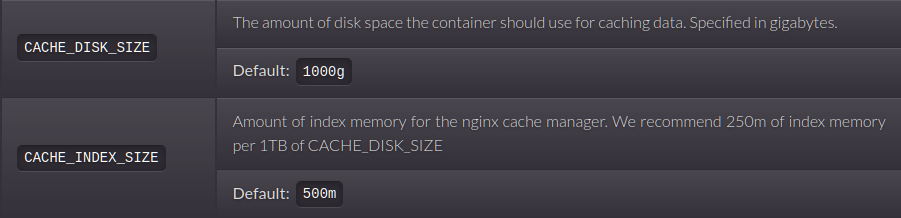
-
Not from my side.
-
Probably wrong configured path in combination with the share settings. If you are using /mnt/cache/appdata/... in the template you have to make sure that you have the Mover set to take no action and not move the data off from the cache drive. However for 7DtD help I would recommend that you join @Spectral Force's Discord, he helps me out with 7DtD support: https://discord.gg/VwwYA5h
-
Oh, interesting you have a Xid error 119, this is completely different than all other issues reported so far. This basically mean that the GSP (GPU System Processor) times out which can be possibly also be caused by link instability. What do you mean by that, where did you enable this? Usually you pass this over in your syslinux.conf
-
And you are certain that this isn't the issue? As said, in the past I had a few reports tdarr crashing Servers. However did you already try to lower the PCIe Gen in your BIOS?
-
No.
-
Yes, I'm not fully remembering if this is the correct way but it looks good to me, `lxc.cap.drop = ` is the easiest way at least. Please note that you have to put this at the very end of the file.



