





unrateable
Members
-
Joined
-
Last visited
-
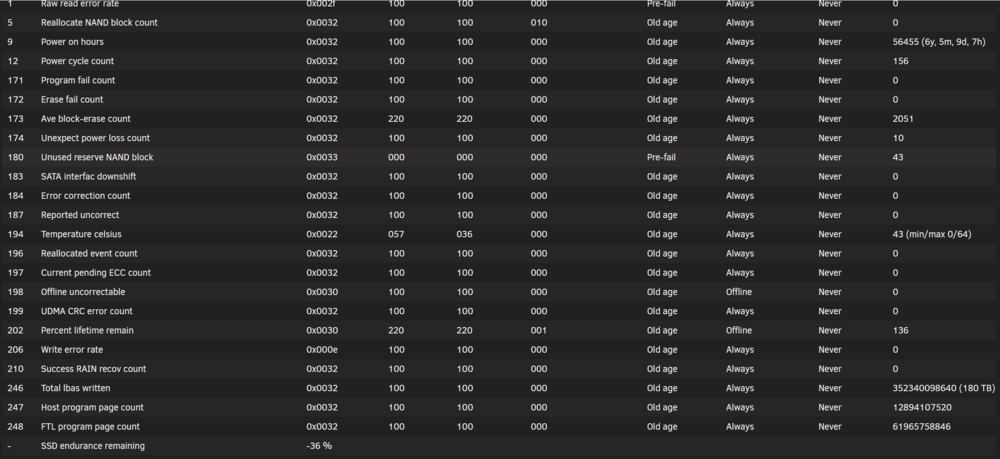
jfyi. I have this. MX 500 1TB drive. Still working well but I dont expect much any longer. I get "current pending ecc weekly, but they all clear out within few hours. Nothing else. Albeit I am careful what to store on this drive. Nothing of high importance for sure. I expect it to fail sooner or later
-
I would like to know if this is somehow fixed(mitigated)
-
Thank you for your take, I will look into that again and try different setups to find out what is causing the high load, and how it would handle additional streams. Hehe. Yeah sorry mate, absolutely right. Thanks for pointing out. I must have been sleeping as well. Bringing it up here in the wrong place. Still appreciate @ich777 take on the subject.
-
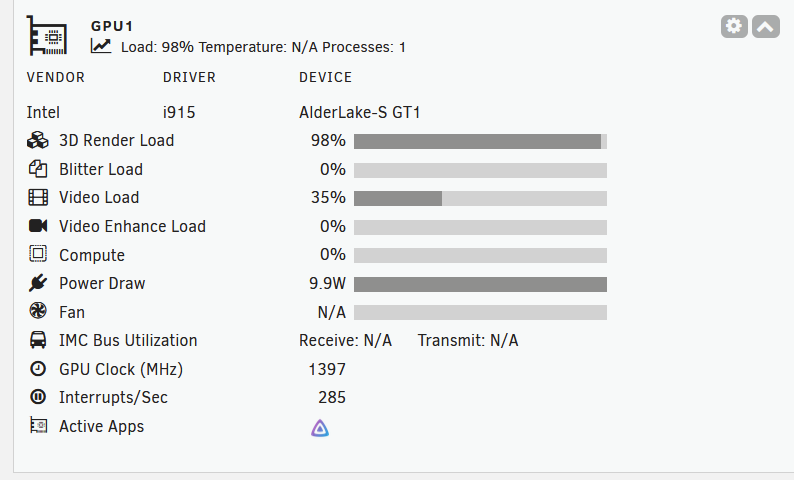
Hi guys, I need a quick sanity check regarding the transcoding utilization of the iGPU 770 in my i7-12700. Jellyfin Docker with passed through dev/dri. The file is 4K HEVC Dolby Vision Profile 5. I am streaming to my mobile phone via WLAN. Jellyfin says transcoding with 89fps, to 42Mbps MP4 H264 AAC . GPU stats in the Dashboard show the picture below. 3D Render Load 98% what the heck? Shouldnt I be able to transcode a couple of those 4K streams without an issue ? I would have expected maybe 10-20-30% range..... Any hint what could be the reason; are you own experiences similar ? What am I missing. When I switch off Tone Mapping the Load decreases substantially. Could that be it ?
-
+1 for Toshiba now due to price /performance ratio in my area. Never any problem. Have been on WD Reds before but albeit solid track record too expensive for me 😅
-
I did their kickstarter and was not really looking for to spend that much. Yeah 6800 CPU should perform better for VM workloads. But you want to virtualize Unraid on top of Proxmox and host VMs on Unraid. That sounds demanding..... I didnt check out the TB4 ports. Ethernet was all I needed :)
-
I tested the DXP4800 Plus and while it is great for a basic NAS the CPU Ressources are a bit underwhelming imho. Especially if you plan to run VMs, and maybe nested virtualization stuff. I had a Win 11 up but performance was not so good. Smaller Linux Distro might run fine.... Docker should be no problem at all. I ended up selling it and building now an i7-12700 powered NAS. Also note by the time I was playing around with this DXP4800 the HDMI port could not be as an output for the iGPU under Unraid. However I was able to use the iGPU as a virtual function device for Jellyfin.
-
thanks for chiming in! Well this 1 bay small 3.5" USB external housing I use works great with all sorts of other HDD drives I use for spare and which I connect to the same USB port of my mainboard - only those that have been previously in the other Unraid machine throw this error. Odd.
-
Hi there, just reaching out again if anybody can give me a word, am I overlooking s.th. Do I need to do s.th with a former different Unraid install array/cache disk before I can mount it in my other Unraid install properly ? I´d hate do erase the disk without accessing it first to go through any files worth keeping...
-
Hi folks, just wondering I used to have another Unraid Instance. I pulled the drives and wanted to plug them via a USB adapter in my other Unraid to check out the data on the disks. But UD does not even recognize any plugged in USB drive with these disks. I get "usb 8-2: can't set config #1, error -110" followed by "rc.usb_manager Autoconnect No Mapping found ASMedia_AS2105 /dev/bus/usb/008/006 008 006 port 8-2" any hint what I need to do here so that these show up properly for mounting?
-
Did you switch of the Watchdog in the BIOS ?
-
I signed up for the 4bay Plus version, the hardware looks very decent for that price, built quality seems to be ok according to first reviews. Lets see how open they are about their platform, would love to run an Unraid instance on it, else it will be a dumb NAS as long as their software is that buggy (as it seems so far). I needed 4 hdd cases anyway so here I get a kind of powerful hardware on top for a few bucks more. Was considering to build a Home Nas with an i5-12400, would cost 200-300$ more, sure more powerful, but I still have my Supermicro E5 built going strong. Just its power consumption 80W idle is getting a bit pricey;) So I plan to shut it down more often when I have the other NAS going.
-
WD_BLACK SN770 NVMe 2TB > 139,99 Euro https://www.westerndigital.com/de-de/products/internal-drives/wd-black-sn770-nvme-ssd?cjevent=544bfcbea24511ed8082011c0a18b8f8&utm_medium=afl1&utm_source=cj&utm_content=Shop+WD+US&cp1=7988170&utm_campaign=USwdhomepage&utm_term=10-28-2021&cp2=digidip#WDS200T3X0E
-
Good summary ! Just a nitpick, the above. 6GBit/s you mean. Net transfer rate max. approx. 600Mbytes/s
-
Hi there, I installed the clamav docker with the default set up. When started it appears to update and then sit idle. Log shows scan folder : "/mnt/cache/downloads" appdata: "/mnt/cache/appdata/clamav/" UID 100 GUID 101 BRIDGE mode When I log in the docker I can manually start the scan with the "clamscan --recursive /scan" command. Any hint what is wrong here ? And why it is not automatically starting once I start the docker, is most appreciated. TIA



