





Laucien
Members
-
Joined
-
Last visited
-
I was not able to solve it in a way that would be useful to you (Moved Paperless to a VM in proxmox) but someone on Reddit was having the exact same issue and discovered that the problem was reported to Github sometimes after I posted here and the documentation now includes some extra variables you need to set. I don't know if it works or not but the guy said it fixed it.
-
Ah, interesting!. That could be a workaround for this. Just put it in the same location as the go file?. I'm guessing same owner and permissions as well.
-
Not sure if this is a bug or if I'm doing something wrong but... Has anyone noticed that if you set a script to run when the array is stopped then the script is not run when you shut down your server?. A bit of background. I'm running Unraid inside Proxmox and a bunch of other VMs use Unraid shares as storage so I want to orchestrate things so that when the array comes up the VMs are started with the storage mounted and if the array is stopped then the VMs are shut down. It works great when I manually stop the array but if I instead want to shutdown Unraid then the script is not triggered even though one of the stages of shutting down is stopping the array. I've seen this with v6.9 and with the newest 6.10. The version of the User Scripts plugin is 2021.11.28.
-
Just click on edit on the container in the docker tab then add new variables with those names and the values you need and restart. I'm trying to get Paperless-ng running behind a reverse proxy using Swag and I'm having a weird issue that I honestly have _no_ idea how to troubleshoot. The container is reachable and I can log in, browse, upload documents and everything but as soon as I try to do any changes to the docs (adding tags or correspondents or changing something or whatever) it either fails silently or I get a popup that says: Error executing bulk operation: {"detail":"CSRF Failed: CSRF token missing or incorrect."} If I open the developer tools I see the POST request returned a 403 and that error. I tried setting up the proxy to use a subfolder and setting the base URL to match (using docker variables). I also tried as a subdomain which would be my preferred method. In both cases I also set up PAPERLESS_ALLOWED_HOSTS and PAPERLESS_CORS_ALLOWED_HOSTS to the corresponding values. In both cases I get the same behavior. The weird thing is that the error only happens when I try to modify things from the Paperless 'normal' UI. When I go to the admin interface I can modify whatever I want and it works. Any ideas?.
-
OK so I found something. I installed dstat to check the I/O on a specific disk and here's what I got: Here's with Telegraf with the SMART input plugin enabled: ----system---- --dsk/sdc-- ----most-expensive---- time | read writ| i/o process 28-02 02:25:46| 0 0 |shfs 2079k 4901k 28-02 02:25:47| 0 0 |php-fpm 7661k 758k 28-02 02:25:48| 0 0 |shfs 2233k 5318k 28-02 02:25:49| 0 0 |shfs 2006k 4968k 28-02 02:25:50|2048B 0 |shfs 2334k 5935k 28-02 02:25:51| 0 0 |php-fpm 45M 3862k 28-02 02:25:52| 0 0 |shfs 2324k 4945k 28-02 02:25:53| 0 0 |shfs 2191k 5546k 28-02 02:25:54| 0 0 |containerd-9506k 9409k 28-02 02:25:55| 0 0 |shfs 2421k 6957k 28-02 02:25:56| 0 0 |shfs 2100k 6074k 28-02 02:25:57| 0 0 |shfs 2106k 5652k 28-02 02:25:58| 0 0 |cache_dirs 13k 20M 28-02 02:25:59| 0 0 |shfs 2858k 7894k 28-02 02:26:00|2048B 0 |shfs 4220k 8579k 28-02 02:26:01| 0 0 |php-fpm 70M 6148k 28-02 02:26:02| 0 0 |php-fpm 89M 4730k 28-02 02:26:03| 0 0 |containerd-9487k 9408k 28-02 02:26:04| 0 0 |shfs 2079k 5756k 28-02 02:26:05| 0 0 |shfs 2291k 6356k 28-02 02:26:06| 0 0 |shfs 2250k 6382k 28-02 02:26:07| 0 0 |php-fpm 7801k 758k 28-02 02:26:08| 0 0 |dockerd 481k 94k 28-02 02:26:09| 0 0 |shfs 179k 419k 28-02 02:26:10|2048B 0 |telegraf 1947k 19k See how there's some read activity every 10 seconds? That's the scanning interval configured in Telegraf. Here's the same query with Telegraf running but with the SMART plugin disabled: ----system---- --dsk/sdc-- ----most-expensive---- time | read writ| i/o process 28-02 02:28:50| 0 0 |shfs 2269k 5409k 28-02 02:28:51| 0 0 |shfs 2053k 4867k 28-02 02:28:52| 0 0 |shfs 2138k 5050k 28-02 02:28:53| 0 0 |shfs 1976k 5076k 28-02 02:28:54| 0 0 |shfs 2200k 5333k 28-02 02:28:55| 0 0 |containerd-9506k 9409k 28-02 02:28:56| 0 0 |shfs 2300k 5075k 28-02 02:28:57| 0 0 |php-fpm 42M 3813k 28-02 02:28:58| 0 0 |shfs 2401k 6440k 28-02 02:28:59| 0 0 |shfs 2208k 6437k 28-02 02:29:00| 0 0 |shfs 4119k 8965k 28-02 02:29:01| 0 0 |shfs 10M 16M 28-02 02:29:02| 0 0 |cache_dirs 76k 20M 28-02 02:29:03| 0 0 |containerd-9487k 9408k 28-02 02:29:04| 0 0 |shfs 2210k 5747k 28-02 02:29:05| 0 0 |shfs 2460k 6214k 28-02 02:29:06| 0 0 |shfs 2687k 7160k 28-02 02:29:07| 0 0 |shfs 2217k 5862k 28-02 02:29:08| 0 0 |shfs 2290k 6244k 28-02 02:29:09| 0 0 |shfs 2224k 6365k 28-02 02:29:10| 0 0 |shfs 2639k 7237k 28-02 02:29:11| 0 0 |shfs 2914k 7400k 28-02 02:29:12| 0 0 |containerd 93k 480k 28-02 02:29:13| 0 0 |containerd 93k 480k 28-02 02:29:14| 0 0 |shfs 264k 326k 28-02 02:29:15| 0 0 |containerd 93k 480k 28-02 02:29:16| 0 0 |containerd 93k 480k 28-02 02:29:17| 0 0 |containerd 93k 480k 28-02 02:29:18| 0 0 |containerd 93k 480k 28-02 02:29:19| 0 0 |containerd 93k 480k 28-02 02:29:20| 0 0 |dockerd 1532k 147k 28-02 02:29:21| 0 0 |dockerd 894k 450k 28-02 02:29:22| 0 0 |cache_dirs 276k 29M 28-02 02:29:23| 0 0 |shfs 1960k 5683k 28-02 02:29:24| 0 0 |shfs 2035k 6021k 28-02 02:29:25| 0 0 |containerd-9506k 9409k 28-02 02:29:26| 0 0 |shfs 2179k 5248k 28-02 02:29:27| 0 0 |shfs 2107k 5013k 28-02 02:29:28| 0 0 |shfs 2530k 6197k See how there's no activity?. Anyway, I know this isn't related to the Grafana dashboard project so don't want to derail the thread. If anyone has any idea of where I could look into I'd really appreciate it.
-
Nope, appdata is cache only and the disk remain spun down for hours when not actively accessing the files so other than me browsing the contents or Plex/Nextcloud doing their things there's no other containers or VMs that access the array. The issue I'm having is not that the disks mysteriously wake up but that its keeping them from spinning down. At first I thought there was an issue with 6.9RC2 and people replying to my post here seem to confirm that but disabling the SMART plugin in Telegraf made the problem go away so... wut?.
-
Huh weird. On my case I have 2 SATA HDDs in this server and I'm using the smart plugin to get all the info for the dashboard. My telegraf config is the one from the first post only disabling IPMI as I don't have that. Unraid version is 6.9 RC2. I was having an issue in that the drives will never spin down even if nothing was using them but if I manually spun them down the would remain like that until something actually tried to access the data. From a couple posts on reddit I disabled the auto fan plugin and my Telegraf docker and the problem went away. Then trying to narrow it down I enabled Telegraf again disabling the SMART plugin and disks went back to spinning down as expected. Any idea how I could troubleshoot this? Or what logs/info I could share.
-
Maybe this was discussed in previous pages but tried to search for it and couldn't find anything (nor could I find an actual 'search' button in the thread but that's another issue xD). Is there any workaround to Telegraf and the SMART check input plugin preventing disks from being spun down? I kinda thought it was an 6.9RC2 bug but after some comments on Reddit realized that that bit as causing it. Disks remain off is manually spun down but will not go into that state on their own even if completely inactive because Telegraf checking the SMART values seems to be preventing it.
-
Was having the same issue earlier today then I noticed a new update 2 hours ago that fixed it. Update your container (forcing it if needed) and the problem should go away.
-
Hey, I've been struggling with a couple issues for the past few days and finally ran out of things to try so.... halp! :D. My setup is a pretty standard one with Swag for the reverse proxy, this Nextcloud container, everything in their own custom docker network and Cloudflare as the DNS for my own domain name (only DNS, not proxying). I'm using Linuxserver's Swag default configs for almost every service I'm reverse proxying. For Nextcloud I have 2 issues. First one is that it complains a couple HTTP headers are missing. The "X-Content-Type-Options" HTTP header is not set to "nosniff". This is a potential security or privacy risk, as it is recommended to adjust this setting accordingly. The "X-Robots-Tag" HTTP header is not set to "none". This is a potential security or privacy risk, as it is recommended to adjust this setting accordingly. The "X-Frame-Options" HTTP header is not set to "SAMEORIGIN". This is a potential security or privacy risk, as it is recommended to adjust this setting accordingly. This is the Nextcloud subdomain config I'm using -> Pastebin Link. This is the ssl.conf settings I'm using -> Pastebin Link. This is what I've gotten so far: The headers are there. If I run an SSL check using this site I can see them being reported (image link) but if I check Nextcloud's own security scan then it complains about those headers just as my local installation does (another image link). I know its sourcing the correct file because if I make a change to the ssl.conf, like disabling HTST, then Nextcloud adds another error to complain about it. I looked into the webserver running inside the Nextcloud container just to rule that out but all the settings are present there as well. Any thoughts? I have no idea where else to check. //Edit: Found out that if I just remove all the optional headers from ssl.conf then Nextcloud would say everything is OK but of course all my other sites will be lacking that stuff. I can use a separate config for nextcloud but I don't get why it complains when the values are there and just goes along when removed. ----------------------------------- My second problem is with getting Collabora to work. I followed Spaceinvader One's tutorial and did these steps: Installed the docker container + added it to the same network as Netcloud. Set the Nextcloud address/domain on the Collabora container (Image link). Tried with two \\ as in the video as well but checking the Collabora logs I think using only one \ is the correct way. Added a CNAME for the subdomain pointing to my root domain. Used the sample settings from Swag (Pastebin link). I also tried with the configs in his video. In the Nextcloud UI I made sure the app is enabled (Image link) and that it can connect correctly (Another image link). But then I create a new file and when I click to edit it it redirects me to the correct site but complains with the message "collabora.mydomain.com refused to connect". I checked nginx, Collabora and Nextcloud and I don't see anything on any logs. I have absolutely no idea where to go with troubleshooting this one haha. //Edit: Looks like this issue is also happening to me with OnlyOffice. I can get all the setup and everything working but as soon as I try to edit a file I get the "documentserver.mydomain.com refused to connect" so I'm guessing I'm missing a step somewhere? Tried adding that domain to the trusted_domains array but nothing. //Edit 2: OK, it seems like it has something to do with the iframe and the Content-Security-Policy header: Refused to frame 'https://documentserver.mydomain.com/' because an ancestor violates the following Content Security Policy directive: "frame-ancestors 'self'". I don't get it though. I tried setting that header to the domain, the subdomain, removing it complete and no matter what I do it still complains about it. ------------------ Thanks to whoever takes the time to read this and sorry for the huge wall of text :D.
-
Ah, that makes total sense. Thanks!.
-
Is there a problem with this plugin under 6.4.0_rc15e or am I screwing up somewhere?. Was trying to set a custom tab and point it to a docker running a Grafana dashboard but even though I can perfectly access it through the browser I only get a white rectangle in unRAID. Thought it was that specific container but I can't make it work with any URL pages. Only with unRAID built-in stuff. These are my settings.
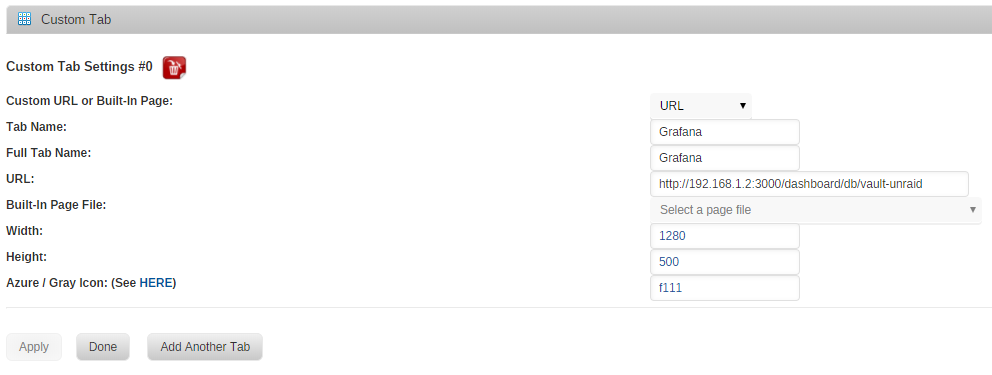
-
Hey!, So, I wanna use zsh+Oh My Zsh in the unRAID shell but I'm having some issues with the setup so that it gets re-installed on every reboot. I enabled zsh using the nerd pack plugin then I can install OMZ manually and it works perfectly but I can't figure out how to make it persist after a reboot. In summary. I enabled zsh on the nerd pack and added these lines to my go script: The result is that I get zsh as the default shell correctly but the weird thing is that when I SSH into unRAID using PuTTy I don't have Oh My Zsh installed and yet in the command prompt in the actual server (as in, the video output from that computer) I see it installed correctly. Am I missing anything?.
-
I followed the guide on the latest video using my macbook pro and vmware to install everything into the vdisk then move it into unRAID but I'm stuck on the bootloop when trying to start the VM right after the Clover menu. I'm assuming it's because I screw up somewhere with the AppleSMC/OSK Key but I can't figure out what the issue is. Here's the message I'm getting -> imgur link And here's what my XML template looks like right now -> pastebin link Any idea on where I might be screwing up?
-
Hi!, What I'm gonna ask is probably going to be really noob-y but I'm not exactly sure where to go to find the information (tried googling!). I have the plugin for the client running and from what I can tell from the logs it is correctly connecting to my VPN provider. On the settings page it says it's connected, it gives me a WAN IP that's different from my ISP's provided one and the Interface column shows "tun5". Also, if I run the Speedtest.net plugin from unRAID it matches me with a Miami based server that says it's something like 10 miles away... I'm more than 9 hours flight time from Miami in South America so that's another good sign haha. What I don't know is... is there a way to route all the traffic coming from a specific docker or VM through the VPN tunnel?. I have it set to 'Route specific IPs' and filled in a couple IPs in the 'webaddress.txt' file but don't know if that's doing anything haha. Basically what I'd like to do is to route all sabnzbd, Deluge and an IRC client (all 3 of them separate dockers) traffic through the VPN tunnel then maybe a VM too. The reason I'm trying to do it this way is because my current VPN provider only allows 1 connected device at any single time. Is that doable?. Thanks .


