carps.cygnet36
Members
-
Joined
-
Last visited
-
Yeah same, I just followed https://github.com/ChuckPa/DBRepair?tab=readme-ov-file#installation inside the container's console, and it worked fine. Check took about 1 minute, and automatic took a couple of minutes. Seems the DBRepair container still needs some work. But cool little tool none the less
-
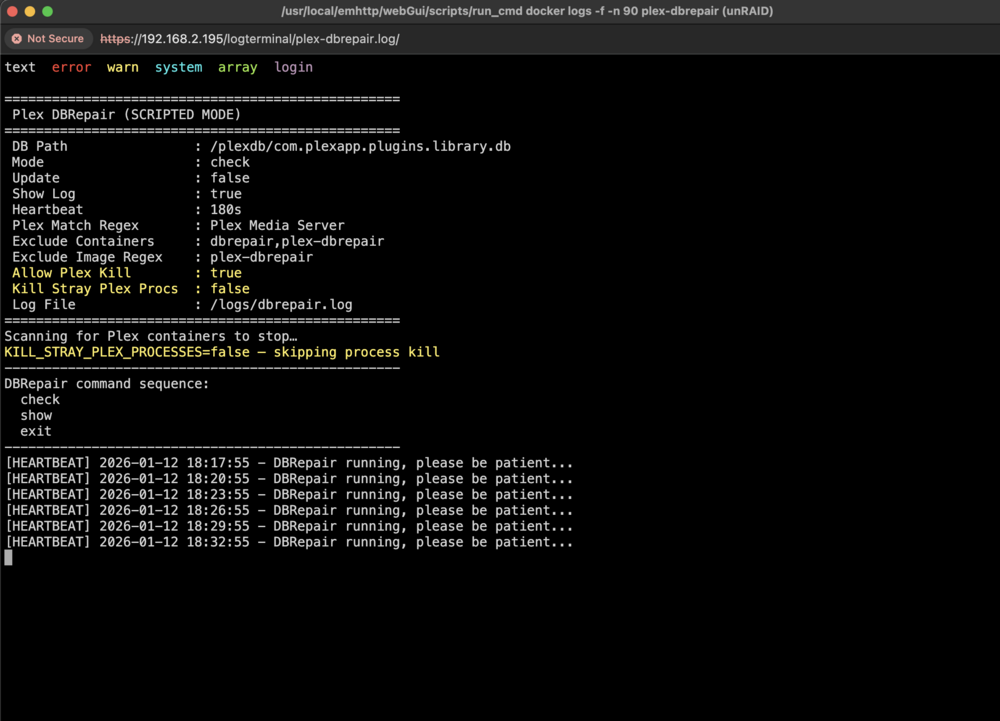
testing this out ... how long does it normally take to run? I couldn't find that information anywhere on github repo ... mines been running for over 15mins now. Might be worth adding that information somewhere.
-
I know this reply is well after this thread, but I just did a Windows 11 install with the latest Windows 11 ISO as of March 2, 2025. Here is the steps I used, hopefully it may help someone else :) Set up the VM, and set all the normal settings for OS ISO, vdisk etc In the VM settings, toggled to XML view and removed my network section. For me that was: <interface type='bridge'> <mac address='52:54:00:cd:b2:76'/> <source bridge='br0'/> <model type='virtio-net'/> <address type='pci' domain='0x0000' bus='0x01' slot='0x00' function='0x0'/> </interface> I used SPICE for the virtual graphics, but VNC should work fine. TIP: You could also create a custom Windows 11 VM template if you wanted to recall it in future Started the VM On the very first install page where it asks for your country, click the little keyboard icon in bottom right and make sure your keyboard layout and language is correct Press `SHIFT + F10` to open a command prompt. If you're on a Mac you may need to do `Fn + SHIFT + F10` In command prompt type `OOBE\BYPASSNRO` and press enter, the install will restart Go through the country and language selection When it gets to the network section, you should now have a new option at the bottom "I don't have an internet connection" - Select that Create your local username and password, and go through the rest of the install items Once Windows 11 is finished installing, you can add your network info back into the XML and should be good to go TIP: You could also take a VM snapshot at this in case you wanted to just rollback to post install at any time etc.
-
Seems like because this issue is so inconsistent across unraid Mac users, and there are so many variables that could be involved, I don’t think the Unraid team will get around to addressing this. Not even sure if it’s Unraid specific, it could be an underlying Linux issue … and perhaps that’s why truenas being BSD based, doesn’t suffer from this issue. With Unraid 7 on its way, and the array now being optional, I’m going to see if just running ZFS pools will yield a different result on Mac devices …. Perhaps simply the way the array and fuse system is, that’s what’s causing the problem. We will see what happens once unraid 7 lands
-
@johnwhicker So just an update on my issue, I recently started migrating from XFS to ZFS. This didn't result in any changes to the Mac SMB issue, however I am in a much better place using ZFS instead of XFS for my pools. I have only changed my general cache, docker pool, and VM pool which are on SSD media over to ZFS. Next is to work out how I am going to migrate my array to ZFS. Anyway, during this I also decided to test out Disk Shares, I have never used them before (except for the cache pools), and wouldn't you know it, when accessing a disk share from Macs over SMB is instant, same as windows. What this tells us is that there is something in FUSE that is causing Mac SMB to bug out. Now at the moment because my array is still set up in the old traditional xfs (6.11.x and before, without pool functionality) I only get each disk surfaced as a share, not the pool of disks itself. So once I work out how I want to migrate the data from my array, I will be creating a pool (maybe multiple) for my array disks, which will then be surfaced as a disk share. Accessing a disk share takes FUSE out of the equation, and should hopefully fix this problem moving forward. Now that I have discovered this, I'm wondering if this was also why UnRAID NFS shares didn't work very well on MacOS either, as they would have also be going through FUSE for this. I encourage you to test this yourself as it looks like thats the go. Cheers!
-
Hey peeps! Nowwwwww I already know there have been a number of threads already about this, however this problem seems to really have no solid answer or solution. So please don't lash out for a new post about it lol 🙂' I'm going to break it down as simply as I can. Unraid 6.11.0 Intel Core i7 32GB RAM Array size: 58TB # of Drives: 8 Parity drives: 1 NIC: Intel Quad Port Gigabit NIC Average Overall Server Load: 10-15% Network Switch: Standard Gigabit Managed switch, no fancy config Wireless: Nothing fancy, standard N & AC wifi Dockers: Nothing fancy, not taxing the hardware at all Devices Mac Mini 2012 (10.15 Catalina) Mac Mini M1 2021 (13.2.1 Ventura) Macbook Pro M2 2022 (13.2.1 Ventura) Multiple Windows 10 machines All machines connected to network via Ethernet & Wireless Affected share type: SMB Is NFS also affected: Sort of, no where near as bad as SMB Symptoms: Both Mac Mini 2012 and Mac Mini M1 - Loading any SMB share takes forever, regardless of how many folders and files are in the share - On average around 5-6 minutes - Copy any files whether it be big single files or lots of small files, goes at around 1MB/s, when it should be around 80MB/s Troubleshooting: - Tested iperf from both macs to unraid - maxes out gigbit connection around 975MB/s, so its not a connection issue - Changed out ethernet cables - Disabled wireless - Changed switch ports - Reset NICs on Mac Mini's - Created brand new test shares with test data Additional info: So to make things more confusing, the Macbook M2 does not have this issue at all. I can access all of the same unraid SMB shares via ethernet or wireless and they load instantly. I can copy files to and from, and it maxes out the connection. Windows 10 machines also have no issues with the same SMB shares and max out the connection. If I use SSH on the Mac Mini devices, its a lot faster, however still not like the M2 or the Windows machines, only achieving around 40MB/s transfer speed. I also have a TrueNAS box, so to throw another spanner in the works, the Mac Mini devices do not have any issues accessing SMB shares on the TrueNAS box. I have set up the TrueNAS SMB shares to be the same as the UnRAID SMB shares for making troubleshooting more accurate. This issue has been going on Unraid for as long as I can remember, and until I got my Macbook M2 recently, I just figured that was something I would just have to deal with using Mac with UnRAID. However, the Macbook M2 working properly blows that theory out of the water. I have tried all sorts of different SMB config options etc, nothing works. The key here is the Macbook M2 is not affected, the Mac Mini's work fine with SMB on TrueNAS, so something in UnRAID is not quite right. Keen to get some insight from people and maybe even the devs as to why SMB seems to be troublesome on UnRAID for MacOS? TIA DanielI have had a new error pop up this morning ... the trigger was when I logged back into my Mac Mini, and it was telling me it couldn't reconnect to the nfs shares on my unraid server. Quick check in unraid and all the shares are now missing, obviously due to the error. The only device in the house that uses nfs is my mac, which I have been using with nfs for a long time with unraid. I've not seen this error before, the only thing I can think of that may have led to this is leaving some finder windows open with those nfs shares overnight. Here is the syslog portion: ar 25 05:21:59 unRAID CA Backup/Restore: ####################### Mar 25 05:21:59 unRAID CA Backup/Restore: appData Backup complete Mar 25 05:21:59 unRAID CA Backup/Restore: ####################### Mar 25 05:21:59 unRAID CA Backup/Restore: Backup / Restore Completed Mar 25 07:00:01 unRAID root: mover: started Mar 25 07:00:02 unRAID root: mover: finished Mar 25 08:12:40 unRAID autofan: Highest disk temp is 40C, adjusting fan speed from: 112 (43% @ 771rpm) to: 135 (52% @ 713rpm) Mar 25 10:27:43 unRAID shfs: shfs: ../lib/fuse.c:1450: unlink_node: Assertion `node->nlookup > 1' failed. Mar 25 10:27:44 unRAID kernel: ------------[ cut here ]------------ Mar 25 10:27:44 unRAID kernel: nfsd: non-standard errno: -107 Mar 25 10:27:44 unRAID kernel: WARNING: CPU: 6 PID: 7793 at fs/nfsd/nfsproc.c:889 nfserrno+0x45/0x51 [nfsd] Mar 25 10:27:44 unRAID kernel: Modules linked in: veth nvidia_uvm(PO) xt_nat macvlan xt_CHECKSUM ipt_REJECT nf_reject_ipv4 xt_tcpudp ip6table_mangle ip6table_nat iptable_mangle vhost_net tun vhost vhost_iotlb tap xt_conntrack xt_MASQUERADE nf_conntrack_netlink nfnetlink xfrm_user xfrm_algo xt_addrtype iptable_nat nf_nat nf_conntrack nf_defrag_ipv6 nf_defrag_ipv4 br_netfilter xfs nfsd auth_rpcgss oid_registry lockd grace sunrpc md_mod it87 hwmon_vid efivarfs ip6table_filter ip6_tables iptable_filter ip_tables x_tables bridge stp llc ipv6 nvidia_drm(PO) x86_pkg_temp_thermal intel_powerclamp nvidia_modeset(PO) coretemp i915 kvm_intel iosf_mbi drm_buddy ttm nvidia(PO) kvm drm_display_helper drm_kms_helper crct10dif_pclmul crc32_pclmul crc32c_intel ghash_clmulni_intel aesni_intel crypto_simd cryptd rapl intel_gtt mxm_wmi drm intel_cstate agpgart mpt3sas igb i2c_i801 ahci i2c_algo_bit i2c_smbus syscopyarea intel_uncore sysfillrect raid_class libahci sysimgblt atl1c i2c_core scsi_transport_sas fb_sys_fops video Mar 25 10:27:44 unRAID kernel: wmi thermal fan backlight button unix Mar 25 10:27:44 unRAID kernel: CPU: 6 PID: 7793 Comm: nfsd Tainted: P O 5.19.9-Unraid #1 Mar 25 10:27:44 unRAID kernel: Hardware name: Gigabyte Technology Co., Ltd. To be filled by O.E.M./Z77MX-D3H, BIOS F17b 01/06/2014 Mar 25 10:27:44 unRAID kernel: RIP: 0010:nfserrno+0x45/0x51 [nfsd] Mar 25 10:27:44 unRAID kernel: Code: c3 cc cc cc cc 48 ff c0 48 83 f8 26 75 e0 80 3d cc 47 05 00 00 75 15 48 c7 c7 0f 34 ef a2 c6 05 bc 47 05 00 01 e8 06 99 90 de <0f> 0b b8 00 00 00 05 c3 cc cc cc cc 48 83 ec 18 31 c9 ba ff 07 00 Mar 25 10:27:44 unRAID kernel: RSP: 0018:ffffc900009a3e30 EFLAGS: 00010286 Mar 25 10:27:44 unRAID kernel: RAX: 0000000000000000 RBX: ffff8881c1490000 RCX: 0000000000000027 Mar 25 10:27:44 unRAID kernel: RDX: 0000000000000001 RSI: ffffffff81ec827f RDI: 00000000ffffffff Mar 25 10:27:44 unRAID kernel: RBP: ffff888103d64000 R08: 0000000000000000 R09: ffffffff82044990 Mar 25 10:27:44 unRAID kernel: R10: 0000000000000000 R11: ffffffff8264afbe R12: ffff8881c1490008 Mar 25 10:27:44 unRAID kernel: R13: ffff8881c1488000 R14: ffffffffa2f12600 R15: ffffffffa2eeda98 Mar 25 10:27:44 unRAID kernel: FS: 0000000000000000(0000) GS:ffff888810380000(0000) knlGS:0000000000000000 Mar 25 10:27:44 unRAID kernel: CS: 0010 DS: 0000 ES: 0000 CR0: 0000000080050033 Mar 25 10:27:44 unRAID kernel: CR2: 0000153ca414d638 CR3: 000000000500a002 CR4: 00000000001726e0 Mar 25 10:27:44 unRAID kernel: Call Trace: Mar 25 10:27:44 unRAID kernel: <TASK> Mar 25 10:27:44 unRAID kernel: nfsd3_proc_getattr+0xaf/0xd7 [nfsd] Mar 25 10:27:44 unRAID kernel: nfsd_dispatch+0x194/0x24d [nfsd] Mar 25 10:27:44 unRAID kernel: svc_process+0x3f1/0x5d6 [sunrpc] Mar 25 10:27:44 unRAID kernel: ? nfsd_svc+0x2b6/0x2b6 [nfsd] Mar 25 10:27:44 unRAID kernel: ? nfsd_shutdown_threads+0x5b/0x5b [nfsd] Mar 25 10:27:44 unRAID kernel: nfsd+0xd5/0x155 [nfsd] Mar 25 10:27:44 unRAID kernel: kthread+0xe7/0xef Mar 25 10:27:44 unRAID kernel: ? kthread_complete_and_exit+0x1b/0x1b Mar 25 10:27:44 unRAID kernel: ret_from_fork+0x22/0x30 Mar 25 10:27:44 unRAID kernel: </TASK> Mar 25 10:27:44 unRAID kernel: ---[ end trace 0000000000000000 ]--- Diagnostic files attached: unraid-diagnostics-20230325-1311.zip Would be great if anyone could shed some light on this one, and where I can start looking. Also side note: other than a reboot or restarting the array, nothing seems to bring the shares back ... unless there is a command I can run that will export all the array shares again?carps.cygnet36 changed their profile photoWell after hours of trying to solve this, I haven't had any success. I have enabled logging, but only to show me failures and blocks etc. When trying to access my UnRAID 192.168.2.195, the privoxy log shows this: 2020-04-25 15:43:30.225 7f3711fdb700 Actions: +client-header-tagger{css-requests} +client-header-tagger{image-requests} +client-header-tagger{range-requests} +set-image-blocker{pattern} 2020-04-25 15:43:33.326 7f3711fdb700 Actions: +client-header-tagger{css-requests} +client-header-tagger{image-requests} +client-header-tagger{range-requests} +set-image-blocker{pattern} 2020-04-25 15:43:33.326 7f3711fdb700 Crunch: Connection failure: http://192.168.2.195/ 2020-04-25 15:43:33.516 7f3711fdb700 Actions: +change-x-forwarded-for{block} +client-header-tagger{css-requests} +client-header-tagger{image-requests} +client-header-tagger{range-requests} +hide-from-header{block} +set-image-blocker{pattern} 2020-04-25 15:43:33.516 7f3711fdb700 Crunch: CGI Call: config.privoxy.org:443 So from what I have been able to teach myself, this indicates the blocks should be coming from +change-x-forwarded-for{block} and +hide-from-header{block} So I added the following to my user.actions file: { \ -change-x-forwarded-for{block} \ -hide-from-header{block} \ } 192.168.2.195 .unraid.net Still no good. Privoxy shows: This would lead me to believe there should be no blocks happening - but still doesn't work. So then I tried using the { fragile } action, which is meant to basically prevent any actions that would cause a site not to load, and I get. Still can't load the site. So then I went to the match-all.actions and basically disabled all the default actions. When I do this, my log shows: 2020-04-25 15:53:44.245 7f3829ffb700 Actions: 2020-04-25 15:53:47.341 7f3829ffb700 Actions: 2020-04-25 15:53:47.341 7f3829ffb700 Crunch: Connection failure: http://192.168.2.195/ 2020-04-25 15:53:47.507 7f3829ffb700 Actions: =================== So I am really at a loss now, no idea what to do from here. Any thoughts?
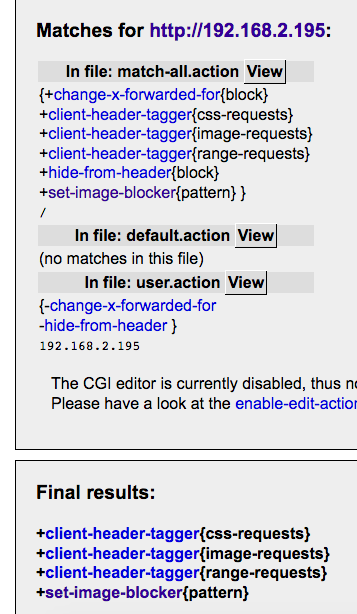
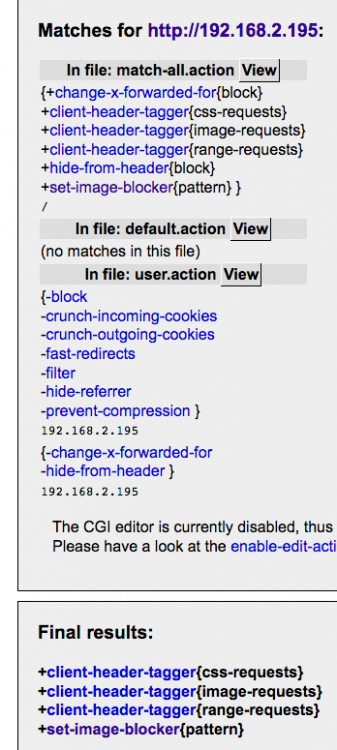
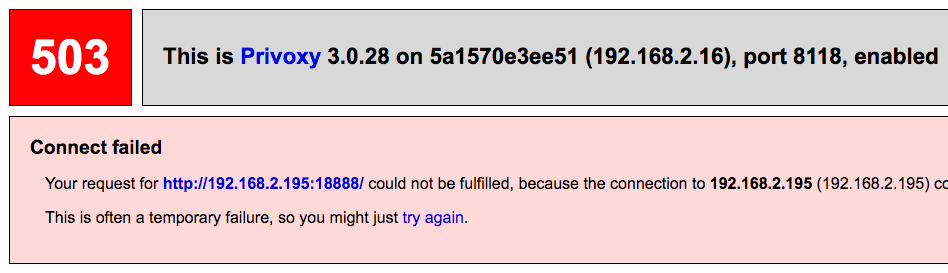
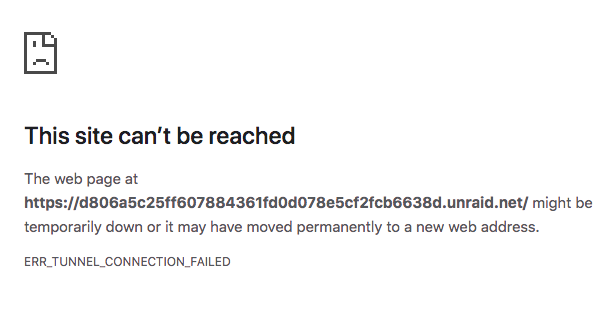
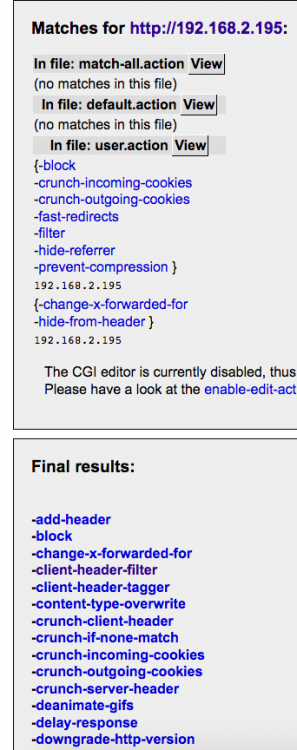 no worries - I’ll try that and report backSo normally when I access my unraid webUI 192.168.2.195 it just redirects to to the https://xxxx.unraid.net address as https is enabled on unraid - no issues. However, when i set my devices to go through privoxyvpn, I can no longer access my Unraid Ui 192.168.2.195 does that make sense?@binhex - First off great work on your dockers mate - really impressive So mine is probably a simple issue, but I can't quite work it out. Local LAN 192.168.2.0/24 UnRAID IP: 192.168.2.195 UnRAID https enabled, so accessing 192.168.2.195 redirects to https://xxxxxxxx.unraid.net UnRAID 6.8.3 Docker 19.03.5 Most of my dockers are using their own IPs (just how I like it) Scenario: I am simply using privoxyvpn to pipe my various device traffic through it and my PIA VPN. - Installed privoxyvpn, configured, connected to VPN - no issues - Pointed my clients (desktop, phones etc) to use 192.168.2.16:8118 - can browse through privoxyvpn no issues. - I also have DelugeVPN installed, I am routing NZBget through that using the container:binhex-delugevpn option - no issues - Privoxy option on the DelugeVPN container is also enabled, so I can use proxy option in Sonarr, Radarr, Lidarr, Jackett etc to pipe through - no issues. Issue: Can't access my UnRAID webUI whilst using the privoxyvpn proxy, or any docker that is using Bridged instead of their own IP (I only have one of those) Privoxyvpn config: IP: 192.168.2.16 LAN_NETWORK: 192.168.2.0/24 ADDITIONAL_PORTS: blank ENABLE_PRIVOXY: yes I can access any docker that is using its own IP address. I can't access 192.168.2.195 or anything related to it like my Diskspeed docker 192.168.2.195:18888 I get this: If I configure in my browser to bypass proxies for local addresses etc and specify 192.168.2.0/24 I can load my Diskspeed container 192.168.2.195:18888 However I still cannot get to my UnRAID webUI, I get this I have read through all the posts in this topic so far, some kind of touch on it, but they are more talking about routing other containers through say your DelugeVPN container, which I am not having any issues with. I'm sure it's something simple, but I have not used Privoxy before, so I'm wondering whether its got to do with the https option being enabled on UnRAID, and somehow privoxy is blocking the redirect? Any help you can give would be great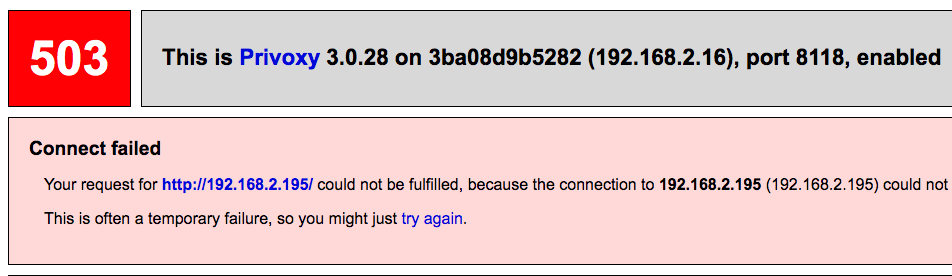
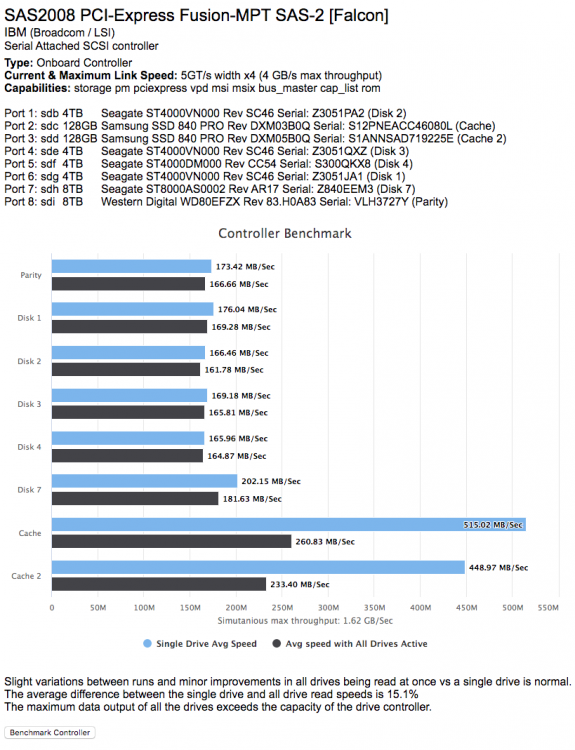
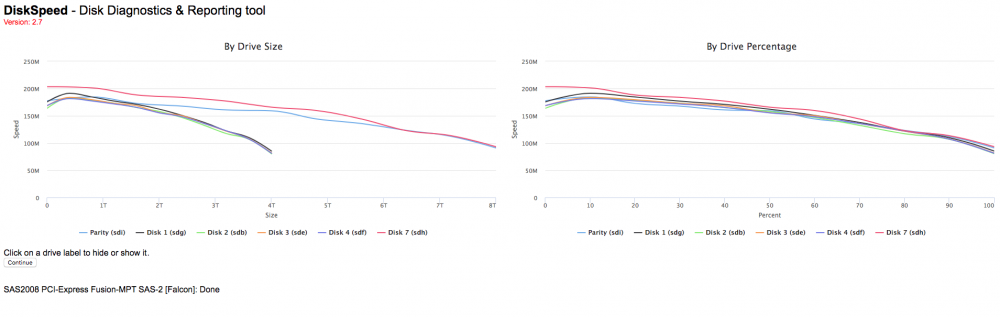
 Yeah I have tried 3 different gigabit switches, with the same result. There is only 1 switch between clients and server. I don’t think it’s the LAN cables as copying from client to client is yielding around 75MB/s. I’ve attached diags I took while I was copying, not sure if it would contain anything different to diags when not copying. unraid-diagnostics-20200418-0013 (during file copy).zipHey all, firstly I hope everything is staying healthy and well in this tough time! So I just found out about this tool, and I want to say thanks so much to JB for creating this - very easy to use and good info *NOTE: if this is not the appropriate forum for this question, please feel free to move it* So I have been having speed issues with my server for a long time, where I can not get anymore that 30/35Mb/s file transfer on any device in my home network, even when only transferring to one device at a time. I have tried testing SMB, FTP, SCP, AFP and they are all the same - I tried rsync and that came in at a thundering 8-9Mb/s - YAY! NOT! I was lazy and just dealt with it (bigger fish to fry!), but now that everyone is at the house, it is creating some issues. So I used this tool to see what my drives are doing to try and see if there is any issues. I have a very simple set up 24GB RAM Intel® Core i7-3770 CPU @ 3.40GHz 24TB array with cache pool A few dockers (Emby, sonarr, radarr, lidarr, NZBget, deluge etc), and couple of VMs I spin up when I want to use them. Full gigabit network and all devices support 1gb .... all client devices have SSDs or flash based storage apart from my unraid box. According to the benchmarks the drives average around 160Mb/s, so I should be able to saturate my gigabit network without issue, but thats never been the case - I have tried 3 different gigabit switches, with the same result. No drive errors are presenting either. Here are some screens Diagnostics unraid-diagnostics-20200417-2353.zip Any help at all would be appreciated guys!


 @jbrodriguez I have attached the unbalance logs for you as requested. unbalance.log