





Xoron
Members
-
Joined
-
Last visited
-
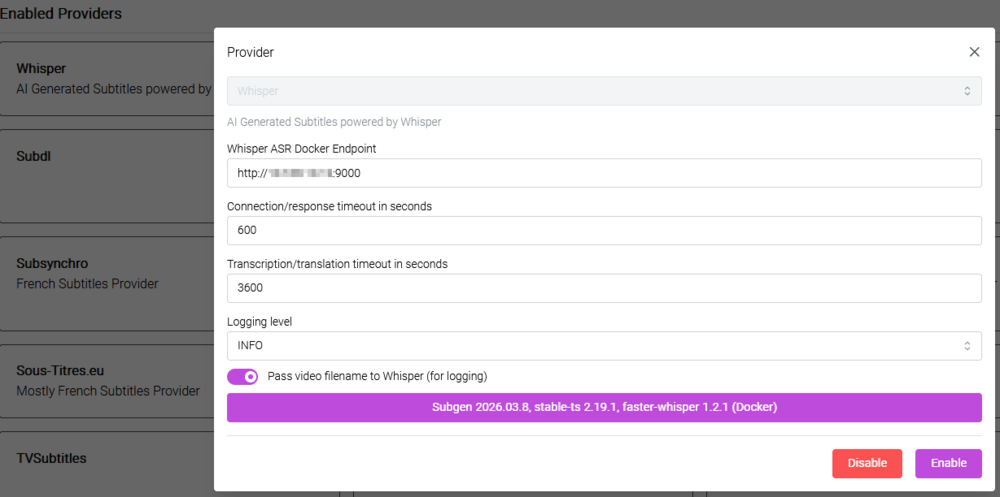
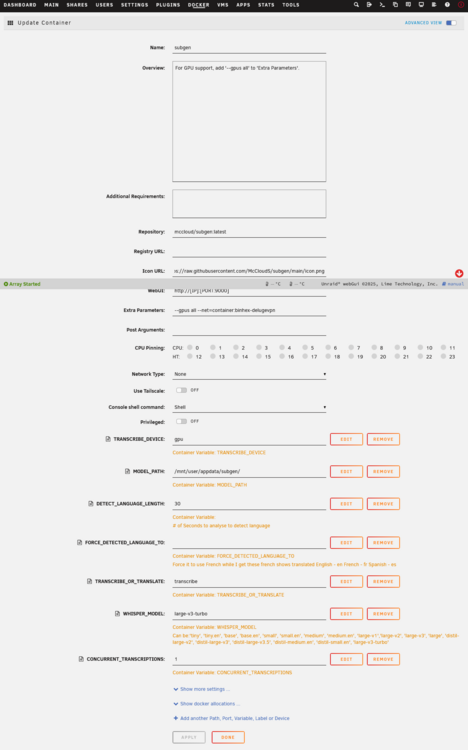
Hope this helps. I run my subgen networking through another docker image. So that part might be different for you.
-
That's exactly what bazarr is for. to download (or in this case generate) subtitles on videos. You should seriously look at bazarr to do that for you.
-
Ok, now you've peaked my interest. What exactly are you using it with Plex for?
-
I abandoned whisper ASR and went with subgen (https://github.com/McCloudS/subgen). And it's been working fine ever since You just use whisper asr in the bazarr setup, and point it at port 9000 for subgen
-
Sorry for the late reply Everthing is working exactly as expected. My setup is fairly basic. But you can always just export the config, shutdown the old docker, start the new one, import the config. If things go sideways, you can always revert back to the old docker.
-
Shout out to @PeteAsking for this docker. I was running a quite old version of Unifi Controller docker version 7.2.92. The recommended upgrade path was to install the same version of this docker, but none that old exists. Figured, why not, lets go for the newest stable version of unifi-controller-reborn, see if that will fly. I backed up my config on my v7.2.92 controller and powered it off. Then I deployed version 9.4.19 of unifi-controller-reborn and the backup restored fine. Logged in with my original credentials. All APs were present, historical logs, everything. Smoothest upgrade I've ever done.
-
I've setup deluge vpn docker, and have all of my arrs running through it fine. I did this back in the 6.9 days of unraid, so each of those dockers routing through deluge have the --net=container:binhex-delugevpn parameter. Now I've decide to take a look at SABnzdb for usenet. I want to route it thorough my deluge vpn docker as well. The default port for SABnzdb is 8080, which another docker currently uses. So I want to set it to be port 8085 (or whatever free port there is). On the SABnzdb docker, I've set the Port: Web Interface to 8085. On Deluge, I've added that port to the various variable that require it (same as my other dockers). But I cannot get the SABnzdb GUI to load. I even went so far as to try and modify the /mnt/user/appdata/binhex-sabnzbd/sabnzbd.ini file (with the docker off) to use port 8085 (port = 8085). But every time I start the docker, the config file reverts the port back to 8080. I must be missing something with the config. The SAB docker should be able to route through delugevpn. Looking for suggestions on what to try next.
-
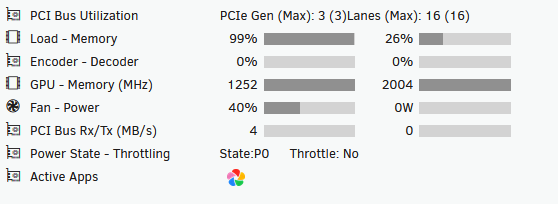
So I've made some progress. I was able to get whisper-asr-webservice to see and attempt to use my GPU, but doesn't seem like it's using the decoded/encoder engine. My original problem was that when you want to use the GPU (--gpus all which is on by default), I had to use the specific repository that calls the compatible docker. onerahmet/openai-whisper-asr-webservice:latest-gpu But now when Bazarr tries to generate subtitles for videos, it never completes it, and the GPU sits idle, all while using up loads of memory:
-
The whisper-asr-webservice doesn't have an official support thread, so posting here. Mods: feel free to relocate to a more appropriate forum. I've deployed the whisper-asr-webservice from the community apps as a docker container. My goal is to have it perform sub creation via Bazarr. I have Bazarr and Whisper talking, and it will generate subs, but only using my CPU. From the documentation, I needed to have the --gpus all extra parameter set. (which it is by default). But with that setting, it's still using the CPU. I've even setup the NVIDIA_VISIBLE_DEVICES and NVIDIA_VISIBLE_DEVICES variables (with the same values that I have set for my other dockers), but still uses CPU. I also added the extra parameter: --runtime=nvidia but still can't get it to use the GPU I'm sort of at a loss on what to try next.
-
I resolved my issue by looking deep into the deluge logs. First, I was getting an error that /config/ssl/daemon.cert could not be read. It has permissions of 600 and was owned by root:root. I changed permissions to 666 on the file. chmod 666 /config/ssl/daemon.* Next it was throwing the same error in /config/auth. So I performed the same chmod on it chmod 666 /config/auth Now I no longer get the never get the error below, and the GUI loads correctly: [info] Deluge process started [info] Waiting for Deluge process to start listening on port 58846...
-
I'm having the same deluge no WebUi issue since updating to 6.11.5 today. I too am using Mullvad VPN for the docker image. I'm getting the same exact message in the logs that I've seen mentioned elsewhere [info] Deluge process started [info] Waiting for Deluge process to start listening on port 58846... What I've tried so far Force Updating the Deluge VPN Container Removing the container, and reinstalling it Generated a new Mullvad OVPN file Changed DNS servers around in the Container config I think my VPN is actually up, just the WebUI for Deluge won't load. I can actually access the Web UI of my other dockers that I route through Deluge VPN. Following this thread for a solution.
-
Thanks to @JorgeB for pointing me to this thread, and to @Cessquill for the good work finding, working in, and resolving this obscure issue. It's plagued me for a few months (and I was away traveling, so I was hoping I wouldn't drop my array while away. Simple change, reboot, all good.
-
Thanks for pointing me to that thread @JorgeB. I had searched the forums, but didn't stumble on it myself.
-
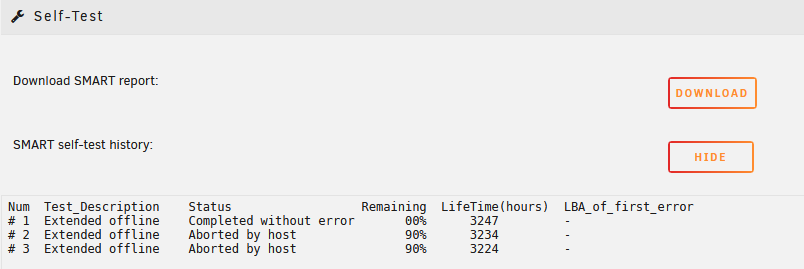
I have two Ironwolf ST8000VN004 7200RPM drives as my Parity Drives. One is less about 9 months old, the the other about 4 months old. Both drives are throwing errors. I've precleared each drive, without any errors Replaced the SATA cable (SFF-8087) that is connected to both drives. Run an extended SMART self test on one of the drives, no errors detected Looking at the smart data, there are no apparent SMART values out of whack I reviewed the diagnostics for the drive, but nothing obvious jumps out. (Attached for review) Looking for suggestions on what might be wrong, and what to look at next to fix this issue (If it's a false error, then suppress it.)

-
I'm having a similar issue with my WD 8TB IronWolf 7200RPM Drives. Now I see that the read error, really isn't an error. BUT it's throwing errors on the GUI and I'm getting alerts that the drive is failing. Other than disabling the alerts (which I'd rather not do), is there a way to have unraid return the correct value.


