





MrChunky
Members
-
Joined
-
Last visited
Everything posted by MrChunky
-
The docker run format that you are using here is different then the xml format Unraid docker templates are using. You should remove the backslashes in the template.
-
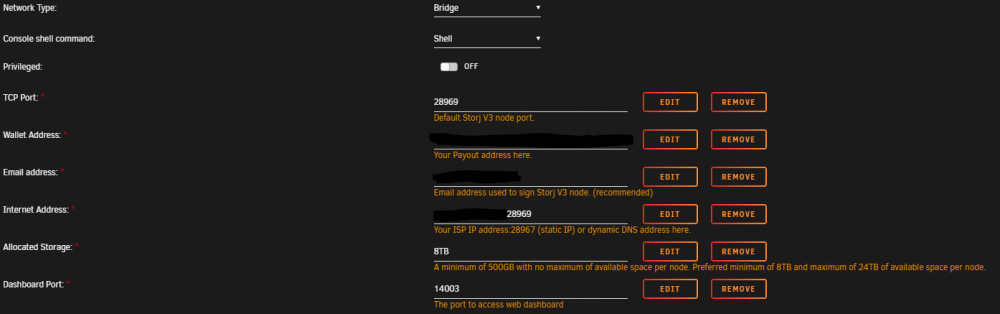
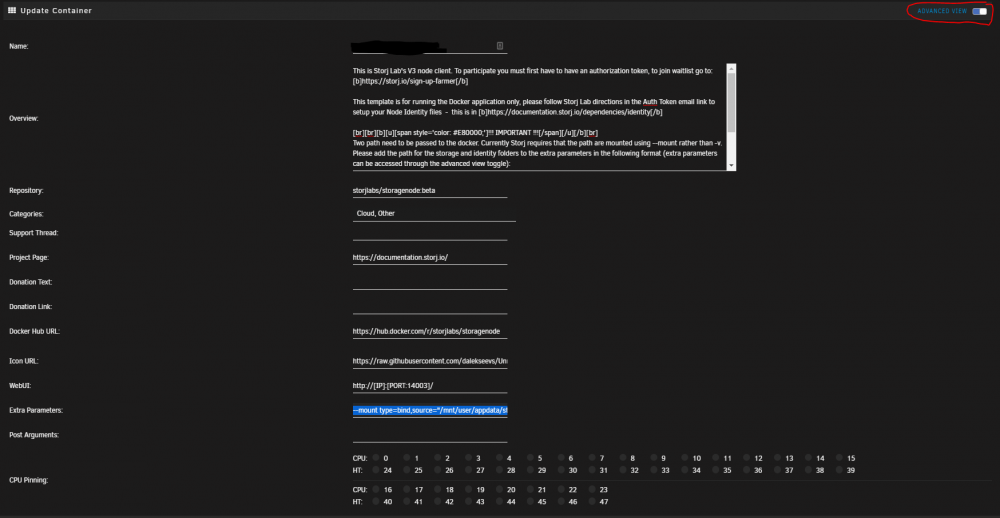
Not sure which template you are referring to here. /usr/local/emhttp/plugins/dynamix.docker.manager/scripts/docker create --name='storagenode-v3' --net='bridge' -e TZ="Europe/Berlin" -e HOST_OS="Unraid" -e 'WALLET'='0xxxx' -e 'EMAIL'='[email protected]' -e 'ADDRESS'='www.xxx.com:28969' -e 'STORAGE'='8TB' -e 'BANDWIDTH'='10000TB' -p '28969:28967/tcp' -p '14003:14002/tcp' --mount type=bind,source="/mnt/user/appdata/storj_cert/identity/storagenode/",destination=/app/identity --mount type=bind,source="/mnt/user/storj/",destination=/app/config 'storjlabs/storagenode:beta' In your case you have trailing backslashes: " \ " after the mount commands that I don't think should be there. When you paste the mount commands into the extra parameters, they should look like this: --mount type=bind,source="/mnt/user/appdata/storj_cert/identity/storagenode/",destination=/app/identity --mount type=bind,source="/mnt/user/storj/",destination=/app/config The docker tag is latest, mine is beta. In addition, make sure the mount command for the identity folder should point directly to the folder with the certificates, and not a level above.
-
Sure, here you go. In the top right you need to toggle the Advanced View to see the extra parameters.
-
Sorry for the late reply. You needed to add the storage via the --mount flag in the extra parameters field as described in the documentation and docker description. That's why you were getting the error.
-
Seems like it may be my configuration that is the problem rather than the wp container. Thanks for the suggestions in any case! I will keep going, if I'll figure it out I'll post...
-
I deleted the mariaDB folder and word-press folder... Am I missing a 3rd folder to delete?
-
Hey Kru-x, Thanks for the prompt response as usual NPM was being weird... for some reason the certificates always get screwed up for me when I use NPM. I get some sort of cant access the folder with certificates error in the log. Anyways, I switched to linuxserver lets encrypt container, which has been working fine for years... Now I have too many redirects error when I try to go to the root or any non admin pages. I can reach every admin page on the wp site, if I put in the path directly or navigate within it. I just cannot get the root or the pages to load... I get ERR_TOO_MANY_REDIRECTS, from both inside and outside my LAN. I am using domain, I went through the installation process while accessing it with www.example.com. so in the general setting the site url is www.example.com from the begining. Yes I can thought the domain, but I have to put in www.example.com/wp-admin to reach it. Already did that, that's how I installed it.
-
I am seeing some really strange behavior... I have wordpress setup and working with nginx proxy manager. I can reach all the pages except for the root. When I input the root address e.g. www.example.com I get ERROR_CONNECTION_TIMEOUT and the address displays as www.example.com:8080. The strange thing is that my port for wordpress is not 8080. In fact, none of the used ports are 8080. I was wondering if someone could shine a light on what going on here...
-
Hi Maggi, Could you post your logs output and a screenshot of your config page for the docker or the run command that appears when you start it.
-
Hi emilp, As Squid mentioned, the update is reliant on proper tag (beta/ latest) maintenance by storj. All I did was create a template that allows you to use the official storj docker image. As you pointed out the beta tag is still in the documentation and provides the latest beta versions. So when it is updated, UnRaid docker will update the container on a schedule, if you have the plugin, or you can manually update it. Also in the storage node GUI it mentions that the minimum allowed is 1.1.0, so i think you should be fine for a while.
-
I would guess that the --mount commands are failing, possibly because the folders are not found. Could you check the folder structures are indeed in place for both mount commands and that the relevant files are in there? This is my how my run command looks: run -d --name='StorjNode-V3' --net='bridge' -e TZ="Europe/Berlin" -e HOST_OS="Unraid" -e 'WALLET'='xxx' -e 'EMAIL'='xxx' -e 'ADDRESS'='xxx:28968' -e 'BANDWIDTH'='10000TB' -e 'STORAGE'='12TB' -p '28968:28967/tcp' -p '14002:14002/tcp' --mount type=bind,source="/mnt/user/appdata/storj_cert/storj/identity/storagenode/",destination=/app/identity --mount type=bind,source="/mnt/user/storjv3/",destination=/app/config 'storjlabs/storagenode:beta' Another is that my net is bridge, not host. But I doubt this is an issue.
-
Overview: Support for Docker image Storj v3 storage node. Application: https://storj.io/ Docker Hub: https://hub.docker.com/r/storjlabs/storagenode GitHub: https://github.com/storj/storj Documentation: https://documentation.storj.io/ Storj forum: https://forum.storj.io/ This is Storj Lab's v3 node client. To participate you must first have to have an authorization token, to get the Authentication Token go here. This template is for running the Docker application only, please follow Storj Lab directions in the documentation to generate your Node Identity certificates using the Authentication Token. Setup !!! IMPORTANT !!! Two path need to be passed to the docker. Currently Storj requires that the path are mounted using --mount rather than -v. Do not use the Unraid docker template built in path variable. Add the path for the storage and identity folders to the extra parameters in the format described below (extra parameters can be accessed through the advanced view toggle, in the very top right corner of the docker UI) During the first run the -e SETUP="true" argument needs to appended before the --mount string to create the required folders. Therefore, on container creation (first run) the string in extra parameters should look like this: -e SETUP="true" --mount type=bind,source="/mnt/user/storj-certs/identity/storagenode/",destination=/app/identity --mount type=bind,source="/mnt/user/storj/",destination=/app/config Copy paste the whole string with altered values to match your setup. The identity folder should point directly to the folder where the certificate files are stored, and not a level above. The locations of the identity and storage folders should not be nested on the unRaid system to avoid permission errors. After the first run the -e SETUP=true argument should be deleted. The string should therefore be edited to look as follows: --mount type=bind,source="/mnt/user/storj-certs/identity/storagenode/",destination=/app/identity --mount type=bind,source="/mnt/user/storj/",destination=/app/config Graceful exit Exit: docker exec -it storagenode-v3 /app/storagenode exit-satellite --config-dir /app/config --identity-dir /app/identity Check status: docker exec -it storagenode-v3 /app/storagenode exit-status --config-dir /app/config --identity-dir /app/identity Enable zksync wallet Edit config.yaml and add the following line: operator.wallet-features: ["zksync"]
-
It dawned on me a few days ago that the stress from trying to run this thing is not worth the 5 dollars I am gonna make on it per month... I would still have a go at it to support the idea, but as @nuhll said, I will chill for now until the issues are sorted out a bit more.
-
Seems we are not the only ones: https://ideas.storj.io/ideas/V3-I-30
-
Please vote for the storj v3 node to be officially supported on Unraid by storj: https://ideas.storj.io/ideas/V3-I-43
-
I got this error with mine: 2019-08-26T11:35:44.215Z [34mINFO[0m process/exec_conf.go:229 Configuration loaded from: /app/config/config.yaml 2019-08-26T11:35:44.237Z [34mINFO[0m kademlia/config.go:78 Operator email: xxx 2019-08-26T11:35:44.237Z [34mINFO[0m kademlia/config.go:92 operator wallet: xxx 2019-08-26T11:35:44.762Z [31mERROR[0m storagenode/main.go:164 Failed to initialize telemetry batcher: process error: telemetry disabled main.cmdRun /go/src/storj.io/storj/cmd/storagenode/main.go:164 storj.io/storj/pkg/process.cleanup.func1.2 /go/src/storj.io/storj/pkg/process/exec_conf.go:262 storj.io/storj/pkg/process.cleanup.func1 /go/src/storj.io/storj/pkg/process/exec_conf.go:280 github.com/spf13/cobra.(*Command).execute /go/pkg/mod/github.com/spf13/[email protected]/command.go:762 github.com/spf13/cobra.(*Command).ExecuteC /go/pkg/mod/github.com/spf13/[email protected]/command.go:852 github.com/spf13/cobra.(*Command).Execute /go/pkg/mod/github.com/spf13/[email protected]/command.go:800 storj.io/storj/pkg/process.Exec /go/src/storj.io/storj/pkg/process/exec_conf.go:72 n /go/src/storj.io/storj/cmd/storagenode/main.go:296 runtime.main /usr/local/go/src/runtime/proc.go:200 2019-08-26T11:35:44.781Z [31mFATAL[0m process/exec_conf.go:286 Unrecoverable error {"error": "Error creating tables for master database on storagenode: migrate: creating version table failed: migrate: file is not a database\n\tstorj.io/storj/internal/migrate.(*Migration).Run:106\n\tstorj.io/storj/storagenode/storagenodedb.(*DB).CreateTables:230\n\tmain.cmdRun:167\n\tstorj.io/storj/pkg/process.cleanup.func1.2:262\n\tstorj.io/storj/pkg/process.cleanup.func1:280\n\tgithub.com/spf13/cobra.(*Command).execute:762\n\tgithub.com/spf13/cobra.(*Command).ExecuteC:852\n\tgithub.com/spf13/cobra.(*Command).Execute:800\n\tstorj.io/storj/pkg/process.Exec:72\n\tmain.main:296\n\truntime.main:200", "errorVerbose": "Error creating tables for master database on storagenode: migrate: creating version table failed: migrate: file is not a database\n\tstorj.io/storj/internal/migrate.(*Migration).Run:106\n\tstorj.io/storj/storagenode/storagenodedb.(*DB).CreateTables:230\n\tmain.cmdRun:167\n\tstorj.io/storj/pkg/process.cleanup.func1.2:262\n\tstorj.io/storj/pkg/process.cleanup.func1:280\n\tgithub.com/spf13/cobra.(*Command).execute:762\n\tgithub.com/spf13/cobra.(*Command).ExecuteC:852\n\tgithub.com/spf13/cobra.(*Command).Execute:800\n\tstorj.io/storj/pkg/process.Exec:72\n\tmain.main:296\n\truntime.main:200\n\tmain.cmdRun:169\n\tstorj.io/storj/pkg/process.cleanup.func1.2:262\n\tstorj.io/storj/pkg/process.cleanup.func1:280\n\tgithub.com/spf13/cobra.(*Command).execute:762\n\tgithub.com/spf13/cobra.(*Command).ExecuteC:852\n\tgithub.com/spf13/cobra.(*Command).Execute:800\n\tstorj.io/storj/pkg/process.Exec:72\n\tmain.main:296\n\truntime.main:200"} storj.io/storj/pkg/process.cleanup.func1 /go/src/storj.io/storj/pkg/process/exec_conf.go:286 github.com/spf13/cobra.(*Command).execute /go/pkg/mod/github.com/spf13/[email protected]/command.go:762 github.com/spf13/cobra.(*Command).ExecuteC /go/pkg/mod/github.com/spf13/[email protected]/command.go:852 github.com/spf13/cobra.(*Command).Execute /go/pkg/mod/github.com/spf13/[email protected]/command.go:800 storj.io/storj/pkg/process.Exec /go/src/storj.io/storj/pkg/process/exec_conf.go:72 n /go/src/storj.io/storj/cmd/storagenode/main.go:296 runtime.main /usr/local/go/src/runtime/proc.go:200 Looks like database is unhappy in some way as well. I got the following response from support: I am not convinced this is true... as the error is not to do with failed audits, but with database access. I am in a situation where I cannot even start the container due to this error. As for the stop time, this can be added to extra parameters afaik. I will experiment with it, since I don't have much to loose.
-
Just to update everyone on the state of storj v3 nodes. It seems that Unraid does not play well with some aspects of the storj v3 container. In particular the volume mapping seems to be broken, I am not sure why or how. My node failed twice in the last month. Currently I have no reliable solution on running v3 node on unraid docker.
-
This my output Storage Node Dashboard ( Node Version: v0.17.0 ) ====================== ID xxxxx Last Contact 1s ago Uptime 33m43s Available Used Egress Ingress Bandwidth xxx PB xxx GB xxx GB xxx GB (since Aug 1) Disk xxx TB xxx GB Bootstrap bootstrap.storj.io:8888 Internal 127.0.0.1:7778 External xxx:28967 Neighborhood Size 253
-
I think I forgot in the description I wrote above that the storjlabs/storagenode shouold be storjlabs/storagenode:latest or storjlabs/storagenode:alpha. Will add it above, thanks for testing:)
-
The USB backup function under flash storage is not working. errors out: Aug 15 18:40:13 Tower nginx: 2019/08/15 18:40:13 [error] 9984#9984: *995 upstream timed out (110: Connection timed out) while reading response header from upstream, client: 192.168.32.160, server: , request: "POST /webGui/include/Download.php HTTP/1.1", upstream: "fastcgi://unix:/var/run/php5-fpm.sock", host: "192.168.32.10:85", referrer: "http://192.168.32.10:85/Main/Flash?name=flash" Aug 16 13:13:38 Tower nginx: 2019/08/16 13:13:38 [error] 9984#9984: *210565 upstream timed out (110: Connection timed out) while reading response header from upstream, client: 10.11.0.2, server: , request: "POST /webGui/include/Download.php HTTP/1.1", upstream: "fastcgi://unix:/var/run/php5-fpm.sock", host: "192.168.32.10:85", referrer: "http://192.168.32.10:85/Main/Flash?name=flash" I tried twice. Second time after restart. I just noticed that the file is actually created in the file system and I can find it, but tit is not auto downloaded through the browser.
-
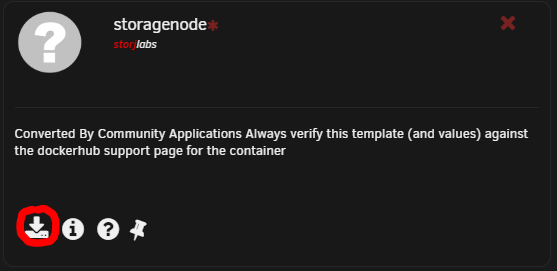
It seems that Unraid does not play well with some aspects of the storj v3 container. In particular the volume mapping seems to be broken, I am not sure why or how. My node failed twice in the last month. Currently I have no reliable solution on running v3 node on unraid docker. The config below is just the latest iteration, that does not seem to work reliably. I am not, the second paragraph is copy pasta, that's why it sounds like I am talking in the first person. Since UnRaid template editor does not support proper config options, I would imagine they have no way of supporting their version of plug and play template. Although, it is trivial to configure it yourself. For any one who wants to do it themselves: 1. Got to community Apps, type in storj, then click "get more results from DockerHub", click on the official storagenode template by storjlabs. The repository should be storjlabs/storagenode:alpha 2. Add the following values manually by clicking "Add another Path, Port, Variable, Label or Device": Port: Host Port: 28967, Connection Type: TCP Port: Host Port: 28967, Connection Type: UDP Variable: Key: WALLET, Value: YOUR_WALLET_ADDRESS Variable: Key: EMAIL, Value: YOUR_EMAIL_ADDRESS Variable: Key: ADDRESS, Value: YOUR_EXTERNAL_IP_ADDRESS:28967 Variable: Key: BANDWIDTH, Value: YOUR_BANDWIDTH (per month) Variable: Key: STORAGE, Value: YOUR_STORAGE_VOLUME 3. Map the storage locations by enabling advanced view In the extra parameters field enter: --mount type=bind,source="/mnt/user/appdata/storj_cert/storj/identity/storagenode/",destination=/app/identity --mount type=bind,source="/mnt/user/storjv3/",destination=/app/config Replace the locations in quotation marks with the locations for your configuration, first one for your identity token location and second for your storage location. 4. Launch docker by clicking Apply


-
Hey @Jcloud , I wanted to mention that the storj node v3 template you have put up is misconfigured. The storj and identity locations should be mounted as --mount rather than -v. This can be achieved in UnRaid through extra parameters only afaik. The difference is very dangerous: if docker will not map the disk to the container for any reason, with the -v option it will create an empty disk inside the container. The customers' data will be stored inside this container. When you then remove the container, the data will be removed with it. In case of --mount it will just fail. Please, replace the -v options to the --mount options ASAP. The --mount option has a different syntax. Please, read about it in the section Running the Storage Node of our Documentation.
-
I didnt find a good guide for integrating Collabora into Nextcloud on unraid... So I thought I would share my config. I am using Nextcloud v13. Prerequisites: Letsencrypt nginx docker Nextcloud docker on a subdomain configure in nginx (e.g. could.yourdomain.com). Instalation: Configure Letsencrypt/nginx Add new subdomain to your letsencrypt configuration (e.g. office.) by editing the lets encrypt docker parameters. Edit the nginx default file (usually: user/mnt/appdata/letsencrypt/nginx/site-confs/default) by adding a new subdomain block for collabora. server { listen 443 ssl; server_name office.yourdomain.com; ssl_certificate /config/keys/letsencrypt/fullchain.pem; ssl_certificate_key /config/keys/letsencrypt/privkey.pem; ssl_dhparam /config/nginx/dhparams.pem; ssl_ciphers 'XXX'; ssl_prefer_server_ciphers on; # static files location ^~ /loleaflet { include /config/nginx/proxy.conf; proxy_pass https://xxx.xxx.xx.xx:9980; } # WOPI discovery URL location ^~ /hosting/discovery { include /config/nginx/proxy.conf; proxy_pass https://xxx.xxx.xx.xx:9980; } # main websocket location ~ ^/lool/(.*)/ws$ { include /config/nginx/proxy.conf; proxy_pass https://xxx.xxx.xx.xx:9980; proxy_set_header Upgrade $http_upgrade; proxy_set_header Connection "Upgrade"; proxy_set_header Host $http_host; } # download, presentation and image upload location ~ ^/lool { include /config/nginx/proxy.conf; proxy_pass https://xxx.xxx.xx.xx:9980; } # Admin Console websocket location ^~ /lool/adminws { include /config/nginx/proxy.conf; proxy_pass https://xxx.xxx.xx.xx:9980; proxy_set_header Upgrade $http_upgrade; proxy_set_header Connection "Upgrade"; proxy_set_header Host $http_host; } } Install the Collabora docker (I'm using chvb's Repository docker here, collabora/code) and fill out the docker variables appropriately. In the Domain field the subdomain of your nextcloud has to be entered in the following format: cloud\\.yourdomain\\.com Now you can download the collabora app through the nextcloud UI and put in the collabora address in the setting menu for the collabora app. (e.g. https://office.yourdomain.com) Restart letsencrypt, collabora and nextcloud. Now if you click on word document in nextcloud it should open in browser with collabora. My nextcloud nginx config for reference: server { listen 443 ssl; root /config/www ; index index.html index.htm index.php; server_name cloud.XXX.com; ssl_certificate /config/keys/letsencrypt/fullchain.pem; ssl_certificate_key /config/keys/letsencrypt/privkey.pem; ssl_dhparam /config/nginx/dhparams.pem; ssl_ciphers 'XXX'; ssl_prefer_server_ciphers on; ssl_session_cache shared:SSL:10m; add_header Front-End-Https on; location / { include /config/nginx/proxy.conf; proxy_pass https://xxx.xxx.xx.xx:444/; } }
-
I am running into an issue where a sparse file is created in cache share by docker. The file is then moved from cache share to the array using mover. On this a full size file is written to the array rather then only the data used. There is nothing extraordinary in the logs. Just says that the particular file is being moved and the array drive starts writing to itself until the sparse file is fully expanded. I am on 6.5.2-rc2
-
SIA is not playing nice with UnRaid system for me. I have my sia share set to use the cache drives. Firstly the mover is not able to move anything because all the share files are constantly open by sia. Secondly when you shut sia down and attempt to move, sia writes the sparse preallocated file as a full file. e.g. you have 8TB share defined, instead of moving the size that is stored, unraid writes a 8TB file, which is obviously impossible if you do not have 8TB free on a single disk (correct me if I am wrong here). I would recommend either using a share that does not use cache and splitting up you share folders into many small chunks by creating multiple share folders. Or using unassigned devices and external drives.



