





severanced
Members
-
Joined
-
Last visited
Everything posted by severanced
-
This has been a nightmare, isn't there just an option to NOT use SSL? Everything is internal I don't need an SSL link and nothing I do works.
-
So, it's strange, but after I powered it up after a commandline "powerdown" shut down if I go to the hostname i get an NGINX error but going to the IP address I get the gui for now. Usually this only lasts a day or so before it starts to fail.
-
I hope someone can help me, for the past couple of weeks my server has been having issues where the webGui either crashes with an NGIX error or just doesn't come up at all, the shares and apps seem to be available and I'm able to SSH to the server but I can't bring anything up in the web. One time I was able to bring it back with restarting PHP but the latest one I couldn't bring it back at all. I hope the diagnostics can help bring some light to it. diagnostics-20250602-0913.zip
-
Thank you @trurl I had to remove the network.cfg file and I had to remove the reservation from my router and then the system started up with an IP, looks like something was jacked there that only came to light now.
-
@trurl How do I get diagnostics out of the server when I can't reach it?
-
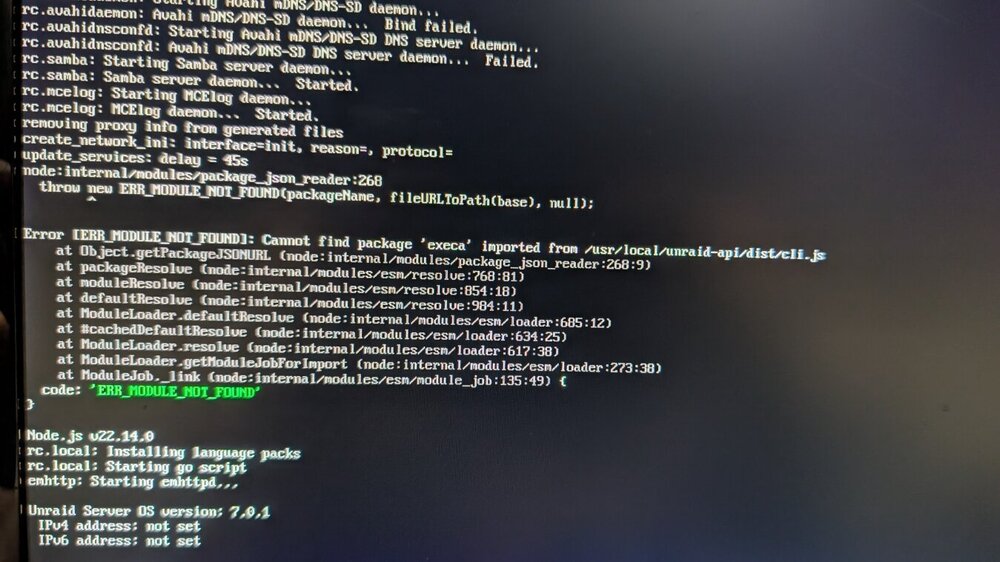
Hello, I hope you can help, I just updated my server to 7.0.1 and now the system doesn't start up properly. I get the error "Error (ERR_MODULE_NOT_FOUND): Cannot find package 'execa' imported from /usr/local/unraid-api-/dist/cli.js Anyone know how I can solve this? I do get a login in the CLI but no web page.
-
So I managed to fix the issue by switching the vDisk from VirtIO to SATA and somehow that brought it back up
-
And just for reference I get a generic "No Bootable Device" error when trying to start the VM even when the disk seems to be connected.
-
After some updates to my VMs and upgrading to 7.0.0 it seems I'm not able to launch my VMs any more. I get an error even though I can see the disk in my file system and it's selected in the properties. The primary disk location is set as "Manual" but when I change it to Auto or Cache it seems to update forever and never stick. Is there something I can do to get my VMs to launch again? I'm including some diagnostics even though I'm not sure if they're relevant. I did apply the most recent patch 1.0.0 and rebooted. diagnostics-20250217-1913.zip
-
Thank you, that looks like that fixed it, I went and updated a bunch of shares that were also set incorrectly from the upgrade
-
I did all of that, things are looking a bit better, but the mover still seems to not be moving things. I enabled the logging and started the mover. As an example one share I expected to be moved is called "Cloud" diagnostics-20250217-1323.zip
-
Hey everyone, I hope you can help, I was getting notifications that my cache was getting full so I tried to run the mover manually and in the logs it just shows : Feb 17 09:17:21 emhttpd: shcmd (1576155): /usr/local/sbin/mover start &> /dev/null & I'm getting some errors about the [Appdatabackup] and when I check the Fix Common Problems I see it says "Unable to write to Docker Image" - Docker Image either full or corrupted, I hope you can help. This is 7.0.0 diagnostics-20250217-0922.zip
-
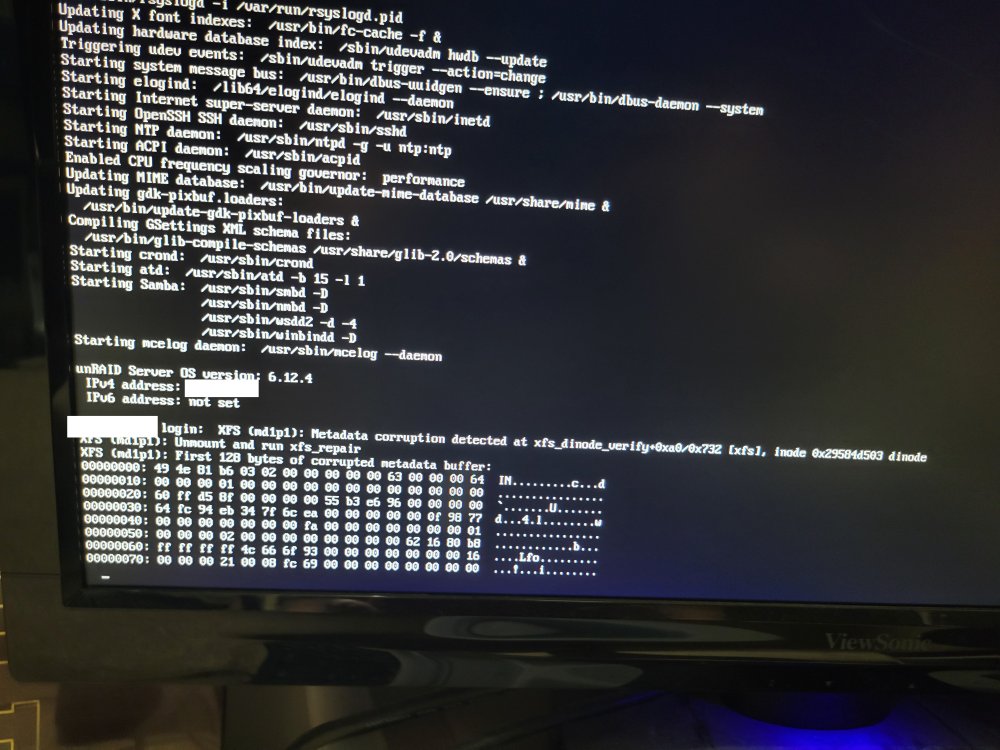
I've been having issues with my Unraid server for a while now. Every couple of weeks or so it'll suddenly become unresponsive and I'll have to do a hard shutdown. I tried doing some syslog checking and created another issue for that here: Unfortunately it looks like the syslogs didn't have anything useful. I randomly checked the monitor on my server and while my server is still responsive I noticed a "metadata corruption" error on the screen. I've included it in the attachments. Any idea what this might be about, if it might be causing the hard stops and how I might fix it?
-
Thanks, I've been buying parts to build a new server, motherboard, memory Etc. My concern with these crashes was that I was going to be taking a piece of hardware that was causing the crash to the new server.
-
Hi, My server had a hard crash again and I had to do a hard shutdown. I was able to pull some syslogs and some diagnostics, I hope these will point to something that might be causing the crash. syslog-10.1.1.29.log crusherjoe-diagnostics-20231010-2357.zip
-
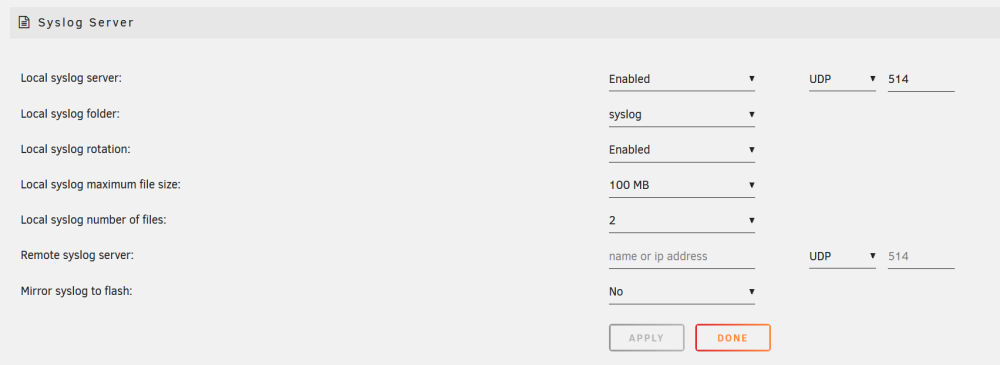
Hi, I'm trying to diagnose a crash that seems to happen every 10-14 days on my server that just locks it up completely forcing me to do a hard reboot. I'm trying to set up a syslog on one of the shares on my server using these settings: However this seems to produce no files, is there something I'm doing wrong or something I need to set up differently?
-
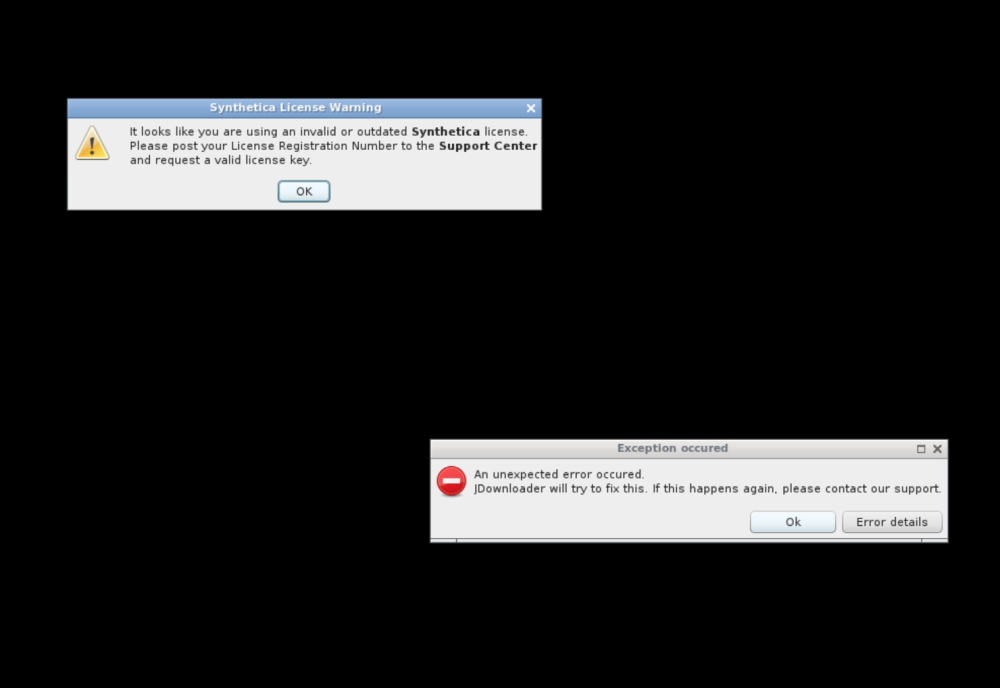
Looks like it started up again, is something up with some of JDownloader's licenses or certs?
-
I just tried launching it again and an update went through from Jdownloader which appears to have fixed the issue.
-
Is anyone seeing this when they start Jdownloader? I've been getting this and Jdownloader shut down right away. Here's the log output: text error warn system array login [xvnc ] VNCSConnST: Client pixel format depth 24 (32bpp) little-endian bgr888 [supervisor ] service 'app' exited (with status 0). [supervisor ] service 'app' exited, shutting down... [supervisor ] stopping service 'openbox'... [supervisor ] service 'openbox' exited (with status 0). [supervisor ] stopping service 'nginx'... [xvnc ] Wed Sep 20 15:53:47 2023 [xvnc ] VNCSConnST: closing /tmp/vnc.sock: Clean disconnection [xvnc ] EncodeManager: Framebuffer updates: 3 [xvnc ] EncodeManager: Tight: [xvnc ] EncodeManager: Solid: 4 rects, 3.34592 Mpixels [xvnc ] EncodeManager: 64 B (1:209121 ratio) [xvnc ] EncodeManager: Bitmap RLE: 1 rects, 150 pixels [xvnc ] EncodeManager: 66 B (1:9.27273 ratio) [xvnc ] EncodeManager: Total: 5 rects, 3.34607 Mpixels [xvnc ] EncodeManager: 130 B (1:102956 ratio) [xvnc ] Connections: closed: /tmp/vnc.sock [xvnc ] ComparingUpdateTracker: 0 pixels in / 0 pixels out [xvnc ] ComparingUpdateTracker: (1:-nan ratio) [supervisor ] service 'nginx' exited (with status 0). [supervisor ] stopping service 'xvnc'... [xvnc ] ComparingUpdateTracker: 0 pixels in / 0 pixels out [xvnc ] ComparingUpdateTracker: (1:-nan ratio) [supervisor ] service 'xvnc' exited (with status 0). [finish ] executing container finish scripts... [finish ] all container finish scripts executed. [init ] container is starting... [cont-env ] loading container environment variables... [cont-env ] APP_NAME: loading... [cont-env ] DISPLAY: executing... [cont-env ] DISPLAY: terminated successfully. [cont-env ] DISPLAY: loading... [cont-env ] DOCKER_IMAGE_PLATFORM: loading... [cont-env ] DOCKER_IMAGE_VERSION: loading... [cont-env ] GTK2_RC_FILES: executing... [cont-env ] GTK2_RC_FILES: terminated successfully. [cont-env ] GTK2_RC_FILES: loading... [cont-env ] GTK_THEME: executing... [cont-env ] GTK_THEME: terminated successfully. [cont-env ] GTK_THEME: loading... [cont-env ] HOME: loading... [cont-env ] INSTALL_PACKAGES_INTERNAL: executing... [cont-env ] INSTALL_PACKAGES_INTERNAL: terminated successfully. [cont-env ] INSTALL_PACKAGES_INTERNAL: loading... [cont-env ] QT_STYLE_OVERRIDE: executing... [cont-env ] QT_STYLE_OVERRIDE: terminated successfully. [cont-env ] QT_STYLE_OVERRIDE: loading... and another error in the program: java.lang.NoClassDefFoundError: org/appwork/swing/trayicon/TrayMouseListener at java.lang.ClassLoader.defineClass1(Native Method) at java.lang.ClassLoader.defineClass(ClassLoader.java:757) at java.security.SecureClassLoader.defineClass(SecureClassLoader.java:142) at java.net.URLClassLoader.defineClass(URLClassLoader.java:473) at java.net.URLClassLoader.access$100(URLClassLoader.java:74) at java.net.URLClassLoader$1.run(URLClassLoader.java:369) at java.net.URLClassLoader$1.run(URLClassLoader.java:363) at java.security.AccessController.doPrivileged(Native Method) at java.net.URLClassLoader.findClass(URLClassLoader.java:362) at java.lang.ClassLoader.loadClass(ClassLoader.java:419) at sun.misc.Launcher$AppClassLoader.loadClass(Launcher.java:352) at java.lang.ClassLoader.loadClass(ClassLoader.java:352) at jd.gui.swing.jdgui.JDGui.<init>(JDGui.java:237) at jd.gui.swing.jdgui.JDGui.<init>(JDGui.java:154) at jd.gui.swing.jdgui.JDGui$35.edtRun(JDGui.java:1700) at jd.gui.swing.jdgui.JDGui$35.edtRun(JDGui.java:1696) at org.appwork.utils.swing.EDTHelper.run(EDTHelper.java:119) at org.appwork.utils.swing.EDTHelper.start(EDTHelper.java:154) at org.appwork.utils.swing.EDTHelper.waitForEDT(EDTHelper.java:168) at org.appwork.utils.swing.EDTHelper.getReturnValue(EDTHelper.java:100) at jd.gui.swing.jdgui.JDGui.init(JDGui.java:1704) at jd.SecondLevelLaunch$11.edtRun(SecondLevelLaunch.java:962) at jd.SecondLevelLaunch$11.edtRun(SecondLevelLaunch.java:955) at org.appwork.utils.swing.EDTHelper.run(EDTHelper.java:119) at java.awt.event.InvocationEvent.dispatch(InvocationEvent.java:311) at java.awt.EventQueue.dispatchEventImpl(EventQueue.java:758) at java.awt.EventQueue.access$500(EventQueue.java:97) at java.awt.EventQueue$3.run(EventQueue.java:709) at java.awt.EventQueue$3.run(EventQueue.java:703) at java.security.AccessController.doPrivileged(Native Method) at java.security.ProtectionDomain$JavaSecurityAccessImpl.doIntersectionPrivilege(ProtectionDomain.java:74) at java.awt.EventQueue.dispatchEvent(EventQueue.java:728) at java.awt.EventDispatchThread.pumpOneEventForFilters(EventDispatchThread.java:205) at java.awt.EventDispatchThread.pumpEventsForFilter(EventDispatchThread.java:116) at java.awt.EventDispatchThread.pumpEventsForHierarchy(EventDispatchThread.java:105) at java.awt.EventDispatchThread.pumpEvents(EventDispatchThread.java:101) at java.awt.EventDispatchThread.pumpEvents(EventDispatchThread.java:93) at java.awt.EventDispatchThread.run(EventDispatchThread.java:82) Caused by: java.lang.ClassNotFoundException: org.appwork.swing.trayicon.TrayMouseListener at java.net.URLClassLoader.findClass(URLClassLoader.java:387) at java.lang.ClassLoader.loadClass(ClassLoader.java:419) at sun.misc.Launcher$AppClassLoader.loadClass(Launcher.java:352) at java.lang.ClassLoader.loadClass(ClassLoader.java:352) ... 38 more And another Jdownloader error just before it existed. org.jdownloader.update.launcher.JDLauncherFailedException: java.lang.NullPointerException at org.jdownloader.update.launcher.SecondLevelLauncher.launchJDownloader(SecondLevelLauncher.java:679) at org.jdownloader.update.launcher.SecondLevelLauncher.init(SecondLevelLauncher.java:465) at org.jdownloader.update.launcher.SecondLevelLauncher.runMain(SecondLevelLauncher.java:233) at org.jdownloader.update.launcher.JDLauncherViaClassLoader.main(JDLauncherViaClassLoader.java:10) at sun.reflect.NativeMethodAccessorImpl.invoke0(Native Method) at sun.reflect.NativeMethodAccessorImpl.invoke(NativeMethodAccessorImpl.java:62) at sun.reflect.DelegatingMethodAccessorImpl.invoke(DelegatingMethodAccessorImpl.java:43) at java.lang.reflect.Method.invoke(Method.java:498) at org.jdownloader.updatev2.JDClassLoaderLauncher.main(JDClassLoaderLauncher.java:152) at org.jdownloader.update.launcher.JDLauncher.main(JDLauncher.java:8) Caused by: java.lang.NullPointerException at jd.SecondLevelLaunch.go(SecondLevelLaunch.java:982) at jd.SecondLevelLaunch.start(SecondLevelLaunch.java:515) at jd.SecondLevelLaunch.mainStart(SecondLevelLaunch.java:481) at org.jdownloader.startup.Main.main(Main.java:247) at org.jdownloader.launcher.StandaloneLauncher.launchJDownloader(StandaloneLauncher.java:137) at org.jdownloader.update.launcher.SecondLevelLauncher.launchJDownloader(SecondLevelLauncher.java:641) ... 9 more
-
Thanks, I've got one set up so I'll see what happens with the next crash.
-
Hello, I've been having an issue for the past several months and I'm hoping that I can get some direction on it, I've had an issue where, without warning, my Unraid server looses all connectivity and basically freezes, I can't get anything to show up on screen on the machine itself, and, obviously I'm not able to connect to it. I'm using version 6.12.3. I have to force an unclean shutdown and, of course, a parity check has to ensue once it starts up, I I don't think it's a network issue or power issue and I thought it might be an issue with the USB drive so I replaced it entirely but the issue continued happening, is there anything I can look for, logs or whatever to possibly find out what the issue is?
-
Thanks, I unchecked those, rebooted my system, then checked them and rebooted again and it seems to have cleared the red error.
-
I'm not sure how to check that since none of my hardware has changed.
-
To add to this, I was also curious because I'm in the middle of buying new hardware (motherboard, CPU, memory) to upgrade everything and I was worried about this error and being able to upgrade and start things up normally.
-
Good point, I should have probably done that in the first post, this is what I've got. diagnostics-20230729-1655.zip




