






NewDisplayName
Members
-
Joined
-
Last visited
Everything posted by NewDisplayName
-
What is the correct route to allow the 10.* to get to the 192.168 (br0) subnet via router, instead of intern of unraid? My idea is, since docker wont allow host to reach br0, why not go the way around from the router? (or does docker still know its host -> br0?, i dont think so)
-
How should unraid access your phone?
-
Sorry, thats false. What should it cache when it NEVER gets an ip to that domain??? Also i see it working just fine. The only reason that the dns blocking works, without a correct route to docker containers was that it first go to the first router, instead of direct to the docker. I cant reach dockers either. I think there need to be a route added to unraid to allow access from 10.* to br0 but i cant translate the network settings inside unraid. I think the route is missing inside unraid bc all other devices can access all other things in network fine without adding any route anywhere.
-
No, i made a mistake. My pihole dns server is working, but its not reachable via VPN..... because ive entered my routers DNS IP (which is obv. reachable) which then relay to the pihole dns (br0)... I think there must be a route added to unraid to get VPN -> unraid -> docker working...? But how, i dont know.
-
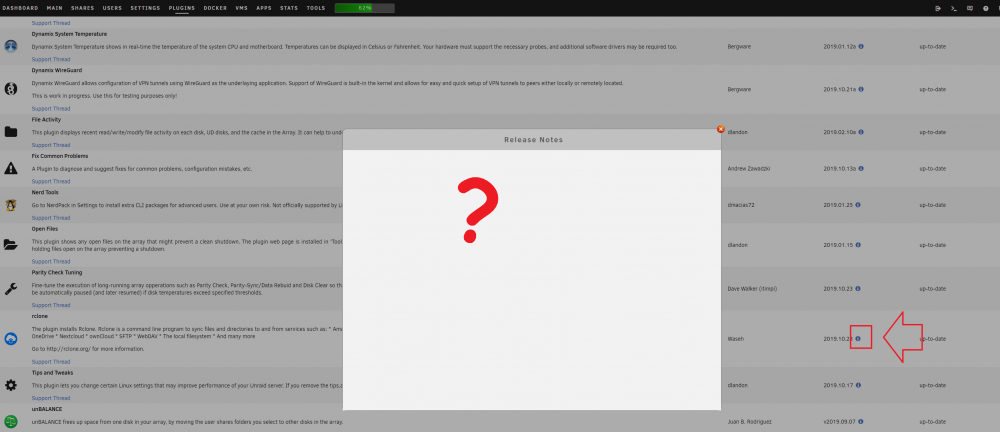
Okay, i found something out while looking at the source code. The text you showed is there, but its invisible...??? If i click and drag, i can see it... using latest google chrome.. wtf the code seems to be the same also, (same css, same layout "ul" "li" "h2" and so on...??) I can see... <!DOCTYPE HTML> <html lang="en"> <head> <meta name="robots" content="noindex, nofollow"> <meta http-equiv="Content-Security-Policy" content="block-all-mixed-content"> <link type="text/css" rel="stylesheet" href="/webGui/styles/default-fonts.css?v=1571655817"> <link type="text/css" rel="stylesheet" href="/webGui/styles/default-popup.css?v=1571655817"> </head> <body style="margin:14px 10px"> <h2>dynamix.system.stats</h2> <h3>2019.01.31c</h3> <ul> <li>fixed memory graph</li> <li>updated font-awesome icons</li> <li>fixed bar color regression</li> <li>added 'autov' function for .css and .js loading</li> I cant see... !DOCTYPE HTML> <html lang="en"> <head> <meta name="robots" content="noindex, nofollow"> <meta http-equiv="Content-Security-Policy" content="block-all-mixed-content"> <link type="text/css" rel="stylesheet" href="/webGui/styles/default-fonts.css?v=1571655817"> <link type="text/css" rel="stylesheet" href="/webGui/styles/default-popup.css?v=1571655817"> </head> <body style="margin:14px 10px"> <h2>rclone</h2> <h3>2019.10.23</h3> <ul> <li>Make rclone wrapper branch agnostic</li> </ul>
-
Hmm, any idea why that wont work? I just checked other plugins, some work, some not, where does that data get pulled from? Maybe its piholed? (but i dont see any blocks, so no idea)
-
Im not sure why i outcomented the start and stop commands of your script, but there was a reason. (or i just like it seperate, i cant remember)
-
Sorry, i cant see it. Is that the correct way to view the changelog?
-
Thanks for this plugin, i saw a few updates over the last weeks... sadly there is no changelog and the name of the update doesnt seem to belong with the official naming... so, i would ask if you could give us a changelog? (or make the naming the same like original?) e.g. which version belong to 2019.10.23? v1.49.5 - 2019-10-05?
-
Just use my automatic script. I dont have that problem with disconnecting mounts, but its my fail safe. I run it every minute, if mount is not working, stopping all mount related dockers, if mount is running again, starting dockers... (create/change directories to your liking) #!/bin/bash # Check if Mount workz if [[ -f "/mnt/user/mount_rclone/google_vfs/mountcheck" ]]; then # Mount workz echo "$(date "+%d.%m.%Y %T") INFO: Mount okay, starte Docker" if [[ -f "/mnt/user/appdata/other/docker/docker_on" ]]; then #docker schon gestartet. echo "$(date "+%d.%m.%Y %T") INFO: Docker bereits gestartet." exit else #docker noch nicht gestartet logger $(date "+%d.%m.%Y %T") Docker noch nicht gestartet. Starte Docker... docker start PlexMediaServer docker start radarr docker start Sonarr docker start ombi docker start lidarr touch /mnt/user/appdata/other/docker/docker_on rm -f /mnt/user/appdata/other/docker/docker_off fi else if [[ -f "/mnt/user/appdata/other/docker/docker_off" ]]; then echo "$(date "+%d.%m.%Y %T") INFO: Docker bereits gestoppt." exit else logger $(date "+%d.%m.%Y %T") Mount im Arsch. Docker stoppen... docker stop PlexMediaServer -t 1 docker stop radarr -t 1 docker stop Sonarr -t 1 docker stop ombi -t 1 docker stop lidarr -t 1 rm -f /mnt/user/appdata/other/docker/docker_on touch /mnt/user/appdata/other/docker/docker_off fi fi
-
So ill guess, that would explain why it works for me. My guess would be that unraid needs to get a new route.
-
Why so pissy? Im just here to help for free. Youre right it was the other wireguard thread- SORRY! What i meant was that i cant ping the VPN addresses, but it still works.
-
I can. (see some pages prevois)
-
u dont need to see to use.. look some pages earlier i posted my config which works... just differnet ips
-
Is the pihole in your regular (unraid) network? Then you dont need to do anything, ecepct enter ip of dns on client.
-
The mount script i posted seems to work, even if the "online since" stat is complete garbage Finally i can see WHY i get disconnects while gaming... today it was my music library... maybe i should store these locally until i have my 1gbits..
-
What exactly is the problem?
-
If you need, i dont know, but i guess yes. (I think you can only connect one time at the same time) If you should, ofc.
-
Hey, yes that should be correct. rclone rcd --rc-web-gui --rc-addr :5555 & is just be used to download the latest web gui (bc unraid delete linux after ever restart) sadly the normal commands dont auto download the gui (it seems)
-
Router 1 192.168.1.1 Router 2 192.168.2.1 Router 3 (load balancer) 192.168.0.1 Google Wifi 192.168.86.1 (Gateway is 192.168.0.1) Unraid 192.168.86.2 PiHole 192.168.86.5 All routers are standard setup WAN/LAN and all devices can talk to each other (but thats default) Only thing i did was 1 port forward from router 1 -> router 3 (all dyndns go to router 1 only) -> Google Wifi -> Unraid
-
Can you explain me why i dont need any new routes and it just works out of the box without any changes? U said it doesnt know a way back... but how is the requestet data (e.g. webtraffic) routed back to the mobile... then? Also why is my (br0) pihole working, also without any extra rules...?
-
I got it working: https://github.com/rclone/rclone-webui-react/issues/38 There are my 2 commands i use currently you need to add another script which only runs at the first start... now you can see what your mount is doing!
-
No, im just stupid... you can embed these commands into your mount and or move commands, im currently tryin to work it out.
-
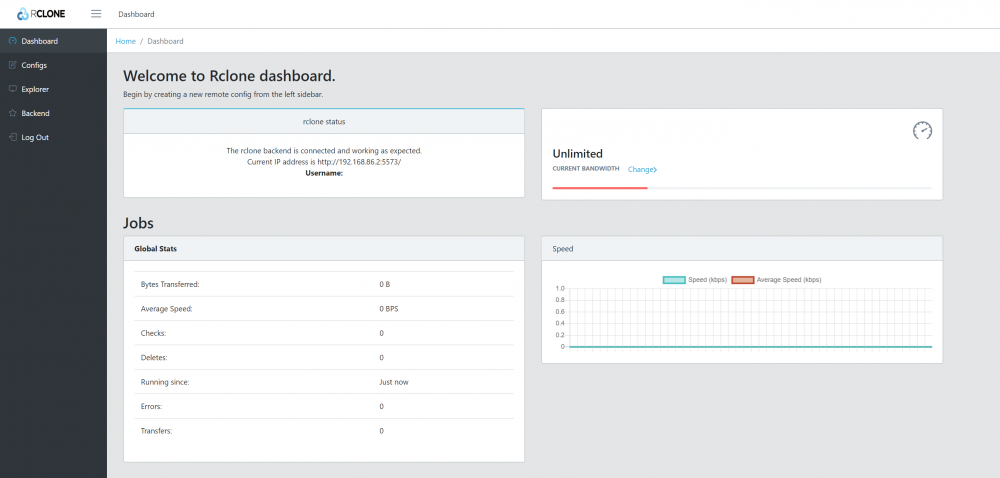
BTW, i found something cool! https://github.com/rclone/rclone-webui-react Just run rclone rcd --rc-web-gui --rc-user=test --rc-pass=test --rc-addr IP:PORT in terminal and you have a GUI for rclone, wtf! Then go to IP:Port in browser. Thats all! Crazy. It seems liek you can change your config there. Theres also a "jobs" "status" and so on, but sadly that doesnt work, maybe someone know how to connect that dashboard to our rclone installs? (so it shows what its doing, i would really love that becasue most time i dont really understand why its downloading) [or does it only show stats from things done via GUI? :(]
-
I dont understand. I didnt do anything like this. And all works. VNC, HTTP, RDP? I have a tripple NAT. Only thing i did was port forward!? Even my local DNS Server is working...? I have the following nets: 192.168.0.*, 192.168.1.*, 192.168.2.*, (3 routers in a row) then wifi network 192.168.86.* Unraid 192.168.86.2 PiHole 192.168.86.5 VPN (standard 10.253.0.10)



