






NewDisplayName
Members
-
Joined
-
Last visited
Everything posted by NewDisplayName
-
Yes i know, but if another drive fails, all data is lost.
-
Normal its not a big problem, if you write with 90mb/s or 120mb/s... but since were all geeks here... it must be automated my usecase is when i have to replace a drive, i copy all contents to the other drives... and then the balance mode would be really nice. Because now u have a few really full drives, and when they fail... you get the idea. But i must say this issue isnt so great anymore, because the dev pointed one option out where you can set how many % it should leave empty while using scatter/gather. Its default is very low, thats why i had the problems. I dont mean its usefull to swing the data around just for some MB/s... that was not intented.
-
So, ive configured some days ago wireguard and there is one phone connected, working well. Never had any network problems. Then i need to update rclone plugin, thus i restartet the server. After it came back, i couldnt reach any docker and because i read somewhere on forum that another user had a similiar problem... i just tried to disable wireguard... and you guessed it, all working fine again. If i enable it - no dockers reachable - again. unraid-server-diagnostics-20191017-1945.zip
-
Speed, full drives are slower.
-
Thats what i suggested some time ago, he refuse to implement it...
-
My guess would be that you misconfigured the IPs? make screenshots from your settings
-
What are you talking about? Im using "remote tunneled access". Like i have it configured, it uses my pihole, please read my whole post. The problem is that blocking youtube ads via ONLY DNS is hard (not do able)
-
try relogging, it says csrf token, has something to do with your session..
-
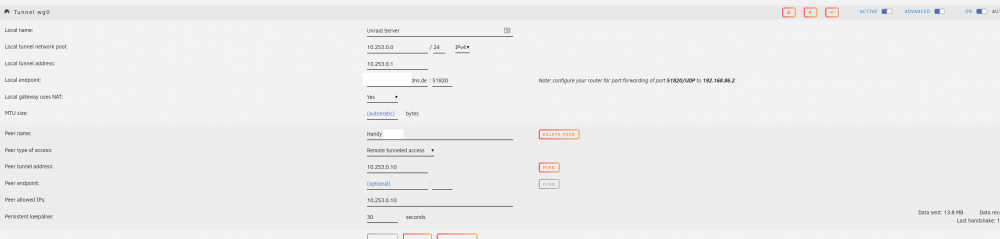
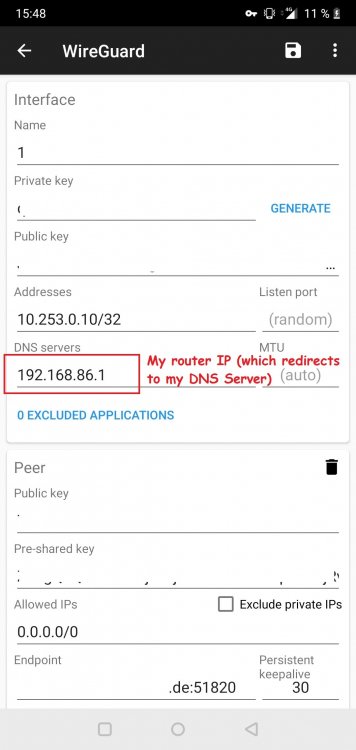
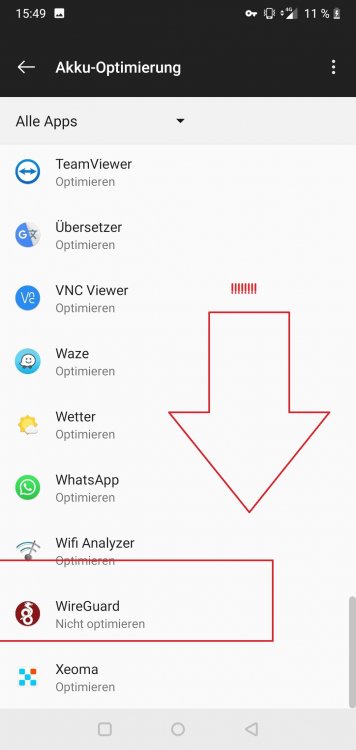
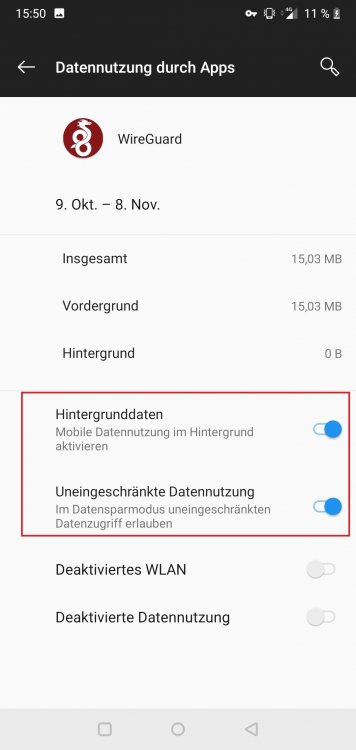
Hahha, i found out one of the biggest issues.... I always run my mobile in energy saver mode... which prevents apps like wireguard from running correctly... YOU NEED to enable UNLIMITED DATA USAGE and DEACTIVATE any ENERGY saving features for wireguard (!!!) (or dont use energy saver mode) So theres that mysteriom cleared... next question is, how to get my lokal DNS running. Tutorial on the internet say you can use your lokal DNS Server (which doesnt seem to work for me) if i set the DNS to 192.168.86.5 nothing works (local dns not, local ip not, internet not) I GOT IT WORKING 100% I needed to enter my routers IP as DNS (which himself get the DNS from my local DNS Server - i guess it was blocking other DNS Servers?) Thats my Setup which seems to work for now with my own dns Server: Only problem left is, how to block youtube ads on mobile... on desktop i dont get any ads bc of pihole, but on mobile, even with pihole as dns server, i still get ads.. anyone any idea?
-
Maybe its a bug, or not good working on all phones, but what u ask should do "remote tunneled acccess".
-
I know, but i dont need it long...
-
It seemed so easy at the start. But im lost. Like suggested im using "remote tunneled access". - i want to access my LAN(s) - and Internet. My phone can connect (handshake) with unraid. Finally i can access unraid ip. (ive entered unraid ip in allowed ips) and see the unraid interface. BUT i cant access internet (ive tried setting DNS to 8.8.8.8 or blank) [i think i cant access unraid when i set an DNS server???] So ive changed allowed ips to 0.0.0.0/0 (which should mean access to all ipv4 addresses) Then nothing works (no unraid ip, no internet) Any help? I have different subnets, does this have anything to do with it? (but any of the subnets would be allowed by 0.0.0.0/0 (so i dont see the problem) I would really like A LOG FILE, somewhere.... Edit: SO ive got it working. Im not quite sure what the problem was. But i disabled "private DNS" in android settings. Ive removed DNS Server in the wireguard clients config (just blank). LAN and WAN is working. Terrirble speed, but ill test that later. (around 2,5Mbits) AllowedIPs ive set just to the peer tunnel address, it seems like i understand that wrong in the first place, its not what the client is allowed to talk to, its which ips are allowed to connect to the VPN (?). NOW is the question, how to use my own pihole DNS server when connected to VPN (thats the whole point for me for VPNing in) I guess my phone can reach the DNS Server 192.168.86.5 perfectly fine, but someone mentioned my dns Edit2: I dont know why. But it keeps stopping to work...?! No Lan/WAN. Can anyone post a documentation how to archive the following: VPN into unraid, reach LAN and Internet?
-
Ok, i found it. Go to terminal and enter /usr/local/emhttp/plugins/unbalance/unbalance -port 6237 (if you close terminal, the session gets terminated) and then go manual in you rbrowser to yourip:6238 Thanks!
-
i really need this plugin to move some folders on some disks, can anyone tell me how we can get it to work? Ive tried normal starting and goin manual to the right IP:PORT (does not work) I tried setting the port to ***8, start, does not work...
-
You also go to McDonalds and ask for support on your Burger King menue?
-
which does, btw, not work for me.. changing port also doesnt seem to work (doesnt get saved)
-
hm. do you know how i can find out if i have the latest version? edit: "rclone version" in terminal does the trick Is that correct version? rclone v1.49.5 - os/arch: linux/amd64 - go version: go1.12.10
-
I think it means you should go to 6238 instead of 6237 (but dont change anything)
-
Would make sense, but pihole doesnt show any DNS querrys (from mobile) and internet is also not working (i also tried 8.8.8.8 btw) Its not another machine, but its another IP. Its a pihole docker on unraid. Also reaching unraid (192.168.86.2) in my case, should not involve DNS and should work right away, but doesnt... OR? I must say i have a crazy network, so it might be causing issues, but i dont really know where to look because i have no exp with VPNs. Basically i have 3 routers (multiple, tripple NAT), i dont know if that makes a difference. Why? Because i bundle 4 Internet lines (2x LTE + 2x DSL) The DNS is only pointing to one router ofc, and all routers (between WAN and unraid) redirect the port to the correct destination (thats not my first port redirect, never had problems with that) the 10.* is also not used in my network.
-
Hey there, i would like a option to disable auto logout. I dont find it any logic to FORCE users to login again. What happens is all save their passwords, and then, what is the use of auto logout? When you can login with one click... useless. I really want an option to disable the forced logout so i can just login where i want to login and logout when i want to logout. (like every webservice on this earth?) Thanks.
-
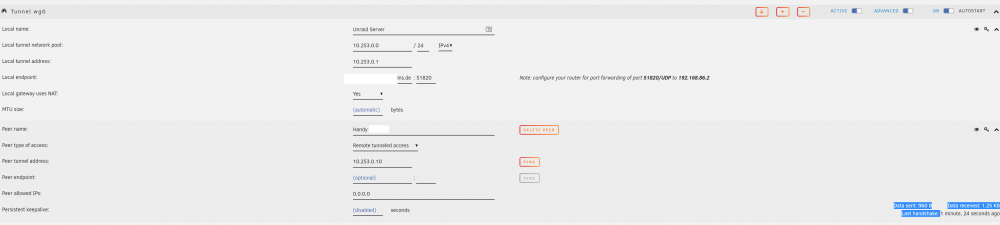
Ive read about the secruity problems with it, and as far as i understand this just is just a problem for big companies. I mean we can add 2, 3, 4 peers by hand np. Should i be able to ping the "local tunnel address" from my normal network? I dont understand why its not working. I changed allowed IPS to 0.0.0.0 which should mean everything, right? The handshake seems to work. Data sent: 960 BData received: 1.25 KBLast handshake: 57 seconds ago But i cant browse internet (or local network) via mobile if i enable the VPN. See Picture for more. What ive changed on client (mobile) was adding a dns server (my own local DNS Server) in this case its 192.168.86.5
-
So its the Client IP inside the VPN Network.
-
LoL, i know. But what i dont know is what to set there? Is it the client ip inside the VPN network? Is it my unraids ip range?
-
R u sure your dns points to the correct IP? (and unraid also see the correct ip, try ping your dns via unraid terminal)
-
Sorry what exactly is peer tunnel address? Is it unraid? Is it a free client ip for the mobile? edit: ive set it now to 10.253.0.10 - but i dont know what im doing



