





Squazz
Members
-
Joined
-
Last visited
Everything posted by Squazz
-
Hi there, I'm SO SORRY for replying so late. Right now, I'm using a USB DAC for my audio. Works like a charm :) When at my computer, I'm only running a pair of headphones, no surround.
-
I forgot to edit the template, got it working
-
I totally understand, and I only have this problem due to me using unBalance I was hoping there was a way to tell a program "if you find any dupes on diskX, delete them", so that I was in charge of what files was removed. Guess I'll have to do it the hard way
-
It only looks, right? There's no magic button to help one clean up?
-
I did hear that it could do something like that, of couse I havn't tried "extended tests" yet
-
In my case, this happened when using unBalance to scatter files from one disk to multiple others. As I see this docker could not help with looking for duplicates on the disk-level, so we know of any other docker og app that can help us with finding and deleting these duplicate files?
-
Thank you so much everyone, I got everything up and running again
-
Ok, that's what I thought I had just hoped there was a "restore" button
-
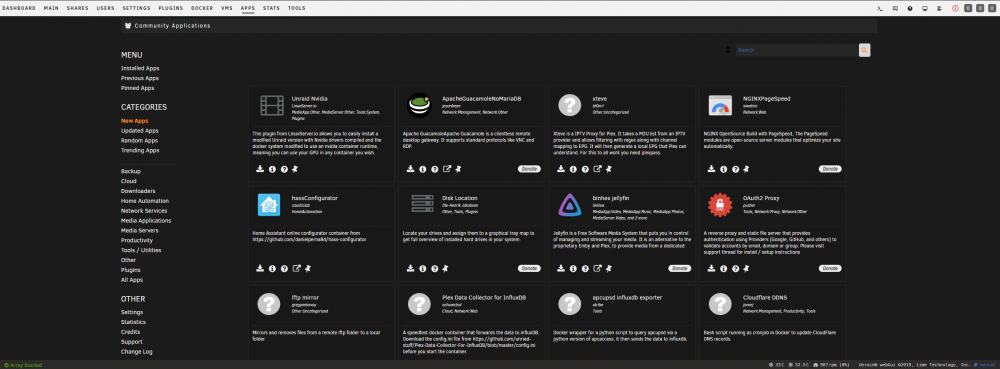
Am I looking in the wrong place?
-
I'm not sure how to use the restore function. Where should I look?
-
How would I go around doing this?
-
I upgraded to the release candidate because I had the problem before on version 6.6.6 Upgrading to the release candidate however gave me the error message, that I didn't have before
-
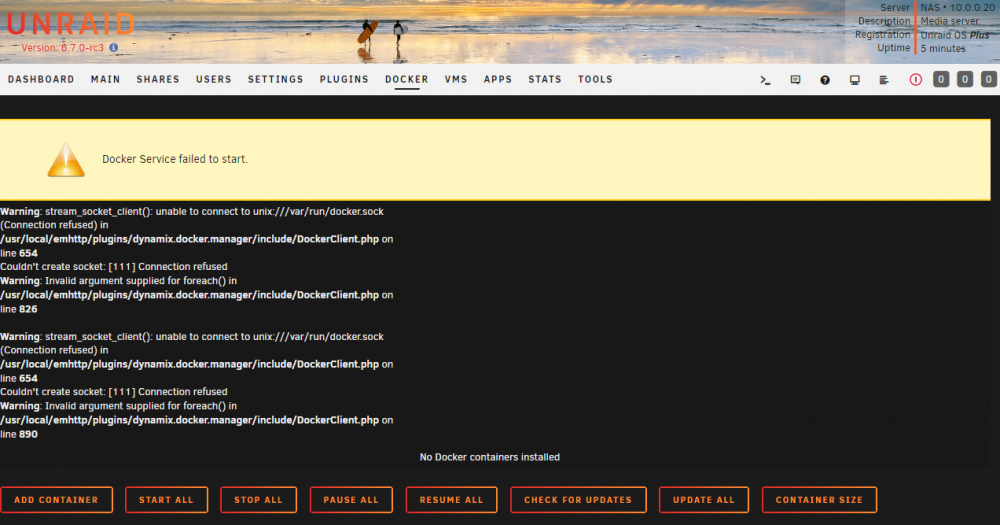
My bad It went a little fast with that post It's the service that won't start Diagnostics: nas-diagnostics-20190210-1626.zip Image where I got the error-message
-
I get the following error message Does anyone know what that means and what I should do about it?
-
In 2019 this saved my day
-
This is something i will have to dig deeper into at some time. Generally I havn't noticed anything alarming. But for some reason it seems CS:GO is capped at 150FPS when I'm playing it on my Win10 VM on Unraid. If I boot up on barebones I get 280+ FPS But this is the only game I have experienced it in (and the only game I play I generate 150+ FPS in) Sorry I can't give a better answer at the time of writing this
-
I'm glad that my updates to the post is helping someone, it makes it worth the work! After your kind words, I'll continue updating the post with new info After my experience with BSODs and parity errors I'm not overclocking my memory anymore. The gains vs. the risks are not worth it to me. But yes, if you want to do a overclock, you should wait until you have all the sticks. Everything would have to be re-tested and probably reconfigured when you get the last sticks. From what I have understood, all USB sticks are fine. I'm running mine on a stick I got for free at a conference, works just fine even though it's a "slow stick".
-
Noted, I'll but that BD aside and await an update for MakeMKV I didn't know this was a new feature that was coming. This potentially really big news!
-
For some reason, this docker is not good friends with my BD copy of "The Imitation Game". Last time I tried, MakeMKV said there was 202 versions it had to save (it canceled that operation due to lack of space ) As far as I can understand Java should be part of this docker, so I'm not sure what I'm doing wrong since it can't handle the playlist obfuscation? Does anyone know?
-
Thanks @tsawind! It both is hard and easy to set up unraid the first time you use it. It sounds like you need to create your own thread about the problems you are facing. I would love to be of assistance in that thread. I guess you already have made such a thread here? https://forums.unraid.net/topic/75834-trouble-with-install/?tab=comments#comment-699373 As the other person mentions there, we need something a little more concrete on what your problem is. I'll write some more on the above mentioned thread
-
I'm leaning more towards optical thunderbolt if something like that ends up being the solution. I've been looking into doing something like this. Got a friends who's working with IT for big companies, will have to pump him for details about thin-clients one day.
-
Thank you so much! I havn't found a way yet. I havn't really had the time to play around with it (new house and IRL stuff), but the new house just makes this more needed than before. I have been thinking about making terminal-link clients in other rooms. But yeah, no real progress in that area yet. Will do a post about it if I find a way. Also please do feel free to give me a shout if you figure out something awesome
-
I am generally seeing 5 hours pr. TB, gues something is very wrong then :/ My Parity is 2x WDC_WD30EFRX My 8 datadrives consists of a mix of WDC_WD30EFRX and WDC_WD20EARX
-
I just had the exact same problem as @sekrit and deleting the files as instructed by @binhex was not a success. Not I got a new kidn of grayish backdrop and no way to connect to Krusader I had to delete the docker and reinstall it to get it working Edit: I just reprovoked the situation. This is the same thing that happened last time I got the gray screen. I am moving a lot of files from one disk to another. Got a popup that says I don't have the rights needed to move one of the files, so I just click "skip" to the dialogue. After that everything disappears and I end up with a gray screen. Nothing to see on the taskbar in the bottom. The files are still being moved, there's a lot of activity on my drives, and I verified that some of the files that was one one disk are now gone on disk 1 but are on disk 2 as they should be. I hope this additional information can help.
-
That's not something I have experienced yet, but if I run into the issue I now know what the solution could be Thanks for that info


