





axipher
Members
-
Joined
-
Last visited
Everything posted by axipher
-
My US-48-G1 runs ay 60 C in my rack alongside a mining rigs and my UnRaid rig in 4U cases. I have a 90 mm fan running at low speed just blowing air across the top of the switch and my USG-3. Without the fan running, it gets up to almost 70 C though, but hovers around there. It is hot to touch at that level and if it does get to 75 C, the internal fan does come on for 10 minutes or so as the fan is only configured for full on or full off at 75 C. The internal fan is pretty loud though, people have come up with commands to turn it on, but no speed control and it turns itself off after the temp is below 75 C for a certain amount of time. There is a large discussion thread on it on the Unifi Forum, I don't have that link handy though. The general consensus was that people aren't happy with the hot temperatures of their 48-port non-POE switches. I'm not sure what the safe temperatures of the chips being used in the Switch are and if running at 60 - 70 C is actually detrimental for long term reliability or not. Personally I prefer my electronics to be at most warm to the touch on the cases in case a cable sits against it or my hand grazes by it while working on something else so I installed the extra fan. Once the warranty runs out on my switch, I'll likely open it up and swap in a couple Noctua fans with a low noise adapter spliced in to some constant 12 V in the switch somewhere. I'll try to remember to post a link to that here if I do it.
-
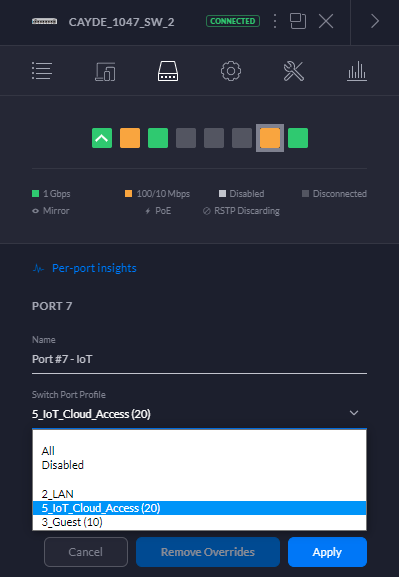
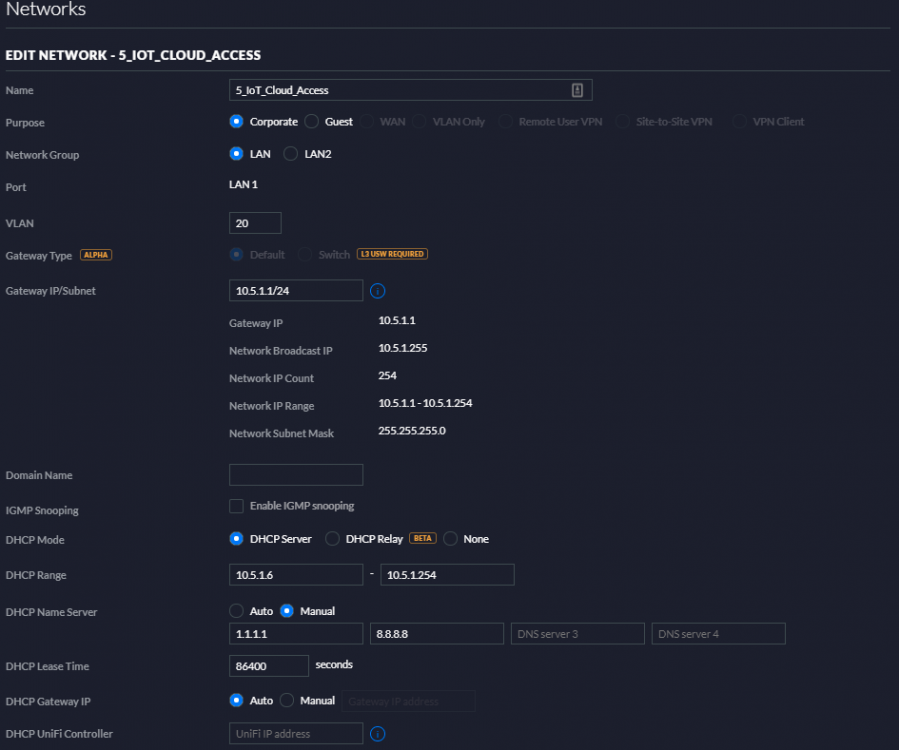
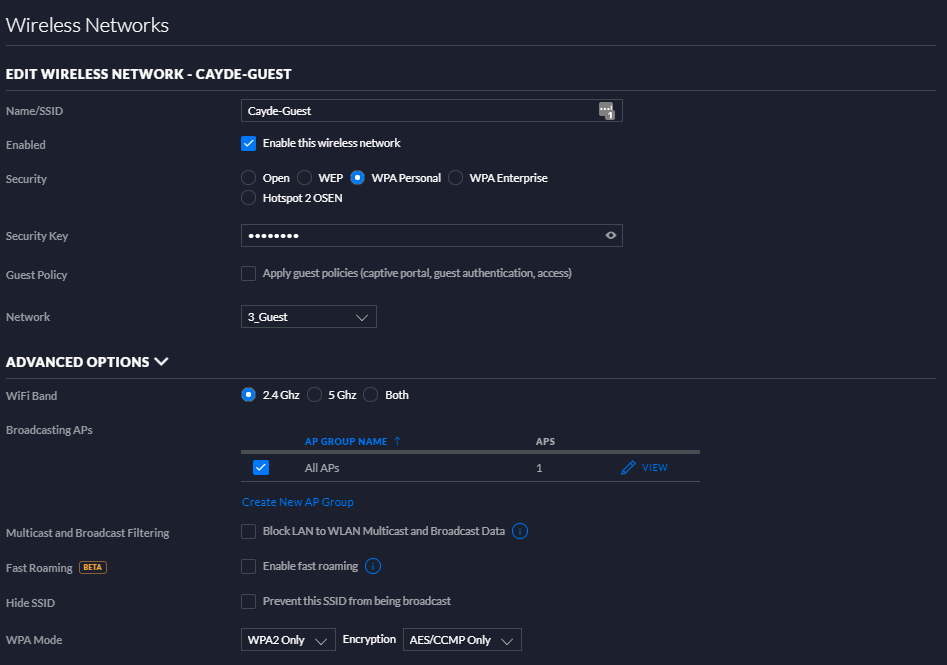
I know the recent controller version 6 broke some things, I think the new setup I have now has a Network that has a VLAN associated with it and then a wireless network SSID configured that uses that configured network, I have my Guest network shown for the wireless example, but "3_Guest" is set up similar to "5_IoT_Cloud_Access". If I connect my phone to my "Cayde-Guest" SSID that is connected to network "3_Guest" on VLAN 10, I only get internet access and can't access other devices or my Chromecasts in the network. Similarly, if I configure a port to be only the "3_Guest" or "5_IoT_Cloud_Access" networks and plug in my laptop to that port, I also get only internet access. As for wired devices, I have the ports on my switch that I'm plugging IOT devices configured to only have the IOT network with a VLAN tagged to that port So that my Philips Hue Bridge for example is plugged in to a port that only has my IOT network turned on for it:
-
I was taking my monthly look at my server to see where my SSD's were at in regards to TB Written (Data units written) as most SSD's have a limited warranty of something like 5 years of 320 TB Written in the case of my SX8200 Pro. There is currently a Warranty Period field where you can enter a warranty that is limited to 5 years: - Unknown - 6 Months - 12 Months - 24 Months - 36 Months - 48 Months - 60 Months It would be nice to expand that list since some drives have 6+ years or allow a custom entry with just a number field and a dropdown for months or years. It would also be nice to have a secondary warranty condition that can be linked to the Data units written so I can enter in a value in TBW for an SSD. Finally, it would be great to have this added to the Alerter/Notifier and its settings to be able to be able to trigger alerts and emails when a drive is nearing it's warranty, say 10% away from either of the defined warranty periods, and then another time when it has surpassed either defined warranty period.
-
Just Export your site and Import to a version of the Beta controller running on a Windows Server 2016 Essentials VM (Free for 180 days up to 5 times for evaluation). Then once the that version of the software becomes mainstream and in the Docker, do the Import/Export again. That's how I moved my Unifi Setup when I was building a new UnRaid box but needed controller access in between. Sadly that is the downside to running early access and/or alpha or beta stuff, you won't get much support outside of the manufacturer themselves in the method they recommend. We can do what we can to help you out here though, just don't expect and miracles.
-
WS discovery is a welcome convenience on my network and I would prefer to leave it running, is it possible to maybe lock it to a specific core to play more nicely with Docker and VM CPU Pinning settings? As it stands, I use CPU pinning to give VM's and Docker Containers access to certain cores to help with higher CPU dependent things like a game server or Plex container, so it would be nice to just throw WS Discovery on specific cores that aren't shared with the CPU dependent stuff.
-
If you open the Docker's Console, type `influx` and hit enter, you will be brought to the InfluxDB console Then type `show databases` and hit enter to see all the created databases Type `use <database name>` and hit enter to select that database Type `show measurements` and hit enter to see all logged measurement values Type `select last(*) from <measurement name>` and hit enter and should show you only the last measurement and all its data
-
Has anyone gotten UDP to work on InfluxDB Docker? I've tried: - Adding a port mapping for 8089 for UDP traffic - installing nano and editing /etc/influxdb/influxdb.conf to add the relevant [udp] section as it doesn't exist - restarting the docker - logs show that it is listening on :8089 for UDP But after all that, it won't accept the same UDP packets that a local Windows InfluxDB does accept.
-
Any luck on the Memory numbers without DPI enabled? Also what are you using as your Cron job (or User Script) to restart the docker daily, I might have to look at that myself.
-
I believe its because your new UPS is reporting LOADPCT as "16.0 percent" instead of just "16.0". So your UPS is actually providing a String Value to the formula when it needs just an Integer or a Float number. You might have to dig in the Grafana Dashboard code and help files to figure out how to strip that string value of the " percent" from the end of it in that formula. Or maybe someone here can help with that. I had to do a custom User Script using CA User Scripts Plugin and the NUT-Settings Plugin instead of the built-in UPS Settings for my Eaton Rack-mount UPS because it was not providing any of the normally named tags and I had to modify all the Grafana charts to look for the new variables, but I didn't have to do any string manipulation like your new UPS would require. Hopefully I can at least point you in the right direction.
-
No problem, sometimes a second set of eyes is all you need on a problem.
-
Well if you have the Unraid-Nvidia Plugin you just want to select an Nvidia Unraid build and let it do the install process on the little pop-up
.thumb.png.67cb073950243b3cf48bf308b0e0eb8a.png)
-
Looks like you may have been running the Unraid Nvidia Build as you have a GPU ID filled in. Did you update Unraid to the non Nvidia 6.8.3?
-
Are you controlling Unifi AP's? If so, you should be able to have them all on the same network and use multiple LAN and WLAN configs in the controller then just configure the AP's themselves with the specific WLAN's you want on each one. For example, my single AP in my house has the following on it form a single cable: WLAN 2G (11n/b/g) Cayde (Disabled) Cayde-2G Cayde-Guest Cayde-IoT WLAN 5G (11n/a/ac) Cayde Cayde-2G (Disabled) Cayde-Guest Cayde-IoT Cayde and Cayde-2G SSID's both use the same network 10.2.1.0/24 Cayde-Guest is a Guest type network 10.3.1.0/24 Cayde-IoT is another network 10.4.1.0/24 that I also have tagged with VLAN 5 on certain ports for my Phillips Hue and Wink Hub This way my Guest and IoT networks can't see the devices on my main network and I give people the choice for the faster 5G on newer devices, ot 2G on older devices or things like my Google Home Speakers and Chromecasts
-
Okay, so not just me then, thanks for at least confirming I'm not completely insane... Yes, Grafana with the dashboards found in the following article as a base, I've tweaked them quite a bit from the originals to work with my Eaton UPS with 3 outlet groups. https://technicalramblings.com/blog/setting-grafana-influxdb-telegraf-ups-monitoring-unraid/
-
Anyone else seeing constant Memory Bloat from the Unifi Docker? My only solution has been to restart Unifi either as part of CA Backup or CA Auto Update to keep memory usage down. It typically starts at a little over 600 MB up to 2.5 GB with no sign of slowing down before restarting it.

-
Thanks for the great work on getting WireGuard working. I followed the guide to get Remote Tunnelled Access working, but I see that it uses UnRaid's Internet Connection. How can I force the tunnelled traffic through a PiHole Docker? Router that UnRaid and PiHole use: 10.3.1.1 PiHole DNS Output via 'br0' (ad-free): 10.3.1.2 Local tunnel network pool: 10.253.0.1 If I try to set a Peer's DNS to 10.3.1.2, traffic just fails when the VPN is turned on, assuming due to being in a different subnet. Is there a way to get WireGuard Peers connected via Remote Tunnelled Access to also go through my PiHole Docker?
-
I haven't dealt specifically with the Orbi, but as long as the Router is configured to use the SteamCache as the Primary DNS and Cloudflare as the Secondary, it should forward everything through the SteamCache no problem. What do you have set as SteamCache's DNS, it should be set to an external known DNS server, I've seen some setups where it gets somehow set to the Router DNS which is pointing back to the SteamCache. Now from your output, it looks like 192.168.1.14 is what you are using for your DNS address, is this your UnRaid server or the SteamCache Docker? If I recall when I had set on up before, SteamCache actually defaulted to getting its own IP address from your router so it wasn't the same IP as your UnRaid server. If you are testing on a Windows box, it may be worthwhile to do a flushdns alongside a release/renew as well to make sure you clear all the cached DNS entries on your machine.
-
To expand on this, the typical way that Routers are set up are in DHCP where they provide at least the following: - IP adress for client machine and subnet mask - DNS settings for client to use (most allow two DNS servers and will default to their own DNS servers or your ISP's DNS servers) - Gateway to use to route all internet traffic In my case, I have the router DHCP DNS settings set up to have my Pi-Hole as the first DNS server and 1.1.1.1 as the second one in case my Pi-Hole Docker is down for an update or UnRaid is down for maintenance. This way as soon as they get a new address from DHCP, they should also pull the DNS settings I set up to what you want when they connect. You may need to reboot your router to force them to request new addresses and not just re-use one if the DHCP lease hasn't expired yet. (Yes I simplified some things so that it may help others searching for help as well, please feel free to correct me on anything and I will edit my post) P.S.: I have had Pi-Hole's DNS set to steamcache for it's primary DNS to that I could both block ads and serve cached Steam files, but I've since disabled that with a faster internet connection and speed limits on my router per client.
-
Hi Exa, I don't want to downplay your problem, but offer an alternative solution instead. I gather that you are wanting to use your Intel CPU's iGPU for hardware transcoding instead of Software to try to offload the limited number of CPU cores from transcoding. GPU transcoding is definitely great for power efficiency as well on a server. I'm not sure what motherboard you are running as you just said a Gigabyte Z270 which would be mini ITX up to full ATX, but I'm assuming that you have at least one free PCIe slot and hopefully in a case that can support a 2-slot GPU. I would like to highly recommend something like a GTX 1050 Ti which can hardware transcode 4k in Plex with the NVDEC patch (or an upcoming Plex Server release with official NVDEC support on Linux) and potentially more than the Nvidia limited 2 streams via certain methods. Linuxserverio has a Plugin that installs a Nvidia specific version of latest Unraid to allow passing through the GPU to Plex for this purpose. The GTX 1050 Ti might seem like a costly upgrade from an iGPU just for transcoding, but it does a fantastic job and uses minimal power when idle. I would stick with the 4 GB VRAM model as Linux 4k transcodes require ~1.5 GB each at worst case form my experience, but if you only have 1080p content, you can probably get by with just a GTX 1050 2GB as it doesn't require an extra power cable and gets all of its power from the motherboard slot. If you need more help with an Nvidia setup for Plex, you might get a little more assistance here, but linuxserverio also has a great Discord too for support on stuff. Cheers, axipher
-
Anyone else getting errors with the Plex Docker relating to Python or Libcrypto? Sep 10 15:30:30 CACHE kernel: Plex Media Scan[22769]: segfault at 300000010 ip 000014923da39097 sp 000014923430b0d0 error 4 in libcrypto.so.1.0.0[14923d928000+204000] Sep 11 22:11:31 CACHE kernel: traps: Plex Media Scan[10223] general protection ip:1484de7b85dc sp:7fff0d1091a0 error:0 in libpython2.7.so.1.0[1484de6c6000+195000] Sep 12 04:51:47 CACHE kernel: Plex Media Scan[14863]: segfault at 300000010 ip 000014e711121097 sp 000014e7039d2fe0 error 4 in libcrypto.so.1.0.0[14e711010000+204000] Sep 12 06:01:47 CACHE kernel: Plex Media Scan[27341]: segfault at 30000001c ip 000014d6f5f21097 sp 000014d6ec7f30d0 error 4 in libcrypto.so.1.0.0[14d6f5e10000+204000] Sep 12 09:06:50 CACHE kernel: Plex Media Scan[28297]: segfault at 51 ip 000014daa525a097 sp 000014da97b12fe0 error 4 in libcrypto.so.1.0.0[14daa5149000+204000] Sep 12 16:41:51 CACHE kernel: traps: Plex Media Scan[21409] trap stack segment ip:14e7b94ab4a9 sp:7ffe6fee2f70 error:0 in libpython2.7.so.1.0[14e7b93b9000+195000]
-
Hey Ian, any chance you can expand on how you updated the alpine repo to latest? I'm trying to get this to work as well. EDIT: Just changed the Repository from telegraf:alpine to telegraf:latest and restarted the Docker and it is working great.
-
For anyone who came here from the "SpeedtestforInfluxDB" Docker, I found a quick way to get proper Upload Speeds. On the current build, I get 380-400 Download and 4-6 Upload on my fibre connection which is actually a 400/200. Browsing around the web, found this page for speedtest-cli: https://www.howtoforge.com/tutorial/check-internet-speed-with-speedtest-cli-on-ubuntu/ Simply opening the Console the for SpeedtestforInfluxDB Docker and running the following command upgraded the version of speedtest-cli being used and I get much close to my 400/200 speeds from the results in the Log. pip install speedtest-cli –-upgrade Cheers community
-
I thought about that, but I would prefer not to install Telegraf directly on UnRaid if possible and continue using Dockers; that would be a separate topic I think as well to install a package directly on UnRaid that would live through upgrades.
-
What would be the easiest way to get NUT-Client integrated in to a running Telegraf Docker so that I can have Telegraf also relay UPS statistics to InfluxDB? The eventual goal is having UPS stats from NUT-Settings Plugin in a Grafana Dashboard from here: https://technicalramblings.com/blog/setting-grafana-influxdb-telegraf-ups-monitoring-unraid/ I found these sites for reference for NUT and Telegraf: https://blog.lbdg.me/n-u-t-ups-monitoring-via-pfsense-grafana/ https://yegor.pomortsev.com/post/monitoring-everything/
-
That would be great, even just checking to see if Docker's are enabled to give a warning to the user with a check box to proceed as a quick sanity check.



.png.ac4141715c3ad2f6343e5229a5823eda.png)

