





jbuszkie
Members
-
Joined
-
Last visited
Everything posted by jbuszkie
-
And it's a lower address range. And it always shows CPU 1 or 2. Above 10M it seems to run fine. It's also repeatable on all slots
-
I've narrowed it down to the block test failing. If I just run that test it fails pretty quickly. If I run the test single core it seems to run ok. Multi core fails quickly. over clocked fails, stock fails, underclocked fails. CPU underclocked fails too. 2nd set of DIMMS from work fails too. This is the 2nd MB since the first showed the same errors and had bent pins. Could it be the CPU??
-
I just got a new MB/CPU/Memory. I'm having issues running memtest for a long period of time. I eventually get errors. I just updated the BIOS of the M/B and I"m re-running. I'm running memtest 5.01. I can boot the win7 install disk.. I can boot to the unraid gui... Should I be able to run memtest overnight without errors? Jim
-
Ok.. What did I miss? I haven't been following too closely.. Did limetech do something in an update that changes how we add a drive? Jim
-
The x in the web page...
-
You need the new script and rename it then you will see these options
-
are you running with the -c option? If yes then it could take a long time! Mine took close to a day
-
Do you have the nerd tools installed? It's part of that package. Once you do.. You type "screen" Then in screen you can do cntl-a then some other letters to do various things. Like I think cntl-a x will exit the screen session (while keeping it running) "screen -r" will re-attach a session. cntl-a ?, I believe will list the commands. Jim
-
Maybe the web keeps a running average where the script window is an instantaneous??
-
You mean these two values? I could just be how often one refreshes vs the other.. The plugin author will have to comment on that. Jim
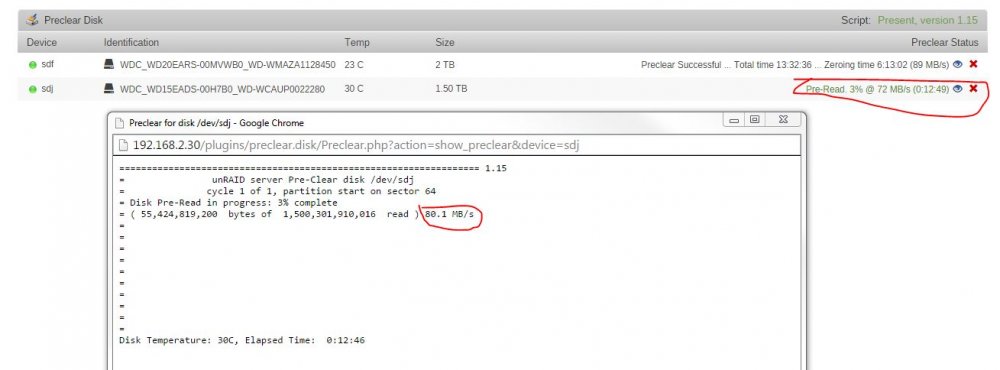
-
ok... now some dumb questions.. did you refresh the browser? Did you try to reboot the system? The script name looks right if in fact it really is in the correct directory like you say it is... I would just double check that. after that, I'm out of ideas.. Jim
-
You mean the e-mailed reports and such? the e-mailed reports will calculate based on time elapsed and bytes done. the gui uses the instantaneous value, iirc...
-
What is the script called? Are the permissions set correctly? (if they need to change at all?)
-
hmm... sounds like there are reasons for and against.. I think maybe I'll just do my one pre-existing 4TB RFS drive. It's only 75% full.. The rest are smaller drives (2 and 3TB) and are full. I usually don't keep updating the OS so if I'm stable now I should be good. As I replace the smaller drives, I'll make them XFS. Jim
-
I'm sure the answer is buried somewhere here in this thread.... but should I bother to change all my drives to XFS? I just finished replacing a 2TB with a spare (it was showing signs of becoming weak) so that became XFS and I consolidated 2 1.5TB drives to a new 4TB drive which also is xfs now. I have one more 4TB (spare for now) drive that I can used to convert the rest of my array to xfs... Is there a compelling reason to do so? What do I gain other than getting rid of any fragmented files? Jim
-
Well it is was it is now.. I have a pro license so I wouldn't have noticed. But it's probably good to know. I used to have a spare machine I used for pre-clears. but now I just do them on the array (it has enough HP now) Looks like others with less of a license will have to use a second machine if they are maxed out on devices. Jim
-
I did not know that.. That seems stupid? Why limit the devices attached? Clearly limit the devices in the array.. but physical devices???
-
Depends. If you're running v5, there's no limit on how many physical devices can be attached to the system. If you're running v6, the license limits the number of physical devices you can have in the system UNLESS you have a Pro license. Really?? what does it do? disable them? How can it?
-
If you have an available sata port, yes you can pre-clear the drive. Pre-clearing happens outside the array
-
You might need some quotes around the echo statement in the send_mail subroutine. Changed to: Someone else can probably explain why it's needed for the cat output and not for the "\n" inserted into the variable! but if I do this: my_message="`cat /tmp/smart_start_sdl` \n";m2=$(echo ${my_message} | tr "'" '`' ) ; echo "$m2" I get this: Disk: /dev/sdl smartctl 6.2 2013-07-26 r3841 [x86_64-linux-4.1.7-unRAID] (local build) Copyright (C) 2002-13, Bruce Allen, Christian Franke, www.smartmontools.org === START OF INFORMATION SECTION === Device Model: ST4000VN000-1H4168 Serial Number: ZZZZZZZ LU WWN Device Id: 5 000c50 07b9b59ce Firmware Version: SC46 User Capacity: 4,000,787,030,016 bytes [4.00 TB] Sector Sizes: 512 bytes logical, 4096 bytes physical Rotation Rate: 5900 rpm Device is: Not in smartctl database [for details use: -P showall] ATA Version is: ACS-2, ACS-3 T13/2161-D revision 3b SATA Version is: SATA 3.1, 6.0 Gb/s (current: 3.0 Gb/s) Local Time is: Tue Sep 29 21:23:31 2015 EDT SMART support is: Available - device has SMART capability. SMART support is: Enabled === START OF READ SMART DATA SECTION === SMART overall-health self-assessment test result: PASSED General SMART Values: Offline data collection status: (0x00) Offline data collection activity was never started. Auto Offline Data Collection: Disabled. Self-test execution status: ( 0) The previous self-test routine completed without error or no self-test has ever been run. Total time to complete Offline data collection: ( 107) seconds. Offline data collection capabilities: (0x73) SMART execute Offline immediate. Auto Offline data collection on/off support. Suspend Offline collection upon new command. No Offline surface scan supported. Self-test supported. Conveyance Self-test supported. Selective Self-test supported. SMART capabilities: (0x0003) Saves SMART data before entering power-saving mode. Supports SMART auto save timer. Error logging capability: (0x01) Error logging supported. General Purpose Logging supported. Short self-test routine recommended polling time: ( 1) minutes. Extended self-test routine recommended polling time: ( 502) minutes. Conveyance self-test routine recommended polling time: ( 2) minutes. SCT capabilities: (0x10bd) SCT Status supported. SCT Error Recovery Control supported. SCT Feature Control supported. SCT Data Table supported. SMART Attributes Data Structure revision number: 10 Vendor Specific SMART Attributes with Thresholds: ID# ATTRIBUTE_NAME FLAG VALUE WORST THRESH TYPE UPDATED WHEN_FAILED RAW_VALUE 1 Raw_Read_Error_Rate 0x000f 100 100 006 Pre-fail Always - 12496 3 Spin_Up_Time 0x0003 096 096 000 Pre-fail Always - 0 4 Start_Stop_Count 0x0032 100 100 020 Old_age Always - 4 5 Reallocated_Sector_Ct 0x0033 100 100 010 Pre-fail Always - 0 7 Seek_Error_Rate 0x000f 100 253 030 Pre-fail Always - 11 9 Power_On_Hours 0x0032 100 100 000 Old_age Always - 0 10 Spin_Retry_Count 0x0013 100 100 097 Pre-fail Always - 0 12 Power_Cycle_Count 0x0032 100 100 020 Old_age Always - 4 184 End-to-End_Error 0x0032 100 100 099 Old_age Always - 0 187 Reported_Uncorrect 0x0032 100 100 000 Old_age Always - 0 188 Command_Timeout 0x0032 100 253 000 Old_age Always - 0 189 High_Fly_Writes 0x003a 100 100 000 Old_age Always - 0 190 Airflow_Temperature_Cel 0x0022 070 070 045 Old_age Always - 30 (Min/Max 22/30) 191 G-Sense_Error_Rate 0x0032 100 100 000 Old_age Always - 0 192 Power-Off_Retract_Count 0x0032 100 100 000 Old_age Always - 4 193 Load_Cycle_Count 0x0032 100 100 000 Old_age Always - 4 194 Temperature_Celsius 0x0022 030 040 000 Old_age Always - 30 (0 22 0 0 0) 197 Current_Pending_Sector 0x0012 100 100 000 Old_age Always - 0 198 Offline_Uncorrectable 0x0010 100 100 000 Old_age Offline - 0 199 UDMA_CRC_Error_Count 0x003e 200 253 000 Old_age Always - 0 SMART Error Log Version: 1 No Errors Logged SMART Self-test log structure revision number 1 No self-tests have been logged. [To run self-tests, use: smartctl -t] SMART Selective self-test log data structure revision number 1 SPAN MIN_LBA MAX_LBA CURRENT_TEST_STATUS 1 0 0 Not_testing 2 0 0 Not_testing 3 0 0 Not_testing 4 0 0 Not_testing 5 0 0 Not_testing Selective self-test flags (0x0): After scanning selected spans, do NOT read-scan remainder of disk. If Selective self-test is pending on power-up, resume after 0 minute delay. \n but if I do this: my_message="`cat /tmp/smart_start_sdl` \n";m2=$(echo "${my_message}" | tr "'" '`' ) ; echo "$m2" I get the correctly formatted output. Disk: /dev/sdl smartctl 6.2 2013-07-26 r3841 [x86_64-linux-4.1.7-unRAID] (local build) Copyright (C) 2002-13, Bruce Allen, Christian Franke, www.smartmontools.org === START OF INFORMATION SECTION === Device Model: ST4000VN000-1H4168 Serial Number: ZXXXXXX LU WWN Device Id: 5 000c50 07b9b59ce Firmware Version: SC46 User Capacity: 4,000,787,030,016 bytes [4.00 TB] Sector Sizes: 512 bytes logical, 4096 bytes physical Rotation Rate: 5900 rpm Device is: Not in smartctl database [for details use: -P showall] ATA Version is: ACS-2, ACS-3 T13/2161-D revision 3b SATA Version is: SATA 3.1, 6.0 Gb/s (current: 3.0 Gb/s) Local Time is: Tue Sep 29 21:23:31 2015 EDT SMART support is: Available - device has SMART capability. SMART support is: Enabled === START OF READ SMART DATA SECTION === SMART overall-health self-assessment test result: PASSED General SMART Values: Offline data collection status: (0x00) Offline data collection activity was never started. Auto Offline Data Collection: Disabled. Self-test execution status: ( 0) The previous self-test routine completed without error or no self-test has ever been run. Total time to complete Offline data collection: ( 107) seconds. Offline data collection Now I haven't tried this in the script. If I had a small disk to try this on I would.. I got rid of all mine.
-
The script seems to be removing some linefeeds from the analyze_for_errors output and the cats of the smart reports.. It didn't do that before. What the e-mail looks like now: Event: Preclear ST4000VN000-1H4168 ZXXXXXX Subject: Preclear: PASS! Preclearing Disk sdm Finished!!! Description: Preclear: PASS! Preclearing Disk sdm Finished!!! Cycle 1 of 1 Importance: normal ========================================================================1.15 == invoked as: /boot/config/plugins/preclear.disk/preclear_disk.sh -M 4 -o 2 -c 1 -f -J /dev/sdm == ST4000VN000-1H4168 ZXXXXXXX == Disk /dev/sdm has been successfully precleared == with a starting sector of 1 == Ran 1 cycle == == Using :Read block size = 1000448 Bytes == Last Cycle`s Pre Read Time : 10:05:41 (110 MB/s) == Last Cycle`s Zeroing time : 8:01:11 (138 MB/s) == Last Cycle`s Post Read Time : 10:16:20 (108 MB/s) == Last Cycle`s Total Time : 28:24:38 == == Total Elapsed Time 28:24:38 == == Disk Start Temperature: 32C == == Current Disk Temperature: 35C, == ============================================================================ ** Changed attributes in files: /tmp/smart_start_sdm /tmp/smart_finish_sdm ATTRIBUTE NEW_VAL OLD_VAL FAILURE_THRESHOLD STATUS RAW_VALUE Raw_Read_Error_Rate = 117 100 6 ok 133493080 Spin_Retry_Count = 100 100 97 near_thresh 0 End-to-End_Error = 100 100 99 near_thresh 0 Airflow_Temperature_Cel = 65 68 45 near_thresh 35 Temperature_Celsius = 35 32 0 ok 35 No SMART attributes are FAILING_NOW 0 sectors were pending re-allocation before the start of the preclear. 0 sectors were pending re-allocation after pre-read in cycle 1 of 1. 0 sectors were pending re-allocation after zero of disk in cycle 1 of 1. 0 sectors are pending re-allocation at the end of the preclear, the number of sectors pending re-allocation did not change. 0 sectors had been re-allocated before the start of the preclear. 0 sectors are re-allocated at the end of the preclear, the number of sectors re-allocated did not change. ============================================================================ ============================================================================ == == S.M.A.R.T Initial Report for /dev/sdm == Disk: /dev/sdm smartctl 6.2 2013-07-26 r3841 [x86_64-linux-4.1.7-unRAID] (local build) Copyright (C) 2002-13, Bruce Allen, Christian Franke, www.smartmontools.org === START OF INFORMATION SECTION === Device Model: ST4000VN000-1H4168 Serial Number: ZXXXXXXX LU WWN Device Id: 5 000c50 07ba4cf8c Firmware Version: SC46 User Capacity: 4,000,787,030,016 bytes [4.00 TB] Sector Sizes: 512 bytes logical, 4096 bytes physical Rotation Rate: 5900 rpm Device is: Not in smartctl database [for details use: -P showall] ATA Version is: ACS-2, ACS-3 T13/2161-D revision 3b SATA Version is: SATA 3.1, 6.0 Gb/s (current: 3.0 Gb/s) Local Time is: Tue Sep 29 21:24:04 2015 EDT SMART support is: Available - device has SMART capability. SMART support is: Enabled === START OF READ SMART DATA SECTION === SMART overall-health self-assessment test result: PASSED General SMART Values: Offline data collection status: (0x00) Offline data collection activity was never started. Auto Offline Data Collection: Disabled. Self-test execution status: ( 0) The previous self-test routine completed without error or no self-test has ever been run. Total time to complete Offline data collection: ( 128) seconds. Offline data collection capabilities: (0x73) SMART execute Offline immediate. Auto Offline data collection on/off support. Suspend Offline collection upon new command. No Offline surface scan supported. Self-test supported. Conveyance Self-test supported. Selective Self-test supported. SMART capabilities: (0x0003) Saves SMART data before entering power-saving mode. Supports SMART auto save timer. Error logging capability: (0x01) Error logging supported. General Purpose Logging supported. Short self-test routine recommended polling time: ( 1) minutes. Extended self-test routine recommended polling time: ( 505) minutes. Conveyance self-test routine recommended polling time: ( 2) minutes. SCT capabilities: (0x10bd) SCT Status supported. SCT Error Recovery Control supported. SCT Feature Control supported. SCT Data Table supported. SMART Attributes Data Str == ============================================================================ What is used to look like in the e-mail (using the original Joe script and V5 of unraid: ========================================================================1.15 == invoked as: ./preclear_disk.sh -M 4 -m [email protected] /dev/sdl == WDCWD40EZRX-00SPEB0 WD-WXXXXXXXX == Disk /dev/sdl has been successfully precleared == with a starting sector of 1 == Ran 1 cycle == == Using :Read block size = 8388608 Bytes == Last Cycle's Pre Read Time : 10:28:36 (106 MB/s) == Last Cycle's Zeroing time : 9:58:54 (111 MB/s) == Last Cycle's Post Read Time : 23:29:46 (47 MB/s) == Last Cycle's Total Time : 43:58:25 == == Total Elapsed Time 43:58:25 == == Disk Start Temperature: 23C == == Current Disk Temperature: 28C, == ============================================================================ ** Changed attributes in files: /tmp/smart_start_sdl /tmp/smart_finish_sdl ATTRIBUTE NEW_VAL OLD_VAL FAILURE_THRESHOLD STATUS RAW_VALUE Temperature_Celsius = 124 129 0 ok 28 No SMART attributes are FAILING_NOW 0 sectors were pending re-allocation before the start of the preclear. 0 sectors were pending re-allocation after pre-read in cycle 1 of 1. 0 sectors were pending re-allocation after zero of disk in cycle 1 of 1. 0 sectors are pending re-allocation at the end of the preclear, the number of sectors pending re-allocation did not change. 0 sectors had been re-allocated before the start of the preclear. 0 sectors are re-allocated at the end of the preclear, the number of sectors re-allocated did not change. ============================================================================ ============================================================================ == == S.M.A.R.T Initial Report for /dev/sdl == Disk: /dev/sdl smartctl version 5.38 [i486-slackware-linux-gnu] Copyright (C) 2002-8 Bruce Allen Home page is http://smartmontools.sourceforge.net/ === START OF INFORMATION SECTION === Device Model: WDC WD40EZRX-00SPEB0 Serial Number: WD-XXXXXXXXX Firmware Version: 80.00A80 User Capacity: 4,000,787,030,016 bytes Device is: Not in smartctl database [for details use: -P showall] ATA Version is: 9 ATA Standard is: Exact ATA specification draft version not indicated Local Time is: Sat Apr 25 18:13:13 2015 EDT SMART support is: Available - device has SMART capability. SMART support is: Enabled === START OF READ SMART DATA SECTION === SMART overall-health self-assessment test result: PASSED General SMART Values: Offline data collection status: (0x80) Offline data collection activity was never started. Auto Offline Data Collection: Enabled. Self-test execution status: ( 0) The previous self-test routine completed without error or no self-test has ever been run. Total time to complete Offline data collection: (52380) seconds. Offline data collection capabilities: (0x7b) SMART execute Offline immediate. Auto Offline data collection on/off support. Suspend Offline collection upon new command. Offline surface scan supported. Self-test supported. Conveyance Self-test supported. Selective Self-test supported. SMART capabilities: (0x0003) Saves SMART data before entering power-saving mode. Supports SMART auto save timer. Error logging capability: (0x01) Error logging supported. General Purpose Logging supported. Short self-test routine recommended polling time: ( 2) minutes. Extended self-test routine recommended polling time: ( 255) minutes. Conveyance self-test routine recommended polling time: ( 5) minutes. SCT capabilities: (0x7035) SCT Status supported. SCT Feature Control supported. SCT Data Table supported. SMART Attributes Data Structure revision number: 16 Vendor Specific SMART Attributes with Thresholds: ID# ATTRIBUTE_NAME FLAG VALUE WORST THRESH TYPE UPDATED WHEN_FAILED RAW_VALUE 1 Raw_Read_Error_Rate 0x002f 100 253 051 Pre-fail Always - 0 3 Spin_Up_Time 0x0027 100 253 021 Pre-fail Always - 0 4 Start_Stop_Count 0x0032 100 100 000 Old_age Always - 4 5 Reallocated_Sector_Ct 0x0033 200 200 140 Pre-fail Always - 0 7 Seek_Error_Rate 0x002e 100 253 000 Old_age Always - 0 9 Power_On_Hours 0x0032 100 100 000 Old_age Always - 0 10 Spin_Retry_Count 0x0032 100 253 000 Old_age Always - 0 11 Calibration_Retry_Count 0x0032 100 253 000 Old_age Always - 0 12 Power_Cycle_Count 0x0032 100 100 000 Old_age Always - 4 192 Power-Off_Retract_Count 0x0032 200 200 000 Old_age Always - 2 193 Load_Cycle_Count 0x0032 200 200 000 Old_age Always - 6 194 Temperature_Celsius 0x0022 129 120 000 Old_age Always - 23 196 Reallocated_Event_Count 0x0032 200 200 000 Old_age Always - 0 197 Current_Pending_Sector 0x0032 200 200 000 Old_age Always - 0 198 Offline_Uncorrectable 0x0030 100 253 000 Old_age Offline - 0 199 UDMA_CRC_Error_Count 0x0032 200 253 000 Old_age Always - 0 200 Multi_Zone_Error_Rate 0x0008 100 253 000 Old_age Offline - 0 SMART Error Log Version: 1 No Errors Logged SMART Self-test log structure revision number 1 No self-tests have been logged. [To run self-tests, use: smartctl -t] SMART Selective self-test log data structure revision number 1 SPAN MIN_LBA MAX_LBA CURRENT_TEST_STATUS 1 0 0 Not_testing 2 0 0 Not_testing 3 0 0 Not_testing 4 0 0 Not_testing 5 0 0 Not_testing Selective self-test flags (0x0): After scanning selected spans, do NOT read-scan remainder of disk. If Selective self-test is pending on power-up, resume after 0 minute delay. == ============================================================================ Any thoughts to why? It would be nice if this was more readable... But great job, otherwise, on this plugin! It's nice to have a gui for it! I always had to look back and see what command line parameters I used in the past for any new pre-clears Jim
-
I"m running chrome and it works just fine for me?
-
Ok.. I think it's running now. Thanks! FYI.... I get this error when running the script.. /boot/config/plugins/preclear.disk/preclear_disk.sh -M 4 -o 2 -c 1 -f -J /dev/sdl root@Tower:/usr/local/emhttp# /boot/config/plugins/preclear.disk/preclear_disk.sh -M 4 -o 2 -c 1 -f -J /dev/sdl /boot/config/plugins/preclear.disk/preclear_disk.sh: line 635: [: missing `]' The program is running.. but I got this error when it started. Jim
-
I don't see the "mail" option when I start a pre-clear? I see it as an option in video... but not in my options? I get the mail notifications for other stuff like array health and what not.. Jim
-
Theoretically the drive accepted the writes to replace the data that could not be read. When a drive has read errors, unraid reads all the other drives and calculates what should have been in the location that had read errors, and issues a write command to put the data that couldn't be read back onto the drive. If the write fails, the drive is red balled (X'ed?) otherwise if the write returns success, the drive stays in service and the error count for that drive is incremented. I'd disable spindown for that drive and run a long smart test, then get a smart report and post it. If you want help deciding what drive needs to be replaced next, get smart reports on all your drives and post them. Thanks! So if the drive's not redballed now it should be there on a restart, right? Now does the long smart test have to be done with the array offline? And how can I just *read* everything on the drive to see if I get the errors again? something like dd to /dev/null. Jim
