





Unoid
Members
-
Joined
-
Last visited
Everything posted by Unoid
-
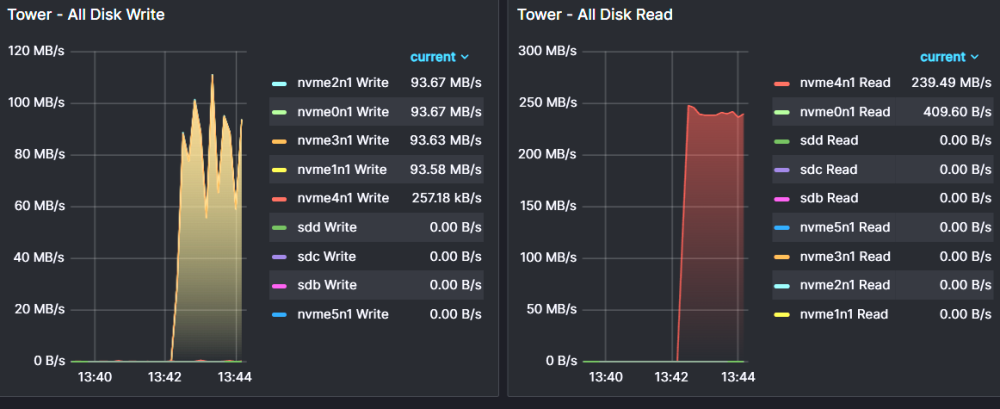
I copied a 27GB file to and from the same zpool mount. my desktop with smb mount to it is limited to 5GBps which this result is earily like reading and writing over the network making out the 5GBps. These speeds should be bottlenecked by write speed of around 2GB/s...
-
Last I tested it was doing many GB/s writes copying large sequential. Just ran a test copying a 9GB blue ray rip (h265) I have. rsync: sent 8,868,009,936 bytes received 35 bytes 311,158,244.60 bytes/sec Grafana only showing peak of 129MB/s write for the rsync. running a dd if=/dev/zero of=/mnt/user/speedtest oflag=direct bs=128k count=32k reported 685MB/s in terminal, but grafana showed 2.03GB/s write to one nvme. a VM with a vdisk mounted of the same zpool share running kdiskmark showed similar speeds to the screenshot in orig post.
-
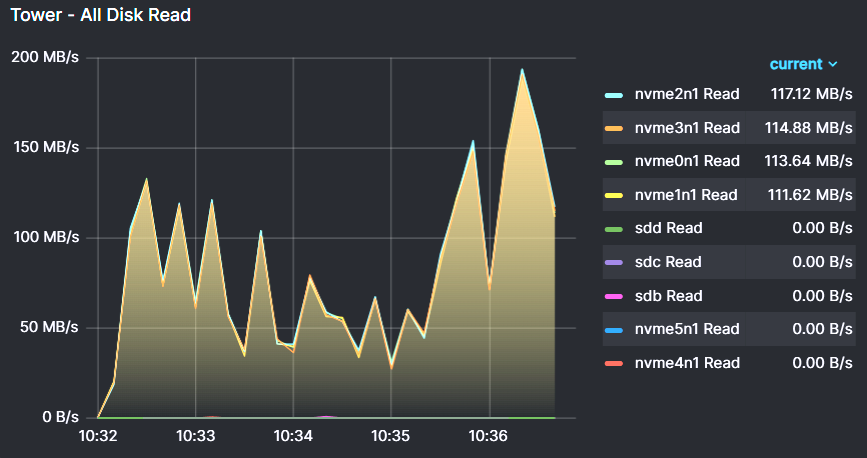
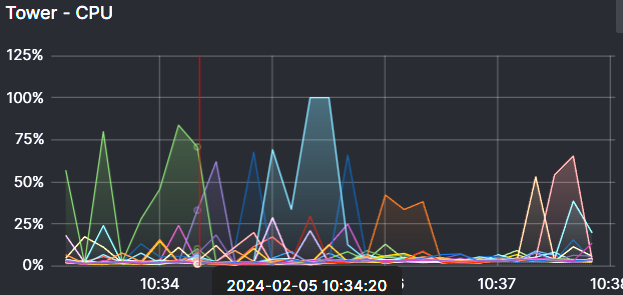
I have compression=on, I'm running a scrub again to gather metrics. I don't see any extra logs to give me more insight. NVME temps are all under 50C, (I just added heatsinks to them) I captured the first 5 minutes of scrub AFTER it does the initial "indexing" or whatever operation: pool: speedteam state: ONLINE scan: scrub in progress since Mon Feb 5 10:30:29 2024 7.92T scanned at 0B/s, 188G issued at 421M/s, 7.92T total 0B repaired, 2.32% done, 05:20:51 to go Disk IO: Writes are all less than 150kb/s. Reads in screenshot. CPU is barely being taxed. mostly sitting around 3-10% across all threads, with occasional spikes to 50-100% Total CPU average under 6%.
-
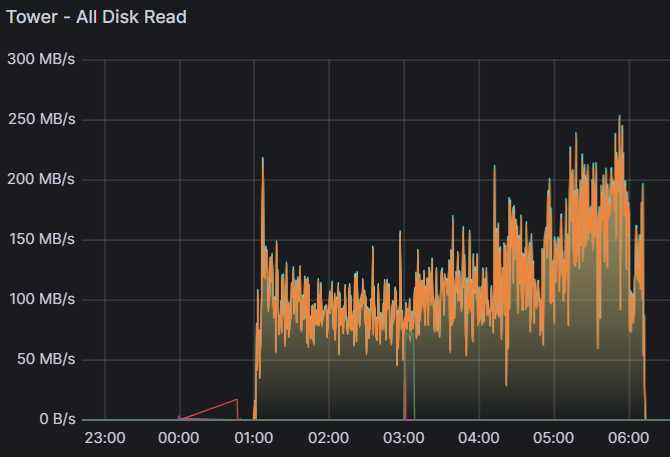
Unraid 6.12.6 Epyc 7302, 16c 3.3ghz 256 GB pc3200 ecc pool in question: 4x4TB team group MP43 nvme pcie 3 4x4x4x4 bifurcation raid z1. 32GB Ram Cache. pool at about 50% use. Compression=on Scrub speeds range from 90MB/s to 250MB/s. shouldn't scrub speeds be a good bit faster? These Team group mp43's do 3000 read, 2400ish writes sequential. TLC NAND with DRAM. 5 hour 11 minutes for 6.3TB data used of 11.8TB pool: speedteam state: ONLINE scan: scrub repaired 0B in 05:11:58 with 0 errors on Thu Feb 1 06:11:59 2024 config: NAME STATE READ WRITE CKSUM speedteam ONLINE 0 0 0 raidz1-0 ONLINE 0 0 0 /dev/nvme0n1p1 ONLINE 0 0 0 /dev/nvme1n1p1 ONLINE 0 0 0 /dev/nvme2n1p1 ONLINE 0 0 0 /dev/nvme3n1p1 ONLINE 0 0 0 errors: No known data errors
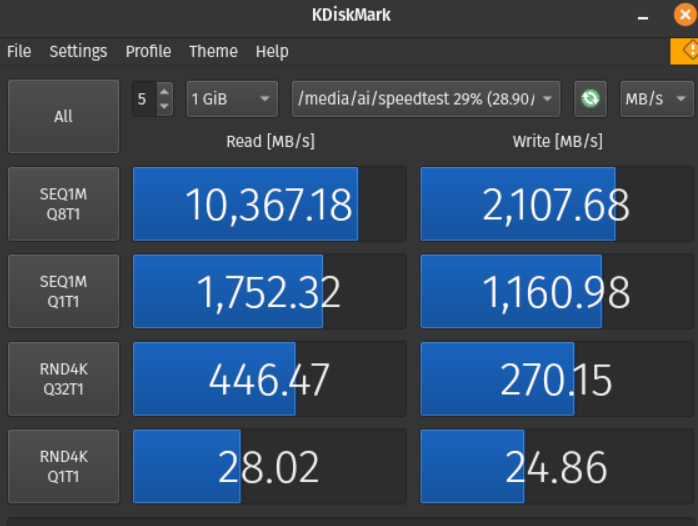
-
I really appreciate you going above and beyond docker related support. I tried multiple network options bridge, br0, host, etc. my opnsense forwarding it spot on. For giggles I fired up an ubuntu 22.03 server VM, did the steamcmd fun and changed my port forward destination to it's IP and my friends can get in. I copied the same palsettings.ini file from the saved directory and everything. I tried nc -u host port, and got success on the docker from a remote server. so I really don't know what's going on.
-
I have 8211 (set as default in docker config, port forwarded correctly like i have other working services. docker allocation shows it listening on it as well. when I or anyone else tries to connect, it gets a network timeout. opnsense was only showing a PASS for outbound traffic via 8211 UDP. if I checked the info firewall logs it would show packets for IN from a known host(a friend, or me on wifi hotspot) and the packet is BLOCKED with IP:random port like 20304 > server dest 8211. I agree, probably networking issue but I've done everything right.
-
Palworld: I can connect using local machine to my unraid server with LAN IP. For some reason I see my opnsense blocking incoming connections targeting my local server :8211. But the source ports are all over the place, 20,000's, to 50,000's and I won't open such a huge range in my opnsense port forward. It's like the game sends the random UDP traffic over the random ports but not actually using 8211 like it should.
-
As of last week telegraf will no longer start: [telegraf] Error running agent: could not initialize input inputs.smart: smartctl not found: verify that smartctl is installed and it is in your PATH (or specified in config): provided path does not exist: [] I have the .conf using sudo for execution, and PATH is fine. which smartctl shows /usr/sbin/smartctl, the binary runs just fine without adding the path to the command as well. echo $PATH includes /usr/sbin/. what's going on? EDIT: I see users above already mentioned this. I'm on 6.8.3 however
-
Binhex, I host my own cloud OpenVPN server I wish to run through. The env variables for setup don't seem to support that. Is there a quick guide on running an .ovpn file? I could more easily just run a VM but that's much more resource intensive then your docker.

