





marshy919
Members
-
Joined
-
Last visited
Everything posted by marshy919
-
Can't type anything. Just getting this error on first time install. ERROR 1045 (28000): Access denied for user 'root'@'localhost' (using password: NO) See heaps of things online on how to fix it, but most of them start with 'sudo' and that command isn't found.
-
Brilliant - that fixed it.
-
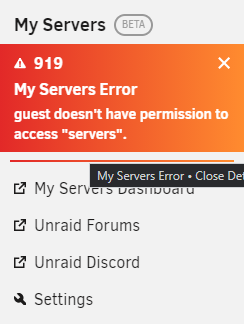
It's like it's saying the guest user doesn't have access. I don't have a user called guest though.
-
Had the same issues about the password not working when logging in. Go back to the IP directly, and they worked. Also had to wait about a minute when it finally came up with the hash.unraid.net login for it to successfully take my credentials. Currently my server is port forwarded - open port check success. Allow remote access - yes Obviously signed in already When I go to https://forums.unraid.net/my-servers/ It shows access unavailable.
-
Thanks for having a look. 919-diagnostics-20200528-0955.zip
-
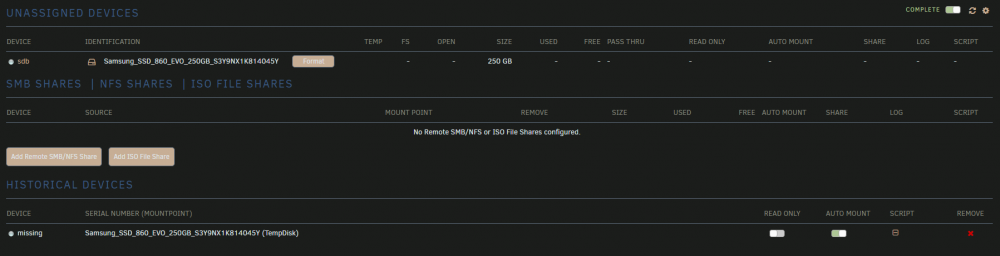
This issue happened before the last update. My disks keep dropping off after a reboot, it goes into missing each time. Was working for the past few months without issue. It's connected via USB, not SATA. I can remove it from 'missing' - format it, and have it working again, but that's not ideal after each reboot. I have since uninstalled the plugin, rebooted server, installed again - same issue. Thanks for your excellent plugin!
-
Same issue - even putting http first Reinstalled, wiped appdata folder without any success Is there a different fix for this issue?
-
Accessing the WebUI is just blank. http://192.168.1.111:9080/ Is there a different port for Flood? Edit: answered my own question. Yes, its 3000 Edit 2: FYI, rTorrent port in the next step is 5000.
-
root@localhost:# /usr/local/emhttp/plugins/dynamix.docker.manager/scripts/docker run -d --name='binhex-rtorrentvpn' --net='bridge' --privileged=true -e TZ="Australia/Adelaide" -e HOST_OS="Unraid" -e 'VPN_ENABLED'='no' -e 'VPN_USER'='vpn username' -e 'VPN_PASS'='vpn password' -e 'VPN_PROV'='pia' -e 'VPN_OPTIONS'='' -e 'STRICT_PORT_FORWARD'='yes' -e 'ENABLE_PRIVOXY'='no' -e 'ENABLE_FLOOD'='yes' -e 'ENABLE_AUTODL_IRSSI'='no' -e 'LAN_NETWORK'='192.168.1.0/24' -e 'NAME_SERVERS'='1.1.1.1,1.0.0.1' -e 'DEBUG'='false' -e 'PHP_TZ'='UTC' -e 'UMASK'='000' -e 'PUID'='99' -e 'PGID'='100' -p '3000:3000/tcp' -p '5000:5000/tcp' -p '9080:9080/tcp' -p '9443:9443/tcp' -p '8118:8118/tcp' -v '/mnt/user/appdata/data':'/data':'rw' -v '/mnt/user/appdata/binhex-rtorrentvpn':'/config':'rw' 'binhex/arch-rtorrentvpn' 474b2951bece2629e7cc2d048191e08cae0b9d7a77bb04cbb2e704d1e25f14bd The command finished successfully! Command to install the docker, with flood enabled, VPN access disabled. 2019-01-16 23:21:50.560295 [info] System information Linux 474b2951bece 4.18.20-unRAID #1 SMP Fri Nov 23 11:38:16 PST 2018 x86_64 GNU/Linux 2019-01-16 23:21:50.589332 [info] PUID defined as '99' 2019-01-16 23:21:51.394718 [info] PGID defined as '100' 2019-01-16 23:21:51.780465 [info] UMASK defined as '000' 2019-01-16 23:21:51.806759 [info] Permissions already set for volume mappings 2019-01-16 23:21:51.837628 [info] VPN_ENABLED defined as 'no' 2019-01-16 23:21:51.860054 [warn] !!IMPORTANT!! VPN IS SET TO DISABLED', YOU WILL NOT BE SECURE 2019-01-16 23:21:51.888906 [info] ENABLE_FLOOD defined as 'yes' 2019-01-16 23:21:51.919305 [info] ENABLE_AUTODL_IRSSI defined as 'no' 2019-01-16 23:21:52.624329 [info] Starting Supervisor... 2019-01-16 23:21:53,014 INFO Included extra file "/etc/supervisor/conf.d/rtorrent.conf" during parsing 2019-01-16 23:21:53,014 INFO Set uid to user 0 succeeded 2019-01-16 23:21:53,017 INFO supervisord started with pid 8 2019-01-16 23:21:54,019 INFO spawned: 'start-script' with pid 68 2019-01-16 23:21:54,022 INFO spawned: 'rutorrent-script' with pid 69 2019-01-16 23:21:54,024 INFO spawned: 'flood-script' with pid 70 2019-01-16 23:21:54,026 INFO spawned: 'irssi-script' with pid 71 2019-01-16 23:21:54,029 INFO spawned: 'watchdog-script' with pid 72 2019-01-16 23:21:54,032 INFO spawned: 'privoxy-script' with pid 73 2019-01-16 23:21:54,032 INFO reaped unknown pid 9 2019-01-16 23:21:54,035 DEBG 'start-script' stdout output: [info] VPN not enabled, skipping configuration of VPN 2019-01-16 23:21:54,036 INFO success: start-script entered RUNNING state, process has stayed up for > than 0 seconds (startsecs) 2019-01-16 23:21:54,036 INFO success: rutorrent-script entered RUNNING state, process has stayed up for > than 0 seconds (startsecs) 2019-01-16 23:21:54,036 INFO success: flood-script entered RUNNING state, process has stayed up for > than 0 seconds (startsecs) 2019-01-16 23:21:54,037 INFO success: irssi-script entered RUNNING state, process has stayed up for > than 0 seconds (startsecs) 2019-01-16 23:21:54,037 INFO success: watchdog-script entered RUNNING state, process has stayed up for > than 0 seconds (startsecs) 2019-01-16 23:21:54,037 INFO success: privoxy-script entered RUNNING state, process has stayed up for > than 0 seconds (startsecs) 2019-01-16 23:21:54,037 DEBG fd 8 closed, stopped monitoring <POutputDispatcher at 22950195615360 for <Subprocess at 22950195615144 with name start-script in state RUNNING> (stdout)> 2019-01-16 23:21:54,038 DEBG fd 10 closed, stopped monitoring <POutputDispatcher at 22950195615648 for <Subprocess at 22950195615144 with name start-script in state RUNNING> (stderr)> 2019-01-16 23:21:54,038 INFO exited: start-script (exit status 0; expected) 2019-01-16 23:21:54,038 DEBG fd 16 closed, stopped monitoring <POutputDispatcher at 22950195616224 for <Subprocess at 22950195615000 with name rutorrent-script in state RUNNING> (stderr)> 2019-01-16 23:21:54,038 DEBG 'rutorrent-script' stdout output: [info] Flood enabled, preventing ruTorrent Web UI from starting... 2019-01-16 23:21:54,039 INFO exited: rutorrent-script (exit status 0; expected) 2019-01-16 23:21:54,039 DEBG fd 26 closed, stopped monitoring <POutputDispatcher at 22950195617376 for <Subprocess at 22950195614712 with name irssi-script in state RUNNING> (stderr)> 2019-01-16 23:21:54,039 DEBG 'irssi-script' stdout output: [info] Autodl-irssi not enabled, skipping startup 2019-01-16 23:21:54,039 INFO exited: irssi-script (exit status 0; expected) 2019-01-16 23:21:54,040 DEBG 'privoxy-script' stdout output: [info] Privoxy set to disabled 2019-01-16 23:21:54,040 DEBG fd 36 closed, stopped monitoring <POutputDispatcher at 22950195688584 for <Subprocess at 22950195614856 with name privoxy-script in state RUNNING> (stderr)> 2019-01-16 23:21:54,041 INFO exited: privoxy-script (exit status 0; expected) 2019-01-16 23:21:54,041 DEBG received SIGCLD indicating a child quit 2019-01-16 23:21:54,041 DEBG 'flood-script' stdout output: [info] Flood enabled [info] Waiting for rTorrent process to start listening on port 5000... 2019-01-16 23:21:54,042 DEBG 'watchdog-script' stdout output: [info] rTorrent config file already exists, skipping copy 2019-01-16 23:21:54,059 DEBG 'watchdog-script' stderr output: dos2unix: converting file /config/rtorrent/config/rtorrent.rc to Unix format... 2019-01-16 23:21:54,104 DEBG 'watchdog-script' stdout output: [info] rTorrent not running 2019-01-16 23:21:54,104 DEBG 'watchdog-script' stdout output: [info] Removing any rTorrent session lock files left over from the previous run... 2019-01-16 23:21:54,106 DEBG 'watchdog-script' stdout output: [info] Attempting to start rTorrent... 2019-01-16 23:21:54,109 DEBG 'watchdog-script' stdout output: Script started, file is /home/nobody/typescript 2019-01-16 23:21:54,173 DEBG 'watchdog-script' stdout output: Script done, file is /home/nobody/typescript 2019-01-16 23:21:54,479 DEBG 'flood-script' stdout output: [info] Configuring Flood... 2019-01-16 23:21:54,479 DEBG 'flood-script' stdout output: [info] Copying Flood config file /config/flood/config/config.js back to container... 2019-01-16 23:21:54,483 DEBG 'flood-script' stdout output: [info] Starting Flood... 2019-01-16 23:21:55,183 DEBG 'watchdog-script' stdout output: [info] rTorrent process started 2019-01-16 23:21:55,184 DEBG 'watchdog-script' stdout output: [info] Waiting for rTorrent process to start listening on port 5000... 2019-01-16 23:21:55,194 DEBG 'watchdog-script' stdout output: [info] rTorrent process listening 2019-01-16 23:21:55,197 DEBG 'watchdog-script' stdout output: [info] Autodl-irssi not enabled, skipping startup 2019-01-16 23:21:55,198 DEBG 'watchdog-script' stdout output: [info] Flood enabled, disabling initialisation of ruTorrent plugins... 2019-01-16 23:21:55,198 DEBG 'watchdog-script' stdout output: [info] Nginx log file does not exist, skipping log rotation 2019-01-16 23:22:31,740 DEBG 'watchdog-script' stdout output: [info] Nginx log file does not exist, skipping log rotation 2019-01-16 23:23:01,748 DEBG 'watchdog-script' stdout output: [info] Nginx log file does not exist, skipping log rotation 2019-01-16 23:23:31,757 DEBG 'watchdog-script' stdout output: [info] Nginx log file does not exist, skipping log rotation 2019-01-16 23:24:01,768 DEBG 'watchdog-script' stdout output: [info] Nginx log file does not exist, skipping log rotation 2019-01-16 23:24:31,777 DEBG 'watchdog-script' stdout output: [info] Nginx log file does not exist, skipping log rotation 2019-01-16 23:25:01,786 DEBG 'watchdog-script' stdout output: [info] Nginx log file does not exist, skipping log rotation 2019-01-16 23:25:31,795 DEBG 'watchdog-script' stdout output: [info] Nginx log file does not exist, skipping log rotation 2019-01-16 23:26:01,800 DEBG 'watchdog-script' stdout output: [info] Nginx log file does not exist, skipping log rotation 2019-01-16 23:26:31,810 DEBG 'watchdog-script' stdout output: [info] Nginx log file does not exist, skipping log rotation First time attempting flood install, I feel like I'm missing a step...
-
That's so coincidental that your BIOS version is 6.6.6 and the latest unraid version is 6.6.6 Must be the devils work
-
Thanks for that, I enabled the settings in the conf but still no connection to the WebUI or RDP. Anything else to try? Cheers Edit: All good, needed to restart server for it to work.
-
Using RDP (win10 client) or 8080 port doesnt bring up anything for me. First time using, and cant seem to get a UI to appear.
-
Thanks for this and for all the previous members who have helped others out. Your information helps a lot Had a few hiccups, but with no prior knowledge I had this all up and running within 2 hours. Added in all my programs, port forwards, outside access with nextcloud etc. Scored an A on SSLlabs. 100/95/90/90. Way in over my head here but these are what dragged my score down. Would love to get the A+ but a bit scared to tinker with this. DNS CAA No (more info) TLS_RSA_WITH_3DES_EDE_CBC_SHA (0xa) WEAK Java 6u45 No SNI 2 Client does not support DH parameters > 1024 bits RSA 4096 (SHA256) | TLS 1.0 | TLS_DHE_RSA_WITH_AES_128_CBC_SHA | DH 2048


