SimonF
Community Developer
-
Joined
-
Last visited
Everything posted by SimonF
-
Looks like the A SPEED VGA is causing an issue are you able to disable it in the bios?
-
What does intel_gpu_top -L show
-
run timeout -k 1.5 3.0 intel_gpu_top -J -s 1000 For the plugin to work you need to sections of the data. Increase the 1.5 towards 3 until you get two blocks. These values should be put into the timers.
-
Set refresh to 4000 and intel top timers to 1.5 3.0
-
New Kernel will be in 7.1 I think there will be a beta soon.
-
Does lspci -ks 0000:49:00.0 show the i915 on the card? What intel)gpu_top timers are set in gpustat?
-
Thanks not sure why it is not finding the driver. Will look to see if I can do a different way, this was the reason it did not work yesterday.
-
Which browser are you using.
-
The XE Driver is not loaded due to it is not in the Kernel. Linux version 6.6.78-Unraid Kernel needs to be 6.8+ I thought you may be using a custom kernel.
-
Thanks, that is strange as it seems to be the driver was coming back blank. So I added code to set to NVIDIA if didn't match which was the fix. $driver = strtoupper($this->getKernelDriver("0000:".$this->settings['PCIID'])); if ($driver != "NVIDIA" && $driver != "NOUVEAU") $driver = "NVIDIA"; Can you run this just so I can see the length. <? function getKernelDriver(string $pciid) { $driver = ''; echo "Check Link\n"; if (is_link('/sys/bus/pci/devices/'.$pciid.'/driver')) { echo "is Link\n"; $strLink = @readlink('/sys/bus/pci/devices/'.$pciid.'/driver'); if (!empty($strLink)) { $driver = basename($strLink); } else { echo "Empty Link\n"; } } return $driver; } echo getKernelDriver("0000:0a:00.0")."\n"; echo strlen(getKernelDriver("0000:0a:00.0"))."\n"; ?>
-
Could you post diagnostics?
-
Would you be able to create a temp file. i.e. nano /tmp/testgpu Copy this code and save. then run php -f /tmp/gputest I think your pciid is 2d:00.0 change if wrong and let me have the results. <? function getKernelDriver(string $pciid) { $driver = ''; echo "Check Link\n"; if (is_link('/sys/bus/pci/devices/'.$pciid.'/driver')) { echo "is Link\n"; $strLink = @readlink('/sys/bus/pci/devices/'.$pciid.'/driver'); if (!empty($strLink)) { $driver = basename($strLink); } else { echo "Empty Link\n"; } } return $driver; } echo getKernelDriver("0000:2d:00.0")."\n"; ?>
-
Looks like we need to add the B580 lspci -nnks 07:00.0 which will provide out like this. 00:02.0 VGA compatible controller [0300]: Intel Corporation AlderLake-S GT1 [8086:4680] (rev 0c) DeviceName: Onboard - Video Subsystem: Micro-Star International Co., Ltd. [MSI] Device [1462:7d25] Kernel driver in use: i915 Kernel modules: i915, xe Then you need to create a file /boot/config/modprobe.d/xe.conf Add the part after : in [] Intel Corporation AlderLake-S GT1 [8086:4680] options xe force_probe=56a0,4680 I have two cards A770 + igpu but the 770 is not in the system at present. 56a0 is the A770. Then you need to run, this would only once as would happen at boot. modprobe -C /boot/config/modprobe.d/xe.conf xe
-
What does lspci -k report for the B580, Not sure if you need to specify it is using the XE driver.
-
Update to 2025.03.12
-
Update to 2025.03.12
-
Install 11a
-
Try ctrl + F5 Which os Vers? Does nvidia-smi provide output?
-
Are you on 11a?
-
Fix will be available in 11a
-
Fix will be available in 11a
-
Can you provide nvidia-smi -q -x
-
What os Vers you on?
-
Do ctrl + F5 in browser.
-
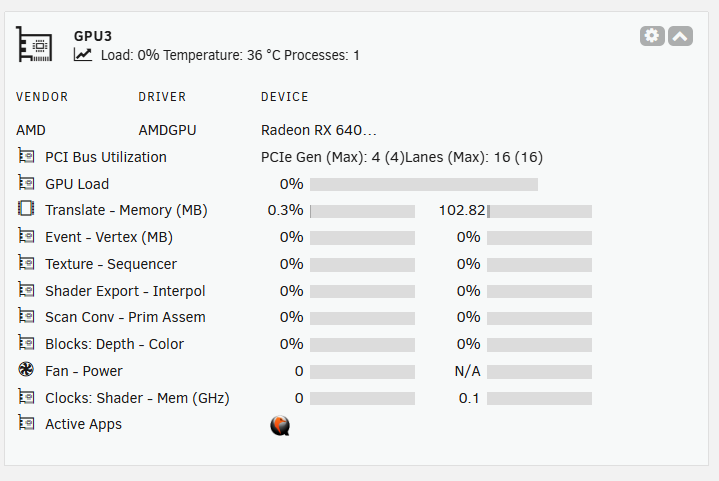
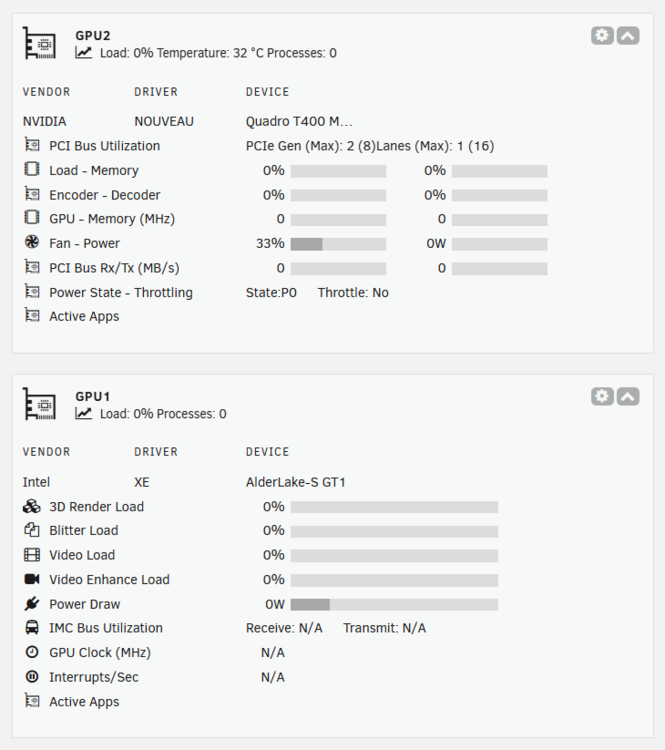
###2025.03.11 Released Add support for AMD Apps. Add Initial support for XE and Nouveau drivers, metrics limited to apps, Temp and Fans. Nouveau and XE will be more for 7.1 with new kernel, Nouveau for support of virgl3d as Nvidia drivers not supported at this time.