






SimonF
Community Developer
-
Joined
-
Last visited
Everything posted by SimonF
-
Looks like the modprobe are not in place. Apr 7 14:54:32 Tower kernel: i915 0000:00:02.0: [drm] fb0: i915drmfb frame buffer device Apr 7 14:54:32 Tower kernel: i915 0000:04:00.0: Your graphics device 4908 is not properly supported by i915 in this Apr 7 14:54:32 Tower kernel: kernel version. To force driver probe anyway, use i915.force_probe=4908 Apr 7 14:54:32 Tower kernel: module parameter or CONFIG_DRM_I915_FORCE_PROBE=4908 configuration option, Apr 7 14:54:32 Tower kernel: or (recommended) check for kernel updates. Apr 7 14:54:32 Tower kernel: xe 0000:04:00.0: Your graphics device 4908 is not officially supported Apr 7 14:54:32 Tower kernel: by xe driver in this kernel version. To force Xe probe, Apr 7 14:54:32 Tower kernel: use xe.force_probe='4908' and i915.force_probe='!4908' Apr 7 14:54:32 Tower kernel: module parameters or CONFIG_DRM_XE_FORCE_PROBE='4908' and Apr 7 14:54:32 Tower kernel: CONFIG_DRM_I915_FORCE_PROBE='!4908' configuration options. You modprobe files on the boot should look like this. root@computenode:~# cat /boot/config/modprobe.d/i915.conf options i915 force_probe=!4908 root@computenode:~# cat /boot/config/modprobe.d/xe.conf options xe force_probe=4908 root@computenode:~# Something is spamming the logs. Maybe a plugin doing fan control? Apr 7 15:03:36 Tower kernel: pgrep[43970]: segfault at 14 ip 000015333483c74e sp 00007ffcd20cdd20 error 6 in libprocps.so.8.0.2[974e,153334837000+a000] likely on CPU 5 (core 5, socket 0) Apr 7 15:03:36 Tower kernel: Code: 75 0a 48 83 c4 50 5d 41 5c 41 5d c3 e8 cb af ff ff 66 66 2e 0f 1f 84 00 00 00 00 00 f3 0f 1e fa 41 54 55 48 89 f5 53 48 89 fb <c7> 47 14 00 00 00 00 48 85 f6 0f 84 52 01 00 00 48 8b 86 d0 01 00 Apr 7 15:04:01 Tower root: pwm-hdd-fan: set fan to value 143
-
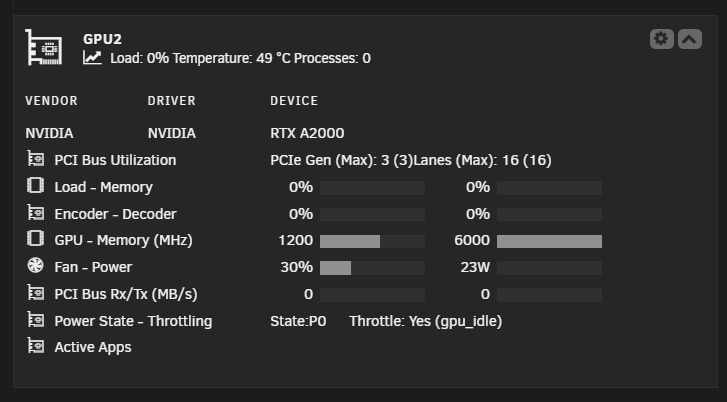
Seem to work ok on my system.
-
It does not look like a complete XML. Are you able to do nvidia-smi -q -x > /mnt/user/appdata/nvfile and take from the appdata share the file nvfile.
-
I need the xml as that is what the command is used for the plugin. Can you attach as a file so I can use as an import to check why it is not working.
-
Sorry thought it was an intel card. Can you provide the results of nvidia-smi -q -x
-
Look in plugins intel_gpu_top should be 2025.03.15
-
What are the GPU top and gpustat versions.
-
I could look at options user defined scripts, Do you have a bash script that could be called etc.
-
Can you provide current diagnostics
-
Will only show IPs if you have loaded guest agent.
-
Does virsh undefine VMname not work? Provide diagnostics
-
389 is looking for FANS. Rename the board file should fix the issue. https://github.com/SimonFair/IPMI-unRAID/blob/500bd8b642f0086872290b767498f13515cc8d69/source/ipmi/usr/local/emhttp/plugins/ipmi/include/ipmi_helpers.php#L389 Likely an issue in the file. Looks like that section may be missing.
-
-
A770 was supported before 7.1 what does container need have you added device path to container /dev/dri
-
Which version of os you running and do you know the controller type. You can add this in the GUI on 7 <qemu:arg value='-set'/> > <qemu:arg value='device.0000:04:00.0.x-msix-relocation=bar2'/>
-
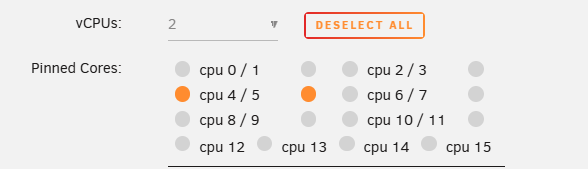
It looks like you are still using the 7.2 model for the machine type you should be able to change to 9.1. Are you running the latet Win-virt drivers? I would recommend not using the first CPU cores. i.e. 0/1 in my case. NB this is beta 2 so you may not see vcpus.
-
It will allow you to revert if required. The XML is the VM definition. So you can virsh dumpxml vmname > filename
-
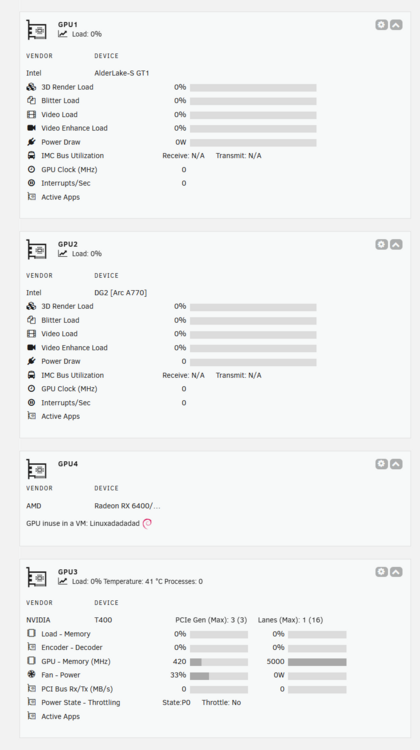
Here is a screen capture in the GPUstat pages.
-
Yes it is fine I have had 4 gpus in my test server AMD, intel arc, intel igpu and Nvidia.
-
You may have to force_probe the card. Have a look to see if there are any messages in syslog or dmesg?
-
Vdisk will be fine may but the hardware is different so OS will need to be activated. You can copy vdisk and dump the xml to create a copy. Virsh dumpxml vmname
-
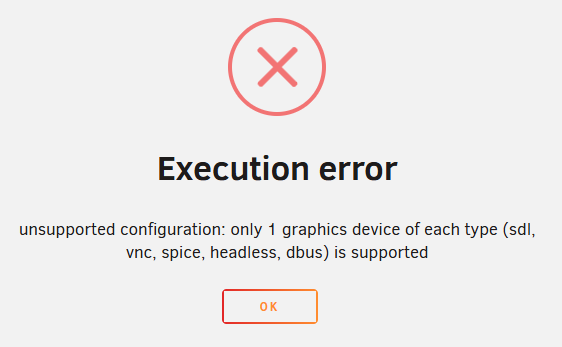
It is not virtualization as in carving the card up. Virgl3d just routes OpenGL work streams to the GPU to process, similar to the way dockers would. Are 3060s individual cards? The process creates the egl-headless for the render, I don't know if multiple can be added but will check. Please share diagnostics. How would you use the multiple GPUs in the VM? <graphics type='vnc' port='-1' autoport='yes' websocket='-1' listen='0.0.0.0' sharePolicy='ignore'> <listen type='address' address='0.0.0.0'/> </graphics> <graphics type='egl-headless'> <gl rendernode='/dev/dri/by-path/pci-0000:00:02.0-render'/> </graphics> <audio id='1' type='none'/> <video> <model type='virtio' heads='1' primary='yes'> <acceleration accel3d='yes'/> </model> <address type='pci' domain='0x0000' bus='0x00' slot='0x1e' function='0x0'/> </video> Looks like only a single GPU can be supported.
-
For Asrock you need to create the board file using ipmi2json. I don't have Asrock MBs so not sure if there are other steps to take. Maybe others can provide guidance.
-
Just to show in the list of sensors or something else?
-
Sata should be fine. It is using a device path on the host so will show as a disk not a pci device.

