






SimonF
Community Developer
-
Joined
-
Last visited
Everything posted by SimonF
-
Can you provide cat /boot/syslinux/syslinux.cfg as this is not in the diags and cat /proc/cmdline if no diags provided.
-
If you type exit + enter it should take you in the bios when you should be able to use boot manager to select a boot device.
-
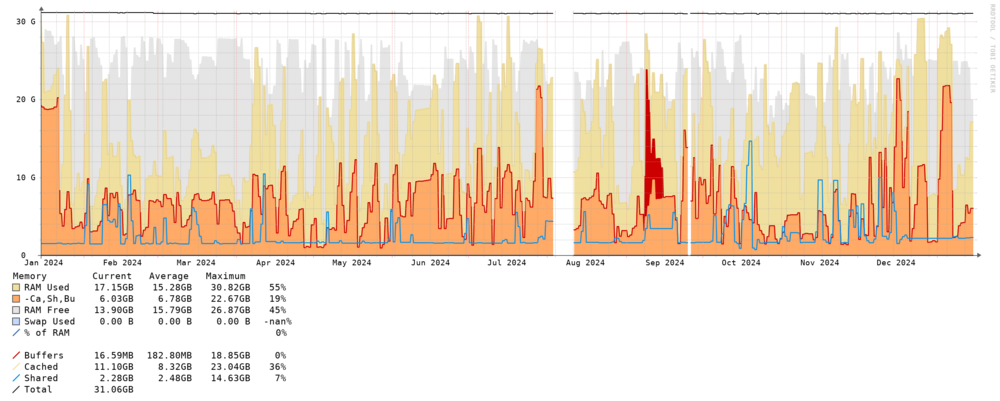
There must be something else causing your issue, I have been running 6.13/7 on my dev/test server for a long time SNMP has been running fine, this is the last 12 Months. This is observium which collects via SNMP.
-
You have to commit the changes back into the base image. Snapshots are using overlay files.
-
timeout -k 1.5 3.0 intel_gpu_top -J -s 1000 Does this provide more output?
-
Thanks there is not enough data the plugin looks for 2 copies. Try timeout -k .9 1.9 intel_gpu_top -J -s 1000
-
Can you provide the output of the following. timeout -k .7 1.3 intel_gpu_top -J -s 1000
-
Via the web gui or external clients, try clearing cookies.
-
Nothing jumping out as yet.
-
Which gpu are you running and can you provide copy of your settings page.
-
Saved in the same folder as the image. It is an overlay file so will only have changes to the main image. Both are required for the VM to function if the VM is running and you look at the xml you will see the backing file. If the VM is active it could also save ram contents. XML is also save in VM dir and nvram if uefi in the libvirt location.
-
Can you post some screen prints
-
Is there ipmi a standalone card also? https://dlcdnets.asus.com/pub/ASUS/mb/Add-on_card/IPMI_Expansion_Card_EM_WEB_EN.pdf?model=IPMI EXPANSION CARD
-
Have you enabled in the settings?
-
Do you have any infomation for the ipmi commands to control the fans. For each board type there is a matrix of commands. ############################################# # ASRock # ipmi-raw 00 3a 01 00 00 00 00 00 00 00 00 # ipmi-raw 00 3a 01 AA BB CC DD EE FF GG HH # 00 = smartfan mode # 01 - 64 = 1% - 100% ############################################# ############################################# # ASRock Dual Socket # ipmi-raw 00 3a 01 CPU_1_OVERRIDE CPU_1 REAR_1 FRONT_1 FRONT_2 FRONT_3 # ipmi-raw 00 3a 11 CPU_2_OVERRIDE CPU_2 REAR_2 FRONT_4 # ipmi-raw 00 3a 01 00 AA BB CC DD EE # ipmi-raw 00 3a 11 00 AA BB CC ############################################# ############################################# # Supermicro X10/X11 # ipmi-raw 00 30 70 66 01 00 64 # ipmi-raw 00 30 70 66 AA BB CC # # AA # 00 - Get value # 01 - Set value # # BB # 00 - FAN 1/2/3/4 or CPU_FAN1/2 # 01 - FAN A or SYS_FAN1/2/3 # # CC # 00 to 64 - Set Speed (0-64) ############################################# ############################################# # Supermicro X9 # ipmi-raw 00 30 91 5A 3 00 FF # ipmi-raw 00 30 91 5A 3 BB CC # # BB # 10 - FAN 1/2/3/4 # 11 - FAN A # # CC # 00 to FF - Set Speed (0-255) ############################################# ############################################# # Dell # raw' => '30 30 02 FF', # + value 01-64 for % FF is all or ID #'auto' => '30 30 01 00', #'manual' => '30 30 01 01', #'full' => '30 30 02 FF 64', # 01 - 64 = 1% - 100% #############################################
-
I have not updated the PR recently. It was never confirmed for 7 the title was the version it was updated to for master in github. I don't have a timeframe for it to be included at present due to it requires other core changes needed in the move process to provide file progress. hopefull will be considered for 7.1 or 7.2
-
Did you toggle slider from basic to advanced top right?
-
Should also be 02.0 as part of the PCI address is missing.
-
Also look at this post
-
I think it should be qemu:arg not qemu:art
-
Strange but thanks I would expect more JSON to be created as it should repeat like the other person with a A380
-
Can you try this timeout -k .7 1.3 intel_gpu_top -J -s 1000 What is the value in the GPU stat settings for intel top timers?
-
Works ok form me. Create a separate post with diagnostics Jan 11 19:51:58 computenode emhttpd: shcmd (47074): /usr/local/sbin/mover start |& logger -t move & Jan 11 19:51:58 computenode move: mover: started Jan 11 19:55:26 computenode move: move: /mnt/disk1/isos/ubuntu-24.10-desktop-amd64.iso Success Jan 11 19:55:48 computenode move: move: /mnt/disk1/isos/gparted-live-1.6.0-10-amd64.iso Success Jan 11 19:56:15 computenode move: move: /mnt/disk1/isos/virtio-win-0.1.266-1.iso Success Jan 11 19:56:15 computenode move: move: /mnt/disk1/isos/glmark2/Ubuntu Success Jan 11 19:56:15 computenode move: move: /mnt/disk1/isos/glmark2/UbuntuAMDVirgl Success Jan 11 19:56:15 computenode move: move: /mnt/disk1/isos/glmark2/UbuntuAMDPassThru Success Jan 11 19:57:31 computenode move: move: /mnt/disk1/isos/ubuntu-24.10-live-server-amd64.iso Success Jan 11 19:57:32 computenode move: mover: finished
-
Are you just using native mover or mover tuner plugin?
-
So was the error Vendor command returned no data. or some thing else. Make sure timers in settings are set to 2000 for refresh and .7 1.3 for intel top timers. and output of timeout -k .7 1.3 intel_gpu_top -J -s 250top -J -s 250 Run the cmd in terminal and copy paste into forum with <> option above ^


