





btrcp2000
Members
-
Joined
-
Last visited
Everything posted by btrcp2000
-
I have had many hard reboots for reasons I'm still figuring out. Parity checks have always come back fine, but recently started showing 464 errors. After the most recent post-reboot check, I ran it again manually with the write corrections box checked. After it finished it still came back and indicated 464 errors?
-
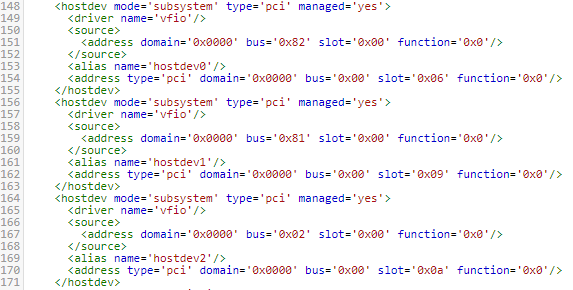
Had to rebuild a Win10 VM and trying to figure out why my USB 3.0 controller card (click here for specs) is not working. Here is the USB Card that VM doesn't see, as well as the video card that it DOES see: Here is a Hauppauge Colossus that is working fine: Here is the XML where I have attempted to make the changes recommended in this thread: What am I not seeing? unraid-diagnostics-20171113-1125.zip


-
I recently moved my plex server from Win10 to the Docker. We didn't have a whole lot going on in terms of customized settings so I just setup from scratch, but I was informed that my daughter had created a bunch of playlists. I still have the older server intact, it just doesn't know where the media is anymore. Is there a way I can extract playlists to move to the Docker version?
-
Ok, thanks for the time you put in
-
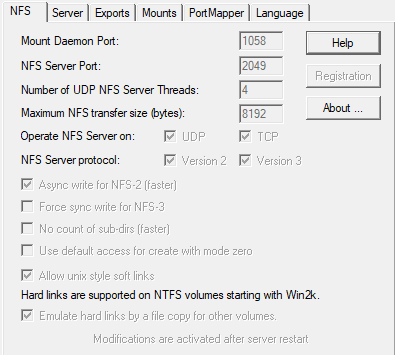
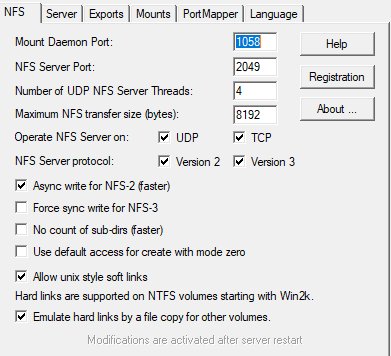
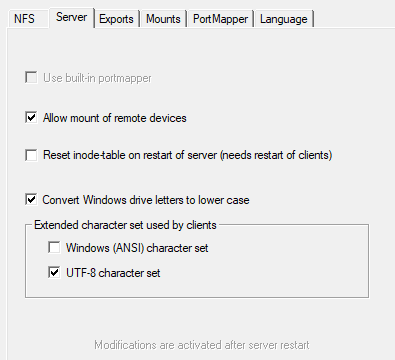
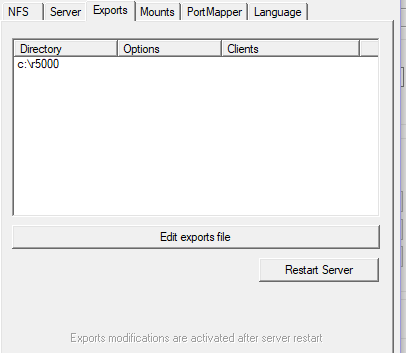
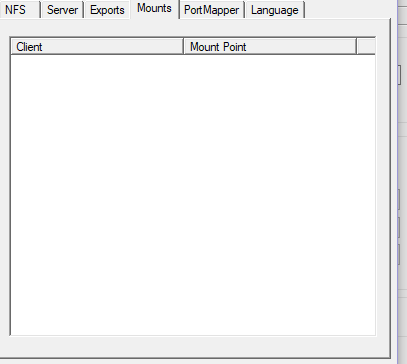
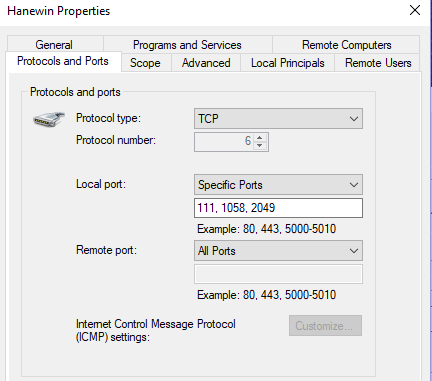
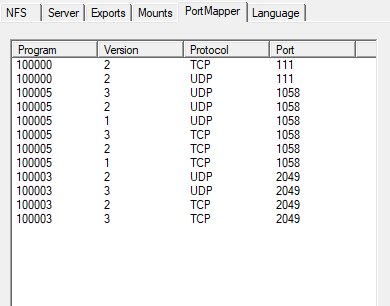
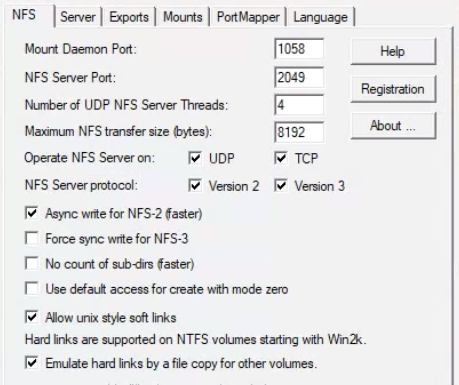
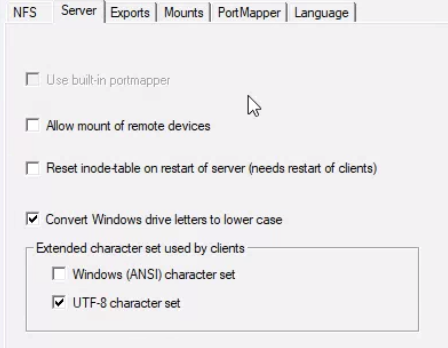
Some of these were posted earlier, but here are all the settings of the Hanewin NFS Server that is installed on the VM. Also below is a screenshot of the firewall rule i setup to deal with the ports (although the firewall has been off completely while I'm working on this)
-
What is the difference then between UD being able to find the share on its own when I click Load Shares and not being able to mount it?
-
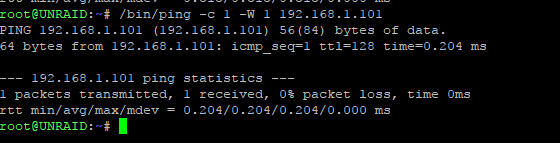
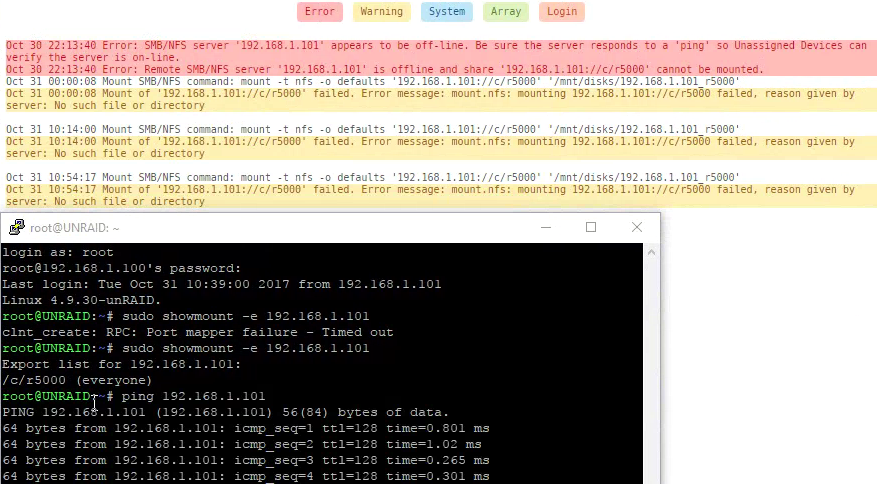
Still banging away on my NFS share issue. Per your suggestion above, I looked into the question of whether the Win10 VM (which is now static ip of 192.168.1.101) responds to a ping. The Error entries from the log below are when the WinVM's firewall is active. When it is shut down, that specific error goes away. Below that is an ssh session first with firewall on where showmount times out, and second with the firewall off, where it sees the share. Below that is the successful ping from UNRAID ssh. Since the ssh showmount command sees the share on the WinVM, it seems like there is an issue with the UD ping? This is with UD updated to 2017.10.30b
-
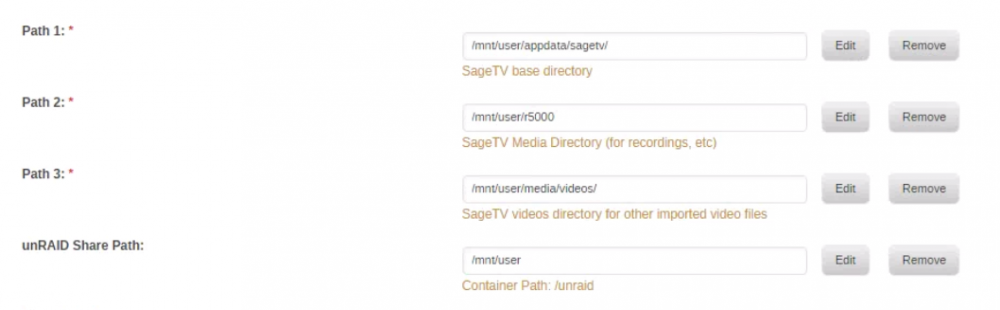
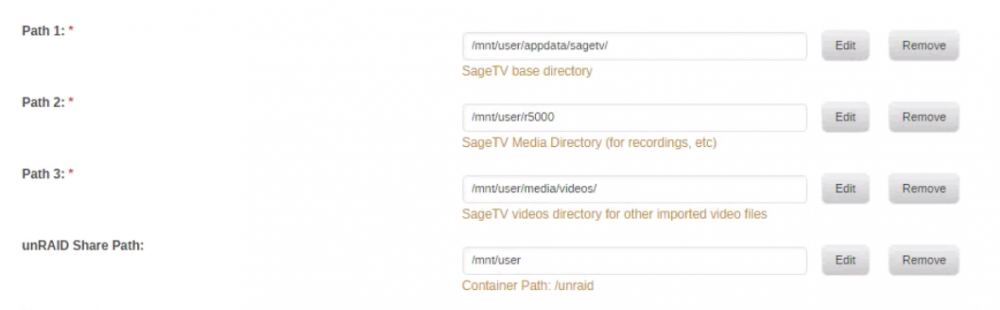
That was one of the first things I did: Back to having Unraid mount an outside NFS share, for whatever it's worth, here are the settings on the other end which again is a Win10 VM hosted on the Unraid server, using hanewin as the NFS server. Firewall is completely off for testing purposes, and I have tried checking/unchecking "Allow mount of remote devices":
-
If this is what you're saying, I think I've tried the "vice versa" approach before, having the Unraid share be the NFS server, and using windows as the NFS client, so I just tried again. This is what the windows VM (192.168.1.138) shows. Unraid is 192.168.1.100 If I edit the sagetv docker config file to show R:\r5000 as the recording drive, upon startup of the docker it gets changed to /opt/sagetv/server/R\:\r5000 which the windows software of course can't find Just throwing stuff at the wall to see what sticks: Recording drive as \\192.168.1.100\mnt\user\r5000 prevents the docker from even starting /mnt/user/r5000 lets the docker start but it complains that the drive is out of space upon recording (it's not) This link is where all this began almost three weeks ago, listing all the stuff i've tried.



-
Agreed, but in my mind that's what I'm trying to do. Sagetv docker passes through a Linux path to the Windows software when it tells it what and where to record. Windows complains it can't find the path. So I need Linux to tell windows to use a path both can see. If I understood the person on the link I sent correctly, they created an nfs share on Windows and mounted it to a Linux server (although not unraid), then adjusted the sagetv properties a certain way. I'm very comfortable with that last part but cannot figure out the shares. I am very open to any other ideas and would have given up by now if I hadn't discovered a possible solution in the link. Also at the point where I would be willing to pay someone to stand this up.
-
I have a TV tuner for sagetv that can only run on windows. The sagetv docker controls it but it instructs it to record programs to a Linux directory, which windows can't see. I have found one other person on the planet who has gotten this to work, but they haven't responded, so I'm trying to recreate(see here) Goal is to dump my standalone windows sagetv server and use unraid for everything, but I'm stuck with the r5000 tuner as I am under contract. If this can't be done I will have to abandon sagetv docker and leave it on the windows VM. Not the end of the world but now that I'm getting more comfortable with *nix I like windows less and less
-
I ssh'd into unraid as root and had it ping 138, it responded as expected. The only folder that exists now on the Nfs server is c:/r5000. The entry from 17:25 is from when I actually had a share called /mnt/user/r5000 on the win VM to test. I had removed it from the Nfs server but not yet from UD, so it was still looking for it when the log was taken. Appreciate the effort, and apologies if I'm a step or two behind. I am a *nix late bloomer
-
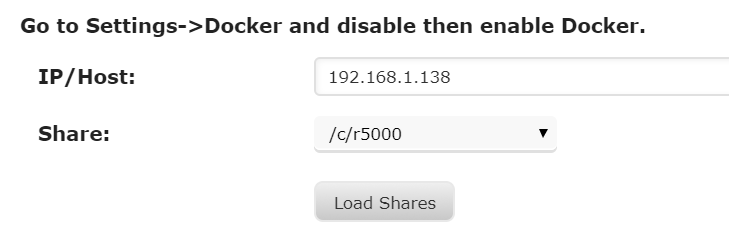
I removed the existing share to start over, entered the IP ending 138. "Load Shares" found the folder as shown: Clicking "Add" results in this without any edits to the mount point: Clicking Mount results in a "Mounting" but it never completes. Log (also attached) looks like this: unraid-unassigned.devices-20171027-2106.zip


-
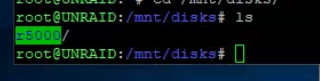
The UD mount command is what UNRAID found when I clicked load shares, i didn't enter it like that. No matter what I put in the mount point it reverts to this: (this was because i wasn't hitting enter before clicking mount). now i see this in the log: but /mnt/disks/r5000 definitely exists: and UNRAID can see the win10 NFS share from its CLI what am I not seeing?


-
A little progress. I dumped FreeNFS and installed Hanewin as an NFS Server on my Win10 VM, although I'm not sure that matters now. I apparently had a firewall issue on the WinVM, now fixed, so within UD, typing in the VM's IP and clicking Load Shares now finds the folder. It is also visible to my UbuntuVM and a standalone Win10 PC with NFS Client running. Neither UD nor Ubuntu will mount it though, which I think has something to do with syntax because I have little idea what I'm actually doing. I have a share setup on Unraid called r5000 (export=yes, security=public for both NFS and SMB). Here's what UD log shows: Same error from Ubuntu VM (for testing only, I do not plan to


-
Same here, no impact from clearing cache
-
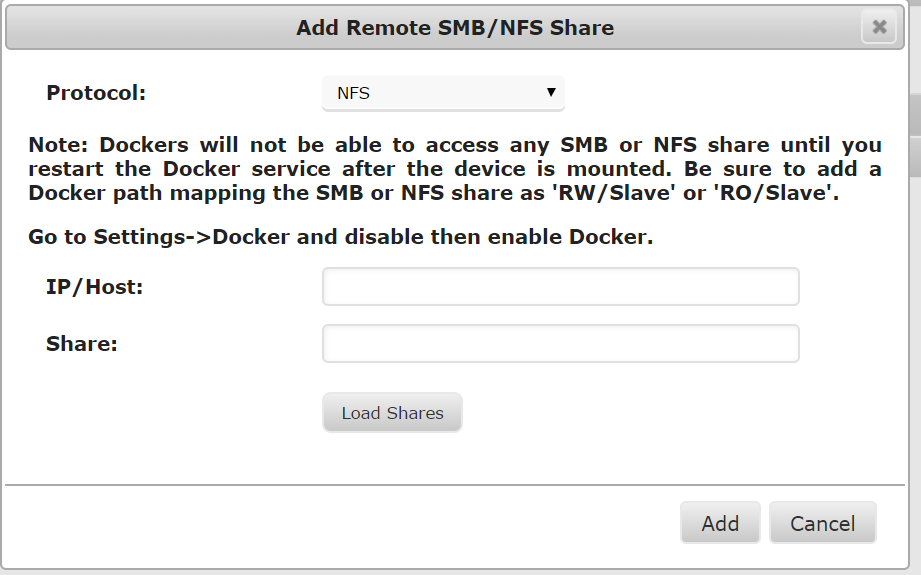
Plugin showed a date of 10/7, so I uninstalled/reinstalled and it is now 10/22, but still looks like the below. This is via chrome and edge on a standalone win10 computer (not the VM)
-
When I select NFS from the dropdown, it only asks me for IP/Host and Share. There is no button for it to search for servers like there is for SMB. If I type in the IP, searching for the share never finds anything. There is a good chance it's not actually being shared even though FreeNFS on the VM looks to be working and is cleared through the firewall. Any other way i could verify?
-
I am attempting to set up an nfs share on a windows VM that unraid can mount via unassigned devices. Using FreeNFS on win10 as the server. The folder on windows is something like c:/mnt/user/r5000, and the VM's IP is 192.168.1.138 What is the exact syntax I should put into the Nfs configuration within UD?
-
I have a situation related to the SageTV Docker that I hope UD can help with. I have a Win7 VM that hosts recording software (no linux drivers for these tuners). Sagetv Docker instructs the windows tuner software what to record and to save it to the array, but it errors out. The software has worked for years with windows SageTV recording to a UNC path, but I cannot get it to find the array even if using the UNC path to the media folders that windows can see. I found the below quoted from the sagetv forums and am trying to replicate but I'm not clear on how. "I have the Windows server with the R5000 configured with a c:\mnt\Sage_Recordings and as I said, this is an NFS share to the Linux SageTV server as well. When Sage says to record to /mnt/R5000_Recordings, the R5000 shows it is doing a "Save As" to /mnt/R5000_Recordings/<progran name>". First off, does this NFS share and its contents live on the windows box with UNRAID mounting it remotely? Or is this physically located on UNRAID with something set up to make windows see it as a local drive? Either way, I am attempting to use UD to set up the NFS share but am not clear on which device the host is (UNRAID or windows VM) based on this question. Does UD only pull in remote shares to treat as its own, or is it also capable of setting up a local NFS share that is part of the windows could mount as a local drive (given that I can't use UNC on UNRAID)? End goal is for all recordings to land on the array, so I am also open to any other solutions. tia
-
ok. so i get the same result if i share and then just copy/paste to tower from another windows machine?
-
Dumb question: how do you move files to the root usb while the server is running? Been searching, but apparently not with my good brain. Sent from my SM-N920P using Tapatalk
-
Maybe I'm misunderstanding but what I saw was different. Before starting over, I clicked start preclear, saw the word starting with a red x, but it never moved beyond that. After usb reformat, it began to show status and progress with the red x Sent from my SM-N920P using Tapatalk
-
I wound up wiping/reformatting the usb drive and starting from scratch. Seems fine now
-
Brand new server build with fresh but used drives that need to be wiped clean. Preclear sticks at "starting", but never actually seems to be doing anything. I followed the spaceinvader video, which does not seem to reference installing a script so I haven't, but the support thread does? I have removed and reinstalled the plugin as well as rebooted the entire server. I know this is something stupid but I'm about 24 hours into trying to figure it out on my own. TOWER-preclear.disk-20170807-1035.zip


