





btrcp2000
Members
-
Joined
-
Last visited
Everything posted by btrcp2000
-
Thanks for respionding. Sig is outdated, I now have 64gb. The functioning VM uses 8gb. ANother one somehow is now using 24gb, which is not something I would have set on purpose, and certainly hadnt made any changes in at least a year. That can't be helping, so I will push it back down to 8gb. But the strange thing is that VM hadnt booted in over a week, and I was still getting OOM errors. is that RAM reserved even if the VM isnt running?
-
Bump. Can someone please take a look? I'm down to one functioning VM, no Dockers due to this memory issue. Thanks!
-
Update: OOM errors continue, so it wasn't nordlynx. Anybody have a minute to look at those diags?
-
FCP Error: * **Out Of Memory errors detected on your server** I suspect it was a nordlynx container, which i wasn't using anyway, and looked funny so i removed it. But please let me know if there is something else here? Thanks! EDIT: now contains older diag file from before I removed nordlynx unraid-diagnostics-20230225-1100.zip unraid-diagnostics-20230223-0528.zip
-
@ParakkaI think you might be having the same issue I was over the last few days (scroll up). I saw the same mentions of adding that port in a lot of places. binhex's comment above is what I was told to do too. I think this one could use a clearly updated and identified new process, unless there is one that I never ran across, or couldn't discern from all the others? Until I got a response here, i didn't see any mention of needing to update from within the app after it's running as opposed to unraid container settings. Thanks for all the help!
-
for now i pointed my firefox container to the qbitvpn privoxy port and i see what i expect to see from what is my ip. But I have to say I did like the ability to do a quick console check from time to time, even though i couldnt do anything with it due to the WebUI issue. I also shut down qbit and the arr complained of no path until i restarted qbit then arr, so it does seem to be working now.
-
Ok, then is there any way to verify that the arrs are actually using the vpn?
-
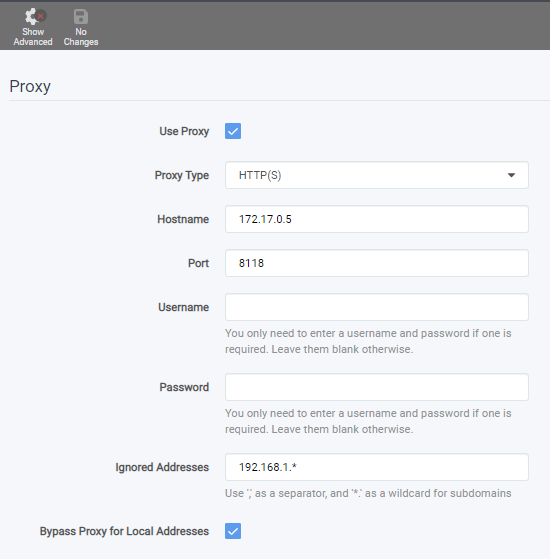
Fresh download of radarr, my settings are below my qbit hostname ends in a 5 instead of a 1 like yours, guessing because I've done so many container attempts. when i use the curl ifconfig.io command from the radarr console, it's still showing my actual ip, not the one that the qbitvpn console shows. is that still the right way to test this?
-
I guess I'm dumber and noober than I thought. How do I get to the WebUI at all for an arrr in order to make these changes? Am I following the spaceinvader video to a certain point, .ie, still listing None for network and adding the extra parameter? Or am I installing it as is with a Bridge network setting to get to the UI temporarily?
-
First off, thanks for responding. I have no preference for how this is set up, I'm just trying to get it all through one device, which is what I thought that video was for, so I'll start from scratch again. Is there a step-by-step guide somewhere that explains how to set it up using privoxy? I'm sure Ive made a mess with all the custom settings and port changes required in the video, so I should start form a clean slate.
-
Yes, I've done everythign in q24 and q25, but I am not clear on the notes below those. Where do I make these changes? Is it on the qbit docker hosting the vpn, or the arr docker being hosted, or somewhere else entirely? "Please keep in mind that when defining connections from an application to another application in the same VPN container network that you will need to set the host to 'localhost' and NOT the LAN IP address, this is because the applications are now bound to the same network and thus should communicate over 'localhost' and NOT the unRAID host IP address."
-
I am officially flailing and getting quite desperate here having made no progress in 3 weeks. Qbittorrentvpn is confirmed working through the NordVPN via a TorGuard check my torrent ip test. I have watched the SpaceInvaderOne video at least a dozen times, and have been able to confirm that the Arrs are also using NordVPN via the Qbit container. But I am absolutely 1000% stumped as to why I cannot get the the WebUI of an Arrr. It seems that something changed earlier this year when iptables were introduced, and the correct method is now explained in bits and pieces across youtube videos, reddit, and these forums. Can anyone spare a few minutes to look at my setup and give me any insight at all? Would rather not abandon this, but without some guidance I'll have to. Redacted logs are below. Thank you in advance for anything at all. QBIT supervisord.log Sonarr supervisord - Copy.log
-
Can someone explain the following? Where precisely am i making this change? Is this in the qbittorrent-vpn container? Need this one dumbed down for me unfortunately. Please keep in mind that when defining connections from an application to another application in the same VPN container network that you will need to set the host to 'localhost' and NOT the LAN IP address, this is because the applications are now bound to the same network and thus should communicate over 'localhost' and NOT the unRAID host IP address.
-
supervisord.log I'm not the one you replied to, but I'm having the same issue. Thanks for any guidance
-
Any thoughts here? Am I missing info needed to diagnose?
-
Using Nord if that matters. First time messing wth VPNs for outbound. I have set up VPN access for a binhex docker that exists for other purposes, and I understand I can route other dockers through it. Whats the difference between that method or just using something like Gluetunvpn? How do killswitches work within both of those?
-
another one with no outside access. I can ping the phone (android), i can access UNRAID, I can see netwprk drives using Samsung's files app. But I cant get it to use the home internet connection despite having chosen "remote tunneled access". On 6.9.2 if that matters. I see lots of others recently with similar issues?
-
Any reason it wouldn't have restarted them? That were all shut down until I started them manually this morning
-
Sometime between 630-7pm EST last night Jan 30th, all of my dockers stopped simultaneously. I know because we made it through the first football game and shut off the TV for a bit, turned it on again for the second game and my TV server was gone which would have been right around that time. Figured I would deal with it later and just watched another way, but now I need to know why everything went poof. TIA unraid-diagnostics-20220131-0857.zip
-
Been dealing with strangeness for a while now, apparently it's all related with disappearing shares, although the data seems intact and I' m not seeing any indications of bad hard drives. Full server reboot fixes it, but it doesnt last an hour. FOr now I have switched off NFS shares, which I'm not sure I needed anyway. WIll see what that does, but could someone look through these logs from shortly after the shares disappeared and see if anything jumps out? TIA unraid-diagnostics-20211126-1412.zip
-
If this isn't getting attention anymore is there a better way? I am not getting anything at the early step of setting the static ip using either /etc/network/interfaces or the updated one in the comments /etc/netplan/50-cloud-init.yaml. This happens on the latest version of Ubuntu Server as well as the 18.04 version. All I get is a blank screen where I can type whatever I want and save it I guess, but nothing pre-populated like the output in the video Obviously very new to ubuntu, so all I can really do is follow paint by number instructions. Where am I going wrong?
-
Two instances of this in the past few weeks, once when upgrading UNRAID and the subsequent reboot, another when shutting down to add more RAM. Server will get to the point of full shutdown, then all drive LEDs light up and it just screams in one long steady beep. SuperMicro says this indicates a heat issue, but I don't see any alerts in IPMI, and the heatsinks don't feel any warmer than usual. It will fully shut down with press of the power button, then reboot. First time it fails with a complaint about mounting a boot device. Hard press again, it boots up as if nothing ever happened. While running, I don;t notice anything out of the ordinary. Right now, it's running like a top, in fact I am typing this on a Win10 VM. Am I about to lose something? Flash and important data is backed up via crashplan as recently as last night, so I should be okay worst case scenario, but is this something I need to address or just wear ear protection when I reboot?
-
Set this up a few weeks ago and have noticed some strangeness that began immediately. None of this makes sense, but it didn't start happening until after Adguard. I set up the docker, gave it its own IP, and set my Ubiquiti USG to use that same IP as its DNS, with 127.0.0.1 as a secondary DNS. I know it works as I can of course see it in the Adguard web page, and it does block the ads on specific sites I was hoping for. I have not done anything custom yet. Here's the weirdness: Reddit cannot connect in the mornings, around 6am, for some reason. It's fine other times Google maps is intermittent, sometimes it works, sometimes it can't connect either. Netflix comes and goes too on specific computers, but not Android devices (shieldTV) These are not issues outside my own network. IE, when reddit loses connection in the morning, I just shut off wifi on y phone, and it connects immediately via the cell network. Also, what is the difference between using the docker and just setting my routers DNS to Adguard's address? Customization? TIA
-
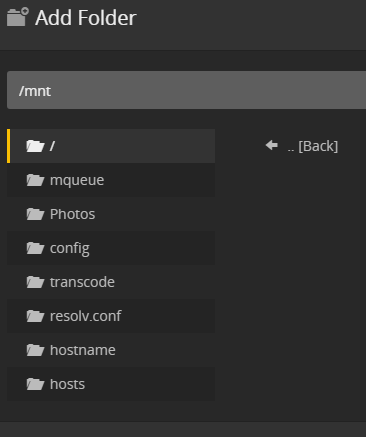
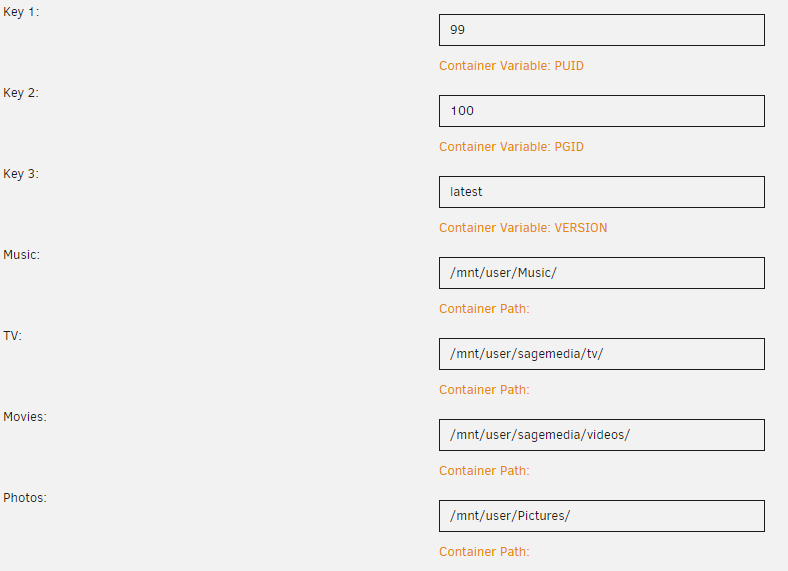
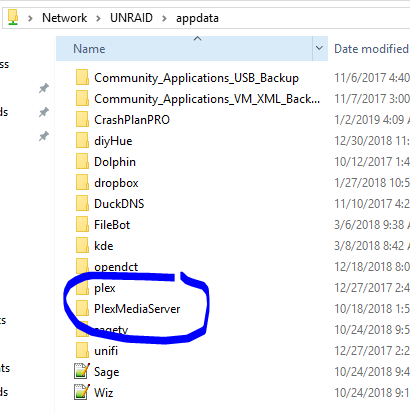
Having a couple issues with Plex, maybe related to each other or not. I was able to create the Photos library, and it behaved as expected finding all the files. However, it cannot see the Video or Music shares. It's as if Plex sees a different set of folders than UNRAID does? The Photos folder in the plex screenshot is the one that works, but why do I not see one for Videos and Music? Not sure this is related, but should I be seeing two Plex folders like this this: And finally, camera upload stopped working months ago and I have tried on mu;ltiple iOS and Android phones. I'm betting that's a Plex problem, but thought I would check here.
-
I've been starting threads on reboots for months, no one seems to have a conclusive answer on what's happening, so I am in trial and error mode with that. The errors were a new thing for me. If you are telling me not to worry about the 464 errors, then I will continue focusing on the reboots. This thread made it seem like they should have gone away with the manual parity check.

