





jbrukardt
Members
-
Joined
-
Last visited
Everything posted by jbrukardt
-
So after fighting with this for literally dozens of hours, everything appearing perfect when i was logged into parsec, all the devices showing up, drivers installed, no errors etc. But still no display. I even went and bought a new monitor. I had the damn HDMI cable backwards. I have super fancy fiber-optic HDMI cables, and theyre active cables which are unidirectional (but apparently not for EDID info...). I had it flipped around, and that means no signal. I'm dumber than i look, thanks for your patience and help all. I now deeply understand VFIO xml and passing parameters
-
Im not home to check... but your edit might have done it. Im parsec'ed in, with the bus/slots like you have em, and in nvidia control panel im seeing the tv-model as display 1. Meaning the hdmi is working. I wont know if it has image until i get home, but thats a big step in teh right direction
-
Modified to this, same symptoms. Ive never seen an error 43 in the logs. <?xml version='1.0' encoding='UTF-8'?> <domain type='kvm'> <name>Windows 11</name> <uuid>c26d4e04-1288-5fc4-0f19-b0ff27c17fc1</uuid> <metadata> <vmtemplate xmlns="unraid" name="Windows 11" icon="windows11.png" os="windowstpm"/> </metadata> <memory unit='KiB'>33554432</memory> <currentMemory unit='KiB'>4194304</currentMemory> <memoryBacking> <nosharepages/> </memoryBacking> <vcpu placement='static'>12</vcpu> <cputune> <vcpupin vcpu='0' cpuset='4'/> <vcpupin vcpu='1' cpuset='5'/> <vcpupin vcpu='2' cpuset='6'/> <vcpupin vcpu='3' cpuset='7'/> <vcpupin vcpu='4' cpuset='8'/> <vcpupin vcpu='5' cpuset='9'/> <vcpupin vcpu='6' cpuset='10'/> <vcpupin vcpu='7' cpuset='11'/> <vcpupin vcpu='8' cpuset='12'/> <vcpupin vcpu='9' cpuset='13'/> <vcpupin vcpu='10' cpuset='14'/> <vcpupin vcpu='11' cpuset='15'/> </cputune> <os> <type arch='x86_64' machine='pc-q35-7.1'>hvm</type> <loader readonly='yes' type='pflash'>/usr/share/qemu/ovmf-x64/OVMF_CODE-pure-efi-tpm.fd</loader> <nvram>/etc/libvirt/qemu/nvram/c26d4e04-1288-5fc4-0f19-b0ff27c17fc1_VARS-pure-efi-tpm.fd</nvram> <boot dev='hd'/> </os> <features> <acpi/> <apic/> <hyperv mode='custom'> <relaxed state='on'/> <vapic state='on'/> <spinlocks state='on' retries='8191'/> <vendor_id state='on' value='123456780ab'/> </hyperv> <kvm> <hidden state='on'/> </kvm> </features> <cpu mode='host-passthrough' check='none' migratable='on'> <topology sockets='1' dies='1' cores='6' threads='2'/> <cache mode='passthrough'/> </cpu> <clock offset='localtime'> <timer name='hypervclock' present='yes'/> <timer name='hpet' present='no'/> </clock> <on_poweroff>destroy</on_poweroff> <on_reboot>restart</on_reboot> <on_crash>restart</on_crash> <devices> <emulator>/usr/local/sbin/qemu</emulator> <disk type='file' device='cdrom'> <driver name='qemu' type='raw'/> <source file='/mnt/user/isos/virtio-win-0.1.229-1.iso'/> <target dev='hdb' bus='sata'/> <readonly/> <address type='drive' controller='0' bus='0' target='0' unit='1'/> </disk> <controller type='usb' index='0' model='qemu-xhci' ports='15'> <address type='pci' domain='0x0000' bus='0x00' slot='0x07' function='0x0'/> </controller> <controller type='pci' index='0' model='pcie-root'/> <controller type='pci' index='1' model='pcie-root-port'> <model name='pcie-root-port'/> <target chassis='1' port='0x10'/> <address type='pci' domain='0x0000' bus='0x00' slot='0x02' function='0x0' multifunction='on'/> </controller> <controller type='pci' index='2' model='pcie-root-port'> <model name='pcie-root-port'/> <target chassis='2' port='0x11'/> <address type='pci' domain='0x0000' bus='0x00' slot='0x02' function='0x1'/> </controller> <controller type='pci' index='3' model='pcie-root-port'> <model name='pcie-root-port'/> <target chassis='3' port='0x12'/> <address type='pci' domain='0x0000' bus='0x00' slot='0x02' function='0x2'/> </controller> <controller type='pci' index='4' model='pcie-root-port'> <model name='pcie-root-port'/> <target chassis='4' port='0x13'/> <address type='pci' domain='0x0000' bus='0x00' slot='0x02' function='0x3'/> </controller> <controller type='pci' index='5' model='pcie-root-port'> <model name='pcie-root-port'/> <target chassis='5' port='0x8'/> <address type='pci' domain='0x0000' bus='0x00' slot='0x01' function='0x0' multifunction='on'/> </controller> <controller type='pci' index='6' model='pcie-root-port'> <model name='pcie-root-port'/> <target chassis='6' port='0x9'/> <address type='pci' domain='0x0000' bus='0x00' slot='0x01' function='0x1'/> </controller> <controller type='pci' index='7' model='pcie-root-port'> <model name='pcie-root-port'/> <target chassis='7' port='0xa'/> <address type='pci' domain='0x0000' bus='0x00' slot='0x01' function='0x2'/> </controller> <controller type='virtio-serial' index='0'> <address type='pci' domain='0x0000' bus='0x02' slot='0x00' function='0x0'/> </controller> <controller type='sata' index='0'> <address type='pci' domain='0x0000' bus='0x00' slot='0x1f' function='0x2'/> </controller> <interface type='bridge'> <mac address='52:54:00:ef:f5:13'/> <source bridge='br0'/> <model type='virtio-net'/> <address type='pci' domain='0x0000' bus='0x01' slot='0x00' function='0x0'/> </interface> <serial type='pty'> <target type='isa-serial' port='0'> <model name='isa-serial'/> </target> </serial> <console type='pty'> <target type='serial' port='0'/> </console> <channel type='unix'> <target type='virtio' name='org.qemu.guest_agent.0'/> <address type='virtio-serial' controller='0' bus='0' port='1'/> </channel> <input type='tablet' bus='usb'> <address type='usb' bus='0' port='1'/> </input> <input type='mouse' bus='ps2'/> <input type='keyboard' bus='ps2'/> <tpm model='tpm-tis'> <backend type='emulator' version='2.0' persistent_state='yes'/> </tpm> <audio id='1' type='none'/> <hostdev mode='subsystem' type='pci' managed='yes'> <driver name='vfio'/> <source> <address domain='0x0000' bus='0x01' slot='0x00' function='0x0'/> </source> <rom file='/mnt/user/data/binary/Zotac.RTX2080Ti.11264.181023_VM.rom'/> <address type='pci' domain='0x0000' bus='0x03' slot='0x00' function='0x0' multifunction='on'/> </hostdev> <hostdev mode='subsystem' type='pci' managed='yes'> <driver name='vfio'/> <source> <address domain='0x0000' bus='0x01' slot='0x00' function='0x1'/> </source> <address type='pci' domain='0x0000' bus='0x04' slot='0x00' function='0x0'/> </hostdev> <hostdev mode='subsystem' type='pci' managed='yes'> <driver name='vfio'/> <source> <address domain='0x0000' bus='0x01' slot='0x00' function='0x2'/> </source> <address type='pci' domain='0x0000' bus='0x05' slot='0x00' function='0x0'/> </hostdev> <hostdev mode='subsystem' type='pci' managed='yes'> <driver name='vfio'/> <source> <address domain='0x0000' bus='0x01' slot='0x00' function='0x3'/> </source> <address type='pci' domain='0x0000' bus='0x06' slot='0x00' function='0x0'/> </hostdev> <hostdev mode='subsystem' type='pci' managed='yes'> <driver name='vfio'/> <source> <address domain='0x0000' bus='0x03' slot='0x00' function='0x0'/> </source> <address type='pci' domain='0x0000' bus='0x07' slot='0x00' function='0x0'/> </hostdev> <memballoon model='none'/> </devices> </domain>
-
Thank you, ill try these. CSM introduces all kinds of problems with having the iGPU and Nvidia gpu active simultaneously for me unfortunately. Ill try everything else before i try that.
-
Config: Goals 1) Passthrough 2080ti to a windows 11 gaming VM, output 4k HDR from that GPUs HDMI port 2) Have the 12600k iGPU available for quicksync (plex, etc) Hardware: 12600k Asus z690-P Wifi D4 Zotac 2080ti 2-Fan Model 64GB DDR4 3600 65 inch HDR capable TV, hdmi 2.0 HDMI cable plugged from iGPU to HDMI 2 TV input (outputs successfully the unraid cli) HDMI cable plugged from 2080ti hdmi port to HDMI 3 TV input (outputs nothing in any scenario, no signal) BIOS Setting iGPU Multi-Monitor Enabled Primary GPU: Onboard UEFI Boot Secure Boot Software Windows 11 installed with VNC, boots fine Installed parsec Enabled Remote desktop Added 2080ti + nvme to vfio and rebooted Added 2080ti as primary adapter, passed audio and usb-c hub as additional pcie devices edited bios rom pulled from techpowerup like spaceinvadervideo says turned off hyperv iommu groups are clean and separate VM Config <?xml version='1.0' encoding='UTF-8'?> <domain type='kvm' id='1'> <name>ebonhawk</name> <uuid>2ecf171c-b0af-91e4-248c-16d061f0bf88</uuid> <metadata> <vmtemplate xmlns="unraid" name="Windows 11" icon="windows11.png" os="windowstpm"/> </metadata> <memory unit='KiB'>33554432</memory> <currentMemory unit='KiB'>33554432</currentMemory> <memoryBacking> <nosharepages/> </memoryBacking> <vcpu placement='static'>12</vcpu> <cputune> <vcpupin vcpu='0' cpuset='4'/> <vcpupin vcpu='1' cpuset='5'/> <vcpupin vcpu='2' cpuset='6'/> <vcpupin vcpu='3' cpuset='7'/> <vcpupin vcpu='4' cpuset='8'/> <vcpupin vcpu='5' cpuset='9'/> <vcpupin vcpu='6' cpuset='10'/> <vcpupin vcpu='7' cpuset='11'/> <vcpupin vcpu='8' cpuset='12'/> <vcpupin vcpu='9' cpuset='13'/> <vcpupin vcpu='10' cpuset='14'/> <vcpupin vcpu='11' cpuset='15'/> </cputune> <resource> <partition>/machine</partition> </resource> <os> <type arch='x86_64' machine='pc-i440fx-7.1'>hvm</type> <loader readonly='yes' type='pflash'>/usr/share/qemu/ovmf-x64/OVMF_CODE-pure-efi-tpm.fd</loader> <nvram>/etc/libvirt/qemu/nvram/2ecf171c-b0af-91e4-248c-16d061f0bf88_VARS-pure-efi-tpm.fd</nvram> <boot dev='hd'/> </os> <features> <acpi/> <apic/> </features> <cpu mode='host-passthrough' check='none' migratable='on'> <topology sockets='1' dies='1' cores='6' threads='2'/> <cache mode='passthrough'/> </cpu> <clock offset='localtime'> <timer name='hypervclock' present='yes'/> <timer name='hpet' present='no'/> </clock> <on_poweroff>destroy</on_poweroff> <on_reboot>restart</on_reboot> <on_crash>restart</on_crash> <devices> <emulator>/usr/local/sbin/qemu</emulator> <disk type='file' device='cdrom'> <driver name='qemu' type='raw'/> <source file='/mnt/user/isos/virtio-win-0.1.229-1.iso' index='1'/> <backingStore/> <target dev='hdb' bus='ide'/> <readonly/> <alias name='ide0-0-1'/> <address type='drive' controller='0' bus='0' target='0' unit='1'/> </disk> <controller type='usb' index='0' model='qemu-xhci' ports='15'> <alias name='usb'/> <address type='pci' domain='0x0000' bus='0x00' slot='0x07' function='0x0'/> </controller> <controller type='ide' index='0'> <alias name='ide'/> <address type='pci' domain='0x0000' bus='0x00' slot='0x01' function='0x1'/> </controller> <controller type='virtio-serial' index='0'> <alias name='virtio-serial0'/> <address type='pci' domain='0x0000' bus='0x00' slot='0x03' function='0x0'/> </controller> <controller type='pci' index='0' model='pci-root'> <alias name='pci.0'/> </controller> <interface type='bridge'> <mac address='52:54:00:91:12:df'/> <source bridge='br0'/> <target dev='vnet0'/> <model type='virtio-net'/> <alias name='net0'/> <address type='pci' domain='0x0000' bus='0x00' slot='0x02' function='0x0'/> </interface> <serial type='pty'> <source path='/dev/pts/0'/> <target type='isa-serial' port='0'> <model name='isa-serial'/> </target> <alias name='serial0'/> </serial> <console type='pty' tty='/dev/pts/0'> <source path='/dev/pts/0'/> <target type='serial' port='0'/> <alias name='serial0'/> </console> <channel type='unix'> <source mode='bind' path='/var/lib/libvirt/qemu/channel/target/domain-1-ebonhawk/org.qemu.guest_agent.0'/> <target type='virtio' name='org.qemu.guest_agent.0' state='disconnected'/> <alias name='channel0'/> <address type='virtio-serial' controller='0' bus='0' port='1'/> </channel> <input type='tablet' bus='usb'> <alias name='input0'/> <address type='usb' bus='0' port='1'/> </input> <input type='mouse' bus='ps2'> <alias name='input1'/> </input> <input type='keyboard' bus='ps2'> <alias name='input2'/> </input> <tpm model='tpm-tis'> <backend type='emulator' version='2.0' persistent_state='yes'/> <alias name='tpm0'/> </tpm> <audio id='1' type='none'/> <hostdev mode='subsystem' type='pci' managed='yes'> <driver name='vfio'/> <source> <address domain='0x0000' bus='0x01' slot='0x00' function='0x0'/> </source> <alias name='hostdev0'/> <rom file='/mnt/user/data/binary/Zotac.RTX2080Ti.11264.181023_VM.rom'/> <address type='pci' domain='0x0000' bus='0x00' slot='0x04' function='0x0'/> </hostdev> <hostdev mode='subsystem' type='pci' managed='yes'> <driver name='vfio'/> <source> <address domain='0x0000' bus='0x01' slot='0x00' function='0x1'/> </source> <alias name='hostdev1'/> <address type='pci' domain='0x0000' bus='0x00' slot='0x05' function='0x0'/> </hostdev> <hostdev mode='subsystem' type='pci' managed='yes'> <driver name='vfio'/> <source> <address domain='0x0000' bus='0x01' slot='0x00' function='0x2'/> </source> <alias name='hostdev2'/> <address type='pci' domain='0x0000' bus='0x00' slot='0x06' function='0x0'/> </hostdev> <hostdev mode='subsystem' type='pci' managed='yes'> <driver name='vfio'/> <source> <address domain='0x0000' bus='0x01' slot='0x00' function='0x3'/> </source> <alias name='hostdev3'/> <address type='pci' domain='0x0000' bus='0x00' slot='0x08' function='0x0'/> </hostdev> <hostdev mode='subsystem' type='pci' managed='yes'> <driver name='vfio'/> <source> <address domain='0x0000' bus='0x03' slot='0x00' function='0x0'/> </source> <alias name='hostdev4'/> <address type='pci' domain='0x0000' bus='0x00' slot='0x09' function='0x0'/> </hostdev> <memballoon model='none'/> </devices> <seclabel type='dynamic' model='dac' relabel='yes'> <label>+0:+100</label> <imagelabel>+0:+100</imagelabel> </seclabel> </domain> VM boots, i can connect to it with parsec or remote desktop, the nvidia card shows up in device manager, but no HDMI output no matter what. VM log, no errors that I can see text error warn system array login 2023-01-18 18:29:21.235+0000: Starting external device: TPM Emulator /usr/bin/swtpm socket --ctrl type=unixio,path=/run/libvirt/qemu/swtpm/1-ebonhawk-swtpm.sock,mode=0600 --tpmstate dir=/var/lib/libvirt/swtpm/2ecf171c-b0af-91e4-248c-16d061f0bf88/tpm2,mode=0600 --log file=/var/log/swtpm/libvirt/qemu/ebonhawk-swtpm.log --terminate --tpm2 2023-01-18 18:29:21.260+0000: starting up libvirt version: 8.7.0, qemu version: 7.1.0, kernel: 5.19.17-Unraid, hostname: scarif-vault LC_ALL=C \ PATH=/bin:/sbin:/usr/bin:/usr/sbin \ HOME=/var/lib/libvirt/qemu/domain-1-ebonhawk \ XDG_DATA_HOME=/var/lib/libvirt/qemu/domain-1-ebonhawk/.local/share \ XDG_CACHE_HOME=/var/lib/libvirt/qemu/domain-1-ebonhawk/.cache \ XDG_CONFIG_HOME=/var/lib/libvirt/qemu/domain-1-ebonhawk/.config \ /usr/local/sbin/qemu \ -name guest=ebonhawk,debug-threads=on \ -S \ -object '{"qom-type":"secret","id":"masterKey0","format":"raw","file":"/var/lib/libvirt/qemu/domain-1-ebonhawk/master-key.aes"}' \ -blockdev '{"driver":"file","filename":"/usr/share/qemu/ovmf-x64/OVMF_CODE-pure-efi-tpm.fd","node-name":"libvirt-pflash0-storage","auto-read-only":true,"discard":"unmap"}' \ -blockdev '{"node-name":"libvirt-pflash0-format","read-only":true,"driver":"raw","file":"libvirt-pflash0-storage"}' \ -blockdev '{"driver":"file","filename":"/etc/libvirt/qemu/nvram/2ecf171c-b0af-91e4-248c-16d061f0bf88_VARS-pure-efi-tpm.fd","node-name":"libvirt-pflash1-storage","auto-read-only":true,"discard":"unmap"}' \ -blockdev '{"node-name":"libvirt-pflash1-format","read-only":false,"driver":"raw","file":"libvirt-pflash1-storage"}' \ -machine pc-i440fx-7.1,usb=off,dump-guest-core=off,mem-merge=off,memory-backend=pc.ram,pflash0=libvirt-pflash0-format,pflash1=libvirt-pflash1-format \ -accel kvm \ -cpu host,migratable=on,hv-time=on,host-cache-info=on,l3-cache=off \ -m 32768 \ -object '{"qom-type":"memory-backend-ram","id":"pc.ram","size":34359738368}' \ -overcommit mem-lock=off \ -smp 12,sockets=1,dies=1,cores=6,threads=2 \ -uuid 2ecf171c-b0af-91e4-248c-16d061f0bf88 \ -display none \ -no-user-config \ -nodefaults \ -chardev socket,id=charmonitor,fd=37,server=on,wait=off \ -mon chardev=charmonitor,id=monitor,mode=control \ -rtc base=localtime \ -no-hpet \ -no-shutdown \ -boot strict=on \ -device '{"driver":"qemu-xhci","p2":15,"p3":15,"id":"usb","bus":"pci.0","addr":"0x7"}' \ -device '{"driver":"virtio-serial-pci","id":"virtio-serial0","bus":"pci.0","addr":"0x3"}' \ -blockdev '{"driver":"file","filename":"/mnt/user/isos/virtio-win-0.1.229-1.iso","node-name":"libvirt-1-storage","auto-read-only":true,"discard":"unmap"}' \ -blockdev '{"node-name":"libvirt-1-format","read-only":true,"driver":"raw","file":"libvirt-1-storage"}' \ -device '{"driver":"ide-cd","bus":"ide.0","unit":1,"drive":"libvirt-1-format","id":"ide0-0-1"}' \ -netdev tap,fd=38,id=hostnet0 \ -device '{"driver":"virtio-net","netdev":"hostnet0","id":"net0","mac":"52:54:00:91:12:df","bus":"pci.0","addr":"0x2"}' \ -chardev pty,id=charserial0 \ -device '{"driver":"isa-serial","chardev":"charserial0","id":"serial0","index":0}' \ -chardev socket,id=charchannel0,fd=36,server=on,wait=off \ -device '{"driver":"virtserialport","bus":"virtio-serial0.0","nr":1,"chardev":"charchannel0","id":"channel0","name":"org.qemu.guest_agent.0"}' \ -chardev socket,id=chrtpm,path=/run/libvirt/qemu/swtpm/1-ebonhawk-swtpm.sock \ -tpmdev emulator,id=tpm-tpm0,chardev=chrtpm \ -device '{"driver":"tpm-tis","tpmdev":"tpm-tpm0","id":"tpm0"}' \ -device '{"driver":"usb-tablet","id":"input0","bus":"usb.0","port":"1"}' \ -audiodev '{"id":"audio1","driver":"none"}' \ -device '{"driver":"vfio-pci","host":"0000:01:00.0","id":"hostdev0","bus":"pci.0","addr":"0x4","romfile":"/mnt/user/data/binary/Zotac.RTX2080Ti.11264.181023_VM.rom"}' \ -device '{"driver":"vfio-pci","host":"0000:01:00.1","id":"hostdev1","bus":"pci.0","addr":"0x5"}' \ -device '{"driver":"vfio-pci","host":"0000:01:00.2","id":"hostdev2","bus":"pci.0","addr":"0x6"}' \ -device '{"driver":"vfio-pci","host":"0000:01:00.3","id":"hostdev3","bus":"pci.0","addr":"0x8"}' \ -device '{"driver":"vfio-pci","host":"0000:03:00.0","id":"hostdev4","bus":"pci.0","addr":"0x9"}' \ -sandbox on,obsolete=deny,elevateprivileges=deny,spawn=deny,resourcecontrol=deny \ -msg timestamp=on char device redirected to /dev/pts/0 (label charserial0) Diagnostics attached scarif-vault-diagnostics-20230118-2157.zip
-
ill try again, but that resulted in the cache pool not mounting due to a missing device.
-
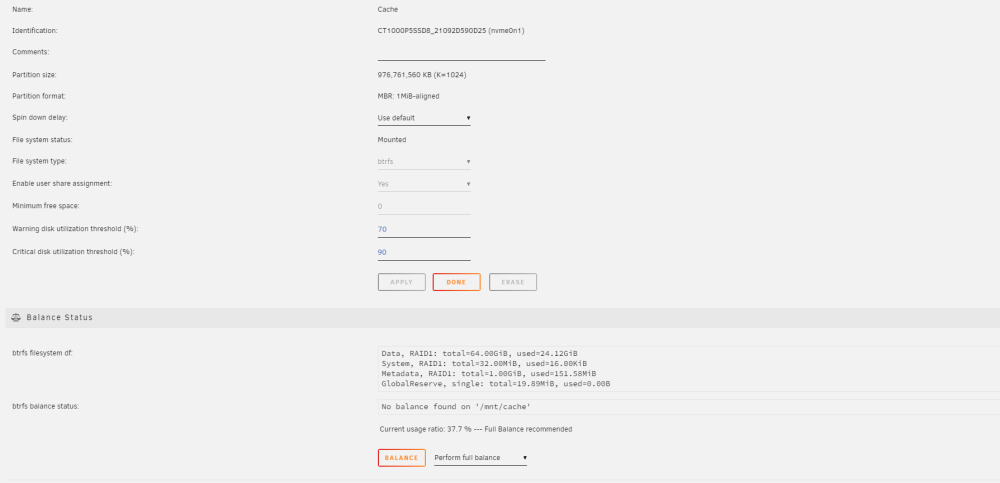
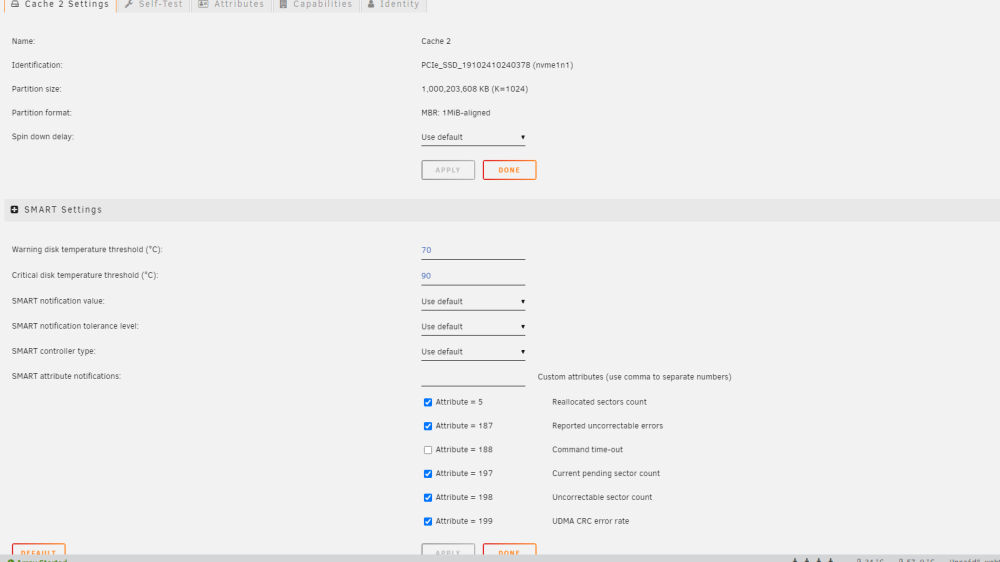
Good morning all, I accidentally mis-allocated a new NVME drive I put in the system. I meant to make it a new cache pool that I was going to use for VMs only, but accidentally added it to the existing cache pool which houses mover/appdata/etc. I would like to remove it.... but it seems that breaks the entire cache pool if i do that. What is the procedure for removing a disk from the cache pool. Screenshots attached of the cache details.

-
myself as well. z690 Prime wifi d4. Itll get stuck posting, and the HBAs wont even spin up the disks. It outputs a HDMI signal, but doesnt post or display anything. BIOS reset generally fixes it, and it boots again... but thats a pain. HBAs are 2x 9300-16i's I wonder if this behavior is something to do with HBAs. Ill try to disable fast boot tonight.
-
new diagnostics tower-transfer-diagnostics-20221107-1240.zip
-
Shoot, I see it in syslog all over the place. Doesn't seem to be on a single minisas, so I expect the controller may be overheating, or I have bad power connections. It does have a few splitters in it, but it's unavoidable with this PSU.
-
Diagnostics are attached, Something glitched and I lost a parity drive (Parity 1), physical failure, and then subsequently during the parity rebuild after physical replacement I had another disk "disabled", Disk 7. I checked SMART on the disk and it seemed fine, so i unassigned it, cycled the array, reassigned it, and booted the array back up. Upon letting the array start up, it seems to be in a bad place. Parity sync is occurring @ 800 kb/s and will take 100 days to complete. 8 TB Elapsed time:21 minutes Current position:1.33 GB (0.0 %) Estimated speed:785.6 KB/sec Estimated finish: 108 days All these drives were precleared about 2 weeks ago, had roughly 80TBs of data written to them, and then the parity drive failure occurred. tower-transfer-diagnostics-20221029-2323.zip
-
Is there a limit to this plugin that it can only pre-clear 10 disks at once? Two of my disks for a new array arent showing up in the list.
-
Claims on reddit that 6.11.0-RC1 is working fine with iGPU + plex + transcoding. Based on kernel 5.18.14 (CVE-2022-21123 (CVE-2022-21123 CVE-2022-21125 CVE-2022-21166)
-
Thats the first result ive seen that has no crashyness. You're sure you're hardware transcoding with the iGPU?
-
Looks like someone already compiled it https://github.com/thor2002ro/unraid_kernel/releases/tag/20220502
-
Would it be possible to add NTFS support to UD+ now that its baked into the 5.15 kernel that 6.10 rc4+ has?
-
Im really struggling with maintaining a clean config.yml for this. Is anyone aware of a script or application that will generate a basic config.yml based upon inputs? Its works, but its super-ugly, and yaml tab and spacing requirements is killing me. Here are my basic desires: Specs: 8 4k cameras, 7 1080p cameras 0) Feed events to mqtt 1) Use my coral 2) Use quicksync for ffmpeg decode to reduce cpu use 3) Detect vehicles, cats, people 4) Detect on 1080P substreams of each camera at 5fps 5) Record clips at native full-stream resolution for playback 6) Record 24/7 in addition to a different location.
-
I also have the exact same issue. I think we're all fundamentally missing something. Perhaps something with the port fowards?
-
Alternatively, the advice on this page also seems to work, with slightly different results https://docs.frigate.video/configuration/hardware_acceleration/ When using the less than 10th generation config there, it puts loads on both 3drender, and video in intel_gpu_top, whereas the config i posted above that uses QSV rather than VAAPI only put loads on the video bar. Im honestly not sure which one is better.
-
All, I figured this out and wanted to post the solution. Here is the config you need to get QSV working with frigate in the frigate.yml database: path: /db/frigate.db mqtt: host: 192.168.0.100 user: frigate password: {MQTT_PASSWORD} detectors: coral: type: edgetpu device: usb birdseye: mode: continuous ffmpeg: hwaccel_args: - -hwaccel - qsv - -qsv_device - /dev/dri/renderD128 record: enabled: True retain_days: 60 cameras: garage_camera: ffmpeg: inputs: - path: rtsp://frigate:{FRIGATE_RTSP_PASSWORD}@192.168.0.173/live0 roles: - detect - rtmp hwaccel_args: - -c:v - h264_qsv detect: width: 1920 height: 1080 front_porch_camera: ffmpeg: inputs: - path: rtsp://frigate:{FRIGATE_RTSP_PASSWORD}@192.168.0.125/live0 roles: - detect - rtmp hwaccel_args: - -c:v - h264_qsv detect: width: 1920 height: 1080 The hwaccel_args: bit is the most important bit, it wont work without that, and most of the configs and tutorials dont show that bit.
-
yep yep, just waiting until magic-blue-smoke gets his adapters back in stock in january and looking for something to hold me over. understand itll only leverage one
-
The pinout looks wrong on that for the e-key dual TPU. Is the picture bad, that looks like it has the block for where the a-key slot would be which would keep the e-key dual tpu from inserting.
-
It seems application independent. No GPU usage no matter what. Im not actually a jellyfin user, I was just using it for testing (as well as frigate). I can run any tests needed, is there a preferred testing methodology?
-
I have a strange issue with intel_gpu_top. Installed from the community apps store, no weirdness. i5-6500t with "Intel Skylake (Gen9) GPU" No matter the usage i push to it (jellyfin, ffmpeg, etc), the only thing that moves is imc writes and imc reads, no movements on the graphs at all. https://imgur.com/5xFCj74
-
Trying to get this setup while waiting for my tpu (have a dual m.2 already, but no adapter yet) Im having some trouble with it consuming massive CPU (50+ % of all the cores on a i5-6500) with only 1 camera, no detect, and using a substream at 5fps. Heres my config.yml: mqtt: host: 192.168.1.11 user: mqtt password: password cameras: back: ffmpeg: inputs: - path: rtsp://username:[email protected]/cam/realmonitor?channel=1&subtype=2 roles: # - detect - rtmp # detect: # width: 1920 # height: 1080 Here's my logs [s6-init] making user provided files available at /var/run/s6/etc...exited 0. [s6-init] ensuring user provided files have correct perms...exited 0. [fix-attrs.d] applying ownership & permissions fixes... [fix-attrs.d] done. [cont-init.d] executing container initialization scripts... [cont-init.d] done. [services.d] starting services [services.d] done. [2021-11-19 09:57:33] frigate.app INFO : Starting Frigate (0.9.4-26ae608) Starting migrations [2021-11-19 09:57:33] peewee_migrate INFO : Starting migrations There is nothing to migrate [2021-11-19 09:57:33] peewee_migrate INFO : There is nothing to migrate [2021-11-19 09:57:33] detector.cpu INFO : Starting detection process: 217 [2021-11-19 09:57:33] frigate.mqtt INFO : MQTT connected [2021-11-19 09:57:33] frigate.edgetpu WARNING : CPU detectors are not recommended and should only be used for testing or for trial purposes. [2021-11-19 09:57:33] frigate.app INFO : Output process started: 219 [2021-11-19 09:57:33] ws4py INFO : Using epoll [2021-11-19 09:57:33] frigate.app INFO : Camera processor started for back: 224 [2021-11-19 09:57:33] frigate.app INFO : Capture process started for back: 226 [2021-11-19 09:57:33] ws4py INFO : Using epoll Standard frigate app right off the store, standard settings.



