





TODDLT
Members
-
Joined
-
Last visited
Everything posted by TODDLT
-
I have two new identical drives and am running preclears on both at the same time last night. IE the pre-clears started less than 1 minute apart for both drives. Very near to 12 hours in, I start getting the same smart error on both drives about the same time. The time stamp is the same minute, it doesn't show seconds Event: Unraid device dev3 SMART health [199] Subject: Warning [TODD-SVR] - udma crc error count is 1 Description: TOSHIBA_HDWG160_81J0A02MFDQG (dev3) Importance: warning Error counts 1 - 4 happened at the same time for both drives over a 3 or so hour period Error 5 came to one drive by itself. Then error 6 for one drive and 5 for the other happened again at the same time. That was the last error sent and it was almost 2 hours ago. Both drives are connected to eSata ports that are extensions from internal MB SATA II ports (I actually just realized those were II's and not III's). Last night I had some difficulty getting the drives connected to start the pre-clears. I have one other external drive that is used for a backup, IE Not part of the array. It is in an external case and connected to a separate SATA extension card with an eSata port. When I first connected the two drives externally, only one showed up under UnAssigned drives along with my warm spare. My backup external drive didnt show up at all and the 2nd new drive wasn't there either. I went through several stages of trouble shooting trying to find a cabling issue before realizing all 4 drives were showing up under "unassigned" on the Dashboard page. Clicking the fresh button for UnAssigned Drives on the Main page resulted in all appearing there. I've never had to hit refresh before to make the main page show everything but rightly or wrongly I assumed this was a non-issue and went on. That said those cables have been checked and re-checked last night. The cables that go from the eSata ports to the MB internal ports are barely long enough and have a 180 bend at the end. They are locking / latching cables so shouldn't come loose. The cables plugged into the drives are also latching. So what now? How could this be happening simultaneously to both drives? Does this sound like a bad drive issue? Would you stop the preclear, check cables, and restart? or let it play out? I'm not sure how I could be getting errors on two drives at exactly the same time if it were a bad drive issue or a cabling issue. Both seem unlikely. Any thoughts or insight is appreciated.
-
yes, certainly easier. Not sure which way I will end up doing it yet. Option 1, replace 1 - 3 TB drive with a 6 - move data from another 3 TB over to the new 6 and then drop the empty 3 TB out of the array. No added capacity (not needed currently), replaces my last older drive, and the entire array is 6 TB drives. This leaves me 2 open drive bays in the server to add 12 TB more in the future before I'd have to ever upgrade my parity drives and I can't even imagine how far out we'd be talking before it had to grow beyond there. I'm pretty sure I'd be replacing the server by the time I consumed that much capacity. I just would need to decide if I'm going to re-build parity or have an empty drive number in the sequence. Option 2, replace both 3 TB wtih 6's. Adds 6 TB capacity now and none of the other gyrations data moves and parity upgrades required (other than normal drive replacement).
-
Thanks for taking the time to explain. All clear now.
-
So does it work to leave "Drive 6" unpopulated while "Drives 7,8,9" are populated?
-
I do use 2 disk parity. So, the procedure for Shrinking the array does not work for 2 disk parity except when you are taking the last drive off, correct? The only way to do this would be to set a new configuration and re-create parity leaving me unprotected for that time? Just making sure I have the situation correct.
-
I have used the procedure outlined here https://wiki.unraid.net/Shrink_array#Procedure_2 to remove the last drive from my array and it worked fine. My question is if I want to remove (shrink) my array by one of the middle drives, what do I do at step 13? For example if I was removing drive in an array of 9 drives: Do I assigned drives 7, 8, 9 in positions 6, 7, 8? Do I leave drive 6 blank and leave 7, 8, 9 as they were assigned? Or am i missing something? Thanks.
-
I will entertain offers. Please send me a private message.
-
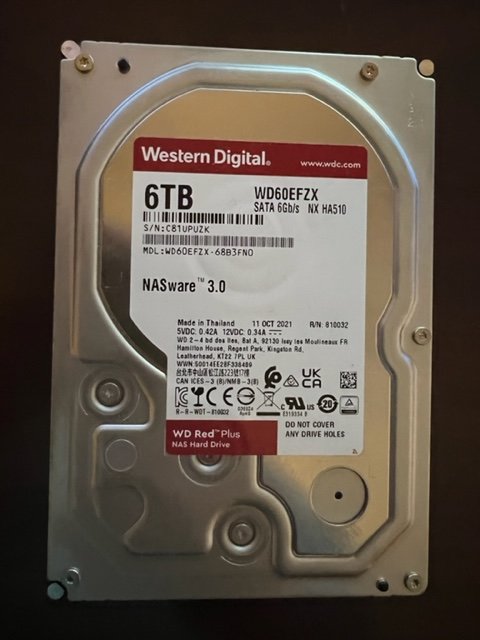
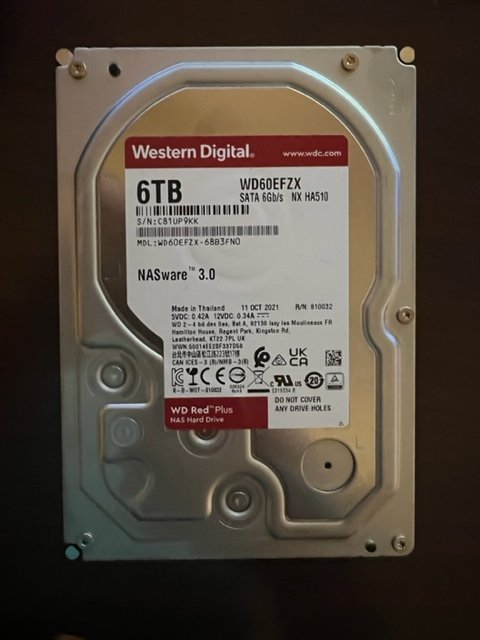
These two drives are brand new. The only use has been to run 2 pre-clear cycles, but they have never been added to the array. I am asking $120 each including USPS Priority Shipping, or $220 for the pair. They typically retail 135-150 before tax and shipping. I will entertain offers. I have attached the preclear report and the smart self test on each drive (Run after the preclear). There is also a photo of the drive showing a manufacture date of October 11, 2021. If you would like any other info let me know. C81UPUZK - Preclear.txt C81UP9KK - Preclear.txt C81UP9KK - Smart.txt C81UPUZK - Smart.txt
-
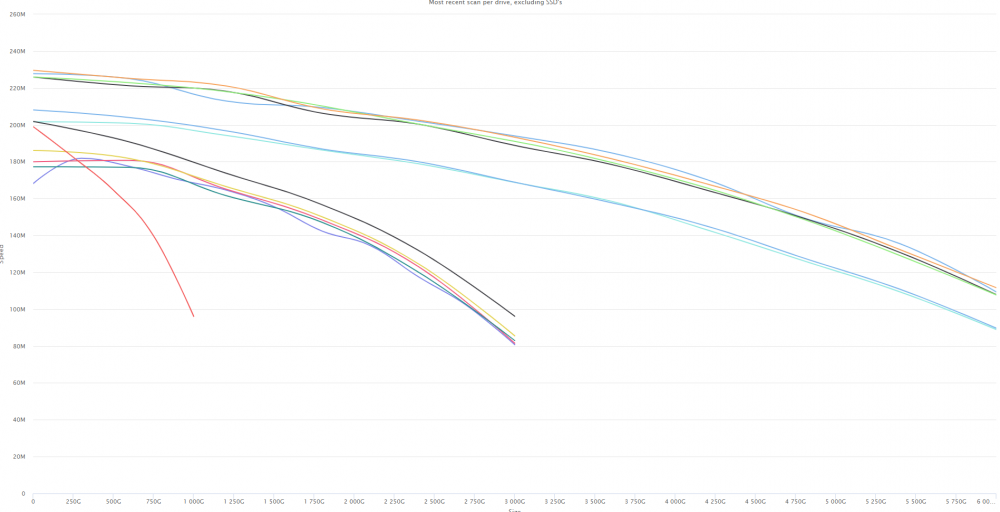
Every time I've asked about the performance difference between a 7200 RPM drive and a 5400 RPM drive, no one thinks it would make a big difference. Lately the 7200's seem to be substantially more expensive and I came across a deal on WD60EFZX drives (5640) over the holidays ($104 ea) so I picked two up. After running 2 pre-clear cycles I noticed on drive took 18 minutes longer than the other in each cycle. I bench marked the drives and they are notably slower than any of the 7200 RPM drives in my array. I'll be arguing with myself for a while on whether the savings was worth the speed (~ $60 per drive). It really only matters during a parity check. This will actually slow my array down because the speed will be more limited once the array passes the 3TB mark and the slower drives drop off.
-
Interesting, thanks for this.
-
Currently: https://www.newegg.com/red-plus-wd60efzx-6tb/p/N82E16822234465?item=N82E16822234465&utm_medium=Email&utm_source=IGNEFL101121&cm_mmc=EMC-IGNEFL101121-_-EMC-101121-Index-_-DesktopInternalHardDrives-_-22234465-S4A4A&ignorebbr=1 https://www.newegg.com/toshiba-n300-hdwg460xzsta-6tb/p/N82E16822149792?quicklink=true
-
I might not be remembering this correctly but thought when unRaid writes to the drive it's actually a multi-step write-read-write, and that's why the drive speed helped overall write speed. Acknowledge I'm a rung or two above my head in knowledge base so just making sure I'm clear.
-
I'm sure this has been discussed before but did a quick search and didn't come up with much. I have a 9 disk array + two parity drives. 2 - 500 GB SSDs and 4 - 3 TB HDD's and 3 - 6 TB HDD's. All the HDD's are 7200 RPM. It's time to upsize a little, and replace the older 3 TB drives in doing so. I find myself questioning the need to stay with 7200 RPM drives over 5400, based on the current price difference. Any thoughts one way or the other. I know read speeds for 7200 are irrelevant for a media server in this discussion Are unRaid write speeds appreciably different with 5-15GB files if both data and parity are 7200 RPM Are parity checks appreciably faster with 7200 RPM drives and then might see a slowdown with introducing a 5400? (right now there is the tail off as i approach 3 TB and then it speeds back up, but I wouldn't want the whole process to slow down over 2 drives). Any suggestions or insight is appreciated.
-
Thanks! It's been long enough since I first enabled Dockers I wasn't remembering. The image file was set to 10GB and I upped it to 30GB so now down to 23% usage. There is also something called Log rotation, which I imagine is saving 1, 2, or 3 files in history for troubleshooting purposes. Mine was set to 1 file 50 MB in size. I upped it to 3 files 100 MB. Not sure in relative terms how big this should be with on 7 dockers installed and 3 that run under daily normal situations. I assume the more dockers you have running the larger that file should be? Doesn't seem particularly important at this point but no download clients installed here. The only real active Docker is Plex. Thanks again, that should hopefully solve the issue.
-
How do you expand the size of the docker image? Is this housed in RAM, or in Cache? None of my dockers "auto-update" and this warning comes around at seemingly random times. What "update" would be occurring to cause this? I'll provide this when I get home in the hour.
-
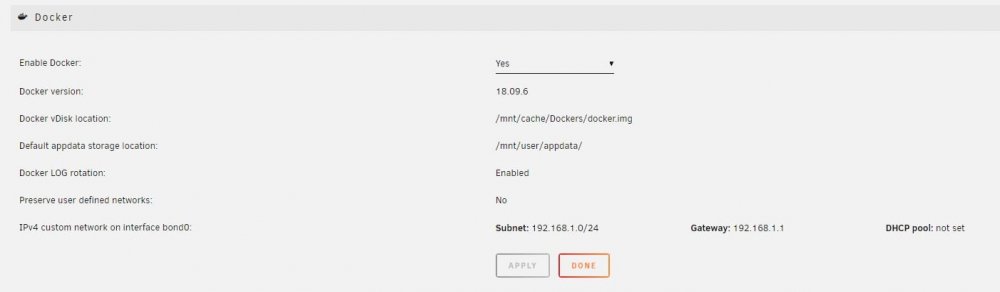
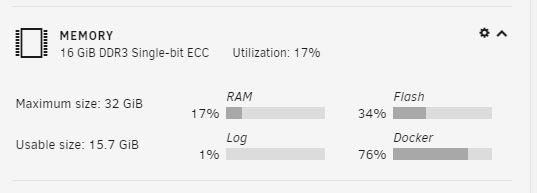
I hope this is the correct area for this question. Every once in a while I get an email notification that says "unRAID Status: Warning - Docker image disk utilization of 88%. Then later it I get a "returned to normal" email. My docker and app data are stored on a cache disk (SSD) that is only used for appdata. It's a 250 GB disk and 27% full. I have attached two images that show my docker settings and memory usage (which shows docker usage at 76%). Is it possible when my Plex app is transcoding and/or doing DVR recording, and using up too much memory? If so can this be offloaded to the SSD Cache? I have plenty of cache drive space, is there a setting wrong that is driving it to use memory instead of the cache disk? how do I get more Docker Image space? Thanks for any help.
-
Got it. Thanks, worked fine and DVR functional again!
-
So does this mean the variable should be: (I think it used to just say "docker") docker:e5cc93306-ls58 or docker:1.18.0.1913-e5cc93306-ls58 or something else? Sorry if I'm asking what should be obvious, but admittedly not a "docker" expert here and continuing to learn more all the time.
-
OK I'll have to do this tomorrow if I have to remove the image too. A few settings I need to re-create and its late. I'll drop a note tomorrow evening. Thanks.
-
I tried this, restarted the docker, no luck. did a force update. no luck, still shows Version 1.18.0.1944 See image EDIT: I also tried it with only e5cc93306-ls58. It looked like it updated that time, but still shows the same version 1.18.0.1944

-
I did try this. I changed "docker" to an actual version number in the variable for "VERSION" I'm currently on Version 1.18.0.1944 I tried using "1.18.0.1913" and "1.17.0.1841" in place of the word "docker" I hit apply, then did a "force update" but the version number didn't change inside plex. Am I missing some syntax here?
-
Isn't there a way to tell the docker to roll back to the previous version / release of Plex. This latest update apparently broke the DVR service (again). It worked yesterday, I ran the update right after a recording. Today 2 recordings failed. When I go into the guide and click on a show that is not recording the info page comes up. If I click on a show that is supposed to be recording I get "An unexpected error has occurred" Any help rolling back a version would be great. I know there is a place to change the version in the docker setup, just not sure what to put in there. Thanks in advance.
-
I recently went through some difficulty with my Plex docker and permission rights for files. It took a week of back and forth on two sections of the forums before I had the answer. In the end it was a simple fix but it seems like very few know its there or can be an issue. I would assume this could potentially affect or be useful in other dockers as well. --Issue-- I use the Plex DVR with the Linuxserver.IO Plex docker. The video files being created by the Plex DVR were being created with limited access rights for anyone but the user "nobody" the owner of the file. I could not move, rename, delete any files without first running the "new permissions" utility on unRaid. --Cause-- linux has a UMASK default of 022, but this is not compatible with the unraid system. This limits user access to the user/group that created the folder and/or file, in this case "nobody." UMASK of 0000 will mean that all files / folders will be r/w access for all users with the appropriate permissions in unRAID. --Fix-- The Plexserver.IO docker has a variable for UMASK that isn't in the default list when first installed. You can add in the docker settings UMASK_SET, and you then assign 0000 there. This resolved the access rights issues to the DVR created files. If this is helpful to others, certainly can be added to any FAQ
-
Worked! Thanks
-
Thanks for this. I set it tonight and now recording.. Hopefully its resolved.


